PS3 [GUIDE] Unbrick a PS3 after an unfortunate PS3Xploit flash

I think it can't work, my ps3 was in 4.82 and it turn off after 3 seconds when i patch the dump with CosOFW484.BIN, work well with
CosOFW482.BIN !!!
No SYSCON will accept same actual version or higher it will flash even the new chosen coreOS to be patched is lower but ps3 will boot to no screen cause EEPROM will not accept lower version coreOS FW so if you get your ps3 brick on 4.82 then you can flash it with 4.82 coreOS bin and update with 4.84HFW PUP or flash it directly with 4.84 coreOS bin and update it with 4.84 HFW PUP both have the same purpose restoring ps3 back from brick but one use same actual coreOS bin and other use higher bin, and @chronoss i think you are wrong
 
No SYSCON will accept same actual version or higher it will flash even the new chosen coreOS to be patched is lower but ps3 will boot to no screen cause EEPROM will not accept lower version coreOS FW so if you get your ps3 brick on 4.82 then you can flash it with 4.82 coreOS bin and update with 4.84HFW PUP or flash it directly with 4.84 coreOS bin and update it with 4.84 HFW PUP both have the same purpose restoring ps3 back from brick but one use same actual coreOS bin and other use higher bin, and @chronoss i think you are wrong
:ambivalence::ambivalence::ambivalence:

how is not work ??? no ps3 boot?? only blackscreen ?
yes, chutdown after 3 second :(

@littlebalup ? / @ Louay, can you identify tristate point and ground point...
Wich motherboard ?
 
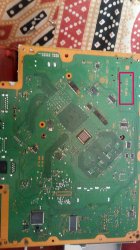
Yeah, is needed to tell the motherboard model, take a look at this photos
https://www.psdevwiki.com/ps3/Motherboard_Revisions

The ground is easy, no solder required
You can connect it to many motherboard points that are common ground, as example, the metal that covers some connectors (USB, HDMI, etc...), all that metal is ground and usually have some "clip" where you can hold the wire by pressure
Another way is to connect the ground to the copper border of the motherboard, the border have some holes where you can insert the wire and twist it, or grab it to the border with this:

The good way
s-l300.jpg

The guetto way
pinza-ropa-madera-jupiter-pack-16-u-hogar-hogar-ferreteria-rayanico-art.jpg
 
Yeah, is needed to tell the motherboard model, take a look at this photos
https://www.psdevwiki.com/ps3/Motherboard_Revisions

The ground is easy, no solder required
You can connect it to many motherboard points that are common ground, as example, the metal that covers some connectors (USB, HDMI, etc...), all that metal is ground and usually have some "clip" where you can hold the wire by pressure
Another way is to connect the ground to the copper border of the motherboard, the border have some holes where you can insert the wire and twist it, or grab it to the border with this:

The good way
s-l300.jpg

The guetto way
pinza-ropa-madera-jupiter-pack-16-u-hogar-hogar-ferreteria-rayanico-art.jpg


My ps3 motherboard's model is :NPX-001
I search on many sites but there is no info about this board .. @sandungas thanks for brief info but only last tell me which is tristate point
 

Attachments

  • photostudio_1558526591642.jpg
    photostudio_1558526591642.jpg
    5.4 MB · Views: 334
My ps3 motherboard's model is :NPX-001
I search on many sites but there is no info about this board .. @sandungas thanks for brief info but only last tell me which is tristate point

Just assumption. It needs confirmation. Use that at your own risk :
tristate-4k-png.18036
 
How did you bricked? PS3Xploit writer has never been released in 4.81...
If your PS3 was under CFW, use the regular nofsm patch and boot to recovery to reinstall a CFW.
my PS3 data code is 2B so it does not accept CFW, i try cosOFW 4.82 & 4.84 but is steel the same problem... black screen and power button green, before that when i take my dump with E3 flasher it was Good and DumpCheaker give me OK.
 
How i can send a private message ???

Click on his name... His profile will be open then click on start conversation

@littlebalup desolder south bridge .... Means option will be of do or die.....if i remove south bridge then solder your indicated tristate to ground..? Or inner side of south bridge there will be tristate point ..... Getting confuse bcoz i am not hardware expert but i have to fix it
 
Last edited:
Click on his name... His profile will be open then click on start conversation

@littlebalup desolder south bridge .... Means option will be of do or die.....if i remove south bridge then solder your indicated tristate to ground..? Or inner side of south bridge there will be tristate point ..... Getting confuse bcoz i am not hardware expert but i have to fix it

I mean, to be sure the tristate trace and point is what is shown on my pics, the SouthBridge must be desoldered to see if the trace goes to the U2 pin of the SB. There are high chance it is, as I don't see any other points that can be it.
I don't say you must desolder the SB to access or to use the tristate...
So, at your own risk, you can try that red point shown on the left hand picture.
 
The theory is...

The tristate is a pin of the southbridge, by "grounding" it all the other input/output pins of the southbridge enters is a "disabled" state (also known as "the third state"... or tristate)
The flash is accessed by other components of the motherboard throught southbridge (it works as an intermediary)

What you want to do is to access the flash contents by using additional hardware (the flasher)... and at the same time you want to power up the motherboard (to power up the flash)
The problem is the data signals from the external flasher are going to have interferences with the other data signals of the motherboard that are trying to access the flash chip
So the solution is to "disable" the southbridge with the tristate pin, this way the flash chip is "isolated" and your external flasher can access to it without interferences
Actually, with the tristate pin you are also disabling access to hdd, usb, lan, wifi, etc, etc, etc... technically you have all the "peripherals" disabled so you have half of the motherboard components "disconnected" from the circuit

Ok... back to the point... :D
It seems the southbridge of the first PS3 superslim models is exactly the same than all the PS3 Slims, is named CXD9963GB
https://www.psdevwiki.com/ps3/South_Bridge#Chipnumbers_.40_SKU.27s
https://www.psdevwiki.com/ps3/CXD9963GB

Sadly there is not a table in wiki with the pinout of it
In wiki there is this photo where can be seen the pads under the southbridge (this is usefull to try to imagine where are connected... and to verify it with a multimeter)
https://www.psdevwiki.com/ps3/File:CXD9963GB-desoldered-form-JSD001.jpg
https://www.psdevwiki.com/ps3/File:CXD9963GB-SB-GRID-bw-chipview.png

And this posts from littlebalup where he was looking at it... because someone "destroyed" the tristate pad with a solder iron, so they was trying to find an alternative point to solder on it... and while doing that they had to "follow the copper trace" to an intermediate "hole" in the motherboard (also known as "via") where the trace goes to the other side of the motherboard
That "via" of the photo seems to match with the other photo of wiki (where the southbridge was removed)... and it seems to be connected to the southbridge pin U2
https://www.psx-place.com/threads/ps3-brick-tristate-point-fell-with-solder.21326/#post-145203
https://prnt.sc/lggnrs

Is very hard to verify all this by yourself (and for everyone), to be completly sure is needed to "follow the traces" in different PS3 motherboards, and are needed photos of the traces under the southbridges (so is needed to remove them)
But sometimes this kind of things can be identifyed with lot of patience by looking at the photos... we are lucky there is one photo in wiki with the southbridge removed
And it looks littlebalup took his time in looking at this in the best way posible, and it seems he was looking at it time ago... so yeah the chances for him to be right are high :)

You can try to review what he is saying by looking at the photos and your motherboard, but most probably at the end is going to be mostly a matter of trying it... or not trying it
I guess you are not going to find a relliable proof (neither me) to know if what he is saying is right or wrong before trying it because we dont have enought info
 
Hello, I am attempting to install cfw on my ps3 for the first time. I installed the 4.8.2 HFW twice, then created a dump of my NOR memory.
Then I used the NOR writer to write the hex file (I did check the md5 hash).
Then I dumped my memory a second time and used the pyPS3checker and discovered it had a danger:

******* Checking repetitions *******
Header Magic0 Repetitions : OK
Header Magic1 Repetitions : DANGER!
Following data expected at offset 0xF00010 :
> 00 00 00 00 0F AC E0 FF 00 00 00 00 DE AD FA CE
Repetition(s) found at offset(s) :
0xF00810

. . .

******* Checks completed *******
Total number of checks = 156
Number of dangers = 1
Number of warnings = 0
Following check(s) returned a DANGER!
repcheck : Header Magic1 Repetitions


I checked my original NOR dump in the pyPS3checker and it also has this error. Is this normal or am I boned?

I asked about this on the Discord server and was pointed to this thread. I was told to mention @littlebalup
 
Hey Guys

Ok so i have managed to unbrick a slim 3003B usung an E3... Everything went well I thought, untill I powered up the PS3.
Before the flash the machone wpuld power down after a couple of seconds due to the brick. Now the machine starts up BUT there is no display and the only way to shut down is to hold the power button for about 10 seconds or remover the power cable.
100% good flash, removed the tristate solder, reconnected everything! Now im stumped. Any ideas?
 
Back
Top