PS3 [GUIDE] Unbrick a PS3 after an unfortunate PS3Xploit flash

Depends on what you have at hand. You'll need a proper dump that contains essential per console data. If the dump was corrupted by using exploit tools, chances are they are only corrupted in ROS0/1 data. In that case, which I had once before, it can be saved from donated dumps, with proper flasher and software.
I would like to try this.
In theory I have several backups from other consoles, some made directly with the E3 Flasher and some made with hombrew. Can I really use one directly and flash it on another console or do I need to edit something in the flash.bin file first?
 
I would like to try this.
In theory I have several backups from other consoles, some made directly with the E3 Flasher and some made with hombrew. Can I really use one directly and flash it on another console or do I need to edit something in the flash.bin file first?
In short, no. You cannot just flash other console's nand to your console. You'll need to use the donated dump to patch your console's dump, hopefully it will recover the corrupted bits. Use littlebalup's tool to patch the corrupted dump, and read the README before you start doing it: https://github.com/littlebalup/PyPS3tools/tree/master/PyPS3rebuilder


I've had a PS3 FAT CECHG04 SEM-001 with brick for a long time. The console shuts down the second I turn it on. Luckily I have a copy of the NAND "dump.hex (256mb)". I have Teensy, does anyone know a diagram, tool or guide to check the information. I understand I should use this littlebalup/WAY-launchers: New GUI for NORway, NANDway and SPIway (github.com) to write the backup. Some help would be great
All the wiring pictures you need:
https://github.com/hjudges/NORway/tree/master/NANDway_Installation

In addition, you'll need a spare PC ATX power supply to power the Teensy while flashing. USB power simply won't be enough. Quote from psdevwiki:
  • Vcc: Teensy 3.3V regulator cannot power the NANDs on the PS3. The drain of the motherboard summed by the other peripherals draw too much current (~1.8A). The NANDs can be powered from external 3.3V power supply like ATX power supply (the orange 3.3V line of the ATX main connector).
 
You can create it from offical PS3UPDAT.PUP file by extracting and decrypting CORE_OS_PACKAGE.pkg

I did this but the hash is different from the list of know hash.
Screenshot 2023-09-09 190856.png

I will list my steps here:

1> I unpacked the UPDATE.PUP 4.90 OFW using PUAD GUI.
2> After that I opened HXD and selected Tools-> File Tools-> Concatenate and choose every file inside CORE OS folder (Less "list.txt")
3> I saved the file.
4> Now I inserted the information(green) on my dump and change the firmware version(yellow) on HxD.
Screenshot 2023-09-09 190152.png


I did this steps without success. My backup is 4.85 and the console is on 4.90. I changed the nand because it was necessary(Nand bad). So I don't have backup of 4.90. I need to change my ROS1 AND ROS2 to be able to bring back my ps3. I tried to flash this backup(4.85) but I received A0603040 from Syscon.
 

Attachments

  • Screenshot 2023-09-09 190806.png
    Screenshot 2023-09-09 190806.png
    82.2 KB · Views: 47
I did this but the hash is different from the list of know hash.
View attachment 41218
I will list my steps here:

1> I unpacked the UPDATE.PUP 4.90 OFW using PUAD GUI.
2> After that I opened HXD and selected Tools-> File Tools-> Concatenate and choose every file inside CORE OS folder (Less "list.txt")
3> I saved the file.
4> Now I inserted the information(green) on my dump and change the firmware version(yellow) on HxD.
View attachment 41214

I did this steps without success. My backup is 4.85 and the console is on 4.90. I changed the nand because it was necessary(Nand bad). So I don't have backup of 4.90. I need to change my ROS1 AND ROS2 to be able to bring back my ps3. I tried to flash this backup(4.85) but I received A0603040 from Syscon.
It will not work like that. You need the complete raw coreos data (the "content" file from the extracted coreos pakage). Then use it as ros patch. Don't mess with coreos single files.
 
It will not work like that. You need the complete raw coreos data (the "content" file from the extracted coreos pakage). Then use it as ros patch. Don't mess with coreos single files.
I try did that but I don't know how. So I use noFSM 4.90(Evilnat based) on DumpChecker. Apparently its just change ROS1 and ROS2 region.
Screenshot 2023-09-09 211354.png


Is this option change the ROS to run the actual 4.90Evilnat firmware?
Another question. When we update ps3 to high version it's update Syscon to run that firmware only? Because I write the nand with my backup 4.85 but it didn't boot.

I will wait your answer, for now I'll solder the Teensy on ps3.
 
Last edited:
I try did that but I don't know how. So I use noFSM 4.90(Evilnat based) on DumpChecker. Apparently its just change ROS1 and ROS2 region.

Is this option change the ROS to run the actual 4.90Evilnat firmware?
Yes. You should be able to boot and to install 4.90 CFW straight forward.

Another question. When we update ps3 to high version it's update Syscon to run that firmware only? Because I write the nand with my backup 4.85 but it didn't boot.

I will wait your answer, for now I'll solder the Teensy on ps3.
Yes, active ROS bank and hash are updated in the syscon at each firmware update. So reinjecting an older dump with an older OFW CoreOS version does not work. You must either patch/update your dump ROS's with the correct OFW CoreOS version (4.90 in your case, matching the hash stored in the syscon) or, for CFW compatible machines only, with a modified CoreOS with syscon hash check disabled (like the noFSM 4.90).
 
Yes. You should be able to boot and to install 4.90 CFW straight forward.


Yes, active ROS bank and hash are updated in the syscon at each firmware update. So reinjecting an older dump with an older OFW CoreOS version does not work. You must either patch/update your dump ROS's with the correct OFW CoreOS version (4.90 in your case, matching the hash stored in the syscon) or, for CFW compatible machines only, with a modified CoreOS with syscon hash check disabled (like the noFSM 4.90).
I wrote the nand using the correct file and check the md5 but I keep receiving the A0603040.

I will explain what happened. My PS3(CECHC-04) bricked because I did a bad custom firmware using ps3builder software. After, I opened the ps3 and checked the two nands but my nand 1 was bad(more than 80 bad blocks). So I decide to replace the nand and wrote my backup but I needed to change the ROS1 and ROS2 sectors.

Then, here I am.

Apparently my backup is good.
There is any change that the syscon was write bad too( firmware hash or sysconpatch)?
Maybe I didn't see a problem on mother board? ( There isn't much information about this A0603040 )
 
How did you made your new re-scrawbled/de-interleaved nand dumps? Did you used your original nand 1 backup from the original nand chip? Or did you used a newly backup from your swapped nand chip?
You should use the second option as flowrebuilder should know if there are any ECC/bad blocks in your replaced NAND to make proper mapped dumps.

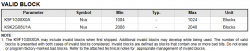
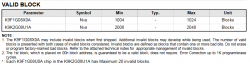
That said your storry is a bit strange. I never seen a crappy MFW destroying a nand. Such amount of bad block is most likely sign of bad dumping method from my experience.
And keep in mind few bad blocks on NAND chips may be totally normal even from factory (up to 20 blocks may be bad).

A bit of reading from NAND datasheet:

upload_2023-9-10_15-47-48.png


upload_2023-9-10_15-49-10.png


upload_2023-9-10_15-50-54.png
 

Attachments

  • upload_2023-9-10_15-42-17.png
    upload_2023-9-10_15-42-17.png
    22 KB · Views: 28
  • upload_2023-9-10_15-44-41.png
    upload_2023-9-10_15-44-41.png
    29.8 KB · Views: 26
How did you made your new re-scrawbled/de-interleaved nand dumps? Did you used your original nand 1 backup from the original nand chip? Or did you used a newly backup from your swapped nand chip?
You should use the second option as flowrebuilder should know if there are any ECC/bad blocks in your replaced NAND to make proper mapped dumps.

That said your storry is a bit strange. I never seen a crappy MFW destroying a nand. Such amount of bad block is most likely sign of bad dumping method from my experience.
And keep in mind few bad blocks on NAND chips may be totally normal even from factory (up to 20 blocks may be bad).

A bit of reading from NAND datasheet:

View attachment 41225

View attachment 41226

View attachment 41227

I used a newly backup from my swapped nand chip and wrote the nand with my diff file. When I made my new re-scrawbled I used the files nand0 and nand1 to do that. The Flow Rebuilder showed-me that changed 48 blocks on nand0 and nand 1.
**The last flash in nands was using my 4.85 backup.**
Screenshot 2023-09-10 115210.png


My steps here:
1> I used the actual nand0 and nand1 dump to re-scrawbled the 4.90 backup file(48 blocks modified in NAND0 and NAND1)
2> I used flow rebuilder files to flash the nand 0 and nand 1.
3> Make a dump from actual nand to check md5 between flow rebuilder files.
4> Compare md5 between dump and flow rebuilder files. (MD5 OK)
5> Check dump on dumpchecker again.(de-interleaved file from dump).

**There is no nand bad block**

Flow rebuilder files md5:
Nand 0: 9834498432361D1BDBE2491003E5083F
Nand 1: DA7042333A453842B01A41ED469B0A56

Actual md5 from dump of nand:
Nand 0: 9834498432361D1BDBE2491003E5083F
Nand 1: DA7042333A453842B01A41ED469B0A56

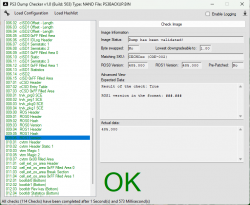
I check this unified dump on Ps3dumpchecker.
Every item is green.
Ps3 worked with 4.90 Evilnat before brick.
Screenshot 2023-09-10 121952.png
 
Last edited:
I used a newly backup from my swapped nand chip and wrote the nand with my diff file. When I made my new re-scrawbled I used the files nand0 and nand1 to do that. The Flow Rebuilder showed-me that changed 48 blocks on nand0 and nand 1.
**The last flash in nands was using my 4.85 backup.**
View attachment 41228

My steps here:
1> I used the actual nand0 and nand1 dump to re-scrawbled the 4.90 backup file(48 blocks modified in NAND0 and NAND1)
2> I used flow rebuilder files to flash the nand 0 and nand 1.
3> Make a dump from actual nand to check md5 between flow rebuilder files.
4> Compare md5 between dump and flow rebuilder files. (MD5 OK)
5> Check dump on dumpchecker again.(de-interleaved file from dump).

**There is no nand bad block**

Flow rebuilder files md5:
Nand 0: 9834498432361D1BDBE2491003E5083F
Nand 1: DA7042333A453842B01A41ED469B0A56

Actual md5 from dump of nand:
Nand 0: 9834498432361D1BDBE2491003E5083F
Nand 1: DA7042333A453842B01A41ED469B0A56

I check this unified dump on Ps3dumpchecker.
Every item is green.
Ps3 worked with 4.90 Evilnat before brick.
View attachment 41229

I'm not sure to fully understand what you did. And it's strange you had the same amount of modiffied blocks on both nands while your NAND 1 is the a donor nand as I undertood. So you should have seen much more diffs on NAND 1.

Anyway, what I should have done myself:
1-Take your unified 4.85 known good backup dump (sould be 256MB).
2-Patch it with noFSM4.90
3-Dump your original NAND 0 and your new donor NAND 1 with teensy+nandway or equivalent.
4-Using flowrebuilder : "RE-SCRAMBLE" using your original NAND 0 dump (from step 3) as "Flash 0", your donor NAND 1 dump (from step3) as "Flash 1", and your patched unified backup (from step 2) as the "Input NAND".
5- Take the newly created NAND 0 and NAND 1 dumps and flash them to the chips respectively (don't invert them). You can use diff files but it may be preferable to do a full flash, at least on the NAND 1.
6- make new dumps and compare for verification.
7- boot the system. It should boot, at least to recovery mode.

hope this helps. If not, well IDK...
 
I'm not sure to fully understand what you did. And it's strange you had the same amount of modiffied blocks on both nands while your NAND 1 is the a donor nand as I undertood. So you should have seen much more diffs on NAND 1.


Anyway, what I should have done myself:
1-Take your unified 4.85 known good backup dump (sould be 256MB).
2-Patch it with noFSM4.90
3-Dump your original NAND 0 and your new donor NAND 1 with teensy+nandway or equivalent.
4-Using flowrebuilder : "RE-SCRAMBLE" using your original NAND 0 dump (from step 3) as "Flash 0", your donor NAND 1 dump (from step3) as "Flash 1", and your patched unified backup (from step 2) as the "Input NAND".
5- Take the newly created NAND 0 and NAND 1 dumps and flash them to the chips respectively (don't invert them). You can use diff files but it may be preferable to do a full flash, at least on the NAND 1.
6- make new dumps and compare for verification.
7- boot the system. It should boot, at least to recovery mode.

hope this helps. If not, well IDK...
I'm not sure to fully understand what you did. And it's strange you had the same amount of modiffied blocks on both nands while your NAND 1 is the a donor nand as I undertood. So you should have seen much more diffs on NAND 1.

Anyway, what I should have done myself:
1-Take your unified 4.85 known good backup dump (sould be 256MB).
2-Patch it with noFSM4.90
3-Dump your original NAND 0 and your new donor NAND 1 with teensy+nandway or equivalent.
4-Using flowrebuilder : "RE-SCRAMBLE" using your original NAND 0 dump (from step 3) as "Flash 0", your donor NAND 1 dump (from step3) as "Flash 1", and your patched unified backup (from step 2) as the "Input NAND".
5- Take the newly created NAND 0 and NAND 1 dumps and flash them to the chips respectively (don't invert them). You can use diff files but it may be preferable to do a full flash, at least on the NAND 1.
6- make new dumps and compare for verification.
7- boot the system. It should boot, at least to recovery mode.

hope this helps. If not, well IDK...

My ps3 bricked, I check the nands, nand 1 had more than 80 bad blocks. I replaced the nand 1. After replaced I wrote using my 4.85 backup(reason of change just 48blocks). Didn't work because it's running 4.90 before brick. So, I inject core os 4.90 from extracted update.pup. Ros1 and Ros2 Hash didn't matched because I did it wrong but ok because I patched the Ros area using ps3dumpchecker(I told here). After this I did exactly the same steps that you to write the nand but console showed for me the error A0603040.
 
Last edited:
My ps3 bricked, I check the nands, nand 1 had more than 80 bad blocks. I replaced the nand 1. After replaced I wrote using my 4.85 backup(reason of change just 48blocks). Didn't work because it's running 4.90 before brick. So, I inject core os 4.90 from extracted update.pup. Ros1 and Ros2 Hash didn't matched because I did it wrong but ok because I patched the Ros area using ps3dumpchecker(I told here). After this I did exactly the same steps that you to write the nand but console showed for me the error A0603040.

Ok, it makes sense. So probably is an hardware issue?

https://www.psdevwiki.com/ps3/Syscon_Error_Codes#3040

upload_2023-9-10_20-54-4.png


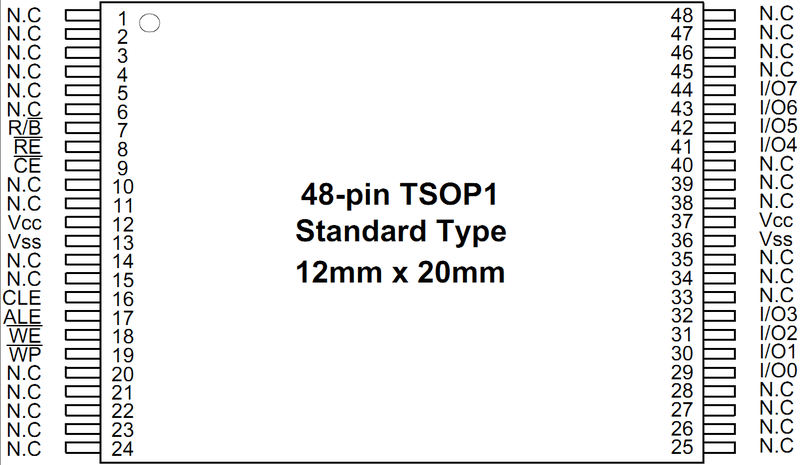
So you should check your solders, starting by the VCC pins 12 and 37 by measuring the voltage on the nand legs (should be 3.3v when powered).
800px-TOSP1-48pin.png
 
Last edited:
Ok, it makes sense. So probably is an hardware issue?

https://www.psdevwiki.com/ps3/Syscon_Error_Codes#3040

View attachment 41236

So you should check your solders, starting by the VCC pins 12 and 37 by measuring the voltage on the nand legs (should be 3.3v when powered).
800px-TOSP1-48pin.png
First of all I want thank you for your help and what you are doing. You are spending your time here to help me with this problem!

Then, I checked every point that I could. Every thing is ok.

Replaced nand:
Screenshot 2023-09-11 192835.png


Nand 0 is ok too.

But I checked the southbridge solder and I press this and ps3 beeped without I touch on power. Is there a SouthBridge's(SB) balls problem? I try to boot ps3 pressing the SB without success, tried to boot ps3 pressing the SB and StatShip2 without success either.

I will replace the SouthBridge(and maybe StatShip2) but I need to confirm if its what I should do!

Look at here:

800px-CECHC-COK-002-diagram.png

371px-EBUS_-_diagram.png


Basically:
Power On > Syscon talk to SouthBridge read the nand > SB try to talk with StatShip2 to send the data(balls problem)> Ebus Data error.

-> So, is syscon rails not connect directly to StatShip2 to make this error occur?(I think just chip start and voltage) It was what bring me to think that the problem should be on SouthBridge.

Screenshot 2023-09-11 200813.png

  1. NAND was correct soldered.
  2. The flash modules has voltages and resistances value ok.
  3. STATSHIP2 has voltages and resistances value ok.
  4. Maybe SouthBridge's solder balls is bad.
Additional information:
The board that I am try to repair is a CECHC. Look below the hardware information:
-> Syscon: Sony CXR713120-202GB different of my donors boards that has CXR714120-302GB.
-> Starship 2: CXD4302GB-1 different of my donors boards that has CXD9909GB.
-> SB: CXD2979GB

I have three COK2 motherboards here. Two donor and one with cold sold to check resistances value.
When PS3 bricked I used MFW Builder to do a custom firmware, the first update file worked good the second update file failed(SB balls problem?)
Yes, I did a custom firmware and update two times.

Questions:
Is there a chance that Syscon bricked on I update? Solutions? (I don't why it's just for curious)LOL
Is there a chance that my dump is bad even though the dump checker gives ok? Solutions?
What I can do before replace the SouthBridge?(I will use another SB)
Can I change the StatShip2 CXD4302GB for CXD9909GB once its on COK2 board too?

Conclusions:
I don't know if it's a system file problem anymore once I don't know how to check this dump better. My last try will change the SB I hope that its work!

 
First of all I want thank you for your help and what you are doing. You are spending your time here to help me with this problem!

Then, I checked every point that I could. Every thing is ok.

Replaced nand:
View attachment 41249

Nand 0 is ok too.

But I checked the southbridge solder and I press this and ps3 beeped without I touch on power. Is there a SouthBridge's(SB) balls problem? I try to boot ps3 pressing the SB without success, tried to boot ps3 pressing the SB and StatShip2 without success either.

I will replace the SouthBridge(and maybe StatShip2) but I need to confirm if its what I should do!

Look at here:

View attachment 41245
View attachment 41251

Basically:
Power On > Syscon talk to SouthBridge read the nand > SB try to talk with StatShip2 to send the data(balls problem)> Ebus Data error.

-> So, is syscon rails not connect directly to StatShip2 to make this error occur?(I think just chip start and voltage) It was what bring me to think that the problem should be on SouthBridge.

View attachment 41248
  1. NAND was correct soldered.
  2. The flash modules has voltages and resistances value ok.
  3. STATSHIP2 has voltages and resistances value ok.
  4. Maybe SouthBridge's solder balls is bad.
Additional information:
The board that I am try to repair is a CECHC. Look below the hardware information:
-> Syscon: Sony CXR713120-202GB different of my donors boards that has CXR714120-302GB.
-> Starship 2: CXD4302GB-1 different of my donors boards that has CXD9909GB.
-> SB: CXD2979GB

I have three COK2 motherboards here. Two donor and one with cold sold to check resistances value.
When PS3 bricked I used MFW Builder to do a custom firmware, the first update file worked good the second update file failed(SB balls problem?)
Yes, I did a custom firmware and update two times.

Questions:
Is there a chance that Syscon bricked on I update? Solutions? (I don't why it's just for curious)LOL
Is there a chance that my dump is bad even though the dump checker gives ok? Solutions?
What I can do before replace the SouthBridge?(I will use another SB)
Can I change the StatShip2 CXD4302GB for CXD9909GB once its on COK2 board too?

Conclusions:
I don't know if it's a system file problem anymore once I don't know how to check this dump better. My last try will change the SB I hope that its work!

I doubp the syscon can get corrupted on update. And yes, unfortunatly bad dump is always a possibility even if it returns all OK by the checkers as, except for the ROS's, it checks the structure and not the content (due to unknown keys).
On the hardware side @RIP-Felix, @vyktormvmpay25 or @Computer Booter may help a lot better than me I guess.
 
What errors from syscon first, why not simple patch 355fsm and writing those. If that boot normal in special glod see sb uart log. If that works too as normal unit call it rsx danzo.
The Syscon error is A0603040.
If I patch 355fsm and writing it must boot??
This ps3 was running 4.90 before brick.
When you say SouthBridge(SB) log there is difference between syscon log? How can I see it?(Not found on wiki).

No, no It need to work, this won't be Rsx donor.
 
We write on syscon w 7202 02
There is a second uart port under SB is on PCI port. I'll add photos of sb uart port.
There you can see log in putty by rx signal only if unit is on glod. I'll add link of Booter doing that.
Also if you boot it 10 seconds then off, patch apply went right. Try enter safe mode /recovery should see image.
https://s.go.ro/4t2k3p0v
Find out which is rx pin. On putty you have to see boot order.
 
Last edited:
We write on syscon w 7202 02
There is a second uart port under SB is on PCI port. I'll add photos of sb uart port.
There you can see log in putty by rx signal only if unit is on glod. I'll add link of Booter doing that.
Also if you boot it 10 seconds then off, patch apply went right. Try enter safe mode /recovery should see image.
https://s.go.ro/4t2k3p0v
Find out which is rx pin. On putty you have to see boot order.
We write on syscon w 7202 02
There is a second uart port under SB is on PCI port. I'll add photos of sb uart port.
There you can see log in putty by rx signal only if unit is on glod. I'll add link of Booter doing that.
Also if you boot it 10 seconds then off, patch apply went right. Try enter safe mode /recovery should see image.
https://s.go.ro/4t2k3p0v
Find out which is rx pin. On putty you have to see boot order.
I did it without success. The ps3 keep going to ylod(I did't use usb with lv2diag). Should I use?. I didn't change syscon value(maybe this is the problem).

I need to do this?
Screenshot 2023-09-13 132640.png


When I solder the SouthBridge tristate on ground the console even though bricked should keep powered on? If the answer is yes so I have a hardware issue because it isn't keeping powered on. I am using a PC PSU to have 3.3v.

@littlebalup
I forgot to say about my dump:
I have a 256mb 4.84ocdex rebug backup(A)
I have a 239mb 4.88evilnat dump from bgtoolset(B)

I inserted the dump B in dump A at offset(h) 40000.

After this I replaced the two ROS and wrote the nand.
Is should be a problem?
 
Last edited:
Back
Top