HDD Keys generating scripts

I've tried live Ubuntu 19.10 and I faced the same problems as on my Mint: no sources for default kernel. I even checked "/etc/apt/sources.list" and there are inside also deb-src, so it in theory all should works... :/ It looks like, for some reason, Linux must be installed with newer kernel to be able to retrieve those damn kernel source code.

I never messing before with kernels or build distributions from scratch, so I'm total noob on this ground.
 
Tried it myself:
  • Started live environment from "ubuntu-19.10-desktop-amd64.iso".
  • Started Terminal.
  • Run "sudo software-properties-gtk".
  • Enable "Source code" and disable Cdrom repo from below.
  • Close without reload and run "sudo apt update".
  • Run "apt source linux-source-5.3.0" without sudo. This will download the kernel source to current directory.
  • Then run "sudo apt build-dep linux-source-5.3.0" to install building dependencies. But this will not work in live environment because no enough space. You need to either create live disk with persistent space or install temporarily in vm without upgrading kernel to build the module.

EDIT: I also tried mint live already and the kernel source for 5.0.0 is indeed missing there, instead there is unfitting source version 5.3.0.
 
I'll try with -toram, I have currently 6GiB, so ~4GiB should be enough.
Thanks again, I didn't uncheck the cdrom.
 
Here is what I have done:
  • I have installed NetBSD x86_64 in a KVM/qemu VM using virt-manager on Kubuntu 19.10.
  • I have connected and prepared the PS3 HDD (from NAND ps3) using bswap16-ecb kernel module. (Not with network based userspace nbd driver.)
  • After the command "kpartx -a /dev/mapper/ps3hdd" I have added a new hardware (Storage) to the VM in virt-manager using the path "/dev/mapper/ps3hdd1"
  • Then booted NetBSD and mounted using the command: "/sbin/mount -v /dev/wd1 /mnt"
  • Following message is shown after mounting: "/dev/wd1 on /mnt type ffs (local, fsid: 0x13/0x78b, reads: sync 1 async 0, writes: sync 2 async 0)"
  • If I mount using following: "/sbin/mount -v -t ufs /dev/wd1 /mnt" it still posts the same message and mount it as default FS ffs.
  • I have used following commands to remove the drive: "/sbin/umount /mnt"; shutdown VM; "kpartx -d /dev/mapper/ps3hdd"; "cryptsetup remove ps3hdd" and "cryptsetup remove ps3hdd-bs"
  • This time I have only tried the rw mount on NetBSD without copying any files to the ps3hdd. PS3 still shows corrupted filesystem on boot. It repair till 100%, reboots and do it again forever in a bootloop. You need to reformat it in Recovery Mode.

Code:
sudo su
apt install qemu-kvm
apt install virt-manager
systemctl status libvirtd
virt-manager

High probably it was broken because opening as FFS (which is native fs for NetBSD family as I read). So I have today trying a road with FreeBSD, to be precise, GhostBSD but I'm stuck of exposing mapper. In theory I did everything properly (?) but BSD doesn't see any /dev/wdx. Is there any additional action needs to be done?

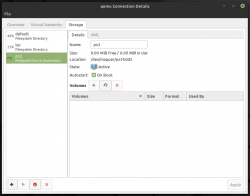
It is normal that shows me zero size (in attachments screen no.2)?

- - -
I was also tried compiling ufs-rw module on installed Mint 20.0 but I cannot perform any of:
Code:
make prepare
make archprepare
make modules M=scripts
make modules M=fs/ufs
It tells me that usbsan not found...

- - -
@DUH-D7000JA Have You tried remounting after mounting? Just curious because maybe solution for Your problem is just easy as this. ^^
 

Attachments

  • feebsd_journey_1.png
    feebsd_journey_1.png
    23.7 KB · Views: 84
  • feebsd_journey_2.png
    feebsd_journey_2.png
    42.7 KB · Views: 80
  • feebsd_journey_3.png
    feebsd_journey_3.png
    155 KB · Views: 83
Last edited:
Sorry for the late response (I didn't see the notification I'm still a noob here >.<)
On Linux I tried unmounting and mounting again but no result, I also tried mounting when already mounted just in case and it says device busy or that it is already mounted... If you meant with GhostBSD I actually haven't booted it yet (do you think I can use VM? Or will it interfere with what I'm trying to do)
So if anyone knows, which commands (similar to cryptmount) do I have to use on GhostBSD to mount the PS4 HDD in read-write?
As always thanks @Berion !
 
@DUH-D7000JA I have gave up with QEMU. No idea how to expose mapper or nbd to VM. I have spend whole day to reading and pulling out hairs from my head. ;)

So I took the road with VirtualBox and did this:
Code:
sudo VBoxManage internalcommands createrawvmdk -filename "/home/mint/ps3/disk.vmdk" -rawdisk /dev/mapper/ps3hdd2
sudo virtualbox

Root privileges is important here because otherwise it won't allow You to read disk.vmdk file.
Then I attached this disk to GhostBSD VM and he see the mapper as physical disk.
But... I don't know why but it looks like he interpret file system as FFS, and should be UFS2. At least in case with PS3.

In theory, this should works:
Code:
mount -v /dev/ada0 /usr/home/ghostbsd/ps3/dev_hdd0
or this:
Code:
mount -v -t ufs2 /dev/ada0 /usr/home/ghostbsd/ps3/dev_hdd0
You could try with PS4 but be prepared to damaged fs if he allow to mount but as FFS.
 
Nice I will try your commands with the PS4 hdd right now with VM and GhostBSD 20.08.04
Sorry if this is a stupid question but, the hdd (the user partition) is encrypted with eap key, and by the commands it seems it tries to mount the normal way as of it is not encrypted. Do I have to do something first do decrypt it?
 
ookay so
-I've gone back on Windows and downloaded GhostBSD 20.08.04 iso using VM
-I've added the ps4 HDD so it can be recognised from GhostBDS by going to VirtualBox's settings>usb>"plus icon on the right">Generic External[XXX]
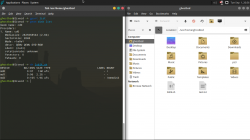
-I launched GhostBSD, listed the disk using the command I saw in your image feebsd_journey_3.png
As you can see in my case the disk is "da0"
list-disk.PNG
 
Not mounting and unmounting but remounting. Sounds the same but who knows (I'm not sure if syntax below is correct, could be "ufstype=ufs2,remount,rw").
Code:
mount -t ufs -o remount ufstype=ufs2,rw /dev/mapper/ps3hdd2 /home/mint/ps3/dev_hdd0
- - -
Of course, You must expose decrypted partition as mapper (cryptsetup blah blah blah eap_key.bin blah blah ps4hdd ;]) and this mapper expose as virtual HDD. Only after that, You can thinking about GhostBSD. That's the point of using VM because any BSD alone (and any Windows alone), cannot decrypt it on the fly (not PS3 HDD and not PS4 HDD).

So... Run Linux (any, by any way You want), make mapper with decrypted stuff, and try what I have described in earlier comment. ^^
 
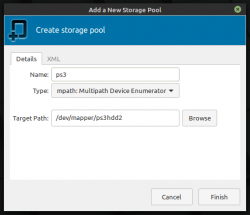
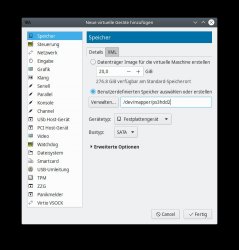
@Berion You have done it wrong at the second attachment, you have added the drive as a pool. But you need to add a new hard drive to you VM directly, like shown in my attachment.

I also couldn't get it to mount with FreeBSD either.
 

Attachments

  • Screenshot_20200914_140517.jpeg
    Screenshot_20200914_140517.jpeg
    72.7 KB · Views: 75
@gmipf You have right. Thanks for advice. ^^

So far I have tested TrueOS (last release) and GhostBSD, both on VBox and KVM/QEMU. None of them letting me to mount exposed device as UFS2 (TrueOS doesn't even see it). I'm using this script to automate the detection for me.

- - -
I have also tried Open Indiana (because as I hear, all Solaris kernels support UFS and UFS2, I don't know if this is true but at least worth a try). Disk (exposed mapper) is visible but I have no idea how to mount it, it doesn't allowing me to doing that. Anyone have experience with those OS family? I don't understand the pools idea and I don't even know if this isn't stick to only ZFS.

I have tried all below voodoo and nothing allow me to mount stuff (it tells that device or mount point doesn't exist while both exist...):
Code:
sudo mount -F ufs2 /dev/dsk/c4t0d0 /jack/ps3/dev_hdd0
sudo mount -F ufs2 /dev/rdsk/c4t0d0 /jack/ps3/dev_hdd0
sudo mount /dev/dsk/c4t0d0 /jack/ps3/dev_hdd0
sudo mount /dev/rdsk/c4t0d0 /jack/ps3/dev_hdd0

"sudo format" showing me only c4t0d0, and when I detach it in vm, it shows nothing, so for sure it is the device I need.

- - -
To check if vm even feeding client OS by exposed mapper, I'm attached the same vdsk/mapper to virtualised Linux Mint and all works ok from it. This test proofs that I'm doing everything properly on decrypting etc. stuff and attaching it to vm as real device. So the problem is something between device recognition in BSD/Solaris and my low knowledge. :/

mention: @DUH-D7000JA

 
Last edited:
I think the reason why those BSD OSs cannot mount decrypted drives is, that they don't know how to properly read and map ps3 partition tables and they also don't seem to like it when you map single partition beforehand with kpartx on the Linux host. kpartx is as far as I understand a modified version of partx and also contains patches for custom PS3 partition table format. Someone need to add those patches to BSD equivalents of partx. I think the equivalent of kpartx on FreeBSD was mdconfig. I also found somewhere this note: "The mdconfig utility first appeared in FreeBSD 5.0 as a cleaner replacement for the vn(4) and vnconfig(8) combo."

If I remember correctly, I already tried (without kpartx) to route /dev/mapper/ps3hdd directly to the VM using mdconfig on FreeBSD guest with no luck.


EDIT: The PS3 patches to kpartx is is mentioned here: https://www.psdevwiki.com/ps3/Mounting_HDD_on_PC#kpartx

And I think this is the actual patch? https://github.com/openSUSE/multipath-tools/blob/master/kpartx/ps3.c

Is it possible that kpartx supports actual byte-swapping of some sort? https://github.com/openSUSE/multipath-tools/blob/master/kpartx/byteorder.h
 
Last edited:
@gmipf I don't think so kpartx is the problem here. The way how partition exposure is transparent to higher layers. Mounting fs tool don't need to know how partition table is build because file system table is part of fs on chosen partition, not the in the partition table. In example, I have attached PS2 HDD (with exotic and unknown partition logic for every OS on PC) as loop device just choosing the sector range where EXT2 or FAT32 was (>>howto<<). And I mounted this fs with even rw without problem. So in theory also byteswapped and decrypted UFS2 on PS3 HDD could be exposed in such way and user would be able mount it on VM (this test bypassing whole mapper voodoo; if work it would mean that problem lie in /dev/mapper support on VM side; if not it proves that FreeBSD for some reason don't like PS3 UFS2). Currently I completely don't have time for that.
 
Last edited:
Just wanted to let all people which observing this thread know, that script project evolved into toolkit:
https://www.psx-place.com/resources/ps3-hdd-decryption-helper.1293/
https://www.psx-place.com/threads/ps3-hdd-decryption-helper.38281/

So since now, all newer versions e.g of the keygen will be there. Yet I'm leaving v1.8b in the attachment of first post because it is version which matching to the tutorial from here (which wasn't updated):
https://www.psx-place.com/threads/tutorial-hdd-mounting-and-decryption-on-linux.23308/

ps3hdd_script_mounter-png.38469
 

Similar threads

Back
Top