BobTheDuck
Member
So ive got a working adapter it seems... But the drive wont boot freehdboot after moving it from my pc. Its in ps2 format but no drive reads... Any help is truly appreciated.


Im still a bit of a noob whats a jumper? Also its genuine and I sntalled it using a disk image using raw copy which used to work to softmod without a MC and using winhiip. But no matter what drive i put in it spins up but wont detect in anything...Did you set its jumper to Single mode (or master, if there is no single-drive mode)? Did you do any mods to the adaptor (i.e. installed a IDE to SATA board)? Is this a genuine adaptor (clones may not be compatible)?
You cannot quite "move" FHDB onto the HDD; it has to be installed. So how did you get it installed?

Oooh the good old ide days...Im still a bit of a noob whats a jumper? Also its genuine and I sntalled it using a disk image using raw copy which used to work to softmod without a MC and using winhiip. But no matter what drive i put in it spins up but wont detect in anything...
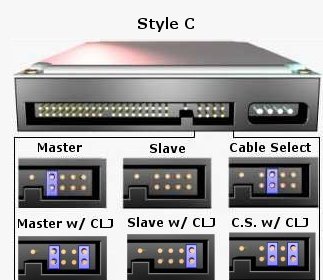


All i did was plug it in... Im so confused tbh.As lord3490 explained, with ide interface, you could define a master & a slave drive manually (with jumper) both plugged on one ide cable.
And the cable select option (CS) was basically a way to let the system decide automatically which drive was master & which was slave, according to which ide cable socket the drive was plugged in.
Have a look at the backside if you can find a jumper and or pins labeled as "master" "slave" and maybe "cable select" or "cs".All i did was plug it in... Im so confused tbh.
Theres no slot for a cable but theres a jumper.As lord3490 explained, with ide interface, you could define a master & a slave drive manually (with jumper) both plugged on one ide cable.
And the cable select option (CS) was basically a way to let the system decide automatically which drive was master & which was slave, according to which ide cable socket the drive was plugged in.
...and free pins?but theres a jumper.
 )
)
Also its genuine
Yes it does. I just realised what you all where pointing out... Its missing the jumper gunna have to get one soonDon't just follow that diagram above. Follow the diagram that is pasted on your HDD because the meanings behind the positions of the jumper can be HDD-specific.
So it has a network port? Fakes, clones and compatibles are known to all have "Sony" branding, but they don't contain Sony parts. All of the clones that I have seen, were copies of the SCPH-10350 and do not have anything under the yellow sticker that should have covered the Ethernet port.


