
You are using an out of date browser. It may not display this or other websites correctly.
You should upgrade or use an alternative browser.
You should upgrade or use an alternative browser.
PS2 HDLGameInstaller
- Thread starter sp193
- Start date

jolek
Senior Member
You mentioned this before, but it was not fixed for one reason or anything. I might not have been able to replicate it.
But as it already cost me a lot to re-engineer the UI to support variable-width fonts properly, I think I will want to just leave it like that for at least now.
I've checked 3 gamepads to eliminate controller fault (double click).
It also happens when I want to edit (Game options) existing game in
Full title, OSD title line 1, OSD title 2, not only games that I want to install from CD\DVD.
Anyway, thanks for new fixes\changes.
When I'll have some spare time I'll try new version.


Grahf
Member
It's a bug. I've reported it a few weeks ago on the other forum. I always just make sure to name games correctly during installation, so I don't have to enter those values again later on. The bug basically adds "!" to the beginning of every line each time you try to edit it.I've checked 3 gamepads to eliminate controller fault (double click).
It also happens when I want to edit (Game options) existing game in
Full title, OSD title line 1, OSD title 2, not only games that I want to install from CD\DVD.

sp193
Developer
OK, thanks. That makes perfect sense. It needs full access to an HDD when it's doing those tasks, so it can't simultaneously create files on it. I don't really care about log files. I just want to monitor S.M.A.R.T., in case something starts to fail. Occasional disk scans won't hurt either.
Yes, it's because we probably should never allow it to read/write from a partition that is being checked and/or repaired.
The reason why that logging system was added, was to be able to gather information on faulty behaviour. We have zero documentation on the filesystems in the homebrew world, much less any documentation on how to check the filesystems properly.
I cloned the Sony modules, so sometimes we get problems from the new code that was not proven in reliability. But because something that checks for integrity must also have good integrity as well, we also get problems from the existing PFS code (13-year old bugs).
But with some luck, perhaps we won't need it anymore.
I've checked 3 gamepads to eliminate controller fault (double click).
It also happens when I want to edit (Game options) existing game in
Full title, OSD title line 1, OSD title 2, not only games that I want to install from CD\DVD.
It's a bug. I've reported it a few weeks ago on the other forum. I always just make sure to name games correctly during installation, so I don't have to enter those values again later on. The bug basically adds "!" to the beginning of every line each time you try to edit it.
I thought I tried it before and it did not work, anyway I just added code for waiting for the user to release all pad buttons before the soft keyboard will consider any input (that the user intends). It seems to make the exclamation mark disappear, but I don't know why such a simple thing wasn't done earlier. Ah well.
Since I didn't want to have to copy+paste the links again, I just replaced the package for the PS2 installer.
Thanks for the reminder.
jolek
Senior Member
Thanks, now everything is fine.
- Fixed the problem with the soft keyboard not waiting for the circle/cross button to be released before considering the user's intended input.
If this change gonna improve performance, why not combine these two pages?
- Disabled pad input when a PC client is connected, to improve performance.
- Network status will be displayed when a PC client is connected, every 10s.
I mean network status and remote administration mode?
However combining these two pages, may have a problem with fitting in the screen.
Anyway, for now I have not found more problems, so... let's:


Grahf
Member
@sp193 I've found a new bug.
v0.821 changes my OSD Title 1 from "OPL" to "O". Even if I edit it back to "OPL" and save the changes, it will automatically revert to "O" every time.
EDIT: Actually, now everything is reduced to the first character. No matter what you input into OSD Title 1, it will end up as just the first character entered.
v0.821 changes my OSD Title 1 from "OPL" to "O". Even if I edit it back to "OPL" and save the changes, it will automatically revert to "O" every time.
EDIT: Actually, now everything is reduced to the first character. No matter what you input into OSD Title 1, it will end up as just the first character entered.
Last edited:
tinostar91
Member
Tried the newest version, however unfortunately I can't install any games. All of them fail at start with "The connection to the console has been lost" after a few seconds. Remembered that you've said it could be because of many games installed, so I've replaced the HDD with a freshly formatted 10 GB one, however it still fails the same. Partition gets created, then nothing. Also tried after reconnecting to "overwrite" it by installing it again but no luck there either. Free space computation is also somehow weird as on a freshly formatted 10 GB HDD it shows 384 MB of free space, while uLe shows 8448 MB.
Grahf
Member
v0.821 doesn't have such issues anymore, so it must be your setup.Tried the newest version, however unfortunately I can't install any games. All of them fail at start with "The connection to the console has been lost" after a few seconds. Remembered that you've said it could be because of many games installed, so I've replaced the HDD with a freshly formatted 10 GB one, however it still fails the same. Partition gets created, then nothing. Also tried after reconnecting to "overwrite" it by installing it again but no luck there either. Free space computation is also somehow weird as on a freshly formatted 10 GB HDD it shows 384 MB of free space, while uLe shows 8448 MB.
However, v0.821 has that annoying bug I mentioned above where it shortens all OSD Title 1 entries to just one character ("O" instead of "OPL", etc.)
sp193
Developer
Tried the newest version, however unfortunately I can't install any games. All of them fail at start with "The connection to the console has been lost" after a few seconds.
If you haven't allowed HDLGManClient to access the Internet (check firewall), please do. The system now uses two ports, of which one is connected from the PS2's side.
Remembered that you've said it could be because of many games installed
I think that was for something else, but it turned out to be not the problem.
Free space computation is also somehow weird as on a freshly formatted 10 GB HDD it shows 384 MB of free space, while uLe shows 8448 MB.
It could be because of the code that I (quickly?) hacked together, following popular request. I don't know whether it's because you're using a 10GB disk, however. If I find out what's causing this, I'll do something about it. Thanks.
My code was loosely based on the Sony example, but their standard disks are 40GB.
@sp193 Have you been able to replicate the bug documented above in v0.821? The OSD Title 1 is written correctly when the game is being installed via PC, but changing it in HDLGI on PS2 always shortens the entry to the first character.
No, sorry. Nowadays, I no longer do PS2 development much. For 5 days a week, I have no PS2s with me.
In the other thread, I mentioned "cost", but I wasn't referring to monetary costs. PS2 development is costly for me because of the energy and time that it requires from me.
Grahf
Member
It's probably something which happened when you were fixing the "!" in the virtual keyboard. I hope you can find the time to fix this at some point because it's incredibly annoying to have all the OSD Titles 1 with just one letter... It happens every time with every game, not matter what is being entered. It was OK in v0.820.In the other thread, I mentioned "cost", but I wasn't referring to monetary costs. PS2 development is costly for me because of the energy and time that it requires from me.
jolek
Senior Member
Tried the newest version, however unfortunately I can't install any games. All of them fail at start with "The connection to the console has been lost" after a few seconds. Remembered that you've said it could be because of many games installed, so I've replaced the HDD with a freshly formatted 10 GB one, however it still fails the same. Partition gets created, then nothing. Also tried after reconnecting to "overwrite" it by installing it again but no luck there either. Free space computation is also somehow weird as on a freshly formatted 10 GB HDD it shows 384 MB of free space, while uLe shows 8448 MB.
What tool you used and what version to format HDD (wLe, WinHIIP, etc)?
What OS you're using on your PC?
It's original NA without any SATA mod?
What Network card on PC have you got?
Did you checked version from 09\12\2018 (0.821)?
tinostar91
Member
Oh yeah, sorry. False alarm. I have my PS2 connected directly, which results in my PC seeing it as connected to a public network which means that just blindly hitting allow on the firewall popup isn't enough to allow it through. Well done and even though I'm a bit late congratulation on figuring out the problem. One problem however which I've noticed is that the speed fluctuates between 61-62 Mbit/s and 58-59 Mbit/s, depending on whether the network status screen is shown or not (slow on shown).If you haven't allowed HDLGManClient to access the Internet (check firewall), please do.
jolek
Senior Member
One problem however which I've noticed is that the speed fluctuates between 61-62 Mbit/s and 58-59 Mbit/s, depending on whether the network status screen is shown or not (slow on shown).
Currently this behavior is done automatically or are you need to enable network status manually?
- Disabled pad input when a PC client is connected, to improve performance.
- Network status will be displayed when a PC client is connected, every 10s.
If manually try version from 09\12\2018.
Grahf
Member
The speed will always fluctuate. However, on average it's ~7000 kB/s, provided that you use a good LAN card and establish a direct connection. Most Intel ones are perfect for this.Oh yeah, sorry. False alarm. I have my PS2 connected directly, which results in my PC seeing it as connected to a public network which means that just blindly hitting allow on the firewall popup isn't enough to allow it through. Well done and even though I'm a bit late congratulation on figuring out the problem. One problem however which I've noticed is that the speed fluctuates between 61-62 Mbit/s and 58-59 Mbit/s, depending on whether the network status screen is shown or not (slow on shown).
tinostar91
Member
Automatically.Currently this behavior is done automatically or are you need to enable network status manually?
jolek
Senior Member
Oh yeah, sorry. False alarm. I have my PS2 connected directly, which results in my PC seeing it as connected to a public network which means that just blindly hitting allow on the firewall popup isn't enough to allow it through. Well done and even though I'm a bit late congratulation on figuring out the problem.
So in the end, after you've added Public and\or Private networks into Windows Firewall everything is fine?
Automatically.
Thanks for confirmation.
However, v0.821 has that annoying bug I mentioned above where it shortens all OSD Title 1 entries to just one character ("O" instead of "OPL", etc.)
I also have this bug.
I mean only OSD Title 1 is affected with this.
When I edit OSD Title 1 (Game options):
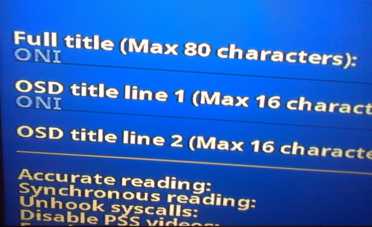
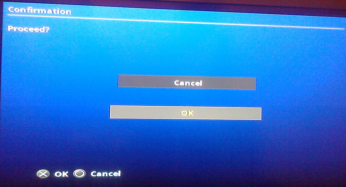
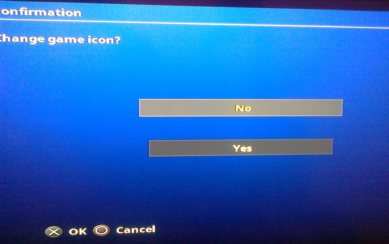
Enter Game options once again OSD Title 1 have only first letter\number:

Grahf
Member
Thank you for the confirmation and visual proof.I also have this bug.
I mean only OSD Title 1 is affected with this.
When I edit OSD Title 1 (Game options):
Enter Game options once again OSD Title 1 have only first letter\number:
tinostar91
Member
I think visualizing the problem will help a bit in this case.The speed will always fluctuate. However, on average it's ~7000 kB/s, provided that you use a good LAN card and establish a direct connection. Most Intel ones are perfect for this.
Similar threads
-
 PS3 PSL1GHT - The Open Source SDK for the PS3 being revived & updated by a group of Devs.
- Started by STLcardsWS
- Replies: 3
-
 PS3 PS3 Firmware 4.93 - Update is Live! (CFW and HFW Released)
- Started by LuanTeles
- Replies: 38
-
PS3 qCFW - Arrives to Slim (2500-3000) & SuperSlim (4000-NOR) PlayStation 3 Models
- Started by STLcardsWS
- Replies: 265
-
Welcome to PSX-Place (v3) - Upgrade Now Complete !!!
- Started by STLcardsWS
- Replies: 36