PS3 [Help] Rip Game Disc to hdd0 using webMAN MOD function not working?

ZeroOne

(Formerly kineticUk)
I've been trying to rip a game from disc to hdd0 using webMAN MOD but I'm not sure how to use this wmMOD feature.

I'm not sure it's a result of my trying to rip disc unsuccessfully but my webMAN file manager is missing the buttons delete, cut, copy and paste.
I remember trying to use the copy and paste buttons and remember I was able to copy a file within the same volume but not from one volume to another (usb000 to hdd0).

I have tried the web commands /copy.ps3 and copy.ps3/***PS3*** and I received a 'game unmounted' message a couple of times but it didn't seem to be copying the disc to hdd0 at any point so far.

I have to figure this out somehow :)
 
Last edited:
I have used the options in webMAN MOD setup to delete the wmtmp and history folders and tried to enable/disable options which I guessed might be relevant to the copy function (FTP, NET, etc). I hope someone can give me a clue because information online re: webMAN MOD rip disc to hdd0 is hard to find and I have found nothing.
I know I can use multiman easy but this should work. I tried to use the VSH menu, selected 'copy disc', heard beep, and back to XMB but the drive isn't spinning and there is no copy progress showing anywhere.
I'm clutching at straws here and it sucks, maybe I need to enable the server inside Network options?

Does anybody know how to reset/recover the delete, cut, copy and paste buttons which are not showing in my file browser at the moment?

Thanks in advance for any help and sorry if this sounds stupid.
 
Just to note alot of info here:
http://www.psx-place.com/forums/webman-mod.126/

Have not used that particular feature myself in webMAN MOD alot, so i would not be as helpful to troubleshoot this one as some. \
You will for sure get an answer here, just be patient (which you have) and bump with new details (as you have) and someone maybe including the dev of the project could advise.

Which CFW are you using?
Which version of webMAN MOD are you using?
 
Thank you very much @STLcardsWS and apologies for posting in the wrong section. While I'm stuck here I will start to read through the information you have linked and hopefully learn more about wMM in the process.

I am trying to use the rip to disc function after a clean install of rebug 4.82 Lite (decided to clean format my PS3 HDD last week) and latest webMAN MOD 1.47.06. I have installed PSNPatch and my video apps but nothing else.

I have tried as best as I can to troubleshoot this issue of mine but I feel like I've made a mess of my wMM in the process (tbh I've not done anything apart from attempt to copy bdvd within wMM File section). I have wMM setup as home page in my PS3 browser and also tried to manage things from my computer.

The most recent thing I tried was call the copy function from within VSH menu but VSH exited to XMB with a beep and there didn't seem to be anything happening. Im trying to work out how to restore the delete cut copy and paste buttons as they have disappeared at some point and I've been trying to work out if there are any settings inside wMM setup which might be preventing the copy function from working.

My webMAN MOD setup:
Disable content scan on startup
Disable USB polling
Disable Reset USB Bus
Disable FTP service
Disable NET service
Plugin memory usage 'Standard'

Tried to Delete: wmtmp and history but am still missing file manager buttons which were showing after installing using the latest wMM updater.

Thanks again for any help everyone :)
 
Last edited:
Been a long time since I've used webmanmod either, but I'm Pretty sure the extra icons etc webmanmod uses are installed by the updater into wmtmp folder.

Reinstalling from the updater should bring those back at least.

I use multiman myself for ripping games to isos, so can't advice much on that front. I'll try later and see what happens.

Edit: also, hold down L1 (I think, hover over the updater for a bit and the description will scroll over and tell you what does what) when running the webmanmod updater to make sure you install the full edition.
 
Last edited:
Thanks a lot for your help @self_slaughter. I noticed a 'Rebuild' and a 'Recover' option inside setup.ps3 (beside the Delete: wmtmp history etc) and I'm guessing one of these options (Rebuild?) might bring the buttons back but I'll probably just run the updater like you have advised to be safe. I made sure to install the full version of webMAN MOD (holding down L1 as instructed) and checked after the installation that the full version was installed. Everything seemed to install fine, I had pulled the HDD and wiped it using my PC (to reset the user count etc and start properly fresh) then installed the bare minimum before wMM using the latest updater.

I thought it was strange that I was unable to copy a file from usb000 to hdd0 when I tried using the file manager buttons (before they disappeared) and could only copy/paste within the same volume but this might be normal (using ftp to manage the PS3 on my computer copying works similarly).

I also tried creating GAMES and PS3ISO folders myself before using the copy.ps3 and copy.ps3/***PS3*** web commands but neither worked (error message on file manager screen).

I installed multiman last night just to be sure there was no problem copying to my HDD and ripped the test disc without an issue.
 
Last edited:
Thanks a lot for your help @self_slaughter. I noticed a 'Rebuild' and a 'Recover' option inside setup.ps3 (beside the Delete: wmtmp history etc) and I'm guessing one of these options (Rebuild?) might bring the buttons back but I'll probably just run the updater like you have advised to be safe. I made sure to install the full version of webMAN MOD (holding down L1 as instructed) and checked after the installation that the full version was installed. Everything seemed to install fine, I had pulled the HDD and wiped it using my PC (to reset the user count etc and start properly fresh) then installed the bare minimum before wMM using the latest updater.

I thought it was strange that I was unable to copy a file from usb000 to hdd0 when I tried using the file manager buttons (before they disappeared) and could only copy/paste within the same volume but this might be normal (using ftp to manage the PS3 on my computer copying works similarly).

I also tried creating GAMES and PS3ISO folders myself before using the copy.ps3 and copy.ps3/****PS3**** web commands but neither worked (error message on file manager screen).

I installed multiman last night just to be sure there was no problem copying to my HDD and ripped the test disc without an issue.
the rebuild and recover options in webMAN setup are for PS3 rebuild and recover not for webMAN. As self_slaughter has mentioned multiMAN is your best option for ripping disc as I too ave never got the wedMAN ripping option to work either and besides if it did you would have to use another manager to convert to ISO, and to get webMAN icons back you definitely need to reinstall (hold L1 for full)
 
the rebuild and recover options in webMAN setup are for PS3 rebuild and recover not for webMAN. As self_slaughter has mentioned multiMAN is your best option for ripping disc as I too ave never got the wedMAN ripping option to work either and besides if it did you would have to use another manager to convert to ISO, and to get webMAN icons back you definitely need to reinstall (hold L1 for full)

The webMAN MOD's command /copy.ps3/net0/***PS3***/<anyfolder>&to=<path/file.iso> creates a Bluray ISO *ONLY* from a remote folder streamed from a PC running ps3netsrv.

webMAN MOD cannot create ISO from local discs. To create ISO directly on PS3 use multiMAN or IRISMAN, or use a PC tool like genPS3ISO found in PS3 Tools Collection or Estwald's MAKEPS3ISO (found in PS3 ISO Tools by Rudi Rastelli) to convert ripped games in folder format to ISO.

webMAN MOD can backup PS3 games on BD to a folder using /copy.ps3/dev_bdvd&to=/dev_hdd0/GAMES/MyGame
(Unmount any game already mounted prior use this command to gain back the access to the physical disc on a PS3 with a working BD drive)
 
Thanks for confirming what the rebuild and recover options do @bitsbubba and for the advice, I'll try to reinstall wMM tonight.

I know multiman does the job (when I tried to use wMM previously I was told the same thing, don't bother trying) but I've wanted to work out how to use wMM's rip function as I might not need to have multiman installed. My games are backed up in JB format and I'm using PS3 ISO Rebuilder to make ISO to use if online. I know it probably sounds like a pointless exercise but if I can I would like to figure this out and if not at least confirm it doesn't work (so it can be fixed if it is possible). I don't mind trying and failing if it helps me learn :)

@aldostools Thank you for the information and everything else (and wMM) :)

I'm guessing the VSH menu option should be working but I'll check that after using the web command.
 
Last edited:
Thanks again everyone, after running the wMM updater the cut copy and paste buttons reappeared in the file manager, really happy to have those back :). I also noticed a [SLIDER] option in wMM which I didn't notice was also missing prior to me running the updater.

I wonder if I installed wMM before updating to 4.82 Lite and lost the file manager buttons as a result. Edit: I'm trippin' nvm.

Anyway I have been waiting for a game which I rebuilt (ISO) to copy but I will try the web command aldostools advised I should use and confirm results asap.[/SLIDER]
 
Last edited:
Just a quick update and thanks again self_slaughter and bitsbubba, after running the wMM updater the cut copy and paste buttons are showing in the file manager, really happy about that :)

I can't properly remember but I wonder if I installed wMM before updating to 4.82 Lite and lost the file manager buttons because of this. I also notice [SLIDER] showing in wMM which I didn't notice had also gone missing prior to me running the updater.

I have been waiting for a game which I rebuilt (ISO) to copy but I will try the web command aldostools advised I should use and confirm the results asap.[/SLIDER]
[SLIDER]
webMAN MOD is not included in REBUG 4.82 lite as it has been in previous REBUG CFWs so a full install would be needed to even have webMAN MOD work at all[/slider]
 
webMAN MOD can backup PS3 games on BD to a folder using /copy.ps3/dev_bdvd&to=/dev_hdd0/GAMES/MyGame
(Unmount any game already mounted prior use this command to gain back the access to the physical disc on a PS3 with a working BD drive)
Tried this Aldo all I got was a game unmounted message
 
Tried this Aldo all I got was a game unmounted message

Thanks for the feedback... It worked the last time I tried it (like 2-3 years ago). Maybe something added broke the feature.

I'll check it later if I get some free time (I haven't turned on my PS3 in months).

EDIT:
I think the issue copying /dev_bdvd is caused by this line:
https://github.com/aldostools/webMAN-MOD/blob/master/include/_mount.h#L128

@bitsbubba If you have time, could you test the command again but with //dev_bdvd ?

Like this:
/copy.ps3//dev_bdvd&to=/dev_hdd0/GAMES/MyGame

If it works, it will save me some time in the debugging ;)
 
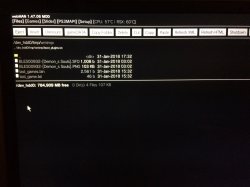
Thanks for looking into this @aldostools. I'm not sure if it helps now but I tried to copy a file (e.g /hdd0/bootplugins.txt) from hdd0 to usb000 and the paste part failed to complete though the PS3 disc lights are flashing constant read/write activity. I cancel out of the browser after waiting a minute or so (PS3 is just stuck on a white screen with a spinning clock, lights on console showing disc activity).

Going back into the wMM file manager I can see that the file I tried to copy is still showing in the clipboard. I tried to complete the copy but this time paste to a folder on the same volume (e.g /hdd0/PSPISO) and this paste fails again (stick on a white screen, spinning clock) and I have to cancel out of the browser again.

It takes a minute or so for the PS3 to recover from the failed copy and load XMB.
5FC299CD-B4AF-4370-B081-33DE57833216.jpeg 6BC43631-F8BB-4983-ABD6-3D56B7AE6897.jpeg 4E1EA99F-D00B-4577-87AF-99C0C53A7361.jpeg
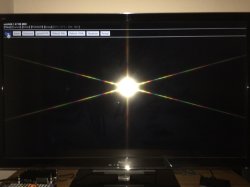
After this I tried to delete wmtmp then history in setup.ps3 guessing it might clear the clipboard (which is now showing /usb000/bootplugins.txt which doesn't exist) but after selecting delete history, the PS3 glitches out on white screens then displays an error on a white screen.
0E03BC01-10D7-40D0-BB67-976E309597A4.jpeg
 
Last edited:
Thanks for looking into this @aldostools. I'm not sure if it helps now but I tried to copy a file (e.g /hdd0/bootplugins.txt) from hdd0 to usb000 and the paste part failed to complete though the PS3 disc lights are flashing constant read/write activity. I cancel out of the browser after waiting a minute or so (PS3 is just stuck on a white screen with a spinning clock, lights on console showing disc activity).

Going back into the wMM file manager I can see that the file I tried to copy is still showing in the clipboard. I tried to complete the copy but this time paste to a folder on the same volume (e.g /hdd0/PSPISO) and this paste fails again (stick on a white screen, spinning clock) and I have to cancel out of the browser again.

It takes a minute or so for the PS3 to recover from the failed copy and load XMB.
View attachment 10594 View attachment 10595 View attachment 10596
After this I tried to delete wmtmp then history in setup.ps3 guessing it might clear the clipboard (which is now showing /usb000/bootplugins.txt which doesn't exist) but after selecting delete history, the PS3 glitches out on white screens then displays an error on a white screen.
View attachment 10597
did you get a copy process started message, I did even though web browser gave me the cannot display page error. The key is HDD activity. Got a few pics of my own I had to kind of stream line the process from XMB lol
ofabuq.jpg

fc18ad.jpg

@aldostools it seems to copy fine but when you mount and try to start it it gives a game start error (I tried 2 games same result)
 
@aldostools it seems to copy fine but when you mount and try to start it it gives a game start error (I tried 2 games same result)

Please try again using this build.

As the files in /dev_bdvd are encrypted, it is required to call syscall 36 before copy to enable the access to the decrypted files.
The file_copy function calls that syscall automatically if the source path start with /dev_bdvd, but it didn't because in your test the source path starts with //dev_bdvd.

In the latest commit of wMM, the web command used to copy works fine again with /dev_bdvd. So it is not longer necessary to use // in the path (unless you want to copy the encrypted files like in your test).
 
did you get a copy process started message, I did even though web browser gave me the cannot display page error.
Not on 1.47.06, no. I tried to copy a couple of .txt files but was unable to successfully. I thought best to mention this too so aldostools was aware that it wasn't only rip to disc copy which wasnt working (in case it helps).

I'm guessing from aldostools replies that there is a copy function responsible for all copy tasks (files, rip bdvd, etc) but on 1.47.06 I have tried repeatedly and failed to copy even a 70b .txt file from /hdd0 to /hdd0/myfolder, hdd0 to usb000, usb000 to hdd0, etc.

I've just reinstalled wMM and checked again but I cannot copy a small .txt or .cfg file either. I'm sure you both know this (probably obvious).

@bitsbubba were you able to copy anything at all in the 1.47.06 release File Manager?

I enable copy (no problem), select file to copy (file and path shows in clipboard), browse to destination in 'Files' and select 'Paste' then wait but the copy never succeeds (either an empty wMM black screen or white screen depending on where I tried to copy to). When I check the File section to see if the file copied, the clipboard still has the file I tried to copy showing but the path has changed to the path I was trying to paste to (file does not exist because the copy didn't succeed).
228AF65E-FF43-493D-A630-6DBC5120E157.jpeg 9C3E0E2F-D853-4CB2-BAAD-A03E3A2E6653.jpeg
 
Last edited:

Similar threads

Back
Top