
You are using an out of date browser. It may not display this or other websites correctly.
You should upgrade or use an alternative browser.
You should upgrade or use an alternative browser.

PS3 HEN Toolbox v1.00
- Thread starter DeViL303
- Start date

No idea what you mean by offline pkg enabler debug, there is no option for that in hen toolbox. That is an obsolete option from han toolbox.I used it for the first time to use the Offline PKG Enabler Debug and the icon of hen toolbox disappeared. Please help me

iesus gamer
Member
iesus gamer
Very good Mr. Devil I am finishing translating the hentoolbox I need very little to know how I send it packaged or unpacked to see it, a question I ask permission if I stop uploading to my YouTube channel the translated hentoolbox if it does not bother you since my followers would like to have the translation thank you and I hope answers. a great thing.
iesus gamer
Member
Another thing Mr. DeViL303 the xml files to replace in the Hentoolbox update I could send them or the pkg with the update to translate them. Thanks and best regards.
Sorry for late reply, Yeah do whatever you want with it, share where ever you want, just please include a link back to this thread. I will add a link to the first post too for all translations with credits to translators of course.iesus gamer
Very good Mr. Devil I am finishing translating the hentoolbox I need very little to know how I send it packaged or unpacked to see it, a question I ask permission if I stop uploading to my YouTube channel the translated hentoolbox if it does not bother you since my followers would like to have the translation thank you and I hope answers. a great thing.
Yes, the best thing for translators to do is to take the files in the available UPDATE(Link), translate them and then add them to the main pkg, overwriting what is in there. Also I recommend adding a note to this update section in toolbox_settings.xml Line 22Another thing Mr. DeViL303 the xml files to replace in the Hentoolbox update I could send them or the pkg with the update to translate them. Thanks and best regards.
Code:
<View id="update_toolbox">
<Attributes>
<Table key="update_toolbox_main">
<Pair key="icon"><String>/dev_hdd0/game/HENTOOLBX/USRDIR/TOOLBOX/icon/refresh.png</String></Pair>
<Pair key="title"><String>Update HEN Toolbox</String></Pair>
<Pair key="info"><String>Download latest toolbox pkg from the official server</String></Pair>
  </Table>
</Attributes>
<Items>
<Query
class="type:x-xmb/folder-pixmap"
key="update_toolbox_main"
attr="update_toolbox_main"
src="#update_toolbox_item"/>
</Items>
</View>I do want to get out a proper AIO pkg with update included and some more small additions, but have not had the spare time lately to work on it.
To pack the HEN Toolbox package i used a custom tool that @lmn7 was kind enough to create for me (Thanks again).
This tool is quite cool I think, it can create a combination of a normal pkg and custom.pkg in one. This means we can have an application/game/data package that also adds files outside of dev_hdd0/game/. This can include dev_blind patches, or any other locations.
Usage:
All you need to do is have the normal pkg files (sfo, icon0, USRDIR folder etc) in a XXXXXXXXX folder just like a standard package, then add your custom folders into the main app folder like this:

Then drag the XXXXXXXXX folder onto the make.bat, in this case the "HENTOOLBX" folder.

This will create a normal package, but any folder included that starts with "dev_" will NOT get installed to dev_hdd0/game/ , but will instead go to its custom path. This has the advantage over the standard custom.pkg that it adds info to the database.
See attached zip for the tool. All credits to lmn7.
@Shadow Joker @in1975
This tool is quite cool I think, it can create a combination of a normal pkg and custom.pkg in one. This means we can have an application/game/data package that also adds files outside of dev_hdd0/game/. This can include dev_blind patches, or any other locations.
Usage:
All you need to do is have the normal pkg files (sfo, icon0, USRDIR folder etc) in a XXXXXXXXX folder just like a standard package, then add your custom folders into the main app folder like this:
Then drag the XXXXXXXXX folder onto the make.bat, in this case the "HENTOOLBX" folder.
This will create a normal package, but any folder included that starts with "dev_" will NOT get installed to dev_hdd0/game/ , but will instead go to its custom path. This has the advantage over the standard custom.pkg that it adds info to the database.
See attached zip for the tool. All credits to lmn7.
@Shadow Joker @in1975
Attachments
iesus gamer
Member
Very good Mr. deVil I send the pkg and translated from the hentoolbox in the folder I leave a note for you to see thanks and greetings.
I leave a link to download: https://mega.nz/#!w3pF1KxA!jd8mmQDV-mDf0dmvdq9kb3OfsiQ0NtM4l4hvwjJj1V8
I leave a link to download: https://mega.nz/#!w3pF1KxA!jd8mmQDV-mDf0dmvdq9kb3OfsiQ0NtM4l4hvwjJj1V8
Thanks, I will check it out, and I will add it to main post after testing a little.Very good Mr. deVil I send the pkg and translated from the hentoolbox in the folder I leave a note for you to see thanks and greetings.
I leave a link to download: https://mega.nz/#!w3pF1KxA!jd8mmQDV-mDf0dmvdq9kb3OfsiQ0NtM4l4hvwjJj1V8
One thing, It looks like you have not translated the latest update, can you check this one http://xmbmods.co/HEN/HEN_Toolbox.pkg , its 726kb I did not change much but it has the newer HEN enabler which people like.
I will combine the update into the main pkg too before releasing it so its all in one.
iesus gamer
Member
If this translated Devil in the package that I send this the Hentoolbox v1.0 + The update Thank you
for everything. Greetings.
for everything. Greetings.
This will need a bit of work. It looks really good, but you have translated the 663kb update that is older. Kind of my fault for not making clear that the update has been updated a few times.If this translated Devil in the package that I send this the Hentoolbox v1.0 + The update Thank you
for everything. Greetings.
HEN Toolbox has ended up being a confusing pkg, due to the way I had to use xai patch and hfw_settings.xml to make it appear only when HEN is enabled and the way the updates have been released without version numbers.
There are files missing from your pkg due to this, possibly due to the way you extracted the pkg too. I need to think about this a bit more. maybe its better if people do not start translations until I have released a new AIO pkg which i will label v1.10 I think. Most of your work will be fine, and it will not take much more work for you to translate 1.10.
I need to think about the way it is made to appear, as its overly complicated now, and also the patch to re-enable it after a HEN update seems to be unstable for some people which then requires a complete reinstall of the Toolbox to apply the patch, and that patch is not included in your pkg. Maybe I will make v1.10 so it is always visible on the XMB, this would simplify things a lot. The downside would be that users will try HEN toolbox options without enabling HEN and get kicked to recovery and complain about it.

Shadow Joker
Member
because they did not do the translation by means of explore_plugin full.rco? I will see if I do it in about 6 languages, but I do not know if 100 will be readableThis will need a bit of work. It looks really good, but you have translated the 663kb update that is older. Kind of my fault for not making clear that the update has been updated a few times.
HEN Toolbox has ended up being a confusing pkg, due to the way I had to use xai patch and hfw_settings.xml to make it appear only when HEN is enabled and the way the updates have been released without version numbers.
There are files missing from your pkg due to this, possibly due to the way you extracted the pkg too. I need to think about this a bit more. maybe its better if people do not start translations until I have released a new AIO pkg which i will label v1.10 I think. Most of your work will be fine, and it will not take much more work for you to translate 1.10.
I need to think about the way it is made to appear, as its overly complicated now, and also the patch to re-enable it after a HEN update seems to be unstable for some people which then requires a complete reinstall of the Toolbox to apply the patch, and that patch is not included in your pkg. Maybe I will make v1.10 so it is always visible on the XMB, this would simplify things a lot. The downside would be that users will try HEN toolbox options without enabling HEN and get kicked to recovery and complain about it.
No, nothing to do with the explore_plugin_full.rco.because they did not do the translation by means of explore_plugin full.rco? I will see if I do it in about 6 languages, but I do not know if 100 will be readable
Shadow Joker
Member
I made my custom toolbox add lines in the rco plugin and edit each language xml with rcomage 1.11 and it works very well in portuguese spanish and english not there letters run as I happened the first time that instead of SYSTEM appeared YSTEMNo, nothing to do with the explore_plugin_full.rco.

pinky
Retired
I made my custom toolbox add lines in the rco plugin and edit each language xml with rcomage 1.11 and it works very well in portuguese spanish and english not there letters run as I happened the first time that instead of SYSTEM appeared YSTEM
I've seen that error before (where it cuts off part of the name).
Shadow Joker
Member
If I already solve it, then I pass the hentoolbox in Spanish, English, Portuguese, French and Italian by means of RCOI've seen that error before (where it cuts off part of the name).
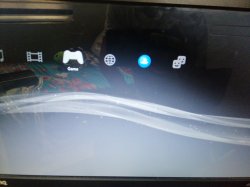
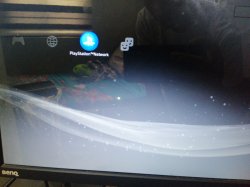
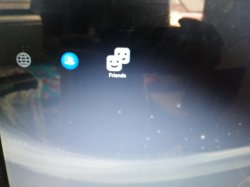
bro I installed this toolbox then this happened, the game list, psn list, and friend list are missing... please help me fix this... i tried rebuild the database and even restore ps3 system and nothing happens
Attachments

ShaolinAssassin
Developer
bro I installed this toolbox then this happened, the game list, psn list, and friend list are missing... please help me fix this... i tried rebuild the database and even restore ps3 system and nothing happens
Is network category list still here ? Can you access Internet Browser ?
Similar threads
-
PS3HEN GameData Reverse sorting after installing latest HEN
- Started by sakran
- Replies: 2
-
 PS3Xploit Flash Writer (4.93 HFW Req)
- Started by Evilnat
- Replies: 10
-
-