
Following the preview that @Roxanne (psx-place's newest addition to the writing team) informed us a few days ago, now comes the official release from developer TheFlow as he drops 3.65 HENkaku Ensō Updater, this will not jailbreak 3.65 firmware, what it will do is allow EXISTING exploited (HENkaku) 3.60 user's to update to 3.65, no longer keeping you in the 3.60 sandbox and allowing your to play additional games since the HENkaku release. Be sure to checkout all the details and information provided by TheFlow, as the dev has also updated the Adrenaline, DownloadEnabler, NoNpDrm and SD2VITA utilities to support 3.65 links also provided below.
-STLcardsWS.
-
3.65 HENkaku Ensō Updater
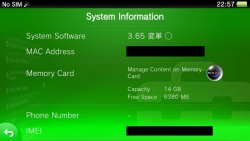
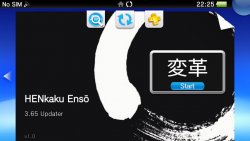
This does not allow you to hack your console that is on a firmware past 3.60. You need to be on firmare 3.60 in order to use this software.
Custom Firmware 3.65 HENkaku Ensō is a port of henkaku to the latest possible firmware that does still have the bootloader vulnerability.
Pros
- You will be able to access the PSN store, activate your device and download your purchased games again (only as long as Sony doesn't decide to release a new update that prevents you from doing that).
- You will be able to play all games that were released for firmwares 3.61-3.65.
- You will not be able to downgrade back to 3.60 if you find that this custom firmware doesn't suit you.
- You can lose the ability to run homebrews, if you modify the OS and end up in a semi-brick where you are forced to reinstall the firmware. This should however not happen to a regular user, but I'd rather not install applications that modify read-only partitions like os0: or vs0:.
- Some applications may not work on the new firmware and need to be ported.
FAQ-
Are Adrenaline, DownloadEnabler, NoNpDrm and SD2VITA compatible on 3.65?
- Yes they have all been updated and are available under my repositories. (Links Below)
-
Is it risky to perform this update?
- All my betatesters have successfully updated and have no issues so far. The updater has been designed carefully, so you dont need to worry.
-
Will I lose the hack if I format my Memory Card or restore the systems settings?
- No, you can nearly do everything with your device and you will not lose HENkaku. You must just NOT reinstall the 3.65 PUP.
-
I have installed a bad plugin and now my device doesn't boot anymore
- Try to enter the Safe Mode and choose 2. Rebuild Database. This will allow you to boot the device with plugins disabled and fresh config.txt files.
-
Will I be able to hack my device that is on 3.65/3.67?
- Not with this software. I will release my exploit chain by the end of this year or next, so you have to be patient.
-
Instructions
- Download updater.vpk and PSP2UPDAT.PUP.
- If you are on a firmware below 3.60, update to 3.60 and install henkaku. Then you can skip to 4.
- If you are already using 3.60 HENkaku (Enso), uninstall all plugins and uninstall the enso patch. It is recommended to first unlink the Memory Card in HENkaku Settings before you uninstall, so that your Memory Card won't be restricted afterwards due to the spoofed version at ux0:id.dat. Uninstalling all plugins and the enso patch is extremely important, as they can interfere with the update process if enabled (the updater will notice you in case you have not uninstalled them correctly).
- Install updater.vpk using VitaShell and put the PSP2UPDAT.PUP file at ux0:app/UPDATE365/PSP2UPDAT.PUP.
- Reboot your device, start HENkaku and directly launch the updater, without launching anything else before like VitaShell or Adrenaline (since they start kernel modules). Also make sure that your battery is at least at 50% Vita user's
- Follow the instructions on screen and enjoy the update process.
- When the updater finishes flashing the new firmware, custom modules will be written to vs0:tai and the bootloader hack injected to the eMMC. You should now be on 3.65 HENkaku Ensō.
-
Donation
- If you like my work and want to support future projects, you can make a small donation. Thank you!
Credits
Note: There is no way to back to 3.60, or to reinstall hacked 3.65 firmware after using this hack!!
- 6.61 Adrenaline- v6.1 (3.65 Support)
- NoNpDrm v1.2 (3.65 Support)
- DownloadEnabler (3.65 Support)
- SD2VITA (3.65 Support)
- VitaShell v1.82 (3.65 Support)
Source: twitter.com/theflow0
Last edited by a moderator:







