
Developer VitaHEX has a new creation for the PS Vita / PlayStation TV community, following the recent PS Vita / PS4 Homebrew release Consolepedia (seen here on PS4 and Vita). Now the dev is back with the release of a new project titled HexFlow Launcher. With this app you will be to launch your games and also homebrew with a 3D CoverFlow interface that allows for Custom Covers to be used as well. The eye candy looks great and comes with some good features out of the gate in this that has just been updated to v0.2.x following the initial release this past weekend.
In v0.2 there has been added support for PSP (adrenaline) bubbles, A new settings menu, new viewing option that displays a bigger view, plus various other changes (v0.2.1 hot fix was just issues as well, so if you have already updated to 0.2 beware there was a quick hotfix) in what appears to be another great projects for the Vita, which has been no stranger to some great homebrew.
In v0.2 there has been added support for PSP (adrenaline) bubbles, A new settings menu, new viewing option that displays a bigger view, plus various other changes (v0.2.1 hot fix was just issues as well, so if you have already updated to 0.2 beware there was a quick hotfix) in what appears to be another great projects for the Vita, which has been no stranger to some great homebrew.
-
HexFlow-LauncherChangelogs
Display and launch your games and homebrews in style.
HexFlow Launcher features a 3d user interface to display your games with their box art and supports many customization options like custom covers and backgrounds.
Launching a game/app from HexFlow Launcher will close the launcher automatically without asking.
v0.2.1:
- Fixed error if no games where found
-
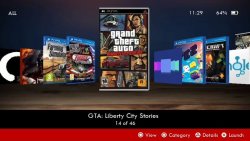
- Added support for PSP adrenaline bubbles (App ID must be "PSPEMUxxx")
- Added PSP 3d boxes
- Added Settings menu (Start button)
- Added 1 new View option (Big view)
- Fixed the Categories button (now it changes instantly)
- Reflection effect can be disabled (Settings menu)
- Added option to change the theme color (Settings menu)
- Added option to set the startup category (Settings menu)
- Changed font to support more characters including Japanese
- Improved performance
- Other bug fixes and improvements
Known Issues
- Changing Categories multiple times might cause the covers to disappear
- Loading the library for the first time might seem slow depending on the number of games/apps you have installed
-
Custom Covers
- Place your custom covers in "ux0:/data/HexFlow/COVERS/PSVITA/"
- Cover images must be in png format and file name must match the App ID or the App Name of each app (recomended resolution 256x256px). Sample image
Custom Background
- Place your custom background image in "ux0:/data/HexFlow/"
- Background image must be named 'Background.jpg' or 'Background.png' (recomended resolution 1280x720px or less).
-
AutoBoot
- If you want to auto-launch HexFlow Launcher every time your PS Vita boots up you can use the AutoBoot plugin by Rinnegatamante.
-
Controls
Navigate your library using the DPad or the Left Stick or with the Touch Screen.
- R/L triggers: Skip 5 items
- Cross: Select/Launch game/app
- Square: Change Category
- Circle: Change View/Cancel
- Start: Extras menu
-
Credits
- Programming/UI: Sakis RG
- Developed with Lua Player Plus by Rinnegatamante
Support
VitaHEX Twitter
VitaHEX Official Page
Downloads
Source: github.com / twitter.com
Last edited:







