Carlos0371
Forum Noob
Hi all, first post so intro: 50s avid retro collector (name it, I've got it......mostly), recently into modding PS3s for resale.
Issue:
Retroarch CE installed on PS3 HeN 4.93.
MAME games cuts off top and bottom, so you can't see "SCORE" and "HIGH SCORE" at the top, and can't see "CREDITS" at the bottom.
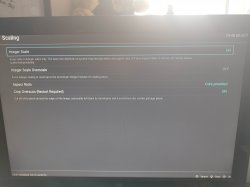
Done a LOT of Googling to try to fix this, everything basically says turn off bezels, turn off overlays, tweak screen ratio etc. but NOTHING works. (There ISN'T a "Bezel" option anywhere in settings anyway, and overlay on or off makes no difference whatsoever).
Also tried 4:3, 3:4, 16:9, Core provided, nothing fixes it.
Literally just want to see the whole screen of the game in vertical format, so if anyone can help, it would be greatly appreciated.
Issue:
Retroarch CE installed on PS3 HeN 4.93.
MAME games cuts off top and bottom, so you can't see "SCORE" and "HIGH SCORE" at the top, and can't see "CREDITS" at the bottom.
Done a LOT of Googling to try to fix this, everything basically says turn off bezels, turn off overlays, tweak screen ratio etc. but NOTHING works. (There ISN'T a "Bezel" option anywhere in settings anyway, and overlay on or off makes no difference whatsoever).
Also tried 4:3, 3:4, 16:9, Core provided, nothing fixes it.
Literally just want to see the whole screen of the game in vertical format, so if anyone can help, it would be greatly appreciated.