PS2 How can I add more games bigger then 4gb?

Tackskull

Member
I there,

when using usbutil to divide an iso game bigger then 4gb, on the root of the USB hard drive, the program create many files of the game and a ul.cfg

The fact is that if I put a second game, usbutil creates many file for the new game, but it creates another ul.cfg file overwriting the orevious one. So basically only the second game is playable, and basically I can only add one game bigger then 4gb..... What I have to do if I want to add many games bigger then 4gb?
 
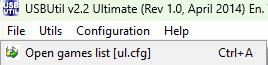
Just open the existing ul.cfg in USBUtil (Open games list [ul.cfg]) and then add the games.


You don't have to overwrite your ul.cfg
The image you posted in not visible. So how can I put all the games in the root of the usb drive and not overwriting the ul.cfg?
 
...or just use ExFAT and simply drag&drop the ISOs.
I didn't know the external usb drive can be formatted in exfat, thanks, i'll do this. I would like to buy internal ssd hard drive, also the internal had disk can be formatted to exfat?
 
For what would you need/want ExFAT on the internal HDD?
I would like to have an internal 2tb hard disk drive with planty on ps2 iso, and formatting that hard disk to exaft would let me put a lot of games bigger then 4tb. Is this possible?
 
  1. 2TB works with APA as well. APA is compatible with EVERY app that supports the internal HDD. ExFAT on internal HDD on the other hand ONLY works on the OPL Grimdoomer Fork.
  2. 4GB-Limit doesn't exist on APA.
  3. So... I suggest you to simply use APA and PFS-Batchkit-Manager or HDL Batch Installer.
 
  1. 2TB works with APA as well. APA is compatible with EVERY app that supports the internal HDD. ExFAT on internal HDD on the other hand ONLY works on the OPL Grimdoomer Fork.
  2. 4GB-Limit doesn't exist on APA.
  3. So... I suggest you to simply use APA and PFS-Batchkit-Manager or HDL Batch Installer.

Thanks :D
 
  • Like
Reactions: TnA

Similar threads

Back
Top