
You are using an out of date browser. It may not display this or other websites correctly.
You should upgrade or use an alternative browser.
You should upgrade or use an alternative browser.
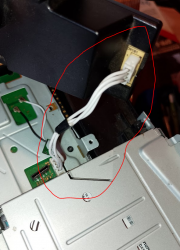
PS3 How can I check if PSU to motherboard cable from PS3 Super Slim works correctly (photo attached)
- Thread starter Lichi
- Start date

esc0rtd3w
Developer
Use a multimeter in diode (continuity) mode and verify each trace on both sides. Then if all good, verify width of traces on cable and match sides with metal ends on plug.
You can also check voltage on PSU, 12v bottom and 5v, standby on plug. I dont remember if those have 3.3v or not on plug.
You can also check voltage on PSU, 12v bottom and 5v, standby on plug. I dont remember if those have 3.3v or not on plug.
Use a multimeter in diode (continuity) mode and verify each trace on both sides.
By this you mean that I should connect the black needle of multimeter set in continuity to the 2nd pin of the cable (ground) and see it if beeps when I connect the red needle in any of the remaining 3 pins that are next to the 2nd pin? I should do that in both of the extremes of the cable.
Then if all good, verify width of traces on cable and match sides with metal ends on plug.
And by this you mean that after I checked that it only beeps when I connect 2d pin to any of the other 3 next to him (and that is doesn't beep when I connect, lets say, pin 1 with 3) I should check if there is continuity along all the 4 pins in the other extreme of the cable?
I really really want to understand
esc0rtd3w
Developer
Yes. If each trace on ribbon cable has continuity on both ends for each, then cable is good. Unless it has a break in it that is off and on. You can wiggle the ribbon a bit while testing and make sure.
For checking DC, switch multimeter to AC/DC voltage around ~20v range. Its harder to test PSU while connected unless motherboard is out of plastic shell.
You can check for ground by continuity test from each pin to chassis. I think rear pin is ground, but double check.
Edit: Never check continuity while powered on.
For checking DC, switch multimeter to AC/DC voltage around ~20v range. Its harder to test PSU while connected unless motherboard is out of plastic shell.
You can check for ground by continuity test from each pin to chassis. I think rear pin is ground, but double check.
Edit: Never check continuity while powered on.
Yes. If each trace on ribbon cable has continuity on both ends for each, then cable is good. Unless it has a break in it that is off and on. You can wiggle the ribbon a bit while testing and make sure.
For checking DC, switch multimeter to AC/DC voltage around ~20v range. Its harder to test PSU while connected unless motherboard is out of plastic shell.
You can check for ground by continuity test from each pin to chassis. I think rear pin is ground, but double check.
Edit: Never check continuity while powered on.
So the cable I'm talking about is a ribbon cable? I thought ribbon cables looked more like the one used to turn on/off the console, which is completely flat.
But anyways, it's seems not be working properly :/. There is no continuity, no beep. I'm taking measure like this:
Attachments
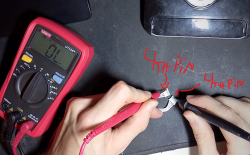
Not sure what BD drive is. The cable in the photo which I'm testing is the one that connects the psu with the motherboard. I think however that it isn't giving continuity not because is not working but because I'm not able to reach the copper which conducts electricity with the multimeter. I mean, at least that is what I'm left to believe. I just tested the same cable but for ps4 (which I know it works) and it also gave continuity when it shouldoh, that cable. Is that for BD drive? Make sure the wire is same across when testing
esc0rtd3w
Developer
I see what you mean now. You can try taping a small needle or paperclip to probe if it wont reach. Chances of cable being bad are probably low.
You could try powering with an ATX power supply if you have one. If it works fine, then your PSU is going bad There is a guide on here for it here https://www.psx-place.com/threads/tutorial-connect-atx-power-supply-to-ps3.17180/
You could try powering with an ATX power supply if you have one. If it works fine, then your PSU is going bad There is a guide on here for it here https://www.psx-place.com/threads/tutorial-connect-atx-power-supply-to-ps3.17180/
esc0rtd3w
Developer
i have a 4001 here thats missing the power ribbon and button, but when i plug it in to ac and then check plug, here is what i have on this one. It does turn on if i connect button and ribbon, but i have it at work, and cant check the other voltages until tomorrow

i will recheck everything tomorrow because i have a better multimeter at work to use.
i will recheck everything tomorrow because i have a better multimeter at work to use.
i have a 4001 here thats missing the power ribbon and button, but when i plug it in to ac and then check plug, here is what i have on this one. It does turn on if i connect button and ribbon, but i have it at work, and cant check the other voltages until tomorrow
View attachment 45037
i will recheck everything tomorrow because i have a better multimeter at work to use.
Thanks a lot for the advice! Ill be far from home until thursday, so I wont be able to test the wire nor to try the needle thing, but Ill get back when Im finally able to do so.
I think you said you would recheck everthing tomorrow (and tomorrow is today). Could you perhaps also test how many volts you get when you connect the 1st pin with the 3rd one? It should be around 12volts. I get 12.62, I think
esc0rtd3w
Developer
From top to bottom 1,2,3,4 (5VSB,GND,ACDC_STBY,ACIN_DET)
When powered on with button, the 3rd pin goes to 3.1v. Powered off, it goes back to around 1.3mv.
Jumpering 1 to 3 spins up fan for a second and goes to same voltage as pin 1 (5.2v). If you get 12v there, something is wrong.
Edit: Let me clarify.
When jumpering pin1 to pin3 with PSU out of console, it does turn on the 12v output on bottom connector. So that is normal.
When powered on with button, the 3rd pin goes to 3.1v. Powered off, it goes back to around 1.3mv.
Jumpering 1 to 3 spins up fan for a second and goes to same voltage as pin 1 (5.2v). If you get 12v there, something is wrong.
Edit: Let me clarify.
When jumpering pin1 to pin3 with PSU out of console, it does turn on the 12v output on bottom connector. So that is normal.
Last edited:
Great, thanks for the measures. When I get home in some days Ill check those w my ps3!From top to bottom 1,2,3,4 (5VSB,GND,ACDC_STBY,ACIN_DET)
When powered on with button, the 3rd pin goes to 3.1v. Powered off, it goes back to around 1.3mv.
Jumpering 1 to 3 spins up fan for a second and goes to same voltage as pin 1 (5.2v). If you get 12v there, something is wrong.
Edit: Let me clarify.
When jumpering pin1 to pin3 with PSU out of console, it does turn on the 12v output on bottom connector. So that is normal.
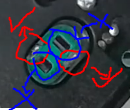
Hey friend. I'm not at home, and took the measures. Almost perfect. There is a thing that confuses me a little. The cable showed the correct voltages, and when jumpering the 1st and 3rd pin, it did came the 12v output, but my multimeter showed me that value only when I put the needles in the metal alloys that are next to the slots where the two elongated metal pins of the motherboard are connected, not when I put the the needles inside the slots.From top to bottom 1,2,3,4 (5VSB,GND,ACDC_STBY,ACIN_DET)
When powered on with button, the 3rd pin goes to 3.1v. Powered off, it goes back to around 1.3mv.
Jumpering 1 to 3 spins up fan for a second and goes to same voltage as pin 1 (5.2v). If you get 12v there, something is wrong.
Edit: Let me clarify.
When jumpering pin1 to pin3 with PSU out of console, it does turn on the 12v output on bottom connector. So that is normal.
Here is a photo that will probably clarify a lot what Im explaining:
Attachments
esc0rtd3w
Developer
Yes, the bottom where the 2 large spade connectors plug into are 12vHey friend. I'm not at home, and took the measures. Almost perfect. There is a thing that confuses me a little. The cable showed the correct voltages, and when jumpering the 1st and 3rd pin, it did came the 12v output, but my multimeter showed me that value only when I put the needles in the metal alloys that are next to the slots where the two elongated metal pins of the motherboard are connected, not when I put the the needles inside the slots.
Here is a photo that will probably clarify a lot what Im explaining:
Seems the power supply is working. What is the actual problem? Doesn't turn on?
You can use a ribbon cable or jump pins on motherboard, but I dont have a schematic on hand with pinout.
Hi friend. Measure wise, all correct. When trying to turn the playstation on, a super weird sound can be heard. Here is the thread I created where the video is attached:Yes, the bottom where the 2 large spade connectors plug into are 12v
Seems the power supply is working. What is the actual problem? Doesn't turn on?
You can use a ribbon cable or jump pins on motherboard, but I dont have a schematic on hand with pinout.
https://www.psx-place.com/threads/ps3-super-slim-weird-sound-when-trying-to-turn-on.45665/
Any ideas?

