How can I upgrade

lightisdark

Forum Noob
This is a noob question.

I just fired up my ps3 and I have a update waiting 4.85 I'm running rebug mmcm firmware. Do I just install the ps3 update and I will still have all the mods or do I have to get more files.

Someone with patience would be good to answer lol
 
Do NOT install the update, you will lose the ability to run any unsigned code and lose the abilty to install CFW again easily, it will just cause a load of hassle for yourself. What version of Rebug are you on , is it 4.84 REX?
 
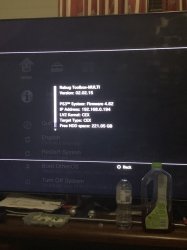
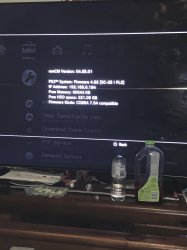
There should be images attached to what I'm on ?
 

Attachments

  • 14496778-2757-4AEB-BC81-0DFA11D2AB9F.jpeg
    14496778-2757-4AEB-BC81-0DFA11D2AB9F.jpeg
    1,006.4 KB · Views: 65
  • image.jpg
    image.jpg
    1.1 MB · Views: 101
I have a update waiting 4.85

If You talking about online update, then it is OFW. When will You install it, then You makes Your console unhacked. And to hack it again, You will must follow by PS3Xploit. Simply, don't do it...

I also strong recommending to blacklist update servers on Your router (if You are using any).

If You want for some reason newer Rebug, go to https://rebug.me/, download fitting for You firmware line (Rex or Lite, whatever Your needs are) and install it from HDD (put your fw package here: "dev_hdd0/updater/00/magic.pup"), turn on debug update in debug options, and after that You will see all firmware packages on HDD listed in menu to easy update (or just install from USB device just like any OFW).

I'm running rebug mmcm firmware.

There is no such thing. Rebug is CFW, and multiMAN is application.

Based on above screens, You have CFW Rebug 4.82.x REX.
Currently, latest Rex is 4.84.2, and Lite 4.85.1.
 
Last edited:
actually it didnt make sense to me, i was looking at the rebug guide and it told me to go to some web browser etc, im going to be using a USB dongle if that helps what you wrote was kinda hard to understand. to be honest i dont even know how i hacked it in the first place. i just want to be able to 4.85 so i have PSN network if that makes things more interesting?

i downbloaded the two files from rebug for 4.85 onto the usb and it does not show up in package manager is there a specific folder it needs to go in for the ps3 to see it? hopefully, someone can decipher what im trying to say
 
When you download them files from REBUG.me they will be zip files. Unzip this on your PC or phone and inside will be a txt file with a URL web address and a folder with a long name, this is the MD5 sum of the pup file your about to download. PC would be best as you should perform an MD5 HASH check of the PUP file before installing it on your PS3.

Copy and paste this URL web address into your browsers address bar and the PUP file will be dowloaded automaticaly as you hit enter.

On the USB deveice you are using, make sure it's formatted to FAT32 MBR (Not GPT) create a folder called PS3 on the root of it, inside this create another folder called UPDATE and place the dowloaded PUP file in here and rename it to PS3UPDAT.PUP (make sure you have windows set to Show file extentions in the folder options or you could end up naming the PUP to PS3UPDATE.PUP.PUP which won't work.

Next you should perform an MD5 hash check of the PUP file on the USB to make sure it has not be corrupted by either the download or transfer to USB. You can use free programs such a WINMD5 or FASTMD5 to do this and remember the hash you are comparing this to is the name of the folder that was inside the ZIP file you download from REBUG. If it matches your good to go, if not then your should re-dowload the PUP and check the md5 after download.

Next insert the USB into your PS3 into the port closest to the BD Drive (Right side USB port). Then make sure there are no disc's in the BD Drive, disable the PS3's internet connection in network settings then go to System Update> Update via Storage Media to install REBUG.

Once installed and the PS3 has Rebooted go to package manager> install packages> Install from System Storage to install the latest REBUG Toolbox that come with the REBUG version you have dowloaded.
 
Or PSN Patch which I feel is much easier to use especially with the plugin. But at least use one of those two. PSN Patch installed as a plugin ensured you can't go online until you have disabled syscalls. And won't allow you to run homebrew once disabled. I do however take some cues from SEN Enabler by disabling some of the sites via my router.
 

Similar threads

Back
Top