PS2 How to boot FMCB from usb infinity modded ps2 slim?

corapeca

Forum Noob
Hi,
please help, i just bought PS2 net box and im dying for it to work.
and im trying to intall FMCB to make PS2 net box work
i bought a modded ps2 slim that requires a usb driver to work, and then i bought fmcb memory card online, i tried putting the fmcb memory card in my ps2 without the usb it says on the screen that configure file couldnt be loaded, i guess its the infinity thing,
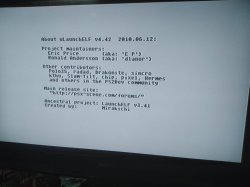
so then, i burnt uLaunchElf on a dvd, and put noobie package on a usb, and put them all to my ps2 to install fmcb, and unfortunately, uLaunchElf couldnt be launched.
so, my last hope i guess, is to boot fmcb from infinity's uLaunchElf, yes they have the ule on their mod, but i tried to browse to fmcb's BOOT.ELf and press it, comes a black blank screen.
so how can i boot fmcb in this situation? please help

General Info:
*Is your PS2 console soft modded (FMCB/FHDB) or using a Modchip or combined?
mod that requires a usb driver, its called infinity v1.93
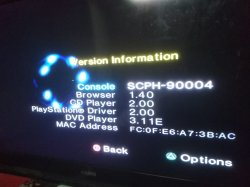
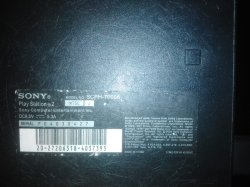
*What model is your PS2 console (exact model number)?
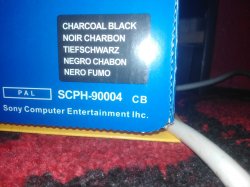
on device label: 70006
on browser: 90004
*And what device (i.e. Disc tray, USB, HDD, or SMB) are you loading the game from?
SSD using PS2 net box
 

Attachments
  • WhatsApp Image 2020-07-06 at 3.59.06 PM.jpeg
    WhatsApp Image 2020-07-06 at 3.59.06 PM.jpeg
    100.5 KB · Views: 212
  • WhatsApp Image 2020-07-06 at 3.59.07 PM (1).jpeg
    WhatsApp Image 2020-07-06 at 3.59.07 PM (1).jpeg
    56.1 KB · Views: 211
  • WhatsApp Image 2020-07-06 at 3.59.07 PM.jpeg
    WhatsApp Image 2020-07-06 at 3.59.07 PM.jpeg
    136.6 KB · Views: 200
Last edited by a moderator:
Hi,
please help, i just bought PS2 net box and im dying for it to work.
and im trying to intall FMCB to make PS2 net box work
i bought a modded ps2 slim that requires a usb driver to work, and then i bought fmcb memory card online, i tried putting the fmcb memory card in my ps2 without the usb it says on the screen that configure file couldnt be loaded, i guess its the infinity thing,
so then, i burnt uLaunchElf on a dvd, and put noobie package on a usb, and put them all to my ps2 to install fmcb, and unfortunately, uLaunchElf couldnt be launched.
so, my last hope i guess, is to boot fmcb from infinity's uLaunchElf, yes they have the ule on their mod, but i tried to browse to fmcb's BOOT.ELf and press it, comes a black blank screen.
so how can i boot fmcb in this situation? please help

General Info:
*Is your PS2 console soft modded (FMCB/FHDB) or using a Modchip or combined?
mod that requires a usb driver, its called infinity v1.93
*What model is your PS2 console (exact model number)?
on device label: 70006
on browser: 90004
*And what device (i.e. Disc tray, USB, HDD, or SMB) are you loading the game from?
SSD using PS2 net box
i removed your zip. it contains popstarter files that are copyrighted and can not be distributed here.
 
  • Like
Reactions: TnA
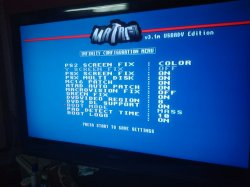
can you boot into infinity's configuration screen? I think it's either circle and triangle or circle and cross at boot up. in there, there should be boot mode dev 1. I think that's something to test if ulaunch works at all. for me, I don't need to do that with either my original or clone infinity. I set up my memory card on the original with boot1.elf up to boot4.elf. I have to hold R1 I think iirc to boot into ulaunch.elf at system boot.

edit: btw, I should probably mention that I know nothing about soft modding the ps2 since I'm hard modded and always have been for about 14 or 15 years.
 
can you boot into infinity's configuration screen? I think it's either circle and triangle or circle and cross at boot up. in there, there should be boot mode dev 1. I think that's something to test if ulaunch works at all. for me, I don't need to do that with either my original or clone infinity. I set up my memory card on the original with boot1.elf up to boot4.elf. I have to hold R1 I think iirc to boot into ulaunch.elf at system boot.

edit: btw, I should probably mention that I know nothing about soft modding the ps2 since I'm hard modded and always have been for about 14 or 15 years.


Thanks for your reply.
its triangle and circle, thanks a lot, thats new to me,
so as in image, boot mode types are:
MASS, INFMAN, DEV1, DEV2, DVDV, AUTO


EDIT:
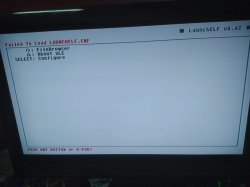
when i tried dev1, i can browse uLE, but it says up in red (Failed to Load LAUCHELF.CNF).
 

Attachments

  • WhatsApp Image 2020-07-07 at 7.16.41 AM.jpeg
    WhatsApp Image 2020-07-07 at 7.16.41 AM.jpeg
    66.3 KB · Views: 161
  • WhatsApp Image 2020-07-07 at 7.26.21 AM.jpeg
    WhatsApp Image 2020-07-07 at 7.26.21 AM.jpeg
    36.5 KB · Views: 150
  • WhatsApp Image 2020-07-07 at 7.26.21 AM (1).jpeg
    WhatsApp Image 2020-07-07 at 7.26.21 AM (1).jpeg
    45.2 KB · Views: 150
that's okay. it's been a long time. the configuration file should be in the boot folder. it's been too long for me to remember how to make one, but I don't think you need it. you can boot other elf files like the one on a disc or usb, right? click on them in the ulaunch file browser. @TnA and @jolek might be able to help further. I can kinda get you in without having done it myself, but I don't know what needs to be done after that.
 
SOLVED:
Thank you so much @pinky , u opened lots of opportunities for me try.

so what i did for it to work is:
1-press traingle and circle on start.
2-change BOOT MODE to DEV1.
3-move noobie package from usb to FMCB memory card.
4-navigate to noobie package folder, launch FREE_MCBOOT.ELF .
5-then choose LAUNCH FMCB.

this way i can launch fmcb using uLE without the usb.

thanks again @pinky , u made my day :D
 
some day I might softmod my system. the only game I have trouble with is mega man anniversary collection. the games run fine, but the opening skips like crazy, so I just use the original disc which works perfectly fine. I think it might be the cheap laptop dvd burner. I bought a bluray burner to see if it would work. the game wouldn't boot at all then, so I dunno.
 
@corapeca Use HWNJ's OSDSYS-Launcher as BOOT.ELF!
It will automatically boot into FMCB then!
Thanks for your suggestion, launching fmcb automatically sounds great, but to be honest im kinda hesitating to do that for two reasons:
1-DEV1's uLE works so well, im afraid if i changed the boot to something else i wont be able to use DEV1's uLE anymore, since my usb uLE doesn't work well, maybe fmcb's uLE as well.
2-im using the PS2 net box's FMCB, and im afraid HWNJ's OSDSYS-Launcher wont work well with this special PS2 net box's FMCB.
im new to working around ps2 and modding it, so for now i got it working thats good enough for me.
but if there is a certain file in m0 i can press using DEV1's uLE to launch fmcb straight without going through noobie package, that would be so great.
 
Hello @corapeca

J'utilise aussi le PS2NetBox, j'en ai aussi vendu certains (3 PS2NetBox et 3 PS2USB2). Je suis celui qui a traduit en Français le fichier de langage du OPL "spécial" pour les NETBOX et USB2 et aussi créé un fichier de compatibilité pour ces deux interfaces.
Voici les liens vers ce fichier et son formulaire d'entrée de donnée (si le coeur vous en dit) :
==> https://docs.google.com/spreadsheets/d/1qDKfmdjMsUfiXr9TeuvuzkX_o_jZAgEPFkTThG8uhNk/edit#
pour le formulaire maintenant :
==> https://docs.google.com/forms/d/e/1FAIpQLScBTEb8wKnKY7WmPsUq5f40FshUwol93mHH-wOtPOxsONxkqw/viewform

In English via Gtrad :
I also use the PS2NetBox, I also sold some (3 PS2NetBox and 3 PS2USB2). I am the one who translated into French the "special" OPL language file for NETBOX and USB2 and also created a compatibility file for these two interfaces.
Here are the links to this file and its data entry form (if you feel like it):
==> https://docs.google.com/spreadsheets/d/1qDKfmdjMsUfiXr9TeuvuzkX_o_jZAgEPFkTThG8uhNk/edit#
for the form now:
==> https://docs.google.com/forms/d/e/1FAIpQLScBTEb8wKnKY7WmPsUq5f40FshUwol93mHH-wOtPOxsONxkqw/viewform

Full thanks.
 
Thanks for your suggestion, launching fmcb automatically sounds great, but to be honest im kinda hesitating to do that for two reasons:
1-DEV1's uLE works so well, im afraid if i changed the boot to something else i wont be able to use DEV1's uLE anymore, since my usb uLE doesn't work well, maybe fmcb's uLE as well.
2-im using the PS2 net box's FMCB, and im afraid HWNJ's OSDSYS-Launcher wont work well with this special PS2 net box's FMCB.
im new to working around ps2 and modding it, so for now i got it working thats good enough for me.
but if there is a certain file in m0 i can press using DEV1's uLE to launch fmcb straight without going through noobie package, that would be so great.

If you want you can try this package:
https://www.psx-place.com/threads/hwcs-osdsys-launcher.30258/page-3#post-250696.

While holding :but r1: at boot it should launch FMCB (started by HWC's OSDSYS Launcher).
When you select / wLaunchELF \ from FMCB menu it will start wLaunchELF.
Copy\replace files into FMCB installer.

Additionally you should be able to write DVD disc with wLaunchELF (Bootable versions tab):
https://www.psx-place.com/resources/wlaunchelf.713/.

Here is FMCB\FHDB 1.965 from 08\12\2018 with wLe and USB drivers from 14\01\2019 for modchips:
http://www.mediafire.com/file/x7m7zxb17pcofg3/%5B081218%5DFMCB-1965-bin_%28USB-140119%29.7z.
Reason for editing: Added FMCB for modchips
 
Last edited:
@corapeca You could have just copied wLE to BOOT as "BOOT2.ELF" and relink those entries to BOOT2 and then replace the BOOT.ELF with HWNJ's OSDSYS-Launcher!
 
@corapeca You could have just copied wLE to BOOT as "BOOT2.ELF" and relink those entries to BOOT2 and then replace the BOOT.ELF with HWNJ's OSDSYS-Launcher!
ITS WORKING GREAT, big thanks to u man @TnA ,
i installed the HWS OSDSYS-Launcher, and now i can not only launch fmcb auto, but also the ps2netbox's OPL.ELF auto, and i mapped R1 button to BOOT.ELF and R2 button to BOOT2.ELF to access either DEV1's uLE or FMCB.
and i guess if wanted things to get back normal, i just delete BOOT.ELF and rename BOOT2.ELF to BOOT.ELF .
 
  • Like
Reactions: TnA
Back
Top