PS2 How to fix black screen after battle with Leon on Kingdom Hearts Final Mix (English Patched) [PS2].

Omar Aqoub

Member
Hey, I have a huge problem.

I fought Leon from Final Fantasy VIII in Kingdom Hearts Final Mix, I tried so many times to make another cutscene where Riku was in Hollow Bastian play but after the battle with Leon, I can only hear the sound but the black screen is only showing on the screen.

I even burnt the ISO to DVD using CDBurnerXP in college. I patched the ISO with FDVDB ESR GUI v0.04.

How do I fix this issue? And how am I supposed to make this cutscene play after the battle with Leon?

thnx.
 
Hey, I have a huge problem.

I fought Leon from Final Fantasy VIII in Kingdom Hearts Final Mix, I tried so many times to make another cutscene where Riku was in Hollow Bastian play but after the battle with Leon, I can only hear the sound but the black screen is only showing on the screen.

I even burnt the ISO to DVD using CDBurnerXP in college. I patched the ISO with FDVDB ESR GUI v0.04.

How do I fix this issue? And how am I supposed to make this cutscene play after the battle with Leon?

thnx.
Try using ESR Direct Off from your MC.
 
Try using ESR Direct Off from your MC.

Same thing. The ISO is also fragmented and my laptop needs repairing because I accidentally created and deleted the new BCD.

My laptop was a Windows 7 laptop but was updated to Windows 10.

Is there a way to defrag the files on Mac/Windows instead?
 
The only moment when you need to worry about fragmentation is when you play via USB, else, it is OK.

1 - Get the Xmas gift here: https://www.psx-place.com/threads/merry-xmas.36001/
2 - Download the two ESR versions attached to this post.
3 - Extract "esr_r9c_direct.elf" and "esr_r10f_direct.elf" and rename them to "esr-r9c.elf" and "esr-r10f.elf" respectively.
4 - Copy them to "mc0:/APPS/" or "mc0:/BOOT/"
5 - Copy the Xmas gift to a pendrive or to your MC (you can paste it anywhere you want)
6 - On your PS2, run the Xmas gift and press: :dir up: :dir up: :dir down: :dir down: :dir left: :dir right: :dir left: :dir right: :but x: :but cir: :but start:
7 - A new menu will appear with different ESR settings. Try:
r9c, Yes, Yes, No
r9c, No, Yes, No
r10f, Yes, No, No

PS: It sound like a joke, but it is not. Do it, for sure.
 

Attachments

The only moment when you need to worry about fragmentation is when you play via USB, else, it is OK.

1 - Get the Xmas gift here: https://www.psx-place.com/threads/merry-xmas.36001/
2 - Download the two ESR versions attached to this post.
3 - Extract "esr_r9c_direct.elf" and "esr_r10f_direct.elf" and rename them to "esr-r9c.elf" and "esr-r10f.elf" respectively.
4 - Copy them to "mc0:/APPS/" or "mc0:/BOOT/"
5 - Copy the Xmas gift to a pendrive or to your MC (you can paste it anywhere you want)
6 - On your PS2, run the Xmas gift and press: :dir up: :dir up: :dir down: :dir down: :dir left: :dir right: :dir left: :dir right: :but x: :but cir: :but start:
7 - A new menu will appear with different ESR settings. Try:
r9c, Yes, Yes, No
r9c, No, Yes, No
r10f, Yes, No, No

PS: It sound like a joke, but it is not. Do it, for sure.

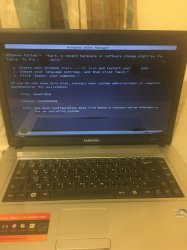
Then can you tell me how to repair this laptop?

It shows me that there was error loading Windows and it shows me this "0xc0000098"
 

Attachments

  • image.jpg
    image.jpg
    1.5 MB · Views: 59
Then can you tell me how to repair this laptop?

It shows me that there was error loading Windows and it shows me this "0xc0000098"
The instructions are displayed on the screen...
Also, you can use a pendrive to run the Windows Installer (set it up with Universal USB Installer).
 
The instructions are displayed on the screen...
Also, you can use a pendrive to run the Windows Installer (set it up with Universal USB Installer).

I have the Windows ISO on my MEGA Download account and maybe I have to format my 32GB SanDisk USB to NTFS so I can burn it to the drive.

But, I can't borough any of my family members' laptops because what if they're gonna catch me read handed?
 
Ask them for help setting up the pendrive... or ask a friend...

I tried going to the Library in Zest and there was no documents, no downloads, no nothing.

A member told me because of the viruses and I'm too scared to use my dad's laptop or my big brother's because they're gonna catch me red handed.
 
I tried going to the Library in Zest and there was no documents, no downloads, no nothing.

A member told me because of the viruses and I'm too scared to use my dad's laptop or my big brother's because they're gonna catch me red handed.
Get the Windows 7 ISO from the Microsoft website. There will be no virus in there.
Ultimate (x64):
https://download.microsoft.com/down...1_ldr_escrow_CLIENT_ULTIMATE_x64FRE_en-us.iso
Professional (x64):
https://download.microsoft.com/down...r_escrow_CLIENT_PROFESSIONAL_x64FRE_en-us.iso

Get Universal USB Installer from the official website: https://www.pendrivelinux.com/universal-usb-installer-easy-as-1-2-3/
There will be no virus there. These guys are legit.

Don't download stuff from any other place!
 
Get the Windows 7 ISO from the Microsoft website. There will be no virus in there.
Ultimate (x64):
https://download.microsoft.com/down...1_ldr_escrow_CLIENT_ULTIMATE_x64FRE_en-us.iso
Professional (x64):
https://download.microsoft.com/down...r_escrow_CLIENT_PROFESSIONAL_x64FRE_en-us.iso

Get Universal USB Installer from the official website: https://www.pendrivelinux.com/universal-usb-installer-easy-as-1-2-3/
There will be no virus there. These guys are legit.

Don't download stuff from any other place!

I can't burn it to my 4.7GB DVD because it's too much capacity… Do I have to format the USB to NTFS?
 
Indeed! I advise you to format the pendrive before installing the image.

I have to ask you and I have a bigger problem.

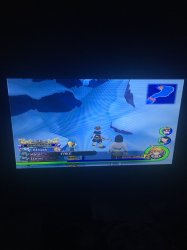
I was playing Kingdom Hearts 2 (EU: SLES_541.14) and when I tried to get to the summit in Land of Dragons to face the mysterious man, I couldn't get in and the "FAKE" glitch pops up.

I'm playing this game on OPL v.0.9.3.
I'm also using Seagate Expansion Portable Drive with 2TB (formatted to FAT32).

How do I fix this issue?
 

Attachments

  • 055FC5DB-F797-4143-A7EB-C5A752AFE854.jpeg
    055FC5DB-F797-4143-A7EB-C5A752AFE854.jpeg
    1.5 MB · Views: 60
I have to ask you and I have a bigger problem.

I was playing Kingdom Hearts 2 (EU: SLES_541.14) and when I tried to get to the summit in Land of Dragons to face the mysterious man, I couldn't get in and the "FAKE" glitch pops up.

I'm playing this game on OPL v.0.9.3.
I'm also using Seagate Expansion Portable Drive with 2TB (formatted to FAT32).

How do I fix this issue?
First of all:
Never use a pocket hard drive in a PS2 without a Y cable. You will kill it slowly and also, sometimes the HDD will not respond, causing various issues. Even if the HDD works, you will kill it slowly...

Now, regarding "FAKE":
You are using cheats didn't ya?
 
First of all:
Never use a pocket hard drive in a PS2 without a Y cable. You will kill it slowly and also, sometimes the HDD will not respond, causing various issues. Even if the HDD works, you will kill it slowly...

Now, regarding "FAKE":
You are using cheats didn't ya?

First of all:
Yes, I am using the cheats, but why would I kill my hard drive? It's the emulator itself…

Second:
What is the Y cable and what does it look like?
 
First of all:
Yes, I am using the cheats
Cheats 'cause the FAKE message. So, delete your save data and start from scratch

but why would I kill my hard drive? It's the emulator itself…
You're killing it 'cause you don't use a Y cable. The console's low amperage on the USB port is killing it.
PS: OPL is not an emulator (or do you mean you're using PCSX2 on a PC?)

What is the Y cable and what does it look like?
https://www.amazon.com/-/es/Cable-Matters-Splitter-Y-Cable-pulgadas/dp/B00L1K1OIA
 
Some games have an anti-cheat protection baked into the game (ex. Valkyrie Profile 2 with it's Gameguard protection), so it's possible that this game might have it too. Though, I've never heard that this game uses that kind of protection or any forms of anti-cheat at all.
 
Last edited:
Some games have an anti-cheat protection baked into the game (ex. Valkyrie Profile 2 with it's Gameguard protection), so it's possible that this game might have it too. Though, I've never heard that this game uses that kind of protection or any forms of anti-cheat at all.

So, how do I use the anti-cheat protection so the FAKE glitch won't pop up?
 
Back
Top