

AggelosCoding
Member
Hello everyone,
Today I will show you how to install HFW 4.89.1 with HEN 3.1.0, including webman and multiman.
I AM NOT RESPONSIBLE FOR ANYTHING THAT HAPPENS TO YOURS CONSOLE SUCH AS BANS, BRICKS, OR ANYTHING ELSE.
DO NOT ENABLE FSM (Factory Service Mode) WITH PS3HEN!
DO NOT INSTALL CCAPI WITH PS3HEN!
DO NOT INSTALL SEN ENABLER WITH PS3HEN! IF YOU WANT TO BYPASS THE UPDATE AND STAY ON OLDER FIRMWARE WITH HEN, USE THIS
First of all, you need to download some files that are needed for this:
-HFW 4.89.1 can be downloaded here.
-Multiman can be downloaded here.
-Webman can be downloaded here.
If you want HEN toolbox you must install the updated version for HFW 4.89.1 which is linked below:
HEN Toolbox 4.89
• When you download everything, extract the HFW update file and rename it as PS3UPDAT.PUP . If it is already named like that, leave it as is.
• Now make a folder named PS3
In that folder, make a new folder named UPDATE
In the UPDATE folder move the PS3UPDAT.PUP you just renamed.
Make sure the name of the update and the folders, are exactly the same or the system will not recognize the update.
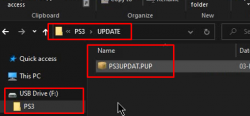
• After this is done, move the PS3 folder including the firmware update, in the root of your FAT 32 USB stick as you see in the picture and put it in the far right USB slot of your PS3, make sure it is the far right slot.
• Then turn on your PS3.
DO NOT FORMAT IF YOU WANT TO KEEP YOUR GAME SAVES!!! IF YOU FORMAT EVERYTHING IS LOST!
Before we continue I want to point out that I formatted my system so the hard drive is cleaned and there are no files that might mess something up. This is not needed but I prefer to do it. If you want to format your system before updating, do it now, with the USB removed from the PS3 and reconnect it after the formatting is done.
DO NOT FORMAT IF YOU WANT TO KEEP YOUR GAME SAVES!!! IF YOU FORMAT EVERYTHING IS LOST!
• Back to the update, there are two ways of updating your PS3.
The first way is by going to the PS3 menu, in the Settings column, the first option which is System Update. Choose System Update, then choose Update via Storage Media and it should detect the USB with the Update inside.
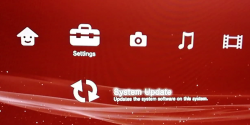
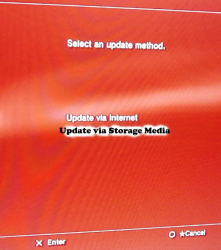
• The second method is by going in the Recovery Menu/Safe Mode. This is the method I am going to use and you can see here how it is done:
-------------------------------------------
Before continuing, I want to say that I installed the firmware twice, just to make sure every single file is correctly installed and any older file is replaced. This is not needed but I prefer to do it.
• With that being said, after the firmware is successfully installed, go to the Network column and open your Internet Browser. Press triangle, go to Tools, go to Confirm Browser Close and disable it as you see in the picture here. Please make sure you do not forget this.

Picture taken by here
If you want you can set as your homepage the HEN install website which is **ps3xploit.com >Domain no Longer owned by team** (ps3xploit.me =new) If you want to change your homepage press triangle, go to Tools and then select homepage. For me that was already done so I did not change anything.
• Once you are on the website(**ps3xploit.com >Domain no Longer owned by team** (ps3xploit.me =new)) in your PS3 browser, press on PS3HEN and select:
HEN Installer/Enabler
If you choose this method, everything installs automatically.
or
HEN Installer (Alternate)
If you choose the alternate method please follow the instructions given on screen!
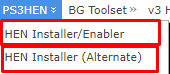
If the installation fails, do not worry. If anything fails, restart your PS3, then open the browser, press triangle, delete cookies, delete search history and delete cache, close the browser, then reopen it and begin the installation again. Have patience and be careful not to press something wrong.
-------------------------------------------
After HEN is installed, reboot your console, go to Game column and Enable HEN.
You now have HEN on the latest available firmware.
I will continue with showing you how to install homebrew, specifically webman and multiman but it is not a requirement for HEN. But you know, without any of these, why installing HEN in the first place
In the beginning of the tutorial, I told you to download some files, so the only thing you need to do now, is put the pkg files in the root of your FAT 32 USB stick.
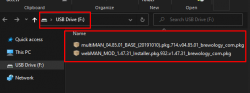
After that, plug your USB stick in your PS3, in the far right slot, make sure it is the far right one.
•Enable Hen and Install both PKG files through:
★Package Manager >> ★Install Package Files >> Standard
•Once both PKGs are installed:
Go to the webman icon, press X and when the screen goes black hold L1 to install the full version.
The console will reboot and webman will be installed.
•Now open multiman and it will install itself too, so just wait for it.
Im also going to show how to setup webman if you want to mod or use rtm tools and stuff. If the settings are already like that, then just quit webman.
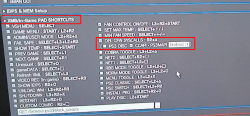
You now have everything that is needed for a full HEN experience.
You need more help or didn't understand something? Leave your question below!
Video tutorial:
Today I will show you how to install HFW 4.89.1 with HEN 3.1.0, including webman and multiman.
I AM NOT RESPONSIBLE FOR ANYTHING THAT HAPPENS TO YOURS CONSOLE SUCH AS BANS, BRICKS, OR ANYTHING ELSE.
DO NOT ENABLE FSM (Factory Service Mode) WITH PS3HEN!
DO NOT INSTALL CCAPI WITH PS3HEN!
DO NOT INSTALL SEN ENABLER WITH PS3HEN! IF YOU WANT TO BYPASS THE UPDATE AND STAY ON OLDER FIRMWARE WITH HEN, USE THIS
First of all, you need to download some files that are needed for this:
-HFW 4.89.1 can be downloaded here.
-Multiman can be downloaded here.
-Webman can be downloaded here.
If you want HEN toolbox you must install the updated version for HFW 4.89.1 which is linked below:
HEN Toolbox 4.89
• When you download everything, extract the HFW update file and rename it as PS3UPDAT.PUP . If it is already named like that, leave it as is.
• Now make a folder named PS3
In that folder, make a new folder named UPDATE
In the UPDATE folder move the PS3UPDAT.PUP you just renamed.
Make sure the name of the update and the folders, are exactly the same or the system will not recognize the update.
• After this is done, move the PS3 folder including the firmware update, in the root of your FAT 32 USB stick as you see in the picture and put it in the far right USB slot of your PS3, make sure it is the far right slot.
• Then turn on your PS3.
DO NOT FORMAT IF YOU WANT TO KEEP YOUR GAME SAVES!!! IF YOU FORMAT EVERYTHING IS LOST!
Before we continue I want to point out that I formatted my system so the hard drive is cleaned and there are no files that might mess something up. This is not needed but I prefer to do it. If you want to format your system before updating, do it now, with the USB removed from the PS3 and reconnect it after the formatting is done.
DO NOT FORMAT IF YOU WANT TO KEEP YOUR GAME SAVES!!! IF YOU FORMAT EVERYTHING IS LOST!
• Back to the update, there are two ways of updating your PS3.
The first way is by going to the PS3 menu, in the Settings column, the first option which is System Update. Choose System Update, then choose Update via Storage Media and it should detect the USB with the Update inside.
• The second method is by going in the Recovery Menu/Safe Mode. This is the method I am going to use and you can see here how it is done:
Before continuing, I want to say that I installed the firmware twice, just to make sure every single file is correctly installed and any older file is replaced. This is not needed but I prefer to do it.
• With that being said, after the firmware is successfully installed, go to the Network column and open your Internet Browser. Press triangle, go to Tools, go to Confirm Browser Close and disable it as you see in the picture here. Please make sure you do not forget this.
Picture taken by here
If you want you can set as your homepage the HEN install website which is **ps3xploit.com >Domain no Longer owned by team** (ps3xploit.me =new) If you want to change your homepage press triangle, go to Tools and then select homepage. For me that was already done so I did not change anything.
• Once you are on the website(**ps3xploit.com >Domain no Longer owned by team** (ps3xploit.me =new)) in your PS3 browser, press on PS3HEN and select:
HEN Installer/Enabler
If you choose this method, everything installs automatically.
or
HEN Installer (Alternate)
If you choose the alternate method please follow the instructions given on screen!
If the installation fails, do not worry. If anything fails, restart your PS3, then open the browser, press triangle, delete cookies, delete search history and delete cache, close the browser, then reopen it and begin the installation again. Have patience and be careful not to press something wrong.
-------------------------------------------
After HEN is installed, reboot your console, go to Game column and Enable HEN.
You now have HEN on the latest available firmware.
I will continue with showing you how to install homebrew, specifically webman and multiman but it is not a requirement for HEN. But you know, without any of these, why installing HEN in the first place
In the beginning of the tutorial, I told you to download some files, so the only thing you need to do now, is put the pkg files in the root of your FAT 32 USB stick.
After that, plug your USB stick in your PS3, in the far right slot, make sure it is the far right one.
•Enable Hen and Install both PKG files through:
★Package Manager >> ★Install Package Files >> Standard
•Once both PKGs are installed:
Go to the webman icon, press X and when the screen goes black hold L1 to install the full version.
The console will reboot and webman will be installed.
•Now open multiman and it will install itself too, so just wait for it.
Im also going to show how to setup webman if you want to mod or use rtm tools and stuff. If the settings are already like that, then just quit webman.
You now have everything that is needed for a full HEN experience.
You need more help or didn't understand something? Leave your question below!
Video tutorial:
Last edited:


