
PSX-Place's own @atreyu187 has recently shared two guides with us & the Vita Community. One is written by himself and another written by reddit user DarkBlack711 , These two separate guides will remove some of those unwanted Sony ads on the LiveArena of the PS Vita & PlayStation TV, DarkBlack711 shows us how to remove the multi-tasking ads and also made some clever suggestions with modifying it to add things such as HENkaku links, which could be useful to some user's/ Then recently atreyu187 also showed us how to remove the Feature Screen on LiveArena. Both useful guides for HENkaku user's if these in system ads bother you. Checkout these latest HENkaku Guides ..
How to Modify / Remove multi-tasking menu for Vita/PsTV
How to Remove the "Featured" Screen on Vita / PsTV
-
How modify/remove multi-tasking menu for Vita/PSTV
By following this guide you will successfully remove all advertisements on the multitasking menu when you press PS button and you can replace with HENkaku apps or your favorite games for a quick change.
- Enable HENKaku
- Open molecularShell/VitaShell and navigate to ur0:shell/ and there you will see a folder named whats_new. Delete it and restart your PS Vita.
- When your Vita restarts you have to press PS button couple of times, this is so that Vita can download new advertisements.
- When the advertisements pop-up again navigate to ur0:shell/whats_new/np/ with molecularShell/VitaShell and inside that folder you will see whatsnew.xml file. Delete it and create a folder named "whatsnew.xml" without "".
- Restart your PS Vita and enjoy your brand new multitasking menu without those pesky advertisements.
Have fun
-
How to Remove the "Featured" Screen on PSTV/Vita TV
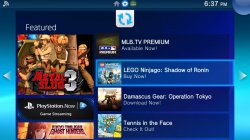
So this is the easiest guide I have ever written. The "Featured" screen for the PSTV is so annoying always making me take a look at it and slowing down what I am trying to do at the time. Sony never updates it with anything new and until @DeViL303 @bitsbubba or some other crafty genius can make use of the XML files I feel it needs to go.
This useless screen isn't even in every region as some countries have seen it as intrusive ad possibly illegal so Sony just didn't add the darn thing. Would have been nice if they gave us a choice to disable this screen.
So here we go as it will take you longer to read this then to actually go the "mod" but here is what is needed to do this. BTW this will also stick after a firmware update to 3.61 if you should so choose. It with my little guide on the permanent v1 whitelist survive the updates.
Guide Requires
- PSTV/Vita TV on 3.60
- HENkaku installed and enabled
- VitaRW
- File Manager e.g. VitaShell molecularShell or OneLUA
- FTP access (not needed but up to you)
SEE FULL TUTORIAL BY ATREYU187:
Link
Last edited:







