
• PS3HEN is now supporting 4.93 Firmware

    View Official Release Post for additional information HERE

How to transfer PS2 saves to PS3/PS2 Classics?

So i have a real PS2 memory card with FreeMCboot, on it i have Ape Escape 2 and 3 saves that
i'd love to transfer over to my PS3 and continue the game there.

I converted my PS2 games on PS3 using "PS2 Classic GUI" and installed them as .PKG.

Just for an experiment, i played "Soul Reaver 2" (PS2 Classic) a bit on my PS3, saved the game,
and backed it up on USB flash memory. This is how it looks:
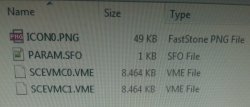
20210829_225405.jpg

I also turned on my PS2 and opened UlaunchELF and copied saves from "Ape Escape 3" to
USB flash memoy also. Here's how THAT looks like:
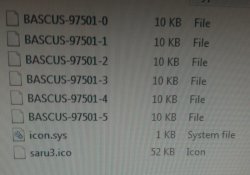
20210829_225055.jpg


So anyway.
How can i transfer My PS2 saves to PS3?
 
you can use Apollo Save tool on your PS3 to decrypt the VME (encrypted virtual memory card format) from the ps2 classics

then you can inject the your PS2 saves to the decrypted image, and then you need to encrypt it back to VME so the ps2 classic emulator can load it. (Apollo also lets you encrypt files back to VME)

to inject ps2 saves, the official way on PS3 is using the PSV format and the XMB manager. That way you can push ps2 saves to ps2 virtual memory cards

anyway, you can also do the whole process on your computer if you transfer the VME files using FTP. You'll need tools to decrypt VME, handle the virtual ps2 memory cards to inject saves, and then re-encrypt.
 
Files i backed up from PS2 classics game arent in PSV format, PSX classics are, i also have those, they are on virtual memory card in XMB.
PS2 classics dont save in virtual memory card, they save in a folder in XMB called "Saved Data Utility (PS2)" and in there are my ps2 classics saces that i can back up and restore in VME format.

Thats why i dont understand what you try to say, im a bit confused.

Also my first question is how to transfer, back up, convert saves from PS2's real memory card, from real PS2 console?

Those are the file i need to transfer from TO a PS3 ps2 classics.
 
PS2 emulators on PS3 using PlayStation 2 Memory Card images. Raw dumps of physical PS2MC. Depend of emulator, "VMC" (shortcut from virtual memory card), can be encrypted (*.vme) or not encrypted (*.vm2).

VMC can be with ECC or without ECC. PS2 emulators on PS3 (just like PCSX2 on PC) supports only those with ECC.

XMB shows not encrypted VMCs as storage devices and You can manage saves there, while encrypted are treating like files.

PSV is not a save but save container designed to keep PSX and PS2 save data.

You cannot copy saves from PS2MC just like that, because some games using time stamps as security layer. Instead, use *.psu (another container but better than Sony's *.psv). So mark save folders in uLE which You want archive, press R1, then copy. Go to "mass:/" (i.e pendrive; only FAT12/FAT16 and FAT32 on MBR are supported), press R1 and choose PSU Paste.

From now, You can do all things on PC side or PS3 side. You need import PSU to VMC and encrypt it. Eventually on PS2 You can make memory card image by Memory Card Annihilator, then add ECC and encrypt it.


And BTW, read this, because You misleading saves with save containers with vmc, and folders with abstracts. ;)
https://www.psx-place.com/threads/ultimate-userdata-backup-guide.29037/
 
Last edited:
I managed to copy save from PS2 memory card in .PSU format on pen drive, and on to my PC.

I'm not sure what next....
Can you clarify please?
 
Last edited:
Depend of the road and target emulator.

Probably easiest for You will be:
1. drag & drop *.psu on PSV Save Converter (newer version is in Bucanero github repo)
2. create VMC in XMB
3. import PSV to VMC
4. encrypt VMC by Apollo and replace *.vme for this game

If You want PC road:
1. download AIO (in resources in my profile), all needed apps are there
2. unpack 8MiB blank VMC with ECC
3. import PSU to this VMC using mymc or Dual MyMC
4. encrypt it using klicense of target game, or if You using PS2 Placeholder, use Update VMC Hashes
5. replace *.vme for this game

Code:
\CONTENT\virtual memory cards.7z
\CONTENT\applications for Windows\save tools\PSV Save Converter v1.1.1.7z
\CONTENT\applications for Windows\save tools\vmc tools\mymc v2.5 alpha.7z
\CONTENT\applications for Windows\save tools\vmc tools\Update VMC Hashes.7z
 
Last edited:
Create Virtual Memory Card. You know, what PS1/PS2 games ask you to do before launching. You can do it manually on XMB on Memory Card Utility.
Oh thats right, i made that already.
The wording confused me.

I converted real MC ps2 saves and transfered them to virtual MC on ps3.
now imma try with apolo thing....
 
Stuck again...

Where its saying: "encrypt VMC by Apollo and replace *.vme for this game"

I installed Apollo to SP3.
What option to use exactly in Apollo for this step?

I'm searching but i don't see "encrypt VMC".
And after i do that how do i "replace *.vme for this game"?
by Apollo again?
How?

Only options i see are...

HDD saves > Ape Escape 3 > and in there there are:
-View save details
-Decrypt SCEVMC0.VME
-Decrypt SCEVMC1.VME
-Import a .VM2 to SCEVMC0.VME
-Import a .VM2 to SCEVMC1.VME
-Copy dummy .PSV Save

User Backups

-Activate PS3 Account
-Export /dev_flash2
-Export Licenses
-Export PS2 .VM2 memory card to USB
-PS2 Classics: Export & Decrypt BIN.ENC images
-PS2 Classics: Import & Encrypt ISOs (HDD)

Other options are Settings, About, Online DB, USB Saves, Trophies
They don't seem relevant...

So what do i do now... ?
 
Last edited:
Actually never mind, i did it by poking around. I have my save working. :redface:
It's "Import a .VM2 to SCEVMC0.VME" option inside "HDD Saves" menu, if anyone reading this is interested to know...

Thanks guys!
 
Actually never mind, i did it by poking around. I have my save working. :redface:
It's "Import a .VM2 to SCEVMC0.VME" option inside "HDD Saves" menu, if anyone reading this is interested to know...

Thanks guys!
Hello, could you help me, I also want to transfer my save data from Ape scape 2 and 3 from PS2 to PS3, I understood that the files were converted to .ps2 and loaded with the app "mymc-alpha-2.7" and rename it to .VM2 , this is how I do it, but there are many files here. They mentioned Apollo for ps3, but I have no idea can you help me step by step.
 
Back
Top