PS4 How to Write FPKG Games to a BD-R Disc for a Jailbroken PS4

Lerain

Forum Noob
Greetings again,

Regarding the installation of Fake PKG, I know that I can use USB drives, FTP, SMB, and so on to transfer them to the PS4 and install them.

However, I have quite a lot of empty BD-R discs (including dual-layer ones), along with some empty blue plastic disc cases, and I would like to make a cool custom backup collection this way.

I'm using the enhanced GoldHEN_AUTO-LOADER_Deluxe_1.5 image to jailbreak my PS4 and I've noticed this image contains some extra PKG applications, which are written to a BD-R disc and I can see them every time I use the GoldHEN PKG install menu.

That made me think: if GoldHEN can see those application PKG files from a Blu-ray disc, it should also be able to see other FPKGs, such as games, which I could then install from the disc.

What I'm not sure about is how exactly to write such a BD-R disc.

For the pre-made ISO images, I've been using ImgBurn 2.5.8.0 with "Write image file to disc"

Do you know if I can simply switch to the "Write files/folders to disc" mode in ImgBurn and call it a day?
Or is there some specific format or requirement that the PS4 (GoldHEN to be specific) expects?

Gratitude
 
P.S. Ok, I got it - nothing magical about it.

So all those BD-JB ISO images are more or less a waste of Blu-ray disc space.

Instead of burning the 10–20 MB BD-JB ISO image to a disc (which also finalizes and locks it), you can simply extract the contents of the BD-JB image and write them to the disc as a normal Blu-ray UDF disc.

On top of that, you can also add some small PS4 PKG games or apps.
You end up with around 22–23 GB of usable space, which is not insignificant.

I just tested this by writing the GoldHEN_AUTO-LOADER_Deluxe_1.5 contents from BUSHIGAN to a Blu-ray disc, and I also added more apps plus three small games - everything on the same BD-R disc.

The jailbreak procedure still works.
I thought that adding more content to the disc would invalidate some kind of certificates, checks, or similar mechanisms, but everything works just fine.

In fact, if you're in the business of writing custom BD-R discs with games just to keep them as backups, you can simply add the BD-JB payload to every disc as well (it's only 16.5 MB). That way, you'll have the ability to jailbreak from any game disc at any time.
 
Great to know! I tried to look at pre-made ISOs and compare with ones i could create from scratch. They seemed to have a lot of padding (empty zeroed space around files) so i decided not to bother. It's great that you can just burn files to a UDF-formatted BD-R. Btw, did you finalize your disc?

If non-finalized discs work, i wonder if we could append files after initial burn. There are several ways AFAIK
* just burn more data - it will create another track, hiding previous one, if i'm not mistaken
* multisession - it's also a new track but with some smart way to reference files from previous tracks so that you don't hide old data
* UDF 2.60 - one can use windows to format disc and it will support pseudo-overwrite, kinda like multisession but also with file deletion and it works on FS level. or something, i could not figure out exactly because all this tech seems half-abandoned in 2026
 
You can just use BD-RE reformatting it every time.

I doubt multisession will be recognized. It stop to be part of standard since DVD.

There are no user friendly buildin tools for UDF creating/modify in Windows Explorer. TBH I don't know any 3rd party software like that for optical discs, only for flash/magnetical disks.
 
LOL that's really dumb of me, totally forgot about rewritable media. there are no blurays sold around me so i only googled for blank disks.

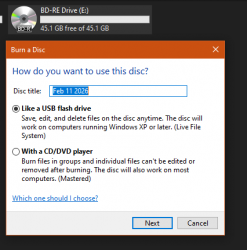
What Explorer can do, is when you insert empty BD-R, it asks to format it and under the hood it's UDF 2.60. Disc then is treated as read-write partition, you can edit and delete existing files as if they were on a normal storage.

Wikipedia says UDF is back-compatible so i think i'll waste some BD-R's that i have for science.
 
So, here we go.
You can ditch these pre-compiled ISOs and make your own disc.

One way is to burn it with any software you want, be sure to make it UDF 2.50 or 2.60. Note that ImgBurn always finalizes disc so it can't be altered later. I didn't test multisession and didn't test burning several UDF tracks one after another, eg with Nero, because found a way that works for me.

1. Format a writable blu-ray disc as "live file system" as windows suggests by default
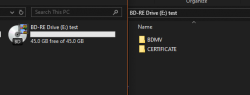
2. For PS4 jailbreak you only need BDMV and CERTIFICATE folders, just copy them and wait for burn to complete. Now it will be recognized as movie Blu-Ray, note that icon in explorer changed
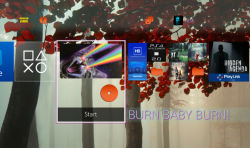
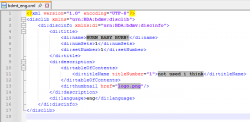
2a. You can change how disc is displayed in PS4. Edit \BDMV\META\DL\bdmt_eng.xml and companion PNG there
3. now add any other content you'd like, eg homebrew PKGs
4. if you want to update exploit, homebrews with new versions, add, delete or edit anything - it works and PS4 respects these changes! explorer_7u4l5Zwk4M.png explorer_Yi25qpvAnp.png 20260211020506.png notepad++_umFeh1ZqXC.png
 
Back
Top