
You are using an out of date browser. It may not display this or other websites correctly.
You should upgrade or use an alternative browser.
You should upgrade or use an alternative browser.

do you mean the internet update is blocked?hey guys i need help in removing hen, i heard to do so i have install ofw, i went to systm updates but its not working .
download the update from sony
put it on fat32 usb (mbr not gpt) like this:
usb\PS3\UPDATE\PS3UPDAT.PUP
use "update via storage media" instead of internet update.
if you update in recovery mode you have to do it this way because there is no internet update in recovery

esc0rtd3w
Developer
do you mean the internet update is blocked?
download the update from sony
put it on fat32 usb (mbr not gpt) like this:
usb\PS3\UPDATE\PS3UPDAT.PUP
use "update via storage media" instead of internet update.
if you update in recovery mode you have to do it this way because there is no internet update in recovery
On NAND and eMMC models, you cant install the PUP from XMB, and yes its blocked in HEN for Online update.
On NOR models, you can update from XMB with or without HEN, but HEN still blocks Online update.
So in your case. YOU have EMMC!
so use recovery
EDIT #1:
If you still have issues IN RECOVERY, then use a different USB drive or port
If that does not work then make sure your usb port is not damaged and the usb drive shows on xmb
Also make sure its FAT32
EDIT #2:
what model is it?
EDIT #3:
i quoted @Coro , but i meant @SINBAD

hey guys i need help in removing hen, i heard to do so i have install ofw, i went to systm updates but its not working .
Last edited:
i see what you mean now. when i saw OP i thought he meant the "dont update till we tell you too" msg in system update under hen...but i read again and think u r right probably.On NAND and eMMC models, you cant install the PUP from XMB, and yes its blocked in HEN for Online update.
On NOR models, you can update from XMB with or without HEN, but HEN still blocks Online update.
So in your case. YOU have EMMC!
so use recovery
EDIT #1:
If you still have issues IN RECOVERY, then use a different USB drive or port
If that does not work then make sure your usb port is not damaged and the usb drive shows on xmb
Also make sure its FAT32
EDIT #2:
what model is it?
EDIT #3:
i quoted @Coro , but i meant @SINBAD
i dont tknow the model exactly but i know its a superslim. whats emmcOn NAND and eMMC models, you cant install the PUP from XMB, and yes its blocked in HEN for Online update.
On NOR models, you can update from XMB with or without HEN, but HEN still blocks Online update.
So in your case. YOU have EMMC!
so use recovery
EDIT #1:
If you still have issues IN RECOVERY, then use a different USB drive or port
If that does not work then make sure your usb port is not damaged and the usb drive shows on xmb
Also make sure its FAT32
EDIT #2:
what model is it?
EDIT #3:
i quoted @Coro , but i meant @SINBAD
thannk you. by the way if install ofw, would i be to reinstall hfw?do you mean the internet update is blocked?
download the update from sony
put it on fat32 usb (mbr not gpt) like this:
usb\PS3\UPDATE\PS3UPDAT.PUP
use "update via storage media" instead of internet update.
if you update in recovery mode you have to do it this way because there is no internet update in recovery
i
i am really sorry to bother you but i can(t seem to be able to install with recovery mode. i tried both usb ports and the xmb could even see there was a usb in it. but it didnt work@SINBAD
Just look at sticker on back. It starts with CECH
Yes you can install HFW over any cex firmware. That's the point of it.
MatthewUwU
Forum Noob
Try reinstalling hfw and ofw twice. Some updates not work maybe because ur usb not 2.0 vers, invalid pup file, not yet connect the usb [emoji1787]
Sent from my SM-G985F using Tapatalk
Sent from my SM-G985F using Tapatalk
MatthewUwU
Forum Noob
Edit:usb stick formatted fat32, if u using externals, make sure the partition is MBR not GPTTry reinstalling hfw and ofw twice. Some updates not work maybe because ur usb not 2.0 vers, invalid pup file, not yet connect the usb [emoji1787]
Sent from my SM-G985F using Tapatalk
Still can not install it from safe mode? Same like me bro. Format is the fastest way [emoji8]
If u only want delete HEN, update it to OFW
Sent from my SM-G985F using Tapatalk
1. i put the updat.pup file in my usb. i made sure to put it in usb/PS3/UPDATE first.why cant you use recovery mode?
please explain the steps you take and provide screenshot with camera or something of an error.
if there is no error, what is happening? its not reading the usb or something
Attachments
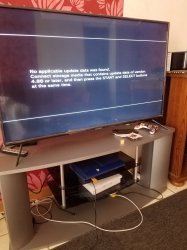
esc0rtd3w
Developer
its not updat.pup1. i put the updat.pup file in my usb. i made sure to put it in usb/PS3/UPDATE first.
it is EXACTLY PS3UPDAT.PUP
its some usb problem
Try reinstalling hfw and ofw twice
that is not gonna change anything!
he can't even install it once lol
MatthewUwU
Forum Noob
I have same problemo with that. I cunt replace my ps3 hdd cause thut :vcan't even install it once lol
hey guys i need help in removing hen, i heard to do so i have install ofw, i went to systm updates but its not working .
Download this link https://www.playstation.com/en-us/support/system-updates/ps3/ and download PUP file. and copy to your FAT32 USB format and update to system update via usb storage on your PS3. for you to have OFW software 4.86.
Similar threads
-

-
PS3 PS3 Superslim with broken bluetooth/wifi can I install HEN?
- Started by blanka0
- Replies: 1
-
PS3 CECH-3004B (slim) on 4.93 and HEN installation/enablement issues
- Started by temenori
- Replies: 1
-
PS3HEN GameData Reverse sorting after installing latest HEN
- Started by sakran
- Replies: 2