MixeryMaxe
Developer
| Download(s): | Source Code: | Homebrew Type: | Developer: |
|
|
'PS3Lock is an authentication-system for the PlayStation 3.
An personal password protects your PS3 against unauthorized access or gives you a restricted access"
Information below based on version 0.5.
Information below based on version 0.5.
| PS3LOCK | ||||||||||||||||
| How it works | ||||||||||||||||
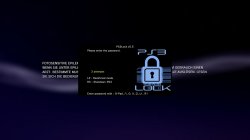 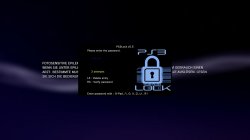 After installation, at first boot you will be prompted to define a password (min. 2 digits, max. 10 digits). To set the password you can use the following buttons:
With  you can cancel the entry and with you can cancel the entry and with  you can save the password. you can save the password. After saving, the PS3 is protected by this password and is required after each restart. After 3 incorrect entries the PS3 will shut down automatically.Authentication is done in the same way as you save it or via an USB device. You have to set up this USB device and this device have to be in "/dev_usb000" (most right, close to BD drive) on PS3 startup. Don't forget to enable "USB authentication" in the settings menu. Through the "restricted mode" it is possible to lock the "XMB settings" (except system update) and the "deleting apps/games" in the XMB. In this mode the games under "dev_hdd0/GAMEZ" are hidden (folder renamed in GAMEZx). For this mode no password is needed. "PS3Lock sleep timer" gives you a time-limited access to the PS3. The sleep timer can set to 0:30h, 1:00h, 1:30h, 2:00h, 2:30h, 3:00h. After 3 warning messages (10, 5, 1min before the preset time), the PS3 will be shutdown. Password protection for PS3Lock settings and XMB possible. Password request for PS3Lock settings and in recurring to XMB (after closing apps/games). | ||||||||||||||||
| Perfect child protection | ||||||||||||||||
| Restricted mode + PS3Lock sleep timer is the perfect child protection. The restricted mode gives access to the PS3 without a password and through the sleep timer this mode is time-limited. After shutdown through the sleep timer the restricted mode is automatically disabled. If restricted mode is disabled you get access to the PS3 only with password. | ||||||||||||||||
| Change Settings | ||||||||||||||||
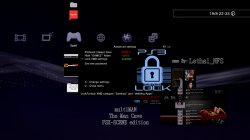
 In XMB you have to push  + to open the settings menu. + to open the settings menu.
| ||||||||||||||||
Advanced settings  | ||||||||||||||||
| ||||||||||||||||
PS3Lock Statistics  | ||||||||||||||||
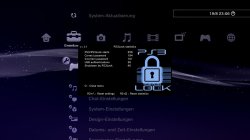 While you are in settings menu you can go to the statistics screen of PS3Lock. There are following infos:
| ||||||||||||||||
| Installation / Setup | ||||||||||||||||
1. Plugin installation on Cobra CFW
Code:
| ||||||||||||||||
2. USB-Authentication
| ||||||||||||||||
3. Background (VSH Menu)
| ||||||||||||||||
| Forgot password ? | ||||||||||||||||
| There are several ways to reset the password: | ||||||||||||||||
1. PS3Lock fail-safe button combo + flag file on USB device.
| ||||||||||||||||
2. With a correctly set up USB device AND "USB authentication" enabled in the settings.
| ||||||||||||||||
3. If you don't have an USB device OR "USB authentication" is disabled.
| ||||||||||||||||
| Changelogs & Credits | ||||||||||||||||
0.5
0.4
0.2
0.1
Credits to @3141card @ermak86 mysis deank @aldostools @bitsbubba |
 , :
, : , :
, : , :
, :
 , :o:,
  ,
, ![:[]:](/styles/nerva/xenforo/smilies.psx/but_square.png "But Square :[]:")
 start:+