iso owners of a desr psx1 with a dead hard drive

I recommended DMDE (on Windows) but it is more complex for this task or dd or gddrescue (on Linux). Any hex editor would also can do this but probably in less efficient way.

If You will use HDDRCT, do not use compressed format as it will make process longer and You will safe almost nothing (because data are mostly encrypted).

Also after connection drive on Windows, do not agree to disk initialization, or it will overwrite important part of "__mbr" which means that You will loose all data.
 
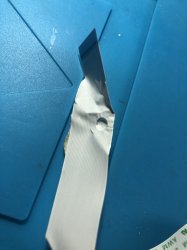
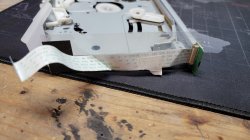
Sorry for the double post but I think I've already found a part of the problem, the PSX has been probably opened by the previous owner, here is the ribbon cable which is connected to the front panel, that explains why the buttons don't work and the leds are always off..

AEA9B1E4-74B9-4BE0-ADF9-B906587D86F2.jpeg
 
hey sorry ive been out of state for awhile. just caught up reading here and yep that will definitely be the issue. the powering on when plugged in is normal so that a plus. first things first is replacing that ribbon cable and then checking the smart data on that drive and getting a raw copy if its functional.

Does it happen to be this cable?
 

Attachments

  • 16220663008546516525188954447745.jpg
    16220663008546516525188954447745.jpg
    2.4 MB · Views: 92
Last edited:
Yes! This is this cable, I've ordered a new one and I should receive it soon.

I've extracted the HDD, S.M.A.R.T is OK, I've also performed a surface scan, there is 0 bad sectors and I've made a raw backup copy so I should be fine.
 
theres a chance you wont even need my help once you get that cable in. you may have a functional hard drive already. ahh ok good i would have offed my spare up if you couldnt find one lol

just sucks theres safe way to power it up without that cable. it controls everything, IR disk insert power eject. you could possible trace out the pins on the connector but i wouldnt risk shorting the wrong ones
 
Well, now that I've replaced the damaged ribbon cable, power led is working, when I plug the PSX it turns on, the power led is red, then after 2-3 seconds it starts to blink green-red.

Still no display at all, the PSX still auto shuts off after a few seconds, the led still blinks red-green and that's all, the buttons have no effect and nothing happens when I try to insert a disc.
 
Take out HDD to PC and see what S.M.A.R.T reporting.

I just got a DESR-5100, but didn't have a transformer so I cleaned it up a bit while it arrived.
I also bought an old pc specifically to backup the HDD. It didn't work out XDDD
For some reason, when I plugged the disk on the computer, it would get incredibly laggy at bios, wouldn't recognize the disk, and would only load the bootloader, getting stuck trying to load any OS.
So, when I got the transformer, I plugged it and, only had static, yay
It shows the PSX logo, then goes to static (probably left on a TV channel before), and neither the front pannel buttons or the remote would do anything.
Sidenote: When I tried deeper cleaning to see if that changed something, the blue part of one of the disc reader ribbon cable snapped off XD. It would show a screen like this: http://thepsx.blogspot.com/2014/08/hmmm.html saying it needed to do some checkings and blabla, then returned to the same. Now I managed to connect that cable correctly and don't have that error (In the process, where I also change the HDD jumper from CS to Master, the blue part of the HDD lights ribbon cable snapped off too. It was easier to reconnect)

Now, the main problem with my unit besides no XMB, is that no homebrew recognizes the HDD. uLE and HDDcheck say I have no HDD connected. And idk what to do!
Btw, I don't have a modchip for the PSX, so I guess if I wanna do something involving update disc, I'll wait for the upcoming
MechaPwn PSX support everyone is talking about XD.

I read also that DESR models sooner or later dying by fuse blowing due to temperature.
Do you know where are they? ;o
 
If You haven't got it works on PC, it means some serious problems with it's electronics (it is completely standard HDD as on PC so absolutely no problems should cause and be fully readable (of course none of the OSes will understand it as using APA and additionally is encrypted)). So then taking it back to DESR was pointless. ;) This HDD is broken and needs replacement (by another HDD from DESR, or original for PSBBN and Linux Kit).
Unfortunately no. My knowledge about DESR models oscillating around zero. Only stuff about i know is HDD logic and hypothesis about way how Sony validating this hardware.
 
If You haven't got it works on PC, it means some serious problems with it's electronics (it is completely standard HDD as on PC so absolutely no problems should cause and be fully readable (of course none of the OSes will understand it as using APA and additionally is encrypted)). So then taking it back to DESR was pointless. ;) This HDD is broken and needs replacement (by another HDD from DESR, or original for PSBBN and Linux Kit).

I didn't really want to think it was dead cause
1) It shows the PSX logo and even can load up to the tuner input, so it loads something and it means it can get the keys I've read it needs to boot from the HDD. (I also tried to boot it with no HDD and blinking lights :p)
2) When it didn't have the disc reader connected it showed the system integrity checker, and I guess the HDD is the only place it can get it (I really don't know so if someone can correct me please do it XD)
3) I really wanted to see if it had some recordings to dip a bit into some japanese TV culture and experience :c

And I put it back on because it still let me turn the thing on XDDD something is something
Btw, the change from CS to MA did nothing :b

Anyways, if someone knows a bit more, please tell (and if you can try to explain the real processes of point 1 and 2 please XD)

PS: Now with the HDD as master, I gave it another shot at the PC, and in the process, the other blue strip of the HDD Access lights ribbon cabled snapped off XDD)

Unfortunately no. My knowledge about DESR models oscillating around zero. Only stuff about i know is HDD logic and hypothesis about way how Sony validating this hardware.
Thank you anyway. Btw, really nice document you made ;D

Last thing. I know the disc drive has two lasers, the DVD and the CD one, and from what I've read the DVD one is the most likely to fail.
The DVD one is responsible to know what kind of disc is inserted right?
I tried putting the only PS1 game I have on uLE and it said something with "DVD-SL?" (ironically it's THE game that I'm not supposed to play here, Dokodemo Issyo XDDD)

I also remember seeing that with FMCB you can do some stuff to make the drive read PS2 DVDs in some cases or something like that, maybe force it to read CDs, I really don't remember XD.
Does anyone here know what's that about?
So if I can use mechapwn or other thing to run CDs I can use the Update Disc maybe
 
Based on what You have wrote here: https://www.psx-place.com/threads/psx-desr-needs-hdd.31053/page-2
This HDD died and You should reconcile with this. ;p

so it loads something and it means it can get the keys I've read it needs to boot from the HDD
Key for encryption/decryption isn't written on HDD. Otherwise encryption would have zero sense, it is like closing door and hiding door key under doormat. ;)

Thank you anyway. Btw, really nice document you made ;D
Thank You. Yet all DESR stuff comes from some living encyclopedia which calls himself as krHACKen. ;p

So if I can use mechapwn or other thing to run CDs I can use the Update Disc maybe
That's how peoples reviving "PSX1". You need to run original update disc with firmware equal or higher to the installed one in the console; or copy of disc on CD-R (and this is why modchip is required or yet none existed MechaPwn for DESR MechaCons (and to run it, You need FMCB for DESR as Free DVD Boot doesn't cover DVD Player versions which are currently exploited)).
 
Key for encryption/decryption isn't written on HDD. Otherwise encryption would have zero sense, it is like closing door and hiding door key under doormat. ;)

I thought that because I read it somewhere ;o
When I say boot I meant showing the PSX logo and being capable to load FMCB. Does this mean, if I plug a generic HDD it would still be able to load those? If the answer is no, then what makes the HDD needed to start the system? 0.0

That's how peoples reviving "PSX1". You need to run original update disc with firmware equal or higher to the installed one in the console; or copy of disc on CD-R (and this is why modchip is required or yet none existed MechaPwn for DESR MechaCons (and to run it, You need FMCB for DESR as Free DVD Boot doesn't cover DVD Player versions which are currently exploited)).

Regarding the modchip, the vitas155 FAQ recommends the modbo 760, and in this thread, people use 5.0. Does it matter, or which one is the better option?
And yeah my A plan is to wait for the MechaPwn to arrive to the PSX for doing something, but now I'm kinda taking in count the modchip option XD

Btw, the only way to know my fw version is from xfrom right? How can I do it without soldering the chips? ;o
The only other way I came across with is the balika uLaunchELF fork that I tried to compile and make it work but at the end with no avail :c
And, when I have the dump, how can I know the version with those files?
 
Maybe You have mislead it with validation. Judging by fact that DESR accepting all official HDD from DESR and PS2, and all of them are ordinary PATA HDDs, that's means that DESR checking some information in sectors exposed by controller. Most probably those which cannot be changed like info from Service Area like i.e serial number, model, firmware version. No one really know what exactly.

I don't know, never have any DESR. They always costing bag of gold and I'm poor as church mouse. ;p It is possible that "alien HDD" will be rejected early in the boot chain.

Both modchips are crap. Both are clones of clones of Matrix clones. Modbo 760 is most popular in late PS2 life period.

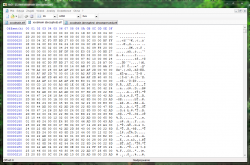
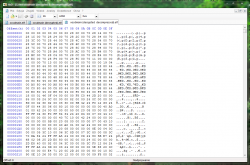
I don't know. In the dump I have seen, flash is literally Memory Card clone and there is only those files there:
bootflag (txt and backup) are amorphic or partial sjis encoded partial standard ascii. I don't see there any version. INSTALL.ID is empty as You can see. xosdmain.elf is encrypted executable.

isobuster_desr_nand.png

isobuster_desr_bootflags.png


But why do You need the version? Just take the latest update disc, it should be last versions released and probably there are last published also on servers. 1.31 for "PSX1" and 2.11 for "PSX2". But I could be wrong of course.
 
Last edited:
You need to run original update disc with firmware equal or higher to the installed one in the console
Once the PSX1 system software is restored to the HDD, you can just toss an install script to the system partition and flag the NAND, so the system gets updated/downgraded via the system software's updater without the need of the original update disc.

And, when I have the dump, how can I know the version with those files?
xosdmain.elf comparison: userheader/nonce or root signature.

The flash content is for the v2.xx system software. 1.xx works differently.

But why do You need the version?
To restore the HDD system software with the same version as the NANDs. The NAND inspection is recommended anyway, to make sure that the token files we do not want are not in there.
 
xosdmain.elf comparison: userheader/nonce or root signature.
What do you mean exactly? ;o
And how can I decrypt the elf? I found a tool by balika that I couldn't get to work on and tried Kelftool to decrypt another xosdmain.elf I downloaded to get some practice and learn where I should look for :p

And I still don't know how to get to xfrom XD could you help me please? ;o
 
No need to decrypt it, the nonce is not encrypted.
Run ps2link, load the required modules and the flash drivers, use fsclient to extract xosdmain.elf from the nand. The version is at offset 10 (dec). 1.06 has v1.00 here.
Or if you want a list of root signatures to determine the version :
Code:
const unsigned char oneROOTSIG[8] = {0x9C, 0x5A, 0x66, 0xB2, 0x45, 0x9F, 0xC0, 0x70}; //1.06
const unsigned char twoROOTSIG[8] = {0x8E, 0xB5, 0x29, 0xEA, 0x99, 0x2D, 0x22, 0x83}; //1.10
const unsigned char threeROOTSIG[8] = {0x25, 0xDB, 0x43, 0x58, 0x69, 0x16, 0x0D, 0x83}; //1.20
const unsigned char fourROOTSIG[8] = {0xF9, 0x31, 0x82, 0x54, 0xCB, 0xE8, 0xE9, 0xCF}; //1.30
const unsigned char fiveROOTSIG[8] = {0x46, 0xDA, 0xCF, 0xDA, 0x3F, 0xA9, 0xC7, 0x4F}; //1.31
const unsigned char sixROOTSIG[8] = {0xED, 0x45, 0xD0, 0x15, 0x12, 0xC3, 0x53, 0xC1}; //2.06
const unsigned char sevenROOTSIG[8] = {0x79, 0xB5, 0x49, 0x83, 0x23, 0x3B, 0x36, 0x41}; //2.10
const unsigned char eightROOTSIG[8] = {0x69, 0xF4, 0xF2, 0xC8, 0x76, 0x21, 0x8D, 0x63}; //2.11
 
No need to decrypt it, the nonce is not encrypted.
Run ps2link, load the required modules and the flash drivers, use fsclient to extract xosdmain.elf from the nand. The version is at offset 10 (dec). 1.06 has v1.00 here.
Or if you want a list of root signatures to determine the version :
Code:
const unsigned char oneROOTSIG[8] = {0x9C, 0x5A, 0x66, 0xB2, 0x45, 0x9F, 0xC0, 0x70}; //1.06
const unsigned char twoROOTSIG[8] = {0x8E, 0xB5, 0x29, 0xEA, 0x99, 0x2D, 0x22, 0x83}; //1.10
const unsigned char threeROOTSIG[8] = {0x25, 0xDB, 0x43, 0x58, 0x69, 0x16, 0x0D, 0x83}; //1.20
const unsigned char fourROOTSIG[8] = {0xF9, 0x31, 0x82, 0x54, 0xCB, 0xE8, 0xE9, 0xCF}; //1.30
const unsigned char fiveROOTSIG[8] = {0x46, 0xDA, 0xCF, 0xDA, 0x3F, 0xA9, 0xC7, 0x4F}; //1.31
const unsigned char sixROOTSIG[8] = {0xED, 0x45, 0xD0, 0x15, 0x12, 0xC3, 0x53, 0xC1}; //2.06
const unsigned char sevenROOTSIG[8] = {0x79, 0xB5, 0x49, 0x83, 0x23, 0x3B, 0x36, 0x41}; //2.10
const unsigned char eightROOTSIG[8] = {0x69, 0xF4, 0xF2, 0xC8, 0x76, 0x21, 0x8D, 0x63}; //2.11

Thank you very much, but for some reason, I can't get PS2NETFS to load :c
I tried making it load SIO2MAN and MCMAN, PSIO2MAN and PMCMAN, PFLASH and PXFROMMAN,
used PS2NETFS.IRX from ps2sdk and loaded from mc0:PS2LINK/ one time and from mc0:BIDATA-SYSTEM/ another time, and fsclient always say that it can't connect to the PS2NETFS server, tho ps2client works perfectly, so I have no idea. I also tried wLaunchELF PS2Net to see, and that worked fine too. Does anyone know what am I missing?

Btw, I also tried to load the modules from ps2client and xLink. When I tried to load PS2NETFS on PS2CLIENT from mc0, in the xLink log it said "Unable to open executable file". In xLink, when loading from my PC, it would say Inter IRX dependancy error, then I tried directly loading PS2SMAP and PS2IP from my PC and then loading PS2NETFS, and the console would crash.
Does it mean the PS2NETFS is flawed? Tho is the same version I used to compile wLaunchELF and that worked pretty well 0.0

Browsing the web, I found out PS2NETFS needs IOMANX from the sdk
So I loaded it and the server could start :D
I used my Frankenstein merge with balika's PS2SDK version, and tried with the vanilla module from the latest sdk
BUT, when I checked xfrom: "dir xfrom:" wouldn't work, saying "Error: Open directory failed. (-2)". "dir from:/" would work and show this:

Code:
[Contents of xfrom:/]

  drwxrwxrwx  4 01-02-2000 31:56:26
  drw-rw-rw-  0 10-11-2004 11:54:00
  drwxrwxrwx  6 10-11-2004 11:54:41
  drwxrwxrwx  2 01-02-2000 31:56:26

 [4 Files - 12 Bytes]

When I tried copyfrom, it would say " Progress: #Error: Read source data failed. (-13)" (there's no filename :P)
I'd also tried mounting to xfrom0: and it would say "Error: Open source file failed. (-24)".
I also tried extflash.irx from the sdk, and any attempt to access xfrom would end up in "Error: Open directory failed. (-47)"

I tried loading SIO2MAN and MCMAN to check how fsclient worked with my MC, and everything was fine.
I also tried to load the P variants from ROM, and then any time I tried to load PFLASH, after loading PSIO2MAN and PMCMAN, the system would crash. I'd like to know what's the explanation :o
I also tried loading PIOMAN and would crash too :P Loading IOMAN wouldn't change anything.

Btw, I doesn't know if it matters, but mounting
 
Last edited by a moderator:

Similar threads

Back
Top