ManaGunZ

PS3 ManaGunZ - PS3 Backup Manager by Zar v1.41

With a PS3 game in my PS3, in ManaGunZ I selected "Dump decrypted Blu-Ray disc" and I get these errors:

Memory comparison failed (md1 mismatch?). Check your 3Dump.bin is correct.
Failed to get d1 and d2
Failed to get_keys

If I select "Dump encrypted Blu-Ray disc" i get:

DumpDecivesData fopen FAILED ! ???

Where's the problem? It is related to Direct Disc Access Mode? My PS3 runs clean Evilnat 4.88.2 and ManaGunZ 1.40.

Which one of dumping methods do I have to choose to have a Redump hash matching ISO? Decrypted or encrypted?
 
please use the pre-release https://github.com/Zarh/ManaGunZ/releases/tag/1.41
I'm still working on it that's why it's a pre-release, but I already fixed several issues (like the one you are talking about).

if you are in HEN you can't use : "Dump decrypted Blu-Ray disc" because you can't get ERK
If you are in CFW do what you prefere.

AFAIK, redump hash is based on encrypted Blu-Ray disc.
 
please use the pre-release https://github.com/Zarh/ManaGunZ/releases/tag/1.41
I'm still working on it that's why it's a pre-release, but I already fixed several issues (like the one you are talking about).

if you are in HEN you can't use : "Dump decrypted Blu-Ray disc" because you can't get ERK
If you are in CFW do what you prefere.

AFAIK, redump hash is based on encrypted Blu-Ray disc.

used 1.41 and tried creating encrypted iso, now it works (maybe in 1.40 without folder already existing the utility wasn't able to create a folder).

during the process of copying iso to external hard drive the process stops at 2gb, but i remember clearly ntfs external drives worked flawlessly on 4.86 cfw with old managunz and old prepntfs. i repeated the copy but after installing prepiso and it does the same thing, maybe this is a problem of mgz_io.c introduced in 1.39.

how can I dump a ps3 disc directly on external unit as said in http://forum.redump.org/topic/37100/updating-default-ps3-dumping-method/ ? can i use encrypted iso matching redump hashes to play directly on managunz or do i need some kind of metadata/keys/irds to make it work or i do i have to create a decrypted iso from the encrypted iso?
 
  • Like
Reactions: Zar
The copy error probably come from mgz_io.c introduced in 1.40... i'll investigate to fix it.

Right now we can't mount encrypted backup, you absolutly need to decrypt it.
Redump hashe use encrypt3d backup since it's the 'raw' data burned to the disc.

To dump it directly to you external.device select a path on you external device.
If it's not working plz tell me. Is it also on ntfs ?
 
used 1.41 and tried creating encrypted iso, now it works (maybe in 1.40 without folder already existing the utility wasn't able to create a folder).

during the process of copying iso to external hard drive the process stops at 2gb, but i remember clearly ntfs external drives worked flawlessly on 4.86 cfw with old managunz and old prepntfs. i repeated the copy but after installing prepiso and it does the same thing, maybe this is a problem of mgz_io.c introduced in 1.39.

how can I dump a ps3 disc directly on external unit as said in http://forum.redump.org/topic/37100/updating-default-ps3-dumping-method/ ? can i use encrypted iso matching redump hashes to play directly on managunz or do i need some kind of metadata/keys/irds to make it work or i do i have to create a decrypted iso from the encrypted iso?
I just read some of your latest posts and made me wonder what you are trying to do, i think there are some details confusing you

First thing worthy to mention is that nowadays is imposible to mount/load/play an encrypted PS3 ISO in PS3, the encrypted formats was originally intended to be used in PS3's that have ODE boards installed (3k3y ODE, cobra ODE, etc..). In that setup the ODE board was decrypting the data "on the fly"
But in CFW/HEN is not posible to do that decryption "on the fly", there are a bunch of hacks/mounting methods that has been used along the years but in plain words... the most popular is when the backup managers "serves" the decrypted data and cheats the firmware into thinking that is reading is a real disc. For simplification purposes the data needs to be decrypted. In theory it could be posible to add an intermediate function to do that "on the fly" decryption but none of the developers did it (and imo there are several reasons that justifyes that decission)
I can see zar is partially interested in it thoug... we will see, lol

The only way to mount/load/play an encrypted PS3 ISO in PS3 is if you use another device connected by network (PC, router, etc...) running "ps3netserv" tool
In this setup the PC is decrypting the ISO... then it "serves" the decrypted data to the PS3 by network
So... technically the PS3 is not loading encrypted data... is the PC who handles the CPU workload caused by the decryption

---------
The other detail you need to keep in mind while using managunz is that it have his own NTFS "driver" integrated in the program (becomes active when you enter in managunz... and stays active incase you exit by "mounting" a game backup from external USB/NTFS)
The NTFS driver from managunz have full functions while the prentfs is partial

So... you dont need to activate the "prentfs"... think in them as 2 different NTFS drivers
 
Last edited:
  • Like
Reactions: Zar
@Zar

I'll give a try copying to an exfat support (from/to) for files over 2gb and report here.

I wanted to start doing a backup of my games using ps3 cfw, so i thought it would be optimal to choose redump standard as I did for ps1 and ps2, but is encrypted, so in this form is good for preservation purpose but useless for gaming. can we decrypt a ps3 iso without a physical disc into bd drive? which is the simplest way to do this starting from a redump collection?

I need to understand another thing: if I create an encrypted iso it matches hashes so I generate an iso identical to the one you generated from the same physical game you had on a cfw console. can we say that my decrypted iso is identical to yours, doing the process on two different cfw consoles with different bd drives and different (but with same encrypted content) discs? if we can affirm this I could start doing my own collection in decrypted mode and understand the reason why redump choosed encrypted mode, avoiding DMCA complaints, legal issues and so on.

@sandungas

You mean that ps3 while in game mode couldn't decypt iso, right?

I explained to Zar what i'm starting to do with my games, it's simple! But as I said I don't know if is a nonsense making a redump collection of my games on my pc hard drive if then I could not use it for gaming at a later time transferring them to my console. what do you suggest to do?
 
  • Like
Reactions: Zar
can we decrypt a ps3 iso without a physical disc into bd drive? which is the simplest way to do this starting from a redump collection?
Use PS3Dec. You need to know the encryption key of your disc, which you usually find online or generate directly with MGZ (It should be embedded in the disc.key files, but it is easier to use MGZ test v1.41, generate Redump files, and look for the decryption key in the log).

If we can affirm this I could start doing my own collection in decrypted mode and understand the reason why redump choosed encrypted mode, avoiding DMCA complaints, legal issues and so on.
Typically, decrypted ISOs are generated using a third party program and are not the original disc simply decrypted. Irisman uses makeps3iso to generate decrypted isos, and I believe multiMAN uses genps3iso (most likely without the original header/footer , but I can't be sure). Zar has only recently integrated PS3Dec into ManaGunZ in order to generate a decrypted ISO using the original header and footer of the disc. You could call these ISOs "proper" decrypted ISOs. You can theoretically generate a "proper" decrypted ISO from a JB Folder dump using the ird file of the game, though I'm not sure it always works.

Anyway, the point is that archiving decrypted ISOs when Redump started collection info about PS3 discs would not have been ideal since the header/footer of every decrypted ISO would not have been the real one, and could vary as gen/makeps3iso were updated. It made much more sense to dump encrypted ISOs which contain the original data that is on disc. (But, this is only speculation; I haven't gone back and read old Redump forum posts).
 
You can dump a decrypted backup and then later encrypt it (with the decryption key, called Data1). An you'll get the hash of redump.

Data1 can be embedded in the header of the iso (3k3y style) or inside a log file (redump GetKey style) or in IRD or in a *.dkey file (ascii) ...

I don't remember if it's available in pre-release but I added an option in Settings/BDVD dumper to add 3k3y header (with Data1) inside the header of the iso.

For now the only tools I know to encrypt/decrypt ps3 iso are isotools of 3k3y and ps3dec.

PS: prepNTFS (it's called prepISO now with the support of exFAT) is not used at all by ManaGunZ.
 
Last edited:
Seems that the best thing to do almost for now is to dump from managunz an encrypted iso (.iso.enc) and a key (.log/.dkey) so that I will be able to generate a proper decrypted iso on my pc with ps3dec and transfer that to my ps3 when i want to play that game. However I always get an error when I try to generate a decrypted iso on managunz. I'm gonna restore and double update with evilnat 4.88.2 and have another try. Could be that cobra is not enabled by default or i need a remarry?
 
What is the error ? I'm still working on it, there is perhaps something broken.
Can you try to dump it to internal hdd ?

It doesn't use cobra/mamba, I don't think it will cause the error.
 
What is the error ? I'm still working on it, there is perhaps something broken.
Can you try to dump it to internal hdd ?

It doesn't use cobra/mamba, I don't think it will cause the error.
restored and double updated to evilnat 4.88.2, then installed managunz 1.41. the usb hdd is recognized only in exfat file system, and copy from/to now works. if the hdd is in ntfs it doesn't show on file manager (i did a mess yesterday because i thought it was hdd1). however i'm still unable to mount ps2 iso and ps1 cue/bin, the app freezes after pressing X on the backup. i got the same sequence of errors while dumping to decrypted bluray:

Memory comparison failed (md1 mismatch?). Check your 3Dump.bin is correct.
Failed to get d1 and d2
Failed to get_keys

Dumping encrypted bluray works without an exception. If I choose hdd0/PS3ISO as target the process goes on even if i don't have a PS3ISO folder existing on hdd0 (it creates the appropriate folder in hdd0), while choosing extfat0 the process fails if the folder PS3ISO is not already present of exfat0. Hope this helps for fixing any issue, Zarh. :)
 
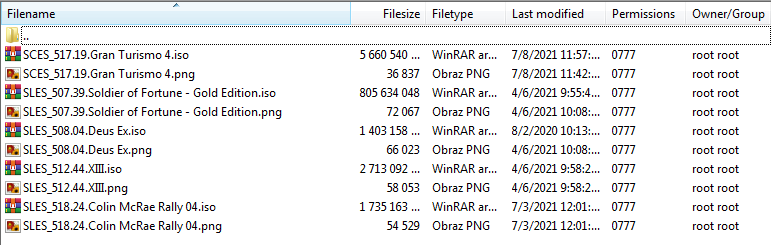
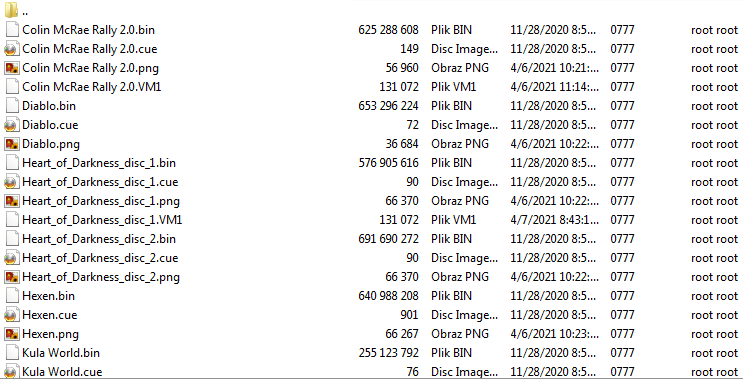
Is there a chance to add support for a cover art in a "different" system?
I mean e.g.
oj1.png

oj2.png


For Diablo.bin to have its cover Diablo.png...
 
@sandungas

You mean that ps3 while in game mode couldn't decypt iso, right?

I explained to Zar what i'm starting to do with my games, it's simple! But as I said I don't know if is a nonsense making a redump collection of my games on my pc hard drive if then I could not use it for gaming at a later time transferring them to my console. what do you suggest to do?
Yes, lets say... while playing the game is going to request files that are located far away from each others, and the decryption function needs to process them on real time
We are not decrypting the whole ISO, but only small parts of it when needed, if the game asks for the same file multiple times then is needed to decrypt the same file several times

One of the reasons why nobody implemented this feature before is because the success of something like this are doubtful... i mean... independently of the coding skills of the person who try it... we dont really know how many CPU workload is going to cause this additional job... and it could happen that the games have low fps, lag, or broken functions caused by low file access (soundtrack not playing, textures missing, etc...)
In the practise this potential problems could made this PS3 backup format using encrypted ISO's could decrease a lot the compatibility with the whole PS3 game library
With the decrypted ISO format generated by makeps3iso we are like 100% compatibility, if this method reduces the compatibility to lets say... 95% i guess not much people is going to use it
But who knows ?, thats the fun of doing experiments, maybe it works great :)
Im not being pesimistic, just explaining this for the people that would like to see this feature working... the problem is we dont know the cost... and doing it "at any cost" could not be good enought

In the PS3 the crypto tasks are made by a controller (an small part of the circuitry) named ENC/DEC located inside the SouthBridge chip
The SouthBridge is like a "hub" and the devices connected to it can be considered peripherals (HDD, USB, BD, and some more) so all the data that is moved back and forth in between them needs to pass throught it. If we find how to tell the ENC/DEC controller to encrypt or decrypt the data for us then it could be considered that is made "by hardware" (without causing any additional workload to the CPU)

...btw for curiosity sake... the same principle can be applyed to the "kraken" de/compressor of the PS5, is a controller inside the APU dedicated to it... so the PS5 can do de/compression "by hardware" while having 100% of the CPU cores availables for other tasks
The new XBOX doesnt have that (neither the PC's) so the de/compression causes a penalty to the CPU cores

---------
Personally i always thought the IRD format is something very useful, at the first days not much people was caring about it, except the ODE owners of course, but i always been interested in it because i relized the list of files with his MD5's inside IRD files (and the way how that IRD files was generated) was very accurate
Lets say... i realized since day one that the IRD format was good enought.. and that same principle of "is good enought" was applyed also to some tools, e.g: the ISO's generated by makeps3iso.exe differs a bit from the ISO's generated by 3k3y tools but it was made for simplification purposes (and also because the 3k3y tools was not so perfect in some taks, i remember to find a couple of bugs, also was abandoned anyway when the 3k3y company dissapeared)

My suggestion is to get used to the IRD files, and how to check your games with them (managunz can do it). If you are making backups from the real disc run a IRD check while doing the backup in decrypted format and you are going to see that all your games are going to pass the IRD verification (with a very few exceptions)
Thats good enought, it means all the paths inside the ISO and all the game files are identical to the originals... is just are not covered by an "encryption layer"

 
Last edited:
Im new to running psx isos and ps2 isos on the ps3 is it possible to create a pkg shortcut for these games to the xmb or is it only ps3 isos that are compatible?

Thanks to the developers of this by the way, this is my main go to piece of homebrew, ive almost got my ps3 setup exactly how i want it.
 
Is there a chance to add support for a cover art in a "different" system?
I mean e.g.
oj1.png

oj2.png


For Diablo.bin to have its cover Diablo.png...

I agree with you @jolek .

Take a look in what we have now for cover images in the same folder:
  • webMAN MOD already uses <yourgame>.bin / <yourgame>.png for covers.
  • In Managunz this naming <yourgame>.bin / <yourgame>.png is the Title Card (it's like a ICON0.PNG from XMB but for Managunz).

@Zar Suggestions to make ManaGunZ follow the standards and make it compatible with wMM:
  • Change the title card for something like <yourgame>.ICON0.PNG in the same folder (it's also used for PS2Classics on wMM)
  • Change the cover for <yourgame>.png in the same folder.
  • Add another option for cover in the same folder as <SERIALNUMBER>.PNG (The serial number format could be one of these: SCUS12345 / SCUS_12345 / SCUS-12345 / SCUS_123.45 / SCUS-123.45).
My best regards.
 
I added something for you (@sandungas) last week. It's something you asked long time ago, at the moment I though it was too complicated because my code wasn't designed for it, but I found a way to make it simple without changing too much code.

I think you'll love it. it's a surprise ;)

@Lambada
ManaGunZ is also going to search for these two path:
BackupPath.ICON0.png/jpg
BackupPath.COVER.png/jpg

'Create ICON0' will have the .ICON0.jpg
 
Last edited:
Cool @Zar !
I'm looking foward to test it out as soon as you release it.

One more thing, please look this quote below:
Im new to running psx isos and ps2 isos on the ps3 is it possible to create a pkg shortcut for these games to the xmb or is it only ps3 isos that are compatible?

Thanks to the developers of this by the way, this is my main go to piece of homebrew, ive almost got my ps3 setup exactly how i want it.

Is it possible to create PS1 and PS2 shortcuts in XMB as well? I didn't know it was possible for PS3 lol.
 
Back
Top