ManaGunZ

PS3 ManaGunZ - PS3 Backup Manager by Zar v1.41

I had PSP Remasters Launcher Fixed [jjkkyu] installed. I launched a PSP game from ManaGunZ like normal and it kicked back to the real XMB, but this time there was no disk icon like you get with the other 3 consoles. So I loaded PSP Remasters and I got a warning saying I have to go to PSN to get the license restored or something like that.
 
OK, one last question. If I have a 2 hdd dock similar to this one and I have 2 2TB hdds in each slot formatted to NTFS, the first one is loaded with PS3 and PS2 isos. I noticed in ManaGunZ that you can use external storage for game data, could I use the second 2TB hdd to store game data? Or won't the PS3 recognize both hdds at the same time?
00--iEDEiteAFlLQyCbttWKfh6WLNQYzcpDHwi5OCg-pDOyBKs5DrI3bqYKKyP3ImmQ5cYdfB3jRoL_VZILaXEufg
 
NTFS library support only usb000 to usb007.

I have something similar But when I plug it it is recognized as usb036 and usb0037 so the ntfs lib doesn't work with it. Maybe yours is like mine... The best thing to do is to try.

on exFAT and FAT32 it's probably working
 
NTFS library support only usb000 to usb007.

I have something similar But when I plug it it is recognized as usb036 and usb0037 so the ntfs lib doesn't work with it. Maybe yours is like mine... The best thing to do is to try.

on exFAT and FAT32 it's probably working

So keep the first 2TB formatted to NTFS, that's where my PS3ISO and PSXISO folders are stored, and then format the second hdd to exfat and the PS3 should recognize them both at the same time? And then I'd be able to use the second hdd for game data?
 
OK, so I put the ntfs hdd in slot 1 with my iso games and then put a fat32 formatted hdd in the second slot for game data in the dock. And the PS3 will be able to read them both at the same time?
 
Maybe the NTFS won't be mounted because the ntfs lib support usb000 to 007 and some dock like mine change the port to 037. To make it working for sure use exFAT (iso) + FAT32 (game data).
 
OK, so I put the ntfs hdd in slot 1 with my iso games and then put a fat32 formatted hdd in the second slot for game data in the dock. And the PS3 will be able to read them both at the same time?

If u use just one usb cable then the read write speed would be slower compared to a standard usb hdd because the ps3 usb 2.0 speed would be shared between two drives
 
Last edited:
If u use just one usb cable then the read write speed would be slower compared to a standard usb hdd because the ps3 usb 2.0 speed would be shared between two drives

I have 1.4TB in isos on a 2TB external NTFS hdd and maybe like 450GB free on internal storage. I'm just trying to find a way to not run out of space. I have another 300GB free on the NTFS hdd, but the game data doesn't save to NTFS. So my options are limited.
 
If u use just one usb cable then the read write speed would be slower compared to a standard usb hdd because the ps3 usb 2.0 speed would be shared between two drives

OK, what if I got a 4TB external hdd and partitioned it in half, the first partition would be FAT32, and the second would be EXFAT. Use the EXFAT for .iso storage and FAT32 for GameData. Or would it be the other way around? The first partition would be EXFAT and the second FAT32?
 
OK, what if I got a 4TB external hdd and partitioned it in half, the first partition would be FAT32, and the second would be EXFAT. Use the EXFAT for .iso storage and FAT32 for GameData. Or would it be the other way around? The first partition would be EXFAT and the second FAT32?

Gamedata installation is made to speed up games from bd: this way the console read the game both from bd and hdd.

Having iso and gamedata on the same device is just a stupid thing (i didnt mean to be rude but thats how i would describe it). Games will run bad that way, because ps3 will read game iso and also gamedata from the same hdd via an usb 2.0 connection (so double work for the same hdd and half speed for each read operation).

Only converted psn games to iso played from external hdd would work sufficently well (because they dont require gamedata installation).

The best way is to use a external hdd for games isos (faster than bd reading) and internal hdd (upgraded from 5400 rpm to 7200rpm) for gamedata installation


No same device for isos and gamedata, no multiple devices that share the same connection: multiple devices on multiple connections is the way (internal hdd via sata 1 + external hdd via usb 2.0).

Better use usb hdd for games and internal hdd for gamedata because this way u will have more space for ps2 games (that runs only from internal hdd) especially considering that ps3 internal hdd max size is 1tb while external hdd max size is 2tb.

Also ps3 uses hdd0 so..
 
Last edited:
That's currently how I'm running it, .iso games on external and game date installed to internal. But with 170 iso games, the internal hdd fills up fast. I know only keep the data installed of the games you're currently playing, but it would be good to not have to install all the updates and DLC every time I want to play something different. I like to have everything organized. Just sit down, choose any game and jump right in. I have a 1TB internal, and half of that is for PS2 isos and the other 400GB is for game data.
 
That's currently how I'm running it, .iso games on external and game date installed to internal. But with 170 iso games, the internal hdd fills up fast. I know only keep the data installed of the games you're currently playing, but it would be good to not have to install all the updates and DLC every time I want to play something different. I like to have everything organized. Just sit down, choose any game and jump right in. I have a 1TB internal, and half of that is for PS2 isos and the other 400GB is for game data.

You could switch internal hdd: this way you can have one internal hdd for gamedata and another for ps2 isos.

Just insert a new internal hdd, reinstall the cfw (that is partially installed on hdd on slim models) or ofw+hen (if u are on ofw+hen) and you are done: this way you can switch the hdd (console turned off of course). You could also clone the hdd to another, then on one u delete ps2 iso and on the other you delete gamedata. You may have problem updating the firmware in the future (because you will only update one hdd and not the other).

You could just use an external hdd just for ps2 isos and copy a game on the fly to internal hdd whenever you want to play a ps2 game.

You may also use a second usb hdd (that uses its own usb cable - so not sharing the same connection) and read iso from one and gamedata from the other but i dont know if there is software support for doing that and also dont know if u may encounter problems (also with just 2 usb ports, both used by 2 different hdd, u will be unable to charge the controller from the console while playing).

You may also considering to use ps3netsrv with webman mod (only via wired connection for performances reason) https://github.com/aldostools/webMAN-MOD/wiki/~-PS3-NET-Server
 
Last edited:
OK, so based on your idea of having 2 internal hdds, I wonder if there's a case that holds 2 hdds and connects by sata that also has a switch. So you can just press a button and it will switch from one drive to the other. That way you don't have to keep opening the case and swapping hdds, you just press a button.
 
OK, so based on your idea of having 2 internal hdds, I wonder if there's a case that holds 2 hdds and connects by sata that also has a switch. So you can just press a button and it will switch from one drive to the other. That way you don't have to keep opening the case and swapping hdds, you just press a button.

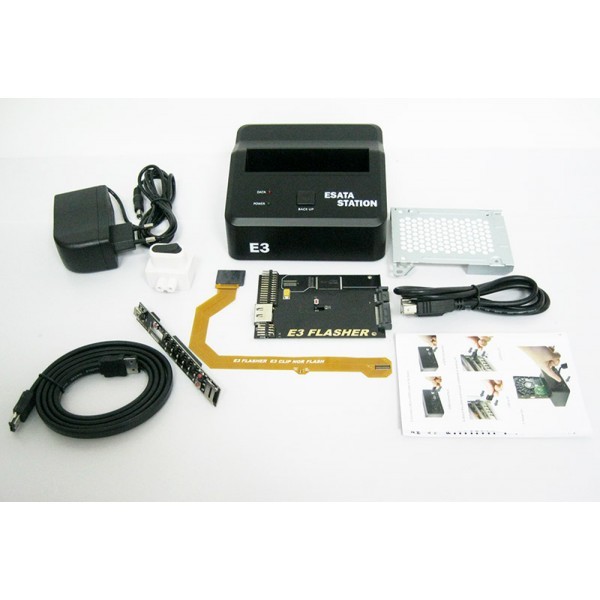
Its not my idea, iirc it was a feature for dual boot (cfw and ofw) of the e3 flasher.

Maybe there is an e3 flasher kit that allow for fast hdd switch, but i have no experience with that
 
Last edited:
so this box has to exist then, I can't imagine people swapping hdds every time they wanted to go back to OFW.

Yes but remember that that specific device also boot from external nor memory (so it does perform not only hdd swap but also nor memory switch - from the external board you can choose from which device boot the system software and you have to manually switch hdd on esata dock - i dont know of u can use another dock, in place of the official one, that has two hdd slot that allow to switch hdd with just a button).

So you dont need the full hardware but just an external sata dock that is connected directly to the ps3 sata connector and from which you can just swap hdd when the console is turned off (remeber that this way you may have problems upgrading the system software so if you have a compatible ps3 slim it would be a lot better to just buy the full e3 dual boot package - this way you can have basically two different, or equal, cfw, one for each nor+hdd, and use one for ps2 games and the other for ps3 gamedata).
The dock also need an external power source.

38789_9_xlarge-1200xauto.jpg


e3_flasher.jpg
 
Last edited:
but something like this would be easier, you plug it into the sata port inside the PS3, then connect and disconnect your hdds as needed. But it would be easier to have a dock that both drives could be in at the same time, and you could press a button and swap between them. I wonder if a dock that uses USB 3.0 could handle a cable that is female USB on one end and Male sata on the other. Like the second image.
00--iEDEiteAFlLQyCbttWKfh6WLNQYzcpDHwi5OCg-pDPOiaO6jFo93mYGO2SotQsdrnHjCyIZu59oV2we_kMG9A
00--iEDEiteAFlLQyCbttWKfh6WLNQYzcpDHwi5OCg-pDPs90DIqPPGUAbZLMzPRmoPKwg5ydwHipy3aIZBf9dNYQ
 
but something like this would be easier, you plug it into the sata port inside the PS3, then connect and disconnect your hdds as needed. But it would be easier to have a dock that both drives could be in at the same time, and you could press a button and swap between them. I wonder if a dock that uses USB 3.0 could handle a cable that is female USB on one end and Male sata on the other. Like the second image.
00--iEDEiteAFlLQyCbttWKfh6WLNQYzcpDHwi5OCg-pDPOiaO6jFo93mYGO2SotQsdrnHjCyIZu59oV2we_kMG9A
00--iEDEiteAFlLQyCbttWKfh6WLNQYzcpDHwi5OCg-pDPs90DIqPPGUAbZLMzPRmoPKwg5ydwHipy3aIZBf9dNYQ
Yes but you will use the same firmware for both hdd and you may have problems when updating. Also u may encounter some error each time u swap hdd (maybe u need to rebuild database or similar things).

If u want to use two internal hdd and swap them, then e3 flasher dualboot kit its the most compatible way that avoid you any software related problem (even if it require you time to install the while kit, also you would need to change thermal paste and solder a wire to the mb)
 
How do I delete all the spam I've created in this thread? I didn't realize what I was doing at the time and I want to remove it all. By the way Zar, my friend, I am ready for PIC1.PNG support for PS2 and PSX in the XMB gui :sfun teleport:. I have everything looking great and that's all that is missing.
 
  • Like
Reactions: Zar
Back
Top