PS3 ManaGunZ v1.31 - Now Compatible w/ 4.82 CFW + New Features & Fixes from Zar

Developer @Zar is back with a new update to the very popular and functional homebrew, ManaGunZ is a excellent feature rich Backup Manager, the best for PS2 Backups w/ PS2 Config Editor built-in that has improved in this release. Also this update now supports 4.82 CFW (CEX), also the addition of a Plugin Monitor has been implemented this will allow you to load and unload plugins from the ps3 homebrew. New translation have been added (Italian, Hungarian and Spanish), plus additional fixes have been applied, all and more can be seen in the release notes provided below along with some important details about the new & Improved PS2 CONFIG Editor.

-STLcardsWS

ManaGunZ v1.31_1.png
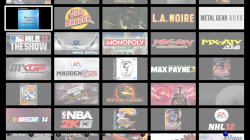
ManaGunZ contains several UI's pictured above is the "FLOW" Option.


  • bullet_by_aerik_khalid-d3ioh6q.png
    ManaGunZ v1.31
    Changelog v1.31
    • Fix : Read&write file.
    • Fix : Support big files (+4GB).
    • Add : Italian, Hungarian and Spanish language.
    • Add : Support fw 4.82 CEX.
    • Fix : Some pnach wasn't applied correctly.
    • Fix : Issue with reading files from bin/cue disk image.
    • Add : Mount Game from file manager.
    • Fix : Removed the refresh window everytime you use an option, sometimes it's useless.
    • Add : CONFIG files extracted from softemu and gxemu.
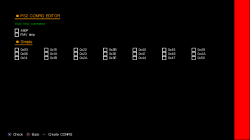
    • Add : Improved PS2 CONFIG editor. See note (1).
    • Fix : Removed the DBCONFIG.txt system.
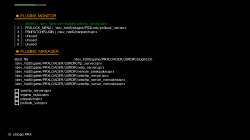
    • Add : Plugin Monitor, it allow you to load or unload a plugin.

    Note (1)
    [LOAD] - The PS2 CONFIG editor is able to load CONFIG files and to display the result on the screen.

    You'll be able to load :
    • "NET" config files from '[ManaGunZ Path]/USRDIR/sys/CONFIG/NET'. These are the CONFIG found in official ps2 classic pkg.
    • "GX" config files from '[ManaGunZ Path]/USRDIR/sys/CONFIG/GX'. These are the CONFIG extrated from gxemu.
    • "SOFT" config files from '[ManaGunZ Path]/USRDIR/sys/CONFIG/SOFT'. These are the CONFIG extrated from softemu.
    • "CURRENT" config files from '[You PS2 Backup Path].CONFIG'. This config is currently used.
    • "CUSTOM" config files from '[ManaGunZ Path]/USRDIR/sys/CONFIG/CUSTOM'. These are unofficial CONFIG.
    [CHECK]
    • Morever, PS2 CONFIG editor check if the original data from the commandID : 0x9 & 0xA & 0xB matches with the data of your PS2 backup.
    • If it's not a match the commandID on your screen will be displayed in red.
    [EDIT]
    • Once it's loaded, you'll be able to ADD or REMOVE a command ID. For now, you can only ADD the commands without parameter, the 'simple' ones.
    • You can add in CONFIG the patches from pnach files. So, the widescreen patches can be added.
    • You can add the patches '480' 'YFIX' and 'FMV skip' to the config too.
    [SAVE]
    • Finally, with the button START, it save your configuration to '[You PS2 Backup Path].CONFIG'. Also, if you edited the CONFIG then a backup of your config is stored in '[ManaGunZ Path]/USRDIR/sys/CONFIG/CUSTOM' folder.


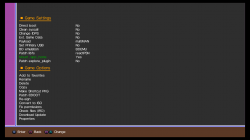
  • PS3 Game Settings Menu
    PS3GameMenu.png
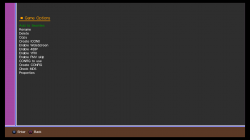
    PS2 Game Setting Menu
    PS2GameMenu.png
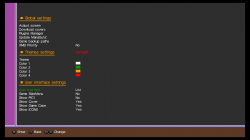
    Global Settings Menu
    Settings.png
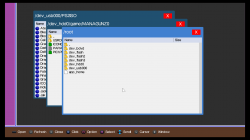
    File Manager
    FileManager.png
    Plugin Monitor Screen
    ManaGunZ v1.31_2.png
    PS2 Config Options
    ManaGunZ v1.31_3.png
    GRID UI
    ManaGunZ v1.31_4.png


Download (latest version) @: github.com/Zarh/ManaGunZ

Source: psx-place.com
 
Last edited by a moderator:
Hey Zar,
I really like your Managunz as well as the built in file manager. I just would like to ask if there is a chance that you would make it two panels as fefault setting? I believe that lots of people would appreciate that. Thanks in advance :)
why it's easy to make 2 panels without being default
 
The PKG File what [Make PKG] creates ends as a Corrupt File when i install it :/
You sure ?, and you mean the "make shorcut PKG", right ?
That creates a very small PKG to install... and when you click in it you enter in managunz (but you cant see managunz) and then returns to XMB

So for it to work you need to have managunz installed, and the game in his path, and the managunz game settings for that game configured well

Hey Zar,
I really like your Managunz as well as the built in file manager. I just would like to ask if there is a chance that you would make it two panels as fefault setting? I believe that lots of people would appreciate that. Thanks in advance :)
I had a nice idea to make that dual windows view inside the filemanager, is easy and i think zar will like the way i imagined it can be implemented
I have a long list of things i will like to report/suggest/help zar to implement but i have not tolk about it yet to dont stress him

chicco33 is right, that problem with the memory is critical (because is the kind of thing that happens always when you fullfill a couple of conditions)
And btw, at least a part of the problem has been identifyed, that red rectangle that appears at right of the screen sometimes is actually a "feature" of tiny3D, lol
Is a warning that indicates the memory asigned to store vertex info has been exceeded (and after that tiny3D stops working and crashes). Is explained in a tiny3D tutorial written by estwald

Thats just a part of the "fix", is needed to increase that memory size... and after that lets see if there are other problems because maybe there are more, such the problems related with FAT devices in USB... this is a bit doubtfull why it was caused

By now, in managunz v1.33 the rule needed to follow to dont "fall" in the memory bug is to dont use the filemanager + otrer menu in the same managunz session
You can enter managunz and use any function... and works ok (but dont enter filemanager)
If you really need to use filemanager, then exit managunz, enter again, go straight to the filemanager... and filemanager works ok (and after using the filemanager exit managunz without entering any other menu)

I spent HOURS inside managunz in the past days and i can tell is safe to use it this way
 
You sure ?, and you mean the "make shorcut PKG", right ?
That creates a very small PKG to install... and when you click in it you enter in managunz (but you cant see managunz) and then returns to XMB

So for it to work you need to have managunz installed, and the game in his path, and the managunz game settings for that game configured well

not completly true. it doesn't use the installed managunz.

@sexybaby I'll investigate on this isssue. Can you tell me what is ur firmware ?
 
@Zar
Im on the latest FW4.82 using ferrox-standard-edition and latest Managunz Version

Everything is configured on Managunz side, also the game paths
Starting the Game with Managunz work without problems

But when I press on " Make Pkg " for the XMB shortcut , it creates the PKG, and when i install the PKG, a got a Incompatible File Icon on XMB :/
 
If you are going to make some changes to that "make pkg" for the XMB shorcut there is another stuff that needs to be added eventually
Now is intended for PS3 games only... but is not available for PS1/PS2/PSP games

Could be nice to be able to make shorcut PKGs for all them
 
  • Like
Reactions: Zar
@Zar Any news about progress? :) It will be late christmass for me if you could fix the freeze issue in Managunz and add the "copy/merge 4GB+ PS2 iso-s to internal" fuction to Managunz.
 
Hii Zar.. I have installed managunZ 1.31 on CFW 4.81, but it can't read and mount encrypted PS2 ISO at dev/PS2ISO Folder

Should I decrypted again PS2 ISO, so ManagunZ can read ando mount to play ??
 
Yes, I didn't included the old method which is for me (as user and also as dev) too annoying. Only decrypted iso are supported by ManaGunZ.

So how can I use config file ?? at PS2 menu there is no option CONFIG to use...

Is there step to enable that option ??
 
So how can I use config file ?? at PS2 menu there is no option CONFIG to use...

Is there step to enable that option ??
In the "game selection" menu you have to press triangle over the game you want to configure (to see the game settings for that game)
From there you have to select "create CONFIG" (this open a full screen window with the "PS2 config editor")
Inside the config editor you have to select "Load config" (and it shows to you 5 groups of configs named GX, SOFT, NET, CUSTOM, CURRENT), you have to choose one of that groups

And thats all, when you are happy with your selection/customization you have to press select button (to save your config)
After that you have to exit.... back to the game selection screen... and by pressing cross over the game icon the game is mounted (together with the config you saved)

------------------------
If for some reason... at the time of entering the "PS2 config editor" and "load config"... doesnt appears that groups of configs... is because your game has some problem... or because there is not any config for that game
 
In the "game selection" menu you have to press triangle over the game you want to configure (to see the game settings for that game)
From there you have to select "create CONFIG" (this open a full screen window with the "PS2 config editor")
Inside the config editor you have to select "Load config" (and it shows to you 5 groups of configs named GX, SOFT, NET, CUSTOM, CURRENT), you have to choose one of that groups

And thats all, when you are happy with your selection/customization you have to press select button (to save your config)
After that you have to exit.... back to the game selection screen... and by pressing cross over the game icon the game is mounted (together with the config you saved)

------------------------
If for some reason... at the time of entering the "PS2 config editor" and "load config"... doesnt appears that groups of configs... is because your game has some problem... or because there is not any config for that game

Thanks Sandugas..
 
480p doesn't seem to work in any game because all we can see is the half screen horizontally after enabling it. Please fix this issue.
 
it's not. I didn't even know these files existed ;)
Can u convert it in iso ?
I could, but iso format doesn't hold subchannel informations, only .sub or .sbi do. Do you think it could be possible to implement img(or bin)/cue/sub with some documentation?
 
That seems complicated... but if you'll ever want to dare and try to implement it in the future I (and many PAL users) will be more than happy!
 

Featured content

Trending content

Back
Top