
Developer @Zar made an update for 4.85 firmware (cex) support for the popular ps3 homebrew ManaGunZ, but also late last month the developer made a huge update, that has added many new features to the popular Game Manager that always comes equipped with plenty of other features for your exploited PS3. Not only is this homebrew for CFW any longer, but since v1.36 ManaGunZ is now both compatible with PS3 Custom FirmWare and also PS3HEN, also zar did not stop there as there has been tons of new additions (seen in the changelogs provided below) and various fixes/optimizations have been brought forward as well in these recent updates that have emerged from developer @Zar. Checkout all the latest details below surrounding ManaGunZ for the PS3.
 ScreenShot of 3D-Cover Flow UI for Game Management
-
ManaGunZ v1.37 - Released on Sept. 11
- Add : Support the firmware 4.85C.
- Fix : Issue with syscall 35. It fix the function to mount JB backups with cobra or mamba, among others.
- Fix FileManager : Issue to open /dev_bdvd.
- Add FileManager : Symbolic links. See Notes (1).
(1) It use cobra/mamba syscall 35.
For example if you want to redirect app_home to dev_bdvd
- _ Select app_home (square)
- _ Option (triangle) then select "SymLink source" (cross)
- _ Select dev_bdvd (square)
- _ Option (triangle) then select "Symlink target" (cross)
ManaGunZ v1.36 - Released on Aug. 23
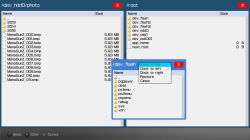
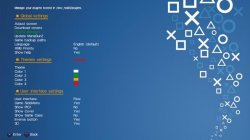
Random Screenshots (File Manager / Settings Page)
-
Add : Support PS3HEN. I removed every feature unsupported by the HEN (tested on HEN 2.3.1).
-
Add : Updated widescreen db from pcsx2 github.
-
Add : If you don't use R2 to manage speed, the speed is increased when you hold a button.
-
Add : For UI FLOW, a scroll bar appears when you browse quickly your backups list.
-
Add : Changed VRAM mapping to manage more backups. See notes(1).
-
Add : Show RGBA values when you edit a color.
-
Change : When you hold circle to quit, there is only one loading ring instead of 3.
-
Add : You can add a color filter on some pictures. See notes (2).
-
Add : Settings menu is splitted in 3 level instead of 2.
-
Add : Platform filter for UI XMB.
-
Fix : It scan dev_cf (compact flash) instead of dev_cd.
-
Add : 'Yes/No' settings are replaced by a toggle.
-
Add : New theme icons for the toggle.
-
Fix : Rawseciso isn't a fself anymore. It fix issue with iso from ntfs with a PS3HEN.
-
Fix : Issue with ps2 elf crc. It fix several issues with iso patching options like when 'disable widescreen' was unavailable.
-
Fix : Pnach wasn't properly translated to .CONFIG, wrong endianness in replacement opcode.
-
Fix : To avoid issues with some characters, the name of game settings files use title_id instead of title.
-
Remove : I removed "Shortcut pkg" option because it's broken. I'll fix it later.
-
Add FileManager : More informations of devices : capacity, file system, name, label, writable.
-
Add FileManager : Several predefined root display is available. Also, you can customize your own display in settings.
-
Add FileManager : Specifics options are available if you select several files with the same extension. For example, you can extract 3 pkg in a row.
-
Add FileManager : New theme icons used for the closebox, the dockbox and the cursor.
-
Add FileManager : Support UTF8 filename and also their content with the TXTviewer.
- Add OffsetFinder : It generate every files to update managunz to a new firmware. Type 'make update'.
(1) Every game pictures are stored in a 512KB slot memory in bitmap format.
For Flow3D, it's stored in 2MB slots, there is less slots.
The dimention of the game pictures is limited.
We can calculate its size = Width x Height x Pitch
I use ARGB texture, the pitch is 4.
The picture size must respect :
Width x Height < 0x20000 = (512 x 1024) /4
And in Flow3D :
Width x Height < 0x80000 = (2 x 1024 x 1024) /4
To not have any memory issue, I suggest you to use the following dimensions:
(2) You can choose the color filter with (R1) in settings.Picture Width Height ICON0 320 176 COVER PS1 250 250 COVER PS2 250 350 COVER PS3 260 300 COVER PSP 200 340 COVER3D PS1 FRONT 450 450 COVER3D PS1 BACK 600 450 COVER3D PS2 570 850 COVER3D PS3 525 950 COVER3D PSP 800 640
It's available for BG, BGS, SIDEBAR, BOXBODY, BOXHEAD and NOTIF pictures.
You can add these colors in colorset.ini file too.
They are named COLOR_BG, COLOR_BGS, COLOR_SIDEBAR, COLOR_BOXBODY, COLOR_BOXHEAD and COLOR_NOTIF.
If you don't write a colors in colorset.ini it will be disabled.
- Add : Support the firmware 4.85C.
Download: https://github.com/Zarh/ManaGunZ/releases
Source Code: https://github.com/Zarh/ManaGunZ
Release / Support Thread @: psx-place.com/forums/...
/Additional information pertaining to 4.85 firmware > > > HERE
Last edited:







