Hi, for first thanks for this very useful guide! I have a problem loading PS1 game into OPL. I followed the guide you wrote step-by-step and all the game are visible in ìto the app page of OPL, but when I try to load a game this message appera on the screen: Error, could not run the item. I try to run the game from uLunchelf and it is ok.

You are using an out of date browser. It may not display this or other websites correctly.
You should upgrade or use an alternative browser.
You should upgrade or use an alternative browser.
PS2 Manual installation guide for PSX games in the APP section of OPL via USB.
- Thread starter gamerman 5000
- Start date

gamerman 5000
Developer
Hi, for first thanks for this very useful guide! I have a problem loading PS1 game into OPL. I followed the guide you wrote step-by-step and all the game are visible in ìto the app page of OPL, but when I try to load a game this message appera on the screen: Error, could not run the item. I try to run the game from uLunchelf and it is ok.
Hello, you may have the addresses wrong, let me know the following:
1.- letter of the USB drive you are using.
2.- address of the "POPS" folder that you are using.
3.- How did you write the line in your "conf_apps.cfg" file
I also suspect something wrong in the address... This is the content of the configuration file I used:
I removed all the blank space on top and bottom, I also used 2 different game using different approach (SLES present or not). Both game works well when lunched directly from uLaunchelf...and both return the same error from within OPL
Legacy of Kain - Soul Reaver = mass:/POPS/XX.SLES_020.27.Legacy of Kain - Soul Reaver.ELF
Crash Bandicoot 3 Warped = mass:/POPS/XX.Crash_Bandicoot_3_Warped.ELF
Crash Bandicoot 3 Warped = mass:/POPS/XX.Crash_Bandicoot_3_Warped.ELF
I removed all the blank space on top and bottom, I also used 2 different game using different approach (SLES present or not). Both game works well when lunched directly from uLaunchelf...and both return the same error from within OPL
gamerman 5000
Developer
I also suspect something wrong in the address... This is the content of the configuration file I used:
Legacy of Kain - Soul Reaver = mass:/POPS/XX.SLES_020.27.Legacy of Kain - Soul Reaver.ELF
Crash Bandicoot 3 Warped = mass:/POPS/XX.Crash_Bandicoot_3_Warped.ELF
I removed all the blank space on top and bottom, I also used 2 different game using different approach (SLES present or not). Both game works well when lunched directly from uLaunchelf...and both return the same error from within OPL
The first thing I recommend is that you use shorter names without "_" for example:
Code:
XX.SLES_020.27.Legacy of Kain.ELF

XX.Crash Bandicoot 3.ELFgamerman 5000
Developer
would be nice if someone who has an big capacity of intelligence and know programming make an ELF gui of POPstarter APP for ps2 outside of OPL like other APPS like Ulaunchelf etc an APP like opl for list the games of POPStarter but an separate app
I guess they haven't implemented it because the games can already be launched as an application in the same OPL.
This avoids having to exit OPL to open another application.
Even if there were, the most practical thing that everyone would surely end up doing is adding that application to the OPL menu which would
It doesn't make sense since they can already be loaded directly.
The first thing I recommend is that you use shorter names without "_" for example:
Code:XX.SLES_020.27.Legacy of Kain.ELF XX.Crash Bandicoot 3.ELF
Unfortunately I get the same error
gamerman 5000
Developer
Unfortunately I get the same error
Let me take a look at your files in the "Pops" folder.
These are the files in the POPS folder: https://drive.google.com/file/d/1dRYmqd-Rik_6VHp96N0a59m0ulJXHA3v/view?usp=drive_link
And this in the config file
And this in the config file
Legacy of Kain = mass:/POPS/XX.SLES_020.27.Legacy of Kain.ELF
Crash Bandicoot 3 Warped = mass:/POPS/XX.Crash Bandicoot 3.ELF
Legacy of Kain - Soul Reaver = mass:/POPS/XX.XX.Legacy of Kain - Soul Reaver.ELF
Crash Bandicoot 3 Warped = mass:/POPS/XX.Crash Bandicoot 3.ELF
Legacy of Kain - Soul Reaver = mass:/POPS/XX.XX.Legacy of Kain - Soul Reaver.ELF
Duplicete PLEASE remove it...sorry
This is the content of the POPS folder: https://drive.google.com/file/d/1dRYmqd-Rik_6VHp96N0a59m0ulJXHA3v/view?usp=drive_link
And this is the content of the config file:
This is the content of the POPS folder: https://drive.google.com/file/d/1dRYmqd-Rik_6VHp96N0a59m0ulJXHA3v/view?usp=drive_link
And this is the content of the config file:
Legacy of Kain = mass:/POPS/XX.SLES_020.27.Legacy of Kain.ELF
Crash Bandicoot 3 Warped = mass:/POPS/XX.Crash Bandicoot 3.ELF
Legacy of Kain - Soul Reaver = mass:/POPS/XX.XX.Legacy of Kain - Soul Reaver.ELF
Crash Bandicoot 3 Warped = mass:/POPS/XX.Crash Bandicoot 3.ELF
Legacy of Kain - Soul Reaver = mass:/POPS/XX.XX.Legacy of Kain - Soul Reaver.ELF
gamerman 5000
Developer
These are the files in the POPS folder: https://drive.google.com/file/d/1dRYmqd-Rik_6VHp96N0a59m0ulJXHA3v/view?usp=drive_link
And this in the config file
Legacy of Kain = mass:/POPS/XX.SLES_020.27.Legacy of Kain.ELF
Crash Bandicoot 3 Warped = mass:/POPS/XX.Crash Bandicoot 3.ELF
Legacy of Kain - Soul Reaver = mass:/POPS/XX.XX.Legacy of Kain - Soul Reaver.ELF
It is restricted, you must share it with the "anyone with the link" option.
It is restricted, you must share it with the "anyone with the link" option.
Sorry...
Attachments
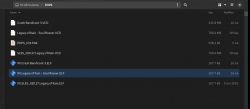
gamerman 5000
Developer
Sorry...
I already found the problem friend.
In the "conf_apps.cfg" file you must place the "=" symbol attached to the "mass" text string so that the lines should look like this:
Code:
Legacy of Kain =mass:/POPS/XX.SLES_020.27.Legacy of Kain.ELF

Crash Bandicoot 3 Warped =mass:/POPS/XX.Crash Bandicoot 3.ELFgamerman 5000
Developer
Now it works, Thanks! I see that in your tutorial you used the space before and after the =. Maybe you can edit the post based on this solution.
I just made it friend, thanks for commenting.

arcadekidflo
Member
There are some widescreen cheats for PSX games out there, any way to add them before or during the conversion to VCD ?
gamerman 5000
Developer
There are some widescreen cheats for PSX games out there, any way to add them before or during the conversion to VCD ?
Most of the codes are in Gameshark format, currently any emulator supports this format.
Some other codes are available in hexadecimal format, so you need an editor like "HxD" to replace hexadecimal values.
In my personal opinion and from my own experience, I do not recommend putting them in widescreen except for PS2 games since they produce many unexpected graphic effects.
In this tutorial we will learn step by step how to install PSX games to load them in Open PS2 Loader (OPL) from the applications menu.
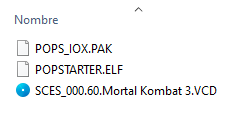
The "POPS" folder of the PSX games should contain the following files "POPS_IOX.PAK" "POPSTARTER.ELF" "game.VCD" in my case "SCES_000.60.Mortal Kombat 3.VCD", and it will look like this:
Sorry but I can't find the link where to find the ".pak" file
gamerman 5000
Developer
In this tutorial we will learn step by step how to install PSX games to load them in Open PS2 Loader (OPL) from the applications menu.
Before continuing, it is necessary to have read the following tutorial "Guide to Install APPS in Open PS2 Loader via USB" since it will be referred to later, you can read it at the following link:
https://www.psx-place.com/threads/guide-to-install-apps-in-open-ps2-loader-via-usb.41054/
What do we need?
1.-Have the POPSTARTER emulator installed.
To download it see the following thread:
https://www.psx-place.com/threads/popstarter.19139/
Does installing Popstarter mean copying the folder and all the files (extracted from POPStarter_20190605.7z) from USB to mc0?
2.- The PSX game rom with VCD extension (the emulator only works with this file extension).
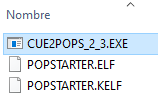
3.- With the help of the file called "CUE2POPS_2_3.EXE" included in the POPSTARTER download, we can convert our games that must be in bin and cue format to VCD format.
It's ok to use Burnaware to transform CD to cue+bin ?
Similar threads
-
PS2 How to Rename PS1 games easily to Play on OPL via POPSTARTER using SMB/USB
- Started by eliminator14
- Replies: 1
-

-
 PS2 Guide to Install APPS in Open PS2 Loader via USB
- Started by gamerman 5000
- Replies: 6
-
PS2 Install open ps2 loader on pcsx2 emulator
- Started by gamerman 5000
- Replies: 6