
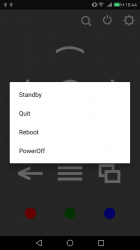
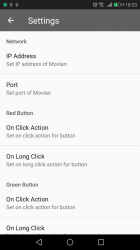
Movian Remote is an extension to the famed Movian Media Center (ps3 Homebrew) in the form of an Android app that can be downloaded from the Google Play Store, giving your smartphone or any android device with a connection to your local network the ability to control Movian instead of your DualShock Controller on the PS3. The updates comes packed with various new features a new UI has been introduced we have attached some pics as seen below. Also ciaha adds a new built-in Share feature that integrates the YouTube plugin within Movian and the Official YouTube App, making sharing seamless (Other plugin/apps supported as well, see details below). There is alot of features packed into this Remote that still is getting some love from the developer. This project is an unofficial project for the Media Center, but don't get confused as Movian later on introduced its own version
with the Official Remote Control , but this is a great alternative that offers a bit more with some of the recent additions, so check it out and leave some feedback for the dev

Note Movian Remote can be used not just in conjunction with the PS3 but other platforms Movian Supports as well
Note Movian Remote can be used not just in conjunction with the PS3 but other platforms Movian Supports as well
-
I just wanted to update everyone that this remote had a major update in the past month, so if you haven't tried it you should check it out. The user interface is completely new and closer matches the user interface of Movian. The other new thing is a built in share feature, so if you start the YouTube app on your phone and select share on a video you can share it directly to Movian (needs YouTube plugin installed on Movian). This also work with other video-streaming apps but I haven't tested them all.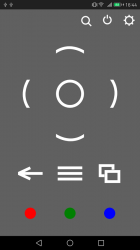
Feedback is always appreciated!
What's New
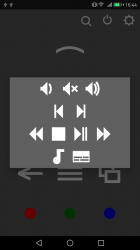
- - Popup mini remote
- - Share tested with YouTube, Vimeo and Dailymotion (needs plugin to be installed in Movian)
- - Firebase analytics
-
Movian Remote
Use your Android phone as a remote for Movian (https://movian.tv/). Now available on Google Play (https://play.google.com/store/apps/details?id=com.claha.showtimeremote)Features
- Buttons for most common actions, see below for a more detailed description
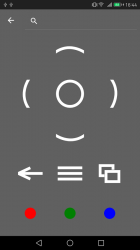
- Use the integrated searchbar to search in Showtime
- Use profiles if you are running Showtime on multiple devices
- Swipe to switch between profiles
- Swipe to switch between navigation and media remote
Navigation
- Up (Press and hold to send multiple times)
- Left (Press and hold to send multiple times)
- OK
- Right (Press and hold to send multiple times)
- Down (Press and hold to send multiple times)
- Back (Press and hold to send multiple times)
- Home (Long press brings up Sys Info)
- Menu (Long press brings up Item Menu)
- Media Stats (Long press brings up Log Window)
- Volume Down (Press and hold to send multiple times)
- Volume Mute Toggle
- Volume Up (Press and hold to send multiple times)
- Previous Track
- Next Track
- Seek Reverse (Press and hold to send multiple times)
- Stop
- Play Pause Toggle
- Seek Forward (Press and hold to send multiple times)
- Play Queue
- Audio Track
- Subtitle Track
Last edited:







