nolemretaW
Member
How to move "Trophies" menu into "Game" category, and how to remove "Playstation Network" and "Friends" categories since I don't use them, and I'm not signed into PSN


for trophy to move it to game category like in 3.55 and lower you can change it in xml but it really not working as it is handled by sprxHow to move "Trophies" menu into "Game" category, and how to remove "Playstation Network" and "Friends" categories since I don't use them, and I'm not signed into PSN

How to move "Trophies" menu into "Game" category, and how to remove "Playstation Network" and "Friends" categories since I don't use them, and I'm not signed into PSN
<Query
class="type:x-xmb/folder-pixmap"
key="seg_trophy"
src="xmb://localhost/%flash/xmb/category_psn.xml#seg_trophy"
/>
To remove the PSN and friends categories completely you need to edit the xmb_plugin_normal.rco and the xmb_ingame.rco. I have some pre prepared rcos attached here that achieve that, They are from one of my toolbox mods but should work on all recent FW.
If you want to patch your own rcos you need to edit this bit of the main rco xml, you can extract the rco using rcomage.
Original:
View attachment 21512
See the "menus" value i have highlighted with a red box, that needs to be edited as that tell the PS3 how many categories there are. It goes 1,2,3,4,5,6,7,8,9,a. So edit that to 0x8, and also remove the 2 lines from the XMList that I have also highlighted.
When finished it should look like this:
View attachment 21513
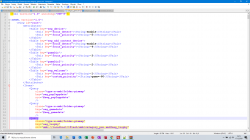
You can add it to the game category by editing the dev_blind/vsh/resource/explore/xmb/category_game.xml, You would need to add this query to the other queries at the top.
Code:<Query class="type:x-xmb/folder-pixmap" key="seg_trophy" src="xmb://localhost/%flash/xmb/category_psn.xml#seg_trophy" />
It should look something like this when you are done. I have added it here as the 2nd icon from the top under Game Data Utility:
View attachment 21510
Note: It will work fine IIRC, but only on the main XMB. It will have a missing icon and title on the ingame XMB. This is due to missing entries in the explore_category_game.sprx, This bugnot fixable unless you copy and rename the explore_category_psn.sprx to explore_category_game.sprx, that is not a viable solution though as it breaks the titles and icons on 3 other items.
Note: It will work fine IIRC, but only on the main XMB. It will have a missing icon and title on the ingame XMB. This is due to missing entries in the explore_category_game.sprx, This bugnot fixable unless you copy and rename the explore_category_psn.sprx to explore_category_game.sprx, that is not a viable solution though as it breaks the titles and icons on 3 other items.
Yes.When i did this some years ago, it leave them as two empty slots in XMB, this fixes it?
Ok, I see your pastie link now, It looks fine.It doesn't work. Yes, the PSN and Friends tabs vanished, but Trophies menu doesn't show https://pastebin.com/4qvy8XX9
<View id="seg_trophy">
<Attributes>
<Table key="trophy">
<Pair key="icon_rsc"><String>item_tex_trophy</String></Pair>
<Pair key="title_rsc"><String>msg_trophy_collection</String></Pair>
<Pair key="data_connection"><String>xcb://localhost/query?limit=2048</String></Pair>
</Table>
</Attributes>
<Items>
<Item class="type:x-xmb/xmltrophy" key="trophy" attr="trophy"/>
</Items>
</View>There is no way to patch those sprx files. We would need the source code afaik to add stuff like that.Icons and text will work if I would somehow patch these files?
Ok, I see your pastie link now, It looks fine.
If you are on DEX or DREX CFW then you will need to edit the category_game_tool2.xml.
Also make sure to use the official category_psn.xml:
Do not remove this from that xml. This must be in the psn xml for this mod to work.
Code:<View id="seg_trophy"> <Attributes> <Table key="trophy"> <Pair key="icon_rsc"><String>item_tex_trophy</String></Pair> <Pair key="title_rsc"><String>msg_trophy_collection</String></Pair> <Pair key="data_connection"><String>xcb://localhost/query?limit=2048</String></Pair> </Table> </Attributes> <Items> <Item class="type:x-xmb/xmltrophy" key="trophy" attr="trophy"/> </Items> </View>
Ok, yeah if you have XMB set to DEX in the Rebug toolbox then your XMB read from different sections in the tool2 xmls.I'm not on DEX or on DREX, just on REX, but I'll try that as well
I didn't set XMB to DEX but I did it as well (both files are modified) and it worked!Ok, yeah if you have XMB set to DEX in the Rebug toolbox then your XMB read from different sections in the tool2 xmls.
Try adding the trophy query to the root and root_dex sections of the category_game_tool2.xml

Do you have DEX debug settings on your XMB in the settings category? If you do then you ARE on DEX XMB.I didn't set XMB to DEX but I did it as well (both files are modified) and it worked!
dex
btw is there a way to make Trophies menu use psn sprx? Or to decompile them and switch some files?
This bug is not fixable
There is no way to patch those sprx files.
I have debug settings, I think Rebug set DEX XMB it itself.Do you have DEX debug settings on your XMB in the settings category? If you do then you ARE on DEX XMB.
a lot of things changed since 3.55 new functions added old ones removed ...etcI have debug settings, I think Rebug set DEX XMB it itself.
And it wouldn't work also if I would copy 3.55 sprx files (3.55 had trophies in game section I think)?
So it may work, but it can also break some things?a lot of things changed since 3.55 new functions added old ones removed ...etc
You can try it if you want, most likely soft brick.So it may work, but it can also break some things?
(By 3.55 i mean "last version that had trophies in game category)
You can try it if you want, most likely soft brick.
If you really want the trophy icon to work in game, and dont care if you break some other icons on the ingame XMB, then make a copy of explore_category_psn.sprx from your current FW and rename it to explore_category_game.sprx and then over write your current game sprx with this renamed one. This will even work on HEN.
Just a side question: how to fix soft brick if that would even happen?most likely soft brick