
MX4SIO memory card frustration

Filename can be any.

You still didn't check, or at least You didn't told us, if You have checked that:
  • Partition table on card is MBR. Nothing else is supported in main branch for BDM devices.
  • Removing all USB and memory cards (MX4SIO is not a memory card) from ports.
 
Last edited:
You still didn't check, or at least You didn't told us, if You have checked that:
  • Partition table on card is MBR. Nothing else is supported in main branch for BDM devices.
  • Removing all USB and memory cards (MX4SIO is not a memory card) from ports.

Sorry Berion, i'm a bit of a Noob as some tech stuff - how do you check the partition table on the card?

I removed USB but doesn't my original Magic Gate memory card have to stay in slot 1 as it's the one running Free McBoot & OPL???
I've got the MX4SIO in slot 2
 
Sorry Berion, i'm a bit of a Noob as some tech stuff - how do you check the partition table on the card?

I removed USB but doesn't my original Magic Gate memory card have to stay in slot 1 as it's the one running Free McBoot & OPL???
I've got the MX4SIO in slot 2

u can convert GPT drive to MBR using CMD or powershell on windows
 
What operating system are You using? On Windows in diskmgmt.msc or diskpart. On Linux i.e in GParted. On macOS I dunno. ;]

FMCB is not running if You run OPL. And OPL isn't run from any media once its loaded, it is run from RAM memory. ;) So You don't need connected any mass storage except MX4SIO for just a test after OPL is loaded.
 
What operating system are You using? On Windows in diskmgmt.msc or diskpart.

Windows 10. Running the diskmgmt.msc (ive attached what it says below) . I also ran diskpart and got up to a command line that i wasn's sure where to go from (also see below)
sdstatus.jpg
discpart.jpg
 
@Tailgunner Right mouse click on disk0, 1, 2 etc. show You if partition table is GPT or MBR. On screen with diskpart, it shows that it is MBR (otherwise it would be star symbol in GPT column).

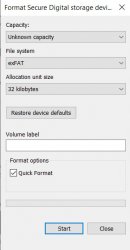
I believe Your problem is first partition (we don't know what is this because both tools are crippled, ;p IsoBuster or GParted could tell You more, if this is even partition, in theory it is empty space but that's very strange to be 16MiB). OPL will not seek second partition, so probably that's why card is not recognized. Remove both partitions (which means You loose data on both of course) and create one, with exFAT, with cluster size not smaller than 8KiB, probably 32KiB will be optimal for You. If this will not help You, then issue lies on MX4SIO faulty hardware or card incompatibility.
 
Last edited:
@Berion ok, i've cleared all partitions, how do i create an new partition with 32kb (sorry, new to this)
clearedSD.jpg


do you mean like this as i reformat the card??format.jpg
 
Last edited by a moderator:
You should NOT "play around" with "removing" the initial 16MB-32MB!!!
Those are there for a reason and the card can be rendered UNUSABLE when doing that!!!
 
Well, I've tried everything again and still no luck, my last resort is to buy another MX4SIO and see if that's the problem - or buy another MX4SIO that comes with SD card for compatibility?
Thanks so much for replying to me and trying to help me out! it's kind of fun trying to solve the problem - it's also a bit frustrating and expensive I guess that's the way it goes with the modding scene.
I'll be an expert when i finally get it working! :tranquillity:
 
Well, I've tried everything again and still no luck, my last resort is to buy another MX4SIO and see if that's the problem - or buy another MX4SIO that comes with SD card for compatibility?
Thanks so much for replying to me and trying to help me out! it's kind of fun trying to solve the problem - it's also a bit frustrating and expensive I guess that's the way it goes with the modding scene.
I'll be an expert when i finally get it working! :tranquillity:
Stop panicking and making impulse purchases.
1. Format SD card with 'SD Memory Card Formatter': https://www.sdcard.org/downloads/formatter/
This will "bring back" that unpartitioned space at the beginning before the partition. And since your card is 64GB, it will automatically be formatted in exFAT. In any case, using it the partition itself will be positioned as it should be.
2. You can check the partition style (MBR or GPT) like this: https://www.softwarepro.org/blog/know-how-to-check-if-partition-is-mbr-or-gpt-windows/
Disk Management: Right-click the target Disk and select "Properties", go to the "Volumes" and you will find out the partition style.
(or in PowerShell usint command Get-Disk)
 
Well, I've tried everything again and still no luck, my last resort is to buy another MX4SIO and see if that's the problem - or buy another MX4SIO that comes with SD card for compatibility?
Thanks so much for replying to me and trying to help me out! it's kind of fun trying to solve the problem - it's also a bit frustrating and expensive I guess that's the way it goes with the modding scene.
I'll be an expert when i finally get it working! :tranquillity:

have you tried a usb flash drive yet?
i mean lets narrow down what is causes.
format the USB flash drive with Exfat and copy just one game
and use the latest build of OPL, if it works, maybe your MX4SIO is the problem or the SD card.

Just suggesting..
 
You should NOT "play around" with "removing" the initial 16MB-32MB!!!
Those are there for a reason and the card can be rendered UNUSABLE when doing that!!!
What are You talking about? For what reason empty space on start of a card can be mandatory? It is useless, totally useless... If some file system supports bad blocks marking, it doing it on his filesystem table, so only for his partition. Card firmware don't works on such high level as logic structure of his exposed LBA. So I don't see any purpose to having empty 16 or 32MiB on start of the media... And none of my, never have any and always works as intended.

SD/SDHC/SDXC Cards have a "Protected Area" for SD Card security purposes. The SD Memory Card Formatter does not format the protected area in the SD/SDHC/SDXC Cards. The protected area shall be formatted by an appropriate PC application or SD host devices that provide SD security function
?

anyway, since both GPT & MBR with Exfat format supports the latest OPL
it should be okay.

try this build

https://github.com/grimdoomer/Open-PS2-Loader/releases/tag/v1.2.0.1-beta
It is not latest OPL, it is a fork. Those changes can be part of official OPL in future but for now are not.
 
Last edited:
Aha... So let's see...
I KNOW that this space is there for a reason...

Sure, it usually works without that, but do you think it was put there "willy nilly" without a reason??
 
Actually yes but I found on their site what I have added in quote. They didn't explained it. Maybe in docs is but download doesn't work for me and I'm not comfortable to allow every strange js to execute blindly. :P
 
Ok, now where finally getting somewhere!! I put an ISO in a "dvd" folder on a USB stick and it WORKED!!!
OPL did the spinning circle thing during start up and it recognised it!!
I reformatted the SD using the program that R1vver suggested and checked the partition style (which is MBR) tried it out again but still nothing, nothing detected, so it looks like the problem possibly lies in the MX4SIO (even though the green light and activity light flashes) or it's something to do with the SD card compatibility
I'm using a Kingston 64Gb Canvas Select Plus mini SD inside an adapter which i thought was on the compatible list but i could be wrong
 
Actually yes but I found on their site what I have added in quote. They didn't explained it. Maybe in docs is but download doesn't work for me and I'm not comfortable to allow every strange js to execute blindly. :P
The documents where this is really explained are not available for public. You have to be a member of the SD association.
Although several documents have been leaked online and can be found, but anyway.
There were discussions about this stuff in the Hekate for the Nintendo Switch github repository (there is also a few nuances with SD cards, not like here, but quite similar). There it was more chit-chats about cluster sizes, but the motive of empty space before the partition start was also brought up (in passing).
In the end, no one attempted to write a user-manageable utility for Windows that takes into account all of the nuances of the SD documentation.
 

Similar threads

Back
Top