MX4SIO memory card frustration

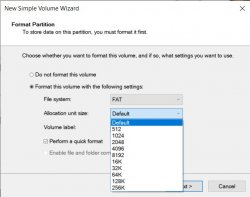
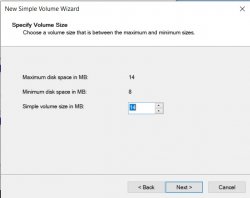
It keeps asking to enter an allocation space when i try to format it (no options to click zero or none) it just keeps putting the unallocated space in (16mb by default) is there an option to format without an unallocated space?

Try it without and see if it makes a difference
 
It keeps asking to enter an allocation space when i try to format it (no options to click zero or none) it just keeps putting the unallocated space in (16mb by default) is there an option to format without an unallocated space?

Is that in New Simple Volume Wizard?
 
Last edited:
In that in New Simple Volume Wizard?

yes I right click on the unallocated space, but there's no delete option, only New Simple Volume Wizards and then you go into these options (see attachements) it forces you to select an unallocated space.....
 

Attachments

  • part1.jpg
    part1.jpg
    34.5 KB · Views: 59
  • part2.jpg
    part2.jpg
    53.5 KB · Views: 97
yes I right click on the unallocated space, but there's no delete option, only New Simple Volume Wizards and then you go into these options (see attachements) it forces you to select an unallocated space.....

Okay, try deleting any partitions that you may have so the drive is entirely unallocated space. Then try formatting with New Simple Volume Wizard. Make the volume size the same as the maximum size and the allocation unit size 32K

EDIT: oh and you should use exFAT as it allows for single files larger than 4GBs
 
Last edited:
It worked!! no unallocated space!!! ok i'll try again now with the MX4SIO , surely it has to work this time...

Okay, try deleting any partitions that you may have so the drive is entirely unallocated space. Then try formatting with New Simple Volume Wizard. Make the volume size the same as the maximum size and the allocation unit size 32K

EDIT: oh and you should use exFAT as the filesystem as it allows for single files larger than 4GBs
 
No luck :( I'll try my other SD cards, but failing that, i've tried just about everything. I'm gonna be kicking myself if it's something simple
 
Still nothing detected. Well you can't say i didn't try just about everything ;)
at least the USB works, i'll just kick on with that until the next build
 
Still nothing detected. Well you can't say i didn't try just about everything ;)
at least the USB works, i'll just kick on with that until the next build

Out of curiosity, where did you get your adapter from? It's unlikely it would be the adapter as the debugger was able to successfully initialize one of the cards but you never know. If you have some soldering skills you could always DIY an adapter or do an internal mod.
 
Out of curiosity, where did you get your adapter from? It's unlikely it would be the adapter as the debugger was able to successfully initialize one of the cards but you never know. If you have some soldering skills you could always DIY an adapter or do an internal mod.

I got it from Ebay locally (Australia) from a supplier. It's a Bitfunx< adapter (originally from China i imagine)
I have soldering skills on big stuff, but when it comes to small stuff like PCBs and small fiddly stuff, i don't know how they do that kind of work without melting everything, i admire anyone who can!
 
Argh :disturbed: i thought someone said that blank allocation was supposed to be there back in this thread.
It's not really that simple with that blank space before the partition began.
According to the SD manufacturer's association documentation, it must be present. This is a theory. In theory, everything is always simple and beautiful.
There is also practice. Often cards work successfully (are recognized by various systems (not necessarily the PS2) and read/write) without that blank space. Sometimes cards do not work without it. And once I saw a case where a card stubbornly did not want to be recognized by the system if this blank space was present, but worked fine when it was not present (though that card was of very shady origin).
 
Last edited:
That's interesting stuff r1vver. Sometimes i wish everything was the same format and operated the same way!
It would save a lot of time and messing about.

It's not really that simple with that blank space before the partition began.
According to the SD manufacturer's association documentation, it must be present. This is a theory. In theory, everything is always simple and beautiful.
There is also practice. Often cards work successfully (are recognized by various systems (not necessarily the PS2) and read/write) without that blank space. Sometimes cards do not work without it. And once I saw a case where a card stubbornly did not want to be recognized by the system if this blank space was present, but worked fine when it was not present (though that card was of very shady origin).
 
It's not really that simple with that blank space before the partition began.
According to the SD manufacturer's association documentation, it must be present. This is a theory. In theory, everything is always simple and beautiful.
There is also practice. Often cards work successfully (are recognized by various systems (not necessarily the PS2) and read/write) without that blank space. Sometimes cards do not work without it. And once I saw a case where a card stubbornly did not want to be recognized by the system if this blank space was present, but worked fine when it was not present (though that card was of very shady origin).

Is this done to align partitions with erase blocks?
 
It keeps asking to enter an allocation space when i try to format it (no options to click zero or none) it just keeps putting the unallocated space in (16mb by default) is there an option to format without an unallocated space?
You misleading two things each other. ;]

In question You mentioned, diskmgmt asks about cluster size (MS often using wrong terminology, different for what the rest of world using). And this is such another case. ;) Cluster size cannot be zero because clusters are invented for a reason of managing data fragmentation.

Unallocated space which You see on device diagram, is unallocated space to any partition. In other words, it is empty space not used by anything.
 
/////UPDATE//////
After all the frustration trouble i went through with this thread last month, I've just discovered that my Slim PS2 isn't compatible with the MX4SIO - i went and had a look at the item description and it states it might not work with slim models SCPH-7XXXX & SCPH9XXXX my model number is SCPH-70002.
Hopefully they might make one that is compatible in the future , until then i guess im one of the unlucky ones :(
description.jpg
 
Je possède une SCPH70004 qui fonctionne parfaitement avec mon MX4SIO, j'ai effectué de très nombreux tests avec cette console.

I have an SCPH70004 which works perfectly with my MX4SIO, I have carried out many tests with this console.
 
I have an SCPH70004 which works perfectly with my MX4SIO, I have carried out many tests with this console.

I'm guessing my SCPH70002 is the exception that doesn't work, as you can see by this thread , i tried just about everything
 
I am looking to buy a Mx4sio what recommendations should I have for it to work properly... I see that there are problems with micro SD brands my ps2 is Fat 3900
 

Similar threads

Back
Top