PS2 [MX4SIO/SIO2SD] SD Card Adapter and SD-driver for the PS2 SIO2 interface

Dude, I feel like giving you a smooch. Before I reformatted my SD card I turned on PADEMU and almost every game that's supposed to work is smooth as butter. I was under the impression PADEMU was only if you wanted to use a newer DualShock, is there an explanation behind why games just work with it enabled?

The only game still giving me trouble is Gran Turismo 4. With no modes on, I was able to create and save a profile, but after the "Sony Entertainment Presents" splash screen I get the game's chime, I see the symbol for auto-loading my profile, and then it freezes. The compatibility list says "DS2 issues, unplug/replug required" so should I be replugging in my controller when I get to that freeze?

Hiya bro, that's great news! :D

Maybe @TnA knows why having PADEMU = "Enabled" fixes this issue, something with the USB driver?

Yeah same for me, Gran Turismo 4 wouldn't work. However, looking at the Compatibility List (spread-sheet) i see @Vendest got it to work, maybe when he sees this post he can tell us how he got it working. In the notes he wrote:- "DS2 issues, unplug/replug required".
 
Hiya bro, that's great news! :D

Maybe @TnA knows why having PADEMU = "Enabled" fixes this issue, something with the USB driver?

Yeah same for me, Gran Turismo 4 wouldn't work. However, looking at the Compatibility List (spread-sheet) i see @Vendest got it to work, maybe when he sees this post he can tell us how he got it working. In the notes he wrote:- "DS2 issues, unplug/replug required".
gran turismo 4 (dvd5 rip) works for me using opl bdm3 on a scph-90000 (dtl-h90001). though dualshock2 doesnt respond at first, it needs to be disconnected and connected then it works
 
Am I understanding correctly that PADEMU enabled is required for some games to work (to work at all, not just for purposes of pairing with DS3/DS4 of course)?

Can you universally enable PADEMU across all of OPL instead of game specific? Im going to try my luck with a DS3 and TP-Link UB400 hopefully today.

--

FMV stutter big time with Bouncer (documented in spreadsheet)
Micro stutter throughout for MK Shaolin Monks (this title not listed in spreadsheet)

GTA3 load times impressive not as bad as expected, loading into game, not painfully slow.. couple seconds between entering mission and cut scene vs. near instant on SATA HD on Phat. Same with Tekken5 matches, near instant vs. couple seconds . GTA Vice City seems quite a bit longer than SATA HD from recent memory but it is what it is working with here. Mostly very impressed with performance and gameplay itself seems smooth and exactly the same which is also important.

Instantly populates list in OPL vs taking quite a bit on my HD so thats a really nice plus is snappy list loading.

…Could FMV stutters be a result of the tech used or could OPL optimization in a future build fix this possibly?
Other games like Tekken Tag FMV fly!

Also why are some games compatible with SATA HD but not over this solution out of curiosity from a high level would think it would be the same generally speaking

Thx all!
 
Hi Guys,

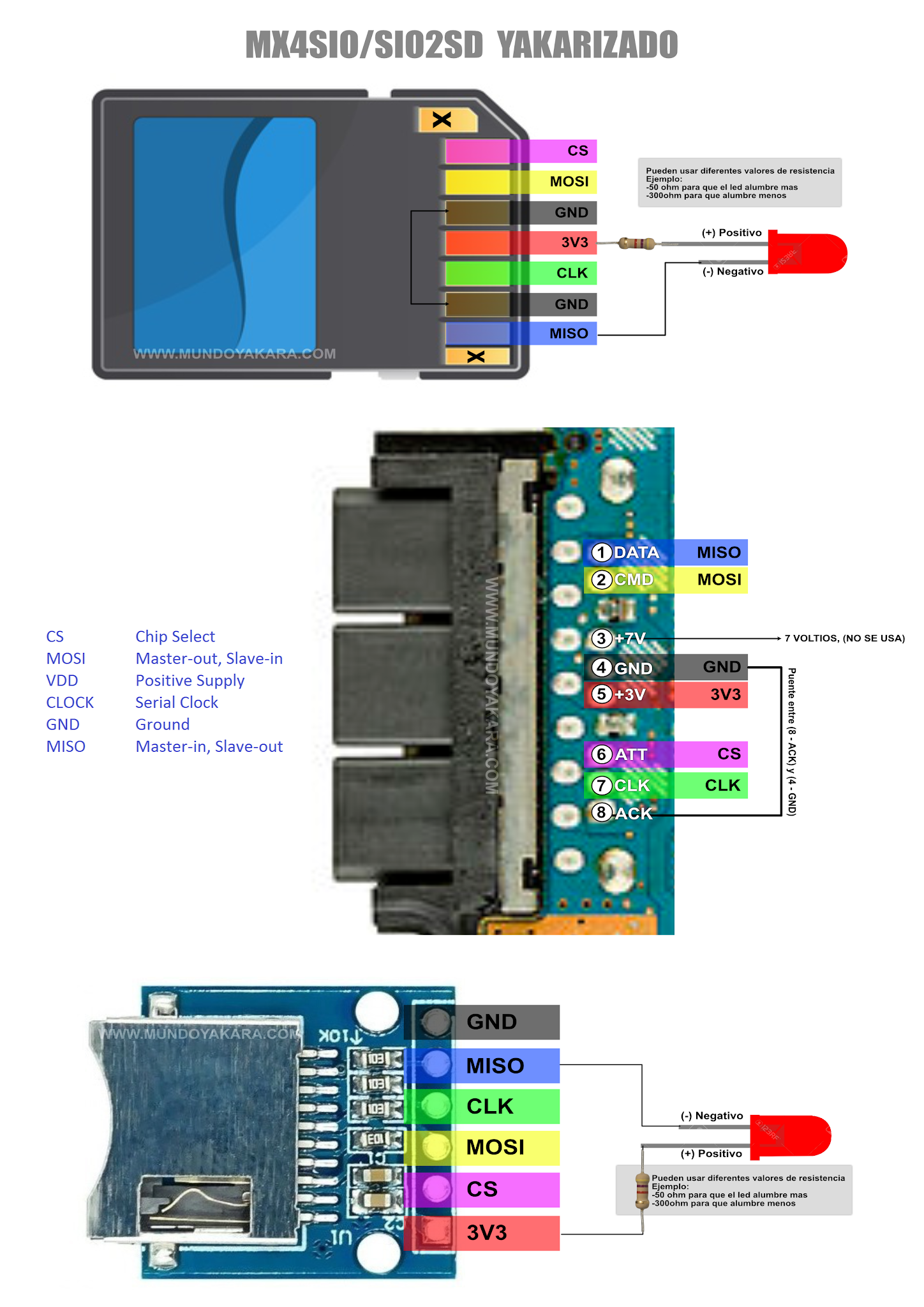
I was able to make my own version: (Ugly soldering skills, I know but it works well I was able to test a number of games on my SCPH-70006 and SCPH-50006)
w5fwRZ1.jpg

And I'm planning to make an improved version using either of these:
FfxIYkB.png

But I'm confused with the wiring diagram.

Can someone help me? TIA.
 
Am I understanding correctly that PADEMU enabled is required for some games to work (to work at all, not just for purposes of pairing with DS3/DS4 of course)?

Can you universally enable PADEMU across all of OPL instead of game specific? Im going to try my luck with a DS3 and TP-Link UB400 hopefully today.

--

FMV stutter big time with Bouncer (documented in spreadsheet)
Micro stutter throughout for MK Shaolin Monks (this title not listed in spreadsheet)

GTA3 load times impressive not as bad as expected, loading into game, not painfully slow.. couple seconds between entering mission and cut scene vs. near instant on SATA HD on Phat. Same with Tekken5 matches, near instant vs. couple seconds . GTA Vice City seems quite a bit longer than SATA HD from recent memory but it is what it is working with here. Mostly very impressed with performance and gameplay itself seems smooth and exactly the same which is also important.

Instantly populates list in OPL vs taking quite a bit on my HD so thats a really nice plus is snappy list loading.

…Could FMV stutters be a result of the tech used or could OPL optimization in a future build fix this possibly?
Other games like Tekken Tag FMV fly!

Also why are some games compatible with SATA HD but not over this solution out of curiosity from a high level would think it would be the same generally speaking

Thx all!
Yes, PADEMU can be enabled globally for all games. All I had to do was enable it in one game, and then the settings carried over to each game automatically. I think you just have to make sure the option is set to "Global."

gran turismo 4 (dvd5 rip) works for me using opl bdm3 on a scph-90000 (dtl-h90001). though dualshock2 doesnt respond at first, it needs to be disconnected and connected then it works
When you mean "doesn't respond," you're not referring to the game freezing right? Just the controller not taking inputs? Going to try a PS3 controller with GT4 to see if anything changes.
 
Last edited by a moderator:
Yes, PADEMU can be enabled globally for all games. All I had to do was enable it in one game, and then the settings carried over to each game automatically. I think you just have to make sure the option is set to "Global.".

thanks

some games work only with it on (tekken 5 I think). Others won't boot without it off (tekken tag , silent hill2)

hoping this rocket fish bt usb i bought works with my spare ds3. I love the Logitech wireless controller but I love options too haha. The tp (toilet paper) link ub400 didn't detect in either of my opl builds on 90001 or OG despite saying it would in the spreadsheet of those compatible dongles on PSx home I think

the rocket fish is supposed to ! Otherwise I give up on that one of actually using pad emu but surprised some games require it to boot even if not using it
 
I had a similar issue. Most of my games would flash green-yellow-pink and then not start, or would not start at all. I use the same version of FMCB but at first I was using the 7500 OPL version with Helder's card, since I have a 75001. You should try using a different OPL version; specifically the BDM3OPL 1629 version. Using that and then turning on PADEMU got almost all my games going. Here's a link to it: PS2 - [MX4SIO/SIO2SD] SD Card Adapter and SD-driver for the PS2 SIO2 interface | Page 15 | PSX-Place

Thanks for the reply I tried both 1627 & 1629 versions and still have the problem... maybe its the game?
 
Yes, PADEMU can be enabled globally for all games. All I had to do was enable it in one game, and then the settings carried over to each game automatically. I think you just have to make sure the option is set to "Global."


When you mean "doesn't respond," you're not referring to the game freezing right? Just the controller not taking inputs? Going to try a PS3 controller with GT4 to see if anything changes.
I've reconnected and disconnected my DS2 and 3 at GT4's freeze point(on Mode 6), no dice. I even tried deleting my save in case it was corrupted.

Thanks for the reply I tried both 1627 & 1629 versions and still have the problem... maybe its the game?
Yea unfortunately it could be a bunch of variables - your SD card, OPL version, what modes the game are on, etc. I would double check the compatibility sheet to see if your game is on it. https://docs.google.com/spreadsheet...ouid=100544618205762226251&rtpof=true&sd=true

Also make sure PADEMU is enabled and set to "Global." You can do that by accessing any game's option menu on OPL.
 
Last edited by a moderator:
I've reconnected and disconnected my DS2 and 3 at GT4's freeze point(on Mode 6), no dice. I even tried deleting my save in case it was corrupted.
no freezing for my tests, game runs fine apart from slight fmv stutter (no modes needed) just the controller doesnt respond at the save screen i think so unplug/plug is needed
 
no freezing for my tests, game runs fine apart from slight fmv stutter (no modes needed) just the controller doesnt respond at the save screen i think so unplug/plug is needed
Think I may just be SOL here… the analog indicator on my controller won't turn on even after getting plugged back in and Helder's indicator doesn't blink, just stays on red for a bit until it goes out.
 
Think I may just be SOL here… the analog indicator on my controller won't turn on even after getting plugged back in and Helder's indicator doesn't blink, just stays on red for a bit until it goes out.
are you trying a dvd9 or dvd5 iso? maybe thats the issue? im using a toshiba 32gb microsd card if it matters
 
are you trying a dvd9 or dvd5 iso? maybe thats the issue? im using a toshiba 32gb microsd card if it matters
Honestly, I'm not even sure how to check which dvd it is, or how to change it… the game ID is SCUS_973.28, and I'm using a TEAMGROUP Elite A1 128GB SD card if that helps.

I'm starting to wonder if this issue is because the SD isn't formatted into 16k clusters, but I'm doubting that because Gran Turismo 4 is one of the few games left giving me a hard time.
 
Honestly, I'm not even sure how to check which dvd it is, or how to change it… the game ID is SCUS_973.28, and I'm using a TEAMGROUP Elite A1 128GB SD card if that helps.

I'm starting to wonder if this issue is because the SD isn't formatted into 16k clusters, but I'm doubting that because Gran Turismo 4 is one of the few games left giving me a hard time.

I have heard 16k affects compatibility (in a positive way)
 
Is 128GB still the size limit? Someone suggested it may be 256GB now. I don't want to bother using money on a 256GB microSD card if it doesn't work.
 
Is 128GB still the size limit? Someone suggested it may be 256GB now. I don't want to bother using money on a 256GB microSD card if it doesn't work.

@TnA

Also, Viracy was one of the MX4SIO Give Away Winners, and has received his MX4SIO, woooo, oh yeah! :D

@VIRACY ...here bro from page 30 of this thread, see link below, @TnA was testing a Samsung Evo 256GB, but he says Final Fantasy didn't work with this card and his Deckard PS2 (75XXX and above models) ...however when he tested Final Fantasy with a Toshiba Exceria it worked.

https://www.psx-place.com/threads/m...-ps2-sio2-interface.29210/page-30#post-321447

Personally i highly recommend the Toshiba Exceria MicroSD cards, they are very fast when writing files (14.5MB/s rock soild) and for a Class 10 card that is fast. Also the Toshiba Exceria seem to have the best game compatibility. Just be sure if you are buying a 256GB Toshiba Exceria, you get it from an official / authorized source, there are many fakes out there, you'll know it's a fake because they have a write speed of like 4MB/s (basically it's a Class 4 card) ...so if you end up with a fake make sure to test it and return it immediately.

Yes Toshiba Exceria are a little bit more, but not much more than a regular MicroSD of the same size. Personally i would go with maybe a couple 128GB, or a few 64GB cards, so you have a card for racing games, a card for shumps, a card for JRPGs, a card for platformers etc... just an idea that TnA said once before and i think it's a good idea.
 
Last edited by a moderator:
@VIRACY ...here bro from page 30 of this thread, see link below, @TnA was testing a Samsung Evo 256GB, but he says Final Fantasy didn't work with this card and his Deckard PS2 (75XXX and above models) ...however when he tested Final Fantasy with a Toshiba Exceria it worked.

https://www.psx-place.com/threads/m...-ps2-sio2-interface.29210/page-30#post-321447

Personally i highly recommend the Toshiba Exceria MicroSD cards, they are very fast when writing files (14.5MB/s rock soild) and for a Class 10 card that is fast. Also the Toshiba Exceria seem to have the best game compatibility. Just be sure if you are buying a 256GB Toshiba Exceria, you get it from an official / authorized source, there are many fakes out there, you'll know it's a fake because they have a write speed of like 4MB/s (basically it's a Class 4 card) ...so if you end up with a fake make sure to test it and return it immediately.

Yes Toshiba Exceria are a little bit more, but not much more than a regular MicroSD of the same size. Personally i would go with maybe a couple 128GB, or a few 64GB cards, so you have a card for racing games, a card for shumps, a card for JRPGs, a card for platformers etc... just an idea that TnA said once before and i think it's a good idea.
i use a card adapter on my win10 pc and get around 15-20mb/s with the kingston 128gb canvas select. works fine though i need to test final fantasy myself. oh also i received the kioxia 64gb and it works fine also. good write speeds also like the kingston
 
i received the kioxia 64gb and it works fine also. good write speeds also like the kingston
I guess I will check again this weekend why mine did not work. What kind of MX4SIO are you using @psydefx ? I am using a DIY one with a multitap port and an arduino microsd board. Strange, hopefully I can make it work and edit the old post with the proper card compatibility in order to not scare anyone from buying Kioxia Exceria cards.
 
I had to try a few MicroSDs before it worked. My 128GB Samsung Evo didn't work. I had success with a Lexar 128GB.
Also, bd3 wouldn't work for me. Black screen until I loaded the stable and saved settings to the MC.
bd1 booted and saved settings to my HDD, like I wanted, but couldn't see any games on the MicroSD.
Why does BD3 and the stable save settings to MC? I'm using FHDB and would rather settings saved to the HDD
 
Last edited:

Similar threads

Back
Top