PS2 [MX4SIO/SIO2SD] SD Card Adapter and SD-driver for the PS2 SIO2 interface

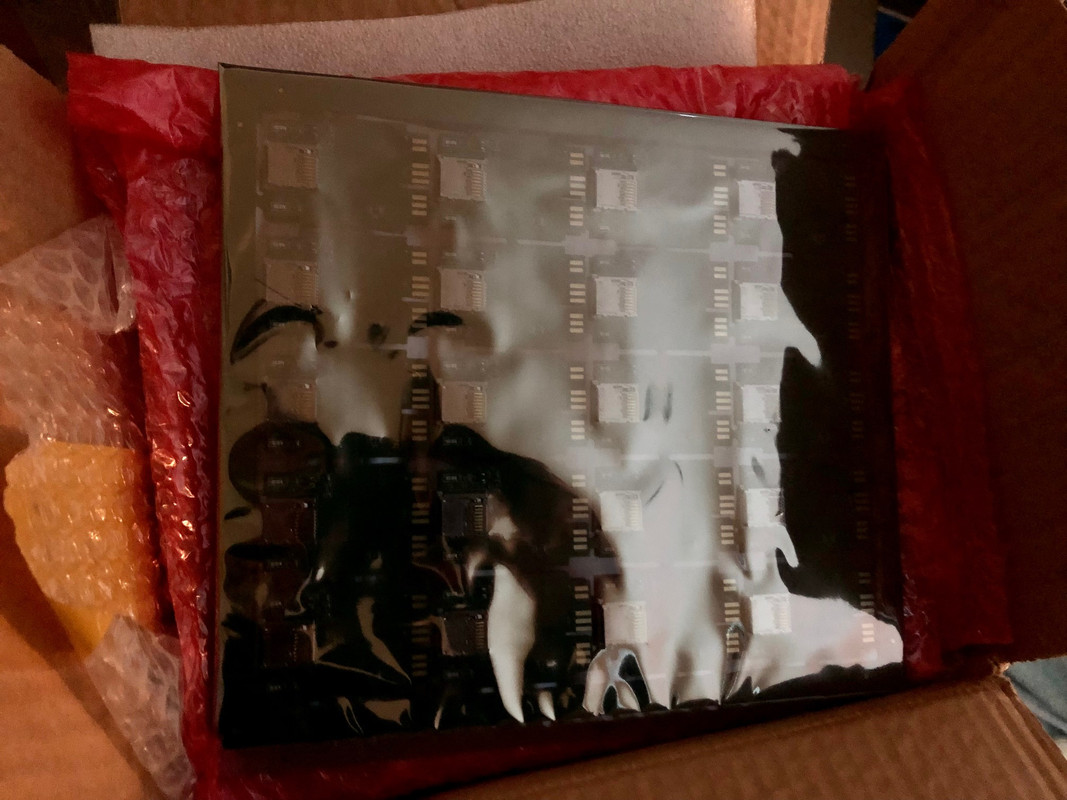
Someone got a package today!
IMG-4125.jpg

Finally! It only took about 3 months from paying them quite a bit of money to me getting a box filled with these! It's like Christmas!
Now to start testing. I purchased 3 different slim PS2's for testing, all with dead disc drives since I don't need them and they were cheap for parts models that all booted fine to the main menu.
I think between me and my friend we have all 4 Aussie models of slim PS2 released here, so I plan to get it running on all of mine, then going to his place and confirming it works with his as well!
Thanks again for that 3d printed case file @partlyhuman I will be able to start printing this weekend and get some units together to start selling by next week with a bit of luck and lots of testing. I might be back here this weekend for advice!
Thanks, scooby gang.
 
Quick question if anyone has the latest, the instructions say anything 75x and above won't work with the mod. Is this still the case? I seem to remember someone mentioning that it should work on all slim models, but I have a 9x slim to test as well and assume that one will still be an issue?
Just trying to figure out if I should even try with the 9x slim or not since I've heard different to the official linked instructions on the main page.
Cheers guys.
 
Being really late to this party. I want to quickly put one together, but question about RESISTOR - 47 Ohm, WHAT WATT ? Also who, where is selling the done unit? Many thanks
 
Quick question if anyone has the latest, the instructions say anything 75x and above won't work with the mod. Is this still the case? I seem to remember someone mentioning that it should work on all slim models, but I have a 9x slim to test as well and assume that one will still be an issue?
Just trying to figure out if I should even try with the 9x slim or not since I've heard different to the official linked instructions on the main page.
Cheers guys.

Hi @MetalMonkey ,
I've built one (soldering adapter to ps2 mc board) for a 90004 PAL PS2 slim. Works fine in slot 2 using OPL 1.2.0 beta (1875 as of present).

Being really late to this party. I want to quickly put one together, but question about RESISTOR - 47 Ohm, WHAT WATT ? Also who, where is selling the done unit? Many thanks
It doesn't pull heavy loads. it's just needed for pull up(ack). see pin 8 on the photo. 3 and 6 on the adapter are VSS( AKA GND/ground) so you bridge those two with a wire.
upload_2022-6-5_7-13-17.png
 
Last edited by a moderator:
Being really late to this party. I want to quickly put one together, but question about RESISTOR - 47 Ohm, WHAT WATT ? Also who, where is selling the done unit? Many thanks
As said, the resistor is a pull up for one of the pins, just so it doesn't float and cause random 1 or 0.
EDIT: I did find that if you buy a cheap 128mb ps2 memory card on amazon, you can remove the little parts (carefully!) and there are 2 surface mount resistors that add up to about 40 ohm in series. I just used those to bridge the 2 pins and that worked fine for me with no extra parts needed. I wired it up to a micro SD to SD adapter so I can still swap out cards too.

As for the finished units, as I posted, I just got a bunch of boards done and am currently looking at testing and 3d printing cases for them, but I'm also in Australia and did this because they are almost impossible to get here if you don't make one yourself.

You'd probably have better luck with the other guys mentioned, but if you're desperate, I'll post overseas.
 
Last edited:
  • Like
Reactions: TnA
Hi @MetalMonkey ,
I've built one (soldering adapter to ps2 mc board) for a 90004 PAL PS2 slim. Works fine in slot 2 using OPL 1.2.0 beta (1875 as of present).


It doesn't pull heavy loads. it's just needed for pull up(ack). see pin 8 on the photo. 3 and 6 on the adapter are VSS( AKA GND/ground) so you bridge those two with a wire.
View attachment 37522
Good to know! Thanks.

MODS: Any chance that the buttons on the main page can be updated with the new info? The latest on those is that it might be able to be done but there was no update on it for a while. Also I'm not sure if there is a significant difference between the original SIO2SD and the MX4SIO but I did note that the newer one had more parts, I got mine done from the SIO2SD version because that is what is linked on the main page, I didn't know about the MX4SIO version until someone here mentioned it after I had paid for the boards to be made.

Is that missing because it's not done by people on this site? Or do the buttons just need updating? Also, what are the advantages of the MX version since it has some extra parts, do you need different OPL versions etc for both because of that?

Cheers guys.
 
Good to know! Thanks.

MODS: Any chance that the buttons on the main page can be updated with the new info? The latest on those is that it might be able to be done but there was no update on it for a while. Also I'm not sure if there is a significant difference between the original SIO2SD and the MX4SIO but I did note that the newer one had more parts, I got mine done from the SIO2SD version because that is what is linked on the main page, I didn't know about the MX4SIO version until someone here mentioned it after I had paid for the boards to be made.

Is that missing because it's not done by people on this site? Or do the buttons just need updating? Also, what are the advantages of the MX version since it has some extra parts, do you need different OPL versions etc for both because of that?

Cheers guys.

Hi friends, ...SIO2SD and MX4SIO are the same, and function the same. Only differences are the SIO2SD can fit inside a PS1 or PS2 memory card case, and the MX4SIO PCB can not.

Also MX4SIO has a few more components compared to SIO2SD:- one extra MOSFET, few more resistors and a MLCC capacitor. Apart from that they fuction 100% exactly the same.

MX4SIO / SIO2SD ...work on all models of Phat / Slim PS2s, however, they do not work with the 90000 Slim models (unless you can already get FMCB / OPL to work with your 90000 Slim model, then it will work just fine).

@K112 ...it's better to use OPL BDM3 for MX4SIO, rather than OPL v1.1.0 or OPL Beta v1.2.0. Reason being OPL BDM3 was specially written for MX4SIO by the original developers here - Wisi and Maximus32. You can find and download OPL 1629 BDM3 on Page 15 of this thread... or use this link as a shortcut:-

https://www.psx-place.com/threads/m...-ps2-sio2-interface.29210/page-15#post-275928

Being really late to this party. I want to quickly put one together, but question about RESISTOR - 47 Ohm, WHAT WATT ? Also who, where is selling the done unit? Many thanks

@CoxyPS3 ...you live in Wales and me in Shropshire, we are practically neighbours lol ...i messaged you about the MX4SIO just now, sorry for delay i have been away recently.

Also @TnA and @All ...some news about the next MX4SIO Ultra Pack Give Away / lottery / raffle (which this time would include a Toshiba Exceria 128GB MicroSD card in every pack) ...i'm just waiting on the 3D printed cases to arrive, and hopefully they won't mostly all be broken like last time.
 
Last edited by a moderator:
Hi, I need some help. Today MC2SIO has arrived. I have a 64 mb memory card with FMCB v 1.953 installed and I installed OPNPS2LD-v1.1.0-Beta-1629-e20f2ee-bdm3 (the opl version I took from here). The games are recognized and were launched pretty fine. The problem is that I cannot save at all. Every game I launch tells me that there is no memory card inserted. There is XD How can I do to solve the problem?
 
Hi, I need some help. Today MC2SIO has arrived. I have a 64 mb memory card with FMCB v 1.953 installed and I installed OPNPS2LD-v1.1.0-Beta-1629-e20f2ee-bdm3 (the opl version I took from here). The games are recognized and were launched pretty fine. The problem is that I cannot save at all. Every game I launch tells me that there is no memory card inserted. There is XD How can I do to solve the problem?

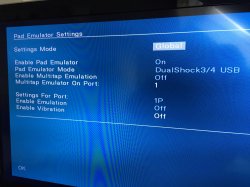
Try looking at the PADEMU settings in OPL, (see photo below) and make sure it's set to "Settings Mode = Global" and "Enable Pad Emulator = "On" (leave everything else as default) then select "OK", then 'Save Settings' ...hopefully that should fix it for you.

PaDEmu settings.jpg
 
Oh man, the Nacho and MrMario tutorials told me to separate games into CD if they were smaller than 4GB, which I thought was weird because even on my HDD it all went into the DVD folder. I doubt that matters for the bigger games but maybe that could be why smaller ones wouldn't work. Although some of the smaller ones DID work being in that folder.

Thanks alot Workz, I'll try this out tonight.
No, actually, MrMario said to use the "CD" directory if the game was under 700 MB (because that means the game was a blue-backed CD-based game--not released on DVD media. I assume Tito said something similar.
 
Try looking at the PADEMU settings in OPL, (see photo below) and make sure it's set to "Settings Mode = Global" and "Enable Pad Emulator = "On" (leave everything else as default) then select "OK", then 'Save Settings' ...hopefully that should fix it for you.

View attachment 37661
Thank you for the help but it's a bloody mess. I tried as you said, but no memory card in port 1.
Another problem was added. I have tried to use opl for 75xxx ps2 slim ( I have 77xxx) and it does not work, black screen. Actually, no opl seems to recognize the SD games anymore, neither the one adviced in various websites (it simply doesn't work, black screen).
I'll try to make some more attemp, it would be disappointing to have spent 35 bucks for nothing.

EDIT: A little update. I recovered a phat ps2 and a slim ps2 with dvd player broken but working. I cannot install opl bdm3 in any of the 3 consoles, under 1.953 and 1,966 FMCB. I installed opl beta 1.2.0 and it doesn't read the sd (refreshed, find the sd but no games, another version I had worked pretty fine but no save). I don't know what to do. I have another memory card, but i don't think the issue is about FMCB.
 
Last edited by a moderator:
Thank you for the help but it's a bloody mess. I tried as you said, but no memory card in port 1.
Another problem was added. I have tried to use opl for 75xxx ps2 slim ( I have 77xxx) and it does not work, black screen. Actually, no opl seems to recognize the SD games anymore, neither the one adviced in various websites (it simply doesn't work, black screen).
I'll try to make some more attemp, it would be disappointing to have spent 35 bucks for nothing.

EDIT: A little update. I recovered a phat ps2 and a slim ps2 with dvd player broken but working. I cannot install opl bdm3 in any of the 3 consoles, under 1.953 and 1,966 FMCB. I installed opl beta 1.2.0 and it doesn't read the sd (refreshed, find the sd but no games, another version I had worked pretty fine but no save). I don't know what to do. I have another memory card, but i don't think the issue is about FMCB.

I had a similar issue with a 77x and had to use the "pre 75x" file to get it to work. I haven't had a look at his for a while though, busy getting a case that works for the 300 boards I just got made before I can test them properly!

Oh and I'm not sure if the memory card issue is the same, but we simply hot swapped a fresh MMC out for the FMCB card and we were able to save then swap back to the FMCB card and keep playing (at least in the grand total of one game we tested that on)
 
I had a similar issue with a 77x and had to use the "pre 75x" file to get it to work. I haven't had a look at his for a while though, busy getting a case that works for the 300 boards I just got made before I can test them properly!

Oh and I'm not sure if the memory card issue is the same, but we simply hot swapped a fresh MMC out for the FMCB card and we were able to save then swap back to the FMCB card and keep playing (at least in the grand total of one game we tested that on)
Thank you for sharing your experience. I've tried both OPLs, 75xxx+ and the regular, I always get black screen. Withr the only release I was able to get working, IFcaro, I've tried to swap the FMCB memory card with a fresh one, but it always gave me the same error (no memory card). I will try again, but I'm starting to be discouraged :(
 

Similar threads

Back
Top