
You are using an out of date browser. It may not display this or other websites correctly.
You should upgrade or use an alternative browser.
You should upgrade or use an alternative browser.
PS2 [MX4SIO/SIO2SD] SD Card Adapter and SD-driver for the PS2 SIO2 interface
- Thread starter TnA
- Start date

Ronnie Sahlberg
Developer
Do you have any other ps2 to test? Isn't this one modchipped or something? I checked with my 50004 and OPL3.ELF (renamed to OPNPS2LD.ELF) works as intended. As for source code I think you should ask Maximus32.
This is the only slim one I have at this point but I have several fat ones.
On the fat ones, I can boot with FreeHDBoot , and then copy the BDM3 ELF file to the hard drive. Then I reboot with no memory card inserted and no usb stick inserted.
Once it has rebooted I start uLE and run the BDM3 ELF and within seconds OPL is running and showing the games on my HDD.
But if I plugin my MX4SIO modified memory card I can not get opl to recognize it or any games as the udb device.
I think I read something that MX4SIO only worked on slim models? So maybe that is the reason. Or my MX4SIO adapter might be broken, doesn't matter, what is important is that the BDM3 ELF file does start and shows the OPL screen within seconds.
Back to my slim. I boot the slim with funtuna on MC0, I start wLE and run the exact same BDM3 ELF as before. I do not have the MX4SIO plugged in. Again, on the slim OPL just hangs with a black screen.
So maybe it just does not work on my specific model of slim? Or maybe something else is wrong with my slim causing it to not work.
Again, it is not super super important for me to get it working since I have SMB1 on my slim and I have 4 Gamestar SATA adapters for my pile of fats, so I am not exactly lacking options, but it would be very cool to try it out.
EDIT:
No modchip.
Sorry, forgot to mention since someone asked about memory card.
I originally used a generic 128MB unofficial memory card. If that could be the issue I did purchase a brand new 8MB official Sony memory card and installed Funtuna and copied DBM3 onto the memory card.
After rebooting Funtuna and running DBM3, it still just hangs with a black screen.
Last edited:
Ronnie Sahlberg put in folder for mc card and test BDM3 1629 opl
https://www.mediafire.com/file/zte5s9ijb7maou3/OPL.zip/file
https://www.mediafire.com/file/zte5s9ijb7maou3/OPL.zip/file
Ronnie Sahlberg
Developer
Ronnie Sahlberg put in folder for mc card and test BDM3 1629 opl
https://www.mediafire.com/file/zte5s9ijb7maou3/OPL.zip/file
Thanks for the help. I tried that OPL config directory but it didn't work.
But I recalled that long time ago I used MechaPwn to set the DVD drive to locked mode so I could play DVD-R disks from uLE.
I ran MechaPwn and restored it from the backup and now OPL starts.
With further testing, the upstream version of opl 1.1.0 does not have this issue. Only the BDM3 build does. It manifests as IF you use MechaPwn and change the drive to Retail-DEX and ForceUnlock (which I use to be able to play DVD-R backups) then BDM3 will hang with a black screen upon starting.
Last edited:
¿Puedes poner una resistencia de 66omh?
Edito: si es posible, mi mx4sio ya funciona con 2 resistencias agregadas de 33ohm que dan un total de 66ohm
Edit: if possible, my mx4sio already works with 2 added 33ohm resistors giving a total of 66ohm
Last edited by a moderator:

atreyu187
Loathsome Dung Eater
Edito: si es posible, mi mx4sio ya funciona con 2 resistencias agregadas de 33ohm que dan un total de 66ohm
Edit: if possible, my mx4sio already works with 2 added 33ohm resistors giving a total of 66ohm
Please use a translator next time. I do not mind posting in your native language but English speaking form and it also helps if anyone is looking for info to fix the same thing.
Utilice un traductor la próxima vez. No me importa publicar en su idioma nativo sino en inglés y también ayuda si alguien está buscando información para solucionar el mismo problema.
partlyhuman
Forum Noob
Heya, just made an account to let y'all know that for a completely different reason I modeled a functional 3D printable PS2 memory card shell. This may be helpful for anyone building SIO2SD using a custom PCB. I have a few working well right now, a bit counterintuitive but I suggest printing it vertically for best results.
https://www.thingiverse.com/thing:5195671
Now that I'm aware of this project I might see if I can modify it specifically for SIO2SD.

https://www.thingiverse.com/thing:5195671
Now that I'm aware of this project I might see if I can modify it specifically for SIO2SD.

Workz_777
Senior Member
Hiya @Ronnie Sahlberg
...sorry to ask (you probably already posted this) what's your slim's model number?
...sorry to ask (you probably already posted this) what's your slim's model number?
Ronnie Sahlberg
Developer
Hiya @Ronnie Sahlberg
...sorry to ask (you probably already posted this) what's your slim's model number?
It is an SCPH-79002
Workz_777
Senior Member
It is an SCPH-79002
Many thanks, mine is a SCPH-77xxx
I was reading about the Deckard revisions here:-
https://playstationdev.wiki/ps2devwiki/index.php?title=IOP/Deckard
"Revisions
3.0 : CXD9796GP (SCPH-75XXX series/L-chassis)
3.0 : CXD9209GP (SCPH-77XXX series/M-chassis)
Starting with N-chassis/SCPH-79XXX, the IOP was integrated into the new main SoC together with its RAM. It still reports as version 3.0 in software."
Could this by why BDM3 might be causing problems, when comparing SCPH-75xxx and SCPH-77xxx with your SCPH-79xxx?
Ronnie Sahlberg
Developer
Many thanks, mine is a SCPH-77xxx
I was reading about the Deckard revisions here:-
https://playstationdev.wiki/ps2devwiki/index.php?title=IOP/Deckard
"Revisions
3.0 : CXD9796GP (SCPH-75XXX series/L-chassis)
3.0 : CXD9209GP (SCPH-77XXX series/M-chassis)
Starting with N-chassis/SCPH-79XXX, the IOP was integrated into the new main SoC together with its RAM. It still reports as version 3.0 in software."
Could this by why BDM3 might be causing problems, when comparing SCPH-75xxx and SCPH-77xxx with your SCPH-79xxx?
Possibly. It works with upstream OPL v1.1.0 but not with BDM3.
ALSO, it ONLY fails IF I change it to Retail-DEX and ForceUnlock (which I use to be able to run backup DVD-R from uLE)
IF I change it back to normal/original mode then BDM3 works.
If you feel brave you could try to switch yours to Retail-DEX/ForceUnlock and see if it happens there too. As long as you backup the flash first it should be safe and easy to restore it afterwards with MechaPwn. But no guarantees ...
Last edited:
Workz_777
Senior Member
Possibly. It works with upstream OPV v1.1.0 but not with BDM3.
ALSO, it ONLY fails IF I change it to Retail-DEX and ForceUnlock (which I use to be able to run backup DVD-R from uLE)
IF I change it back to normal/original mode then BDM3 works.
Ahh yes that's right, you did say that before, my bad. So you can get BDM3 working from MC only when you change your MechaPwn settings back to normal/original?
And does the official OPL v1.1.0 work for your SCPH-79xxx, with both changes:- "Retail-DEX + ForceUnlock" and normal / original mode?
Ronnie Sahlberg
Developer
YESAhh yes that's right, you did say that before, my bad. So you can get BDM3 working from MC only when you change your MechaPwn settings back to normal/original?
YESAnd does the official OPL v1.1.0 work for your SCPH-79xxx, with both changes:- "Retail-DEX + ForceUnlock" and normal / original mode?
Maybe you can try Retal-DEX/ForceUnlock on your 77000 and see if the same thing happens?
Workz_777
Senior Member
Maybe you can try Retal-DEX/ForceUnlock on your 77000 and see if the same thing happens?
...i can try, need to test some games first with my current setup. I just received an Exceria Micro SD card for testing, my Sandisk didn't work, but the Exceria is working very well so far.

I also just made the 10k resistor pull-up modification, and added a switch, so i can test some games with / without the 10k resistor, and report back the results here with a list, all being well soon. Ciao for now.
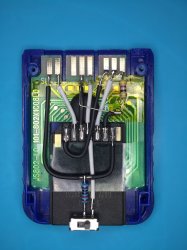
https://imgur.com/a/ZhGPSwp

VegaVegas
Forum Noob
Hi there. I'm a new tester of MX4SIO/SD PS2 adapter or whatever you call it. I used a broken PS1 card and soldered a micro SD->SD adapter to it and long and behold- it works flawlessly!! Here are the photos:


I use PS2 slim SCPH-70004 and used OPLv1.1.0-Beta-1629-e20f2ee-bdm3 and tested there titles and here are the results:
Marvel vs Capcom 2-works perfectly (after PADEMU on)
Mortal Kombat 5: Deadly Alliance USA-gameplay works completely fine but the opening cutscene skips a little
Mortal Kombat: Deception USA-works absolutely perfectly
Mortal Kombat: Deception premium disk USA (Mortal Kombat 1)-boots up but Mortal Kombat 1 loads endlessly
Samurai Shodown Anthology USA- works perfectly
Samurai Spirits - Tenka-ichi Kenkakuden JAPAN (Samurai Shodown 6)-works perfectly
Worms 3D-works perfectly
So far the results sound promising and everything works LEAGUES better than USB! Everything was tested on some old Kingston micro SD card 32GB class 4. I figured maybe a faster SD card will solve sporadic issues with some games. However I have a problem- only this specific micro SD card works. I bought 2x brand new Sandisk micro SD cards 32GB class 10 and they don't work at all. I tried to format them every possible way (in FAT32) and no matter how hard I try, PS2 never detects them at all or crashes. PS2 acts like there is nothing there. Am I missing something here?? Here is the photo:

Kingston-WORKS
Sandisk (both)-don't work at all
Please reply. Thanks in advance
I use PS2 slim SCPH-70004 and used OPLv1.1.0-Beta-1629-e20f2ee-bdm3 and tested there titles and here are the results:
Marvel vs Capcom 2-works perfectly (after PADEMU on)
Mortal Kombat 5: Deadly Alliance USA-gameplay works completely fine but the opening cutscene skips a little
Mortal Kombat: Deception USA-works absolutely perfectly
Mortal Kombat: Deception premium disk USA (Mortal Kombat 1)-boots up but Mortal Kombat 1 loads endlessly
Samurai Shodown Anthology USA- works perfectly
Samurai Spirits - Tenka-ichi Kenkakuden JAPAN (Samurai Shodown 6)-works perfectly
Worms 3D-works perfectly
So far the results sound promising and everything works LEAGUES better than USB! Everything was tested on some old Kingston micro SD card 32GB class 4. I figured maybe a faster SD card will solve sporadic issues with some games. However I have a problem- only this specific micro SD card works. I bought 2x brand new Sandisk micro SD cards 32GB class 10 and they don't work at all. I tried to format them every possible way (in FAT32) and no matter how hard I try, PS2 never detects them at all or crashes. PS2 acts like there is nothing there. Am I missing something here?? Here is the photo:
Kingston-WORKS
Sandisk (both)-don't work at all
Please reply. Thanks in advance
Workz_777
Senior Member
I bought 2x brand new Sandisk micro SD cards 32GB class 10 and they don't work at all. I tried to format them every possible way (in FAT32) and no matter how hard I try, PS2 never detects them at all or crashes. PS2 acts like there is nothing there. Am I missing something here??
Hiya Friend, nice results with your d.i.y tester memory card. With regards to Sandisk Micro SD cards, they don't work as a whole, many here have tried but Sandisk just won't work. Most other Micro SD brands work perfectly:- like Toshiba, Kioxia, Samsung, Kingston, Lexar, Transcend and apparently some un-branded ones too. Just not Sandisk.


Similar threads
-
-
-
PS2 [Testers Needed] MX4SIO - WIP SD Compatibility Thread
- Started by qnox32
- Replies: 199
-
Need help understanding OPL, BDM #'s, MX4SIO, SD card game booting
- Started by devsfan1830
- Replies: 1