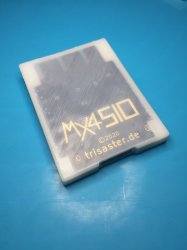
PS2 [MX4SIO/SIO2SD] SD Card Adapter and SD-driver for the PS2 SIO2 interface

@VegaVegas ...just finished the test = failed for me.

BSOD
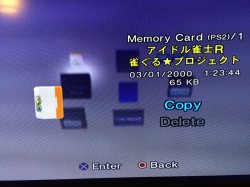
SLPS_251.82.Idol Janshi R Jan Guru Project

- Tried via MX4SIO on BDM3 = fail
- Also tried via USB on Official OPL v1.1.0 = fail

Edit: Then later, as you said VegaVegas, enabled Mode 1, and it worked.
SLPS_251.82.Idol Janshi R Jan Guru Project
 
Last edited:
Yes, if you load it with default settings it doesn't work. I noticed it only boots up if you turn on mode 1. After that I haven't found a way to progress beyond the save screen. This is "interesting"...
 
Yes, if you load it with default settings it doesn't work. I noticed it only boots up if you turn on mode 1. After that I haven't found a way to progress beyond the save screen. This is "interesting"...

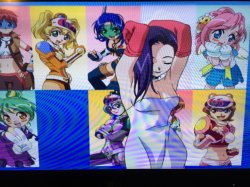
Ah yes, success now it works! MX4SIO

With Mode 1, yep... went to save screen, then pressed "O" for those save options and it works.

Now i see why you wanted to play this game so badly lol ;)

IMG_0039.JPG

IMG_0038.JPG
 
Last edited:
This game is for Japanese educational purposes... only........ Anyway, what configuration worked for you and which versions of each did you use??
 
This game is for Japanese educational purposes... only........ Anyway, what configuration worked for you and which versions of each did you use??

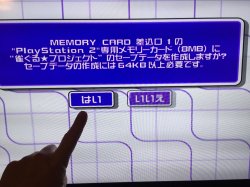
When it loaded to the save MC screen, there were two choices:-

(Japanese games normally use the "O" / Circle button for confirmation, not "X" button)

So arrange the blue box to the left side.
Then click the "O" button on joypad to confirm.
this option.JPG

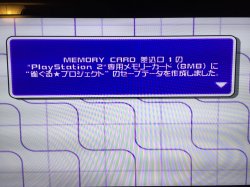
The game will go to this screen below, press "O" on joypad again.
The game should now start (and places a save file on MC0 / slot 1)
IMG_0043.JPG

The save file now showing up after i exited the game...
saves file to MC0.JPG

My setup....
PS2 (EU) Model = 77xxx
Slot 1 = FMCB 1.64
Slot 2 = MX4SIO
Micro SD = Kioxia Exceria 32GB
GUi Format,16k clusters
Pademu = enabled
OPL v1.1.0 Beta 1629 (BDM3)
Sony Dual Shock2 in Port 1
Mode 1 enabled for this game
 
Last edited:
  • Like
Reactions: TnA
Ah crap... I feel so stupid. I'm more than aware Japanese games usually have X as cancellation and O as confirmation. I assumed there was some sort of incompatibility issue (because you can never expect anything from OPL) and accidentally kept pressing the wrong button. Well, I pressed O and yes it worked and even saved. Thanks!

By the way, talking about that game, I noticed some real incompatibility issue and this time it's the oppisite. This game works fine on MX4SIO but the voices are all screwed up (sounds completely robotic) but it works perfectly fine on USB with all voices completely clear. This is interesting

But wait.... does anyone work on that OPL compatibility list every day and who is it??
 
Last edited:
Ah crap... I feel so stupid. I'm more than aware Japanese games usually have X as cancellation and O as confirmation. I assumed there was some sort of incompatibility issue (because you can never expect anything from OPL) and accidentally kept pressing the wrong button. Well, I pressed O and yes it worked and even saved. Thanks!

By the way, talking about that game, I noticed some real incompatibility issue and this time it's the oppisite. This game works fine on MX4SIO but the voices are all screwed up (sounds completely robotic) but it works perfectly fine on USB with all voices completely clear. This is interesting

The audio at my end is good on MX4SIO, with only "Mode 1" enabled for this game. How about you, do you have any more game Modes enabled?

You could try enabling Mode 2, i think this can help with audio / video glitches. So Modes 1 and 2 enabled together (as this game already needs Mode 1 to boot). Also you could try Modes 1, 3, 6 together. Or even Modes 1, 2, 3, 6 together.

Also check what your current GSM settings are, i think mine were set to Auto or NTSC for this game.
 
The game switches to NTSC but I forced NTSC in GSM settings anyway. I tried all possible combination of modes 1+2+3+6 and turning all of them on but all I get is same result- robotic voices on MX4SIO. I use PS2 slim SCPH-70004. Maybe it's worth taking note of
 
The game switches to NTSC but I forced NTSC in GSM settings anyway. I tried all possible combination of modes 1+2+3+6 and turning all of them on but all I get is same result- robotic voices on MX4SIO. I use PS2 slim SCPH-70004. Maybe it's worth taking note of

Hmmmm, strange, you should be getting faster speeds than me (70xxx IOP vs 77xxx Deckard).

TnA said on Page 28...

"MX4SIO currently runs at ~1.2-1.3MB/s (DECKARD-PS2s)

[MX4SIO currently runs at] 1.8MB/s on FATs and 70k-Slims."

Yet for me this game runs very smooth, for both Audio and Video. What about your Micro SD card, did you use GUi Format, if so what cluster size was allocated? (for a 32GB Micro SD Gui format will use 16k clusters as default)

Could it be the DIY build? ...i couldn't properly see yours through the plastic housing in your photos, from what i can see it looks super neat, with nice solders. Did you cut the PCB traces leading to the edge contacts, so the edge contacts are only connected to your soldered wires and nothing else? Did you add the 47 Ohm resistor?

Your wires look like 32 AWG - 30 AWG, if so they have a maximum amp limit (for power transmission) of around 0.09A. I used a 22 AWG solid wire that has a maximum amp limit of around 0.9A, which is 10 times the difference. The +3.3 volt pin might be near your wire's limit. In early versions of the SD spec, cards were allowed to draw up to 200mA (0.2A), now days (from Toshiba specs) it's around 80mA (0.08A), but can go upto 163mA (0.16A). However your wire has a 0.09A limit

Meaning, you could up the size of your wire on the +3.3V power pin, and ground wires, to a 26 AWG (or thicker wire). Just in case your Kingston Micro SD is getting less current than it would like, which could result in slower / less consistent / buggy speeds.
 
Last edited:
Nah, I don't think we should go over all of the trouble for just 1 game. After all this is OPL. I constantly get inconsistencies between various games where somethings works right on SD card but doesn't work on USB or vice versa or some aspect works on one solution but something else is broken in the other etc. Overall yes you are right about power wires and this is usually a good practice to give thicker traces or wires to power rails for all designs and I overlooked it. I should try improving them. I will only post a message if I see any improvements after that
 
Nah, I don't think we should go over all of the trouble for just 1 game. After all this is OPL. I constantly get inconsistencies between various games where somethings works right on SD card but doesn't work on USB or vice versa or some aspect works on one solution but something else is broken in the other etc. Overall yes you are right about power wires and this is usually a good practice to give thicker traces or wires to power rails for all designs and I overlooked it. I should try improving them. I will only post a message if I see any improvements after that

Yeah, for sure if 99.99% of your games are working fine i agree. Just maybe at a later date, for the power + ground lines, it might be good to get a 28 AWG / 26 AWG wire for a future upgrade on your proto-type, most VGA cables have that size wire (if you have any of those laying around). If your Kingston Micro SD card is getting less current (Amps) than it wants, it could inconsistently reduce speeds.

When i get a chance, i will aim to test Mortal Kombat 5 for you, seeing as you had some FMV speed issues there before, to compare speeds with my slower Deckard, if for me there are no FMW / Cutscene issues in comparison, then i would suggest upgrading your power + ground wires to 28 AWG or thicker, and see if there's an improvement. With soldering skills like yours, i'm sure it wouldn't take more than a few minutes.

But wait.... does anyone work on that OPL compatibility list every day and who is it??

Sorry i just noticed you wrote this.

Well, there is also a MX4SIO game compatibility test list done by TNA / Takeshi / Anakin94 / Maximus32.

I am currently testing all the "red" and "yellow" games (not working) on these lists using BDM3, to report back here the results. Then i have been using that OPL-CL site to also see what Modes helped people before for certain games.

Anyways, here are the MX4SIO Excel sheets from TnA:-

(at the base of this spread-sheet it has A-Z tabs to go through)
https://www.trisaster.de/file/sony/ps2/mx4sio/2021-01-28_MX4SIO_Compatibility-List.ods

Another list here done by Anakin94, provided by TnA:-
https://www.trisaster.de/file/sony/ps2/mx4sio/2021-09-13_SIO2SD-MX4SIO_Compatibility-Anakin94.ods
 
Last edited by a moderator:
Yes I did. There is a form for users to submit and I'll add to the master copy. Will make video this week to spread the word.

https://docs.google.com/spreadsheet...ouid=114220944458343422583&rtpof=true&sd=true

:D This is really great news! ...i can't wait to submit some games soon, which are already on the master spread-sheet, in red or yellow (not working) that now do work when tested using BDM3 (and with no Modes enabled) on my 77xxx Deckard.

I also have tested 50+ games over the last few days, (yeah it was painful lol) many are not on the master spread-sheet yet, and they work perfectly, the compatibility is super high, i'm excited to share the results and now we can submit them via the form for the master spread-sheet is amazing news!

For friends here testing their games for MX4SIO ....There is one important thing to note:- as has been mentioned here already, some games won't work with a Sony PS1 / DS1 controller, and freeze on loading screens. Some games will only work with a Dual Shock2 connected, or a DS3 / DS4 via BlueTooth, or USB cable (with PadEmu enabled).

So if when testing, the game fails to load, make sure not to be testing with only a PS1 / DS1 controller, for best results.
 
Last edited:
:D This is really great news! ...i can't wait to submit some games soon, which are already on the master spread-sheet, in red or yellow (not working) that now do work when tested using BDM3 (and with no Modes enabled) on my 77xxx Deckard.

I also have tested 50+ games over the last few days, (yeah it was painful lol) many are not on the master spread-sheet yet, and they work perfectly, the compatibility is super high, i'm excited to share the results and now we can submit them via the form for the master spread-sheet is amazing news!

For friends here testing their games for MX4SIO ....There is one important thing to note:- as has been mentioned here already, some games won't work with a Sony PS1 / DS1 controller, and freeze on loading screens. Some games will only work with a Dual Shock2 connected, or a DS3 / DS4 via BlueTooth, or USB cable (with PadEmu enabled).

So if when testing, the game fails to load, make sure not to be testing with only a PS1 / DS1 controller, for best results.

This is amazing progress. I am bewildered by the amount of activity in the PS2 scene.
Is anyone going to set up an ebay shop to sell these devices? I made one but, lets say my eyes and hands are not as accurate anymore as they were 40 years ago when I worked on surface mounted zilog80 replicas :-(
I would pay material + shipping + 50$-labor for one that looks better than the one I made. Or whatever you need to charge.
 
I would pay material + shipping + 50$-labor for one that looks better than the one I made. Or whatever you need to charge.

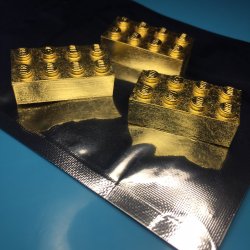
Hiya Ronnie, i think for that budget it would need to be made of Gold! :cool:

And while i don't have a MX4SIO made of Gold yet to sell you...

....i do however have something for your budget, 24 carrat Gold Lego bricks!

Gold _Lego.JPG

Could i interest you in some of these, while you wait for your MX4SIO?


EDIT ....oh wait, hold on, i do actually have a Gold MX4SIO, doh me! ;)

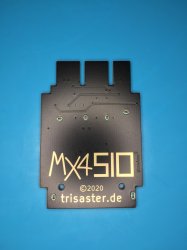
Gold MX4SIO_back.JPG

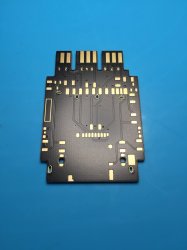
Gold MX4SIO_front.JPG

MX4SIO Gold (After Dark) Edition !

All contacts are gold electro-plated, even the logo! :love heart:

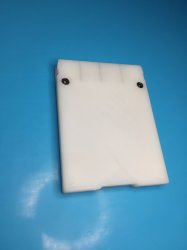
It just arrived today, just after @Ronnie Sahlberg posted his message, i thought it would be funny to make a little joke before i posted the photos here. I do have a 3D printed case too...

IMG_0079.JPG

IMG_0075.JPG
 
Last edited:
Great, you used the original files! :)
That dark PCB looks good as well!

Huge thanks to you guys of course! :D

Yes, btw that 10k pull-up resistor (on Data line) made no difference for me, not for game compatibility, not for Micro SD compatibility either, so the original files are the best.

Only thing, it costs alot when ordering on a personal level though, the PCB + 3D printing companies only do good deals for big bulk orders :rolleyes: ...so OSHPark etc are good for small orders like this.

The 3D printing company didn't like the 0.3mm thickness of the top case (where you see through to the MX4SIO logo) ...they said they would only print this 0.3mm thickness if i agreed to the risks in an email, because they said it would be fragile. But i guess they don't know that's where the PCB sits, and the PCB makes that area strong after.

I was thinking of getting another top case made, and making the 0.3mm thickness to 0.5mm thickness, could still get some of the transparent effect, but then i realized the PCB is 1.55mm thick which makes it hard to add anymore thickness to the top case without the PCB being higher than the actual case it sits in.

Anyways, i'm super happy with it :cool2:
 
Last edited:
  • Like
Reactions: TnA

Similar threads

Back
Top