PS2 [MX4SIO/SIO2SD] SD Card Adapter and SD-driver for the PS2 SIO2 interface

My apologies, I meant the SIO2SD is the one I got. Bloody typos!
I'm really just trying to figure out why there was a 2nd version, and what differences there are, since I have apparently made V1 (SIO2SD), I did ask this once but someone just said they were basically identical. I'm just curious as to what other differences there are, apart from the case being different. I can see there are some extra parts on the MX version. Sorry I got confused between MC and MX I guess, that is probably where half of my confusion comes from.
TL;DR: What is the difference between SIO and MX that needed a 2nd version? And would I need to know anything specific for the SIO version that I got from the front page. Cheers.

EDIT: I do know the name had to change due to the atari or amiga thing, I can't remember which, but I know about that. My main question is, was that the main reason for the change, and the cosmetic and part changes were just for easier access to parts? Or are there any actual functional differences?

And thanks for clearing up my stupidity and mixing up MC and MX and forgetting I made the SIO. Duh to me on that part. No confusion there now. Thank you.

Oh, and while I'm typing, I was wondering, for any of the mods here or all of you. Since I will be selling these with a custom case of some kind, would you like me to put anything in particular to label it or anything? I plan on giving you guys full credit for the design and telling people to come here for help if I can't help them myself. I don't want to go down that MC route at all.

Hey @MetalMonkey ...so this (in bold below) is from the MX4SIO hardware designer Takeshi:-

"MX4SIO (Memory eXpansion For SIO) is an adapter for the PlayStation 2 that lets you connect SD cards to the memory card slot. SIO is the name of the PlayStation's interface chip. In the PlayStation 2 it is called "SIO2".

The version you went with, SIO2SD, was the first of two generations, SIO2SD (1st gen) and MX4SIO (2nd gen). They function exactly the same, and for the most part they share the exact same components, and both have 2 x top facing LEDs. However, MX4SIO can also have 2 more extra LEDs added on the sides of its PCB (4 x LEDs in total).

So the SIO2SD does have a few less components when compared to MX4SIO. SIO2SD has 1 x Mosfet and as a result less resistors that would have teamed up with that extra Mosfet, whereas MX4SIO has two sets of Mosfets and as a result a few more resistors. MX4SIO also has a MLCC capacitor to filter out any AC noise on the power rail, whereas SIO2SD is lacking this MLCC capacitor and has no AC filtering on its power rail.

SIO2SD's PCB is 1.0mm thick, MX4SIO's PCB is 1.6mm thick, because SIO2SD was originally designed so end-users could fit that PCB inside their own PS1 or PS2 memory card case, thus reducing costs / price for the end-user. The devs then thought this was a bad idea because they feared it would drive up the price of PS1 and PS2 memory cards, which wouldn't be fair on people living in countries where the cost of living isn't easy. And also this could have caused a shortage of PS1 / PS2 memory cards, as people would have bought them up to fit the SIO2SD inside of those cases, and then what would have happened to those original PS1 / PS2 memory card PCBs after that, is a question.

So for these reasons, and also because the name "SIO2SD" was already an existing product on the market for Atari 600XL 800XL 65XE 130XE, the devs decided to rename and redesign / improve SIO2SD into what it is today:- MX4SIO. Now the new PCB could be produced cheaper as 1.6mm is more common than 1.0mm at PCB fab houses, and the devs decided to slightly improve the inner workings of the MX4SIO, (as mentioned above with the extra components and options). For example, the new PCB version can accept either a MicroSD socket or a larger SD card socket, both options are avaliable on the newer PCB version.

I guess you could look at it like this, SIO2SD was the devs' prototype, and MX4SIO is the final product. However, it's important to know, both SIO2SD and MX4SIO function the exact same way. It's just MX4SIO has a few more build options available on it's PCB.
 
Hey bro, lol you mean "a real MX4SIO", created here by the PSX-Place Devs / Team (Takeshi, Maximus32, Wisi, TnA, Anakin94) ...not Bitfunx, not MC2SIO, but the real authentic MX4SIO. For me this MX4SIO version works perfectly on my 77K slim with OPL BDM3, and has been working every day. Also, i sent the original version to many members here in PSX-Place and it's working fine.

If you want one, "a real MX4SIO" ;):D ...then please just message me anytime, i have some at the moment :encouragement:
Hello. I just made an account as I'm also interested in your variant of MX4SIO. I don't think I can DM you...are you willing to contact me to discuss payment & shipping options?
 
@Workz_777

Can you please help me, I'm pulling my hair out trying to figure this out. I'm using the compatibility chart notes to no avail. I'm using the MX4SIO with all of the settings you recommended throughout the previous pages here and all of my games are working flawlessly except for two (Burnout 3 Takedown + Dominator). Burnout Revenge is working perfect.

I have tried both NTSC and PAL versions of Takedown/Dominator. Used tons of different settings Mode 1 on and off, GSM on and off, Pademu on and off, etc....etc....

Results:
Burnout 3 Takedown ALWAYS gets permanently stuck at around 75% on the initial loading screen the game does as soon as it boots up.
Burnout Dominator it either stays stuck on a solid white screen or solid black screen depending on the settings used when attempting to boot game.

Note: All 4 of these ISO files are fine because they work properly in both an emulator and when I burn them to a disc to play in real PS2 hardware. My MX4SIO and FMB (on OEM PS2 Memory Card) are probably not problem because 30+ other games I tested are working properly including saving and flawless FMVs. I'm guessing the problem is that my settings do not mirror the settings you are using.

Can you please advise what you think I'm doing wrong? Can you please provide the exact setting that you used to get these 2 games running properly?

I'm on PS2 slim (model 75001). Using BDM3. Using OEM dualshock 2 controller in port 1.

Thanks in advance!

Hiya bro, just gonna message you now :encouragement:
I think my @ you message above did not actually notify you. Can you see this one? Any chance you can share your experience/wisdom with me on the above message? Based on your previous posts here, you seem to be the expert on this device! Thanks
 
Last edited by a moderator:
Hello All,
I'm hoping someone might be able to help me out. I've been trying to get the MC2510 to work on my PS2 (SCPH-79001) and I'm getting nowhere. Here are some details.
I have Free McBoot 1.966 booted and running.
I followed the instruction from the video Macho Nacho created.
When I put the .ELF file from the "Slim 750XX+ OPL for BOOT Folder" in the boot folder on the FMCB disk, when I launch OPL I just get a black screen and it freezes. When I put the .ELF from "Primary OPL for BOOT Folder" folder in the Boot folder on the FMCB disk, OPL will launch, but it freezes when it tries to read "USB".

I can't get past this point. I've downloaded everything a few times to make sure nothing is corrupt. I've tried other copies of the OPL 1.1.0 ELF files from the official page and that won't read the USB either.

Any help would be very much appreciated.

Thanks!!!!
 
Saving in the GUI and hopefully In-game should work again!
I tested, it... finally saves settings without infinite 'saving settings' animation and saving in game works, however I didn't have problem with that. :)

And MX4SIO that lists and loads games doesn't work here even with infamous no MC detected, it lists only CD games folder without showing covers, and yes, it does work with BDM3.
 
Does anyone here have Burnout 3 Takedown and Dominator working? I would like to compare screen shots of my settings page vs your settings page. I have tried everything and both games fail to work on my end.
 
Please try the newest re-build of OPL rev. 1912!

I want to be sure I get the correct file. Where do I download this from?

Sorry, new to this so still figuring out where everything is located.

Thanks
 
Last edited by a moderator:
I recently got a PS2 slim 70012 and set it up using one of helder's game tech MC2SIO adapters (Macho Nachos YT video made this all happen lol). I'm running FreeMCBoot v1.966 on an official PS2 memory card that I created and OPL v1.1.0-Beta-1627-23ba65. So far this is great and about more than half the games I have tried work perfectly. I did have a few questions on the project and in general I'm hoping I can find here:

I just found out yesterday that MC2SIO is a variation of the the main MX4SIO and that really I should be using a MX4SIO adapter. What are the main differences here? Why is MC2SIO being made if it's unofficial or won't get the same support as the main MX4SIO project?

I saw on github that there is a final version of OPL v1.1.0 - is there any advantage to using that final release over the beta version of OPL I have installed? Or is this beta that I have installed now (OPL v1.1.0-Beta-1627-23ba65) the only one that works with Helder's MC2SIO card?

Is there or will there be GunCon2 support? In the compatibility gsheet no one tested lightgun games. I have a Japanese GunCon2 that I use with my MiSTer that I wanted to use for this. So far I have tried booting all the Time Crisis games and Vampire Night with an official PS2 DualShock plugged into controller slot 1 and the GunCon2 plugged into controller slot 2. None of the games booted so I don't know if this is an OPL issue with these games, or a controller setup issue on my end. Or is it a MC2SIO issue?

I've read about clone MX4SIOs floating around but don't know where to get a legit one. Are the ones on aliexpress legit and safe to use? Or is there a member on here that makes and sells MX4SIO?

Lastly, how often is the compatibility gsheet updated? Some of it is not accurate from my testing (is this another MC2SIO issue?)

thanks!
 
@Workz_777

Can you please help me, I'm pulling my hair out trying to figure this out. I'm using the compatibility chart notes to no avail. I'm using the MX4SIO with all of the settings you recommended throughout the previous pages here and all of my games are working flawlessly except for two (Burnout 3 Takedown + Dominator). Burnout Revenge is working perfect.

I have tried both NTSC and PAL versions of Takedown/Dominator. Used tons of different settings Mode 1 on and off, GSM on and off, Pademu on and off, etc....etc....

Results:
Burnout 3 Takedown ALWAYS gets permanently stuck at around 75% on the initial loading screen the game does as soon as it boots up.
Burnout Dominator it either stays stuck on a solid white screen or solid black screen depending on the settings used when attempting to boot game.

Note: All 4 of these ISO files are fine because they work properly in both an emulator and when I burn them to a disc to play in real PS2 hardware. My MX4SIO and FMB (on OEM PS2 Memory Card) are probably not problem because 30+ other games I tested are working properly including saving and flawless FMVs. I'm guessing the problem is that my settings do not mirror the settings you are using.

Can you please advise what you think I'm doing wrong? Can you please provide the exact setting that you used to get these 2 games running properly?

I'm on PS2 slim (model 75001). Using BDM3. Using OEM dualshock 2 controller in port 1.

Thanks in advance!


I think my @ you message above did not actually notify you. Can you see this one? Any chance you can share your experience/wisdom with me on the above message? Based on your previous posts here, you seem to be the expert on this device! Thanks

Hiya @Splintercell70 ...no lol i'm not an expert bro, that would be the others here + the devs, but i am a big fan :D

...o.k so let's check the MX4SIO game compatibility list:-

https://docs.google.com/spreadsheets/d/1zHxhwT4nSkrCCAqJNlSndw1Yeh_9g3eL/edit#gid=2095482473

Burnout 3 Takedown seems to work, i remember testing this game myself and it worked fine on my 77xxx model + BDM3, and others too have confirmed this game works, also Burnout Dominator should be working.

If all the games you've tested so far worked fine, but these two games, all i can suggest is what caused Burnout 3 Takedown to not work for me originally and what fixed it in the end, but i see you are already using a PS2 Dualshock2 gamepad, and that was the fix for me, when i was using a PS1 Dualshock1 gamepad it caused most of the racing game to not load, they would just freeze on the loading bar which also progressed at a very slow speed. The PS2 Dualshock2 gamepad solved this, but you don't have any PS1 controllers inserted in your PS2 when testing this game, right?

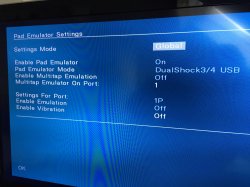
Other than that, make sure your PADemu configuration is set like in this image below:-

pandemu settings.jpg

Don't forget to press "OK" and "Save Settings" after.

You could also try to reformat your SD / MicroSD card just incase it has become fragmented. I use GUiFormat FAT32 and 16384 Allocation Unit Size. Then just place those games into the DVD folder on your SD / MicroSD card, so you can test them again.

I forget if those games you are having problems with are over 4GB or not? If yes, then i presume you are using USBUtil v2.2 to split them down into smaller parts and placed those parts on the root of your MicroSD / SD card? If those games are not over 4GB in size then ignore this.
 
Hiya @Splintercell70 ...no lol i'm not an expert bro, that would be the others here + the devs, but i am a big fan :D

...o.k so let's check the MX4SIO game compatibility list:-

https://docs.google.com/spreadsheets/d/1zHxhwT4nSkrCCAqJNlSndw1Yeh_9g3eL/edit#gid=2095482473

Burnout 3 Takedown seems to work, i remember testing this game myself and it worked fine on my 77xxx model + BDM3, and others too have confirmed this game works, also Burnout Dominator should be working.

If all the games you've tested so far worked fine, but these two games, all i can suggest is what caused Burnout 3 Takedown to not work for me originally and what fixed it in the end, but i see you are already using a PS2 Dualshock2 gamepad, and that was the fix for me, when i was using a PS1 Dualshock1 gamepad it caused most of the racing game to not load, they would just freeze on the loading bar which also progressed at a very slow speed. The PS2 Dualshock2 gamepad solved this, but you don't have any PS1 controllers inserted in your PS2 when testing this game, right?

Other than that, make sure your PADemu configuration is set like in this image below:-

View attachment 38181

Don't forget to press "OK" and "Save Settings" after.

You could also try to reformat your SD / MicroSD card just incase it has become fragmented. I use GUiFormat FAT32 and 16384 Allocation Unit Size. Then just place those games into the DVD folder on your SD / MicroSD card, so you can test them again.

I forget if those games you are having problems with are over 4GB or not? If yes, then i presume you are using USBUtil v2.2 to split them down into smaller parts and placed those parts on the root of your MicroSD / SD card? If those games are not over 4GB in size then ignore this.

Thanks for replying! Yes, my PADemu settings match yours but the game was still not working on BDM3, unfortunately. Good news! I just now fixed it by using build:
OPNPS2LD-v1.2.0-Beta-1913-34f6d46.7z:
https://github.com/ps2homebrew/Open-PS2-Loader/releases/tag/latest.

Thank you Jolek! Now I have all 3 burnout games working perfect on my slim PS2 thanks to you. You rock!

Thanks Workz_777. I have all of my other PS2 games currently working on my MX4SIO by using your recommendations on all of the previous pages. You indirectly helped me a TON!
 

Similar threads

Back
Top