PS2 [MX4SIO/SIO2SD] SD Card Adapter and SD-driver for the PS2 SIO2 interface

There is no official version yet. Well... There is... But no mass production!

There are rather multiple EXTENDED "SIO-Projects" which support, or could support the functionality, like MemCardPro2, PicoMemCard or Helder's project.
 
Hello.

I just registered as I was reviewing the thread and I wanted to contribute with my MOD to my PS2 Slim, using mx4sio, in addition to the problems I've had so far that I'm still working on.
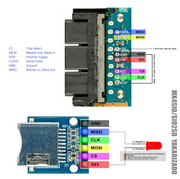
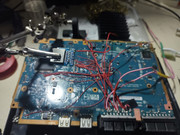
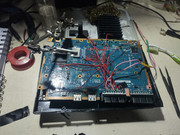
I did it in a homemade way using the diagram of a "mundoyakara" web page, it is not original to me, but once installed, I work with it.

------------------------------------------------------------------------------------
Hardware data
Model console: SCPH-77001
TF Micro SD Card Module Board Mini SD Card Module for Arduino ARM AVR
Status Light led + resistance 22ohm

Software data
FMCB 1.953 in memory slot 1
SD card 16GB
------------------------------------------------------------------------------------

The diagram I used would be this


------------------------------------------------------------------------------------

First Tests

After finishing accommodating the new components inside the casing and closing, the ignition was normal, using the OPL loaded in the FMCB memory card, at first, it did not recognize the modification. After investigating, I used the OPL version "OPNPS2LD-v1.2.0-Beta-DB_all-2202-642fe4e-2021-11-14", which allowed me to enable the "BDM start mode / block devices / MX4SIO / ON" options ".

In the SD memory, an ISO of Metal Slug Anthology was loaded (later I tried several more games), using the program USB Util v2.1, which I defragmented using the program Defraggler v2.22.995. On other PS2 Slims, using these files, it runs perfectly.

-Once the configurations are finished, the PS2 recognizes the games perfectly.

-The status light (light led) connected as indicated in the diagram, constantly alerts me when the SD is working, which helps a lot.

-There are times when turning on the console and entering the OPL, having the led light connected, it does not recognize or the content appears reflected at first, the solution to this that I found is to remove and put back the SD memory without turning off the console , almost instantly recognizes the contents of the SD.

-I can not view the content of the SD through uLauncherELF, entering "mass", it does not show any content, as if there were no USB installed. I deduce from this that the USB driver cannot be used for SD in mx4sio itself, and I have not found a driver that allows me to access the contents of the SD memory. (still pending)

-I can't save in-game data, all games indicate that there is no MC installed. I tried changing the MC (FMCB) to an empty MC, but it still doesn't recognize that MC. (still pending)

Anyway

Although the hardware section could be carried out without major problems, there is no software that supports this modification yet.
I don't have much knowledge in software development, so I can only wait for a version of OPL that supports a modification like this.


I'm sorry, I'm not very good with English
 
Thanks for replying! Yes, my PADemu settings match yours but the game was still not working on BDM3, unfortunately. Good news! I just now fixed it by using build:
OPNPS2LD-v1.2.0-Beta-1913-34f6d46.7z:
https://github.com/ps2homebrew/Open-PS2-Loader/releases/tag/latest.

Thank you Jolek! Now I have all 3 burnout games working perfect on my slim PS2 thanks to you. You rock!

Thanks Workz_777. I have all of my other PS2 games currently working on my MX4SIO by using your recommendations on all of the previous pages. You indirectly helped me a TON!

Hey that's great news! ...i want to play around with this latest build of OPL v1.2.0-Beta-1913 maybe tomorrow, excited :D
 
Got some more noob help questions. Each time I restart my PS2 70012 I have to manually remove the MC2SIO from the PS2 and reinsert it for OPL to recognize it. This is a minor inconvenience but it still worked as intended. Today after a session of THPS3 and restarting my PS2 my saved art isn't showing up in OPL v1.1.0-Beta-1627-23ba65. When I plug the microsd card into my PC OPL manager sees all of the art and I can see it in the ART folder on the card. Any ideas what could be causing this? I have show art selected in the OPL menu. I've only had my MC2SIO since Friday so I doubt it's going bad but any advice/tips?
 
So i tested MX4SIO (PSX-Place Devs' version) with the new version of OPL v1.2.0-Beta-1913...

And it works perfectly with exFAT and saves! :quartet:

Games run and play just like with FAT32

Tested with Toshiba Exceria 128GB exFAT (games placed in DVD folder)

@Haker120 ...bro try with OPL v1.2.0-Beta-1913 and see for yourself

Paco was telling me that Maximus32 has been working on OPL v1.2.0-Beta-1913, that's so cool! :D


Got some more noob help questions. Each time I restart my PS2 70012 I have to manually remove the MC2SIO from the PS2 and reinsert it for OPL to recognize it. This is a minor inconvenience but it still worked as intended. Today after a session of THPS3 and restarting my PS2 my saved art isn't showing up in OPL v1.1.0-Beta-1627-23ba65. When I plug the microsd card into my PC OPL manager sees all of the art and I can see it in the ART folder on the card. Any ideas what could be causing this? I have show art selected in the OPL menu. I've only had my MC2SIO since Friday so I doubt it's going bad but any advice/tips?

@Devastator84 ...give the new OPL a try, it might help...

@jolek already posted the link on page 59, but here is the link again...

https://github.com/ps2homebrew/Open-PS2-Loader/releases/tag/latest

and download this one:- OPNPS2LD-v1.2.0-Beta-1915-96eb7eb.7z
 
Last edited:
Hello all,

Was wondering if anyone has made any progress getting the following two Simpsons games working? Or are they hopeless at this point?
Simpsons Hit and Run
Simpsons Road Rage

Thanks!!

I switched from using BDM3 to v1.2.0-Beta-1913-96eb7eb to see if it would help with over all game play. When I did this every game says "can't load configuration for this item". Any ideas why?

So then I grabbed the latest, v1.2.0-Beta-1915-96eb7eb and it won't even read the SD card.
 
Last edited by a moderator:
I switched from using BDM3 to v1.2.0-Beta-1913-96eb7eb to see if it would help with over all game play. When I did this every game says "can't load configuration for this item". Any ideas why?

So then I grabbed the latest, v1.2.0-Beta-1915-96eb7eb and it won't even read the SD card.

You have to set it correctly, and enable MX4SIO, in the OPL settings under BDM
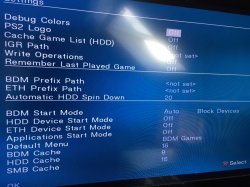
 
You have to set it correctly, and enable MX4SIO, in the OPL settings under BDM
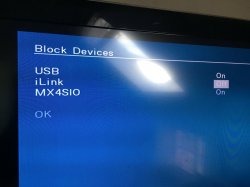
I believe so. Is there some place that shows all the settings I should have in place?

AH HA!! I got it. I was looking at the Block setting backwards on vs off. Seems to be working now.

Sorry, still learning all the ins and outs of this thing.
 
Last edited by a moderator:
@Techuhak

in OPL Settings for OPL v1.2 - 1913

Scroll down to "BDM Start Mode" (see in photo below)...

OPL settings-1.JPG

...then enter "Block Devices"

now turn "On" MX4SIO (see in photo below here)

OPL settings-2.JPG

Then press "OK" and "Save" after.

Also make sure all your OPL settings match the settings in 1st photo here, then see if that fixes it for you.

EDIT: Ah cool you sorted it before i posted this message lol, well if anyone else needs the info hopefully it helps
 
I'm now running this OPL - OPNPS2LD-v1.2.0-Beta-1915-96eb7eb.7z

More games work now, some with video issues but they are booting!

Still running into the no art showing up though. Any idea what could fix that? Art is set to display in OPL, the art shows up in the SD cards ART folder and the art shows in OPL manager when checking on my PC.
 
What kind of video issues bro?

Here are games that were broken for me on OPL v1.1.0-Beta-1627-23ba65 that are now fixed with OPL v1.2.0-Beta-1915-96eb7e

Playstation 2 Slim 70012
MC2SIO / 512 GB Samsung Pro Micro SD card
***Free MCBoot v1.966 // OPL v1.2.0-Beta-1915-96eb7e***

*DOES NOT BOOT
Gradius V (Does not boot, black screen)
Medal of Honor Frontline (Does not boot, black screen)

*BOOTS WITH ISSUES
Ace Combat 4 Shattered Skies (Choppy FMV, video stutter, didn't try gameplay)
Armored Core 3 (Some video stutter but totally playable)
Burnout 3 Takedown (Choppy FMV, video stutter, didn't try gameplay)
Devil May Cry (Choppy FMV, video stutter, didn't try gameplay)
Gran Turismo 3 A-Spec (FMV Stutter)
Guilty Gear X2 (Game runs fine but the intro video skips)
Jak and Daxter (Needs Mode 1,3,6 selected but playable)
Marvel vs Capcom 2 (FMV stutter)
R-Type Final (FMV stutter, didn't try gameplay)
Shadow of the Colossus (FMV stutter, didn't try gameplay)
Tekken Tag Tournament (FMV stutter, audio cuts out, didn't try gameplay)
The Thing (Game boots, but doesn't load the campaign from the menu)
Time Crisis II (Game loads, videos/audio stutter, can't reload with GunCon2)
Time Crisis III (Game loads, videos/audio stutter, can't reload with GunCon2)
Time Crisis: Crisis Zone (Game loads, videos/audio stutter, can't reload with GunCon2)
Vampire Night (some stutter but the game is playable)
Twisted Metal Black (Boots but controller does not work)
Zone of the Enders (FMV Stutter very minor, totally playable)

FIXED
Manhunt
Midnight Club 3 DUB Edition Remix
Rez
Star Wars Battlefront II
 
Last edited:
Here are games that were broken for me on OPL v1.1.0-Beta-1627-23ba65 that are now fixed with OPL v1.2.0-Beta-1915-96eb7e

Playstation 2 Slim 70012
MC2SIO / 512 GB Samsung Pro Micro SD card
***Free MCBoot v1.966 // OPL v1.2.0-Beta-1915-96eb7e***

*DOES NOT BOOT
Gradius V (Does not boot, black screen)
Medal of Honor Frontline (Does not boot, black screen)

*BOOTS WITH ISSUES
Ace Combat 4 Shattered Skies (Choppy FMV, video stutter, didn't try gameplay)
Armored Core 3 (Some video stutter but totally playable)
Burnout 3 Takedown (Choppy FMV, video stutter, didn't try gameplay)
Devil May Cry (Choppy FMV, video stutter, didn't try gameplay)
Gran Turismo 3 A-Spec (FMV Stutter)
Guilty Gear X2 (Game runs fine but the intro video skips)
Jak and Daxter (Needs Mode 1,3,6 selected but playable)
Marvel vs Capcom 2 (FMV stutter)
R-Type Final (FMV stutter, didn't try gameplay)
Shadow of the Colossus (FMV stutter, didn't try gameplay)
Tekken Tag Tournament (FMV stutter, audio cuts out, didn't try gameplay)
The Thing (Game boots, but doesn't load the campaign from the menu)
Twisted Metal Black (Boots but controller does not work)
Zone of the Enders (FMV Stutter very minor, totally playable)

FIXED
Manhunt
Midnight Club 3 DUB Edition Remix
Rez
Star Wars Battlefront II
Time Crisis II (Still need to test my guncon 2 with it)
Time Crisis: Crisis Zone (Still need to test my guncon 2 with it)
Time Crisis III (Still need to test my guncon 2 with it)
Vampire Night (Still need to test my guncon 2 with it)

To find out if the game is working or has smooth FMVs, check / compare with the MX4SIO Game Compatibility list here:-

https://docs.google.com/spreadsheets/d/1zHxhwT4nSkrCCAqJNlSndw1Yeh_9g3eL/edit#gid=2095482473

Also never use a PS1 controller, always use a PS2 or PS3 controller, otherwise PS1 controllers can cause slow loading and stuttering FMVs

I have tested some of those games you list above, and they worked with super smooth FMV, with Toshiba Exceria MicroSD
 
I'm using a samsung pro evo 256 gb micro sd card that has worked perfectly for all the other games I have tested so I'm hoping with further OPL updates the games that have choppy FMVs for me work themselves out. I always use an official Sony PS2 Dualshock as well.

edit: it's a Samsung Pro EVO 256gb micro sd
 
Last edited:
Just tried v1.2.0-Beta-1917-7d786b3 on my 79003 with my MX4SIO and it's a HUGE leap above BDM3!

The only inconsistencies I've noticed with the compatibility list is
- Ridge Racer V (USA) - playable with crackly music when in the menus and in game.
- Dance Dance Revolution Strike (JP) - Now works with no issues!
- Grandia III (USA) - Works fine!
- Crazy Taxi (US) - Now works with no issues!
- Shin Megami Tensei Digital Devil Saga (US) - Now works with no issues!

I have a Samsung Evo 256Gb.

I'll look at submitting some of my findings when I get the time!
 
I'm using a samsung pro evo 512 gb micro sd card that has worked perfectly for all the other games I have tested so I'm hoping with further OPL updates the games that have choppy FMVs for me work themselves out. I always use an official Sony PS2 Dualshock as well.

I'm not sure and i could be very wrong, maybe @TnA knows, but 512GB cards might not be as compatible as lower size cards like 128GB or 256GB. Personally i think 128GB cards are the most compatible, but i have never tested a 512GB MicroSD with MX4SIO + OPL 1.2.0 - 1917.

With my Toshiba Exceria 128GB 99% of the games i tested all have super smooth FMVs. It's known that Toshiba Exceria is the best card to use for MX4SIO followed closely by Samsung Pro Evo, but i'm just not sure about 512GB MicroSDs.

EDIT: @Devastator84 also bro, try with the latest OPL Beta 1.2.0 1917 using exFAT, VMCs now work with 1917 !!! Ohhh yes !!

https://github.com/ps2homebrew/Open-PS2-Loader/releases/tag/latest

I recommend setting up each game's VMC file using OPL Manager on the PC, it can be faster that way to setup VMC for the list of games on the MicroSD, compared to creating each game's VMC file via the PS2.
 
Last edited:
Hello,
Tried MX4SIO with v1.2.0-Beta-1917-7d786b3 on my 90k PS2.
The SD card is Kingston Canvas Go Plus 64 GB.
Games that work so far:
Ratchet & Clank - works good with minor fmv stutters.
Arc The Lad End Of Darkness - works well
Bloody Roar 3 - works well
Jak 2 - stops working after seeing 2 logos , I will need to retry it later with a different dumping perhaps.
Jak X - works fine but freezes when saving/loading randomly , creating a save from SMB or another method first is recommended.
 

Similar threads

Back
Top