PS3 Need help modifying Assassin's Creed II save file

Hi, I wanted to make a thread about this. I wanted to access the ACII Uplay exclusive map. I was thinking of several ways to do it.


If you could glitch through the game and through the walls , could you pass throught the door and access the map?

Another method would be to get a save with the uplay rewards already activated and start a new game. That was a PC method that some people used
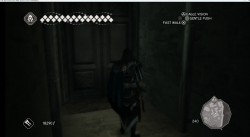
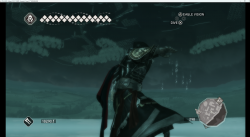
Sorry for the late reply, I had kinda given up on this matter. I just wanted to say that I already tried this using ps3 emulator and it doesn't work because the auditore crypt doesn't seem to be loaded together with the world map, but in another "scene" after you enter the door or select replay memory. Here are 2 screenshots of me at the other side of the door and under Monteriggioni.

I do believe that using an emulator together with ps3 cheat engine would allow you to load the Auditore Crypt scene, but I'm not skilled enough do it. After completing the memory there's a chance that it may saved in the save game, but this is just pure speculation. I've also been looking for people with a save game that has the auditore crypt bit unlocked, but I haven't found anyone. If this save file wasn't copy-protected like the PC one it would have been easier... :apologetic:
 

Attachments

  • image.png
    image.png
    1.8 MB · Views: 930
  • image2.png
    image2.png
    1.9 MB · Views: 59
I've also been looking for people with a save game that has the auditore crypt bit unlocked, but I haven't found anyone.
I keeping all my saves from all platforms, so also from AC2. But I don't know if I have it unlocked. What player must do unlock it?
 
I keeping all my saves from all platforms, so also from AC2. But I don't know if I have it unlocked. What player must do unlock it?
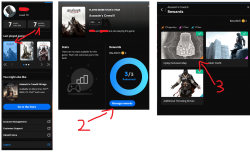
The requirement was to redeem it in uplay before 2021, when they decomissioned it and it became no longer available. You can check if you have it by login to https://ubisoftconnect.com (see attached file). If you have it, you should be able to to open the door in Monterioggioni after sequence 5.
 

Attachments

  • Redeemed.png
    Redeemed.png
    586.6 KB · Views: 54
Oh, so it is stuff came from U-Play. Then unfortunately I didn't use it back in days, started from ACs on PS4. However, everything else I have unlocked except bonuses for completing 100% memories sync.
 
Oh, so it is stuff came from U-Play. Then unfortunately I didn't use it back in days, started from ACs on PS4. However, everything else I have unlocked except bonuses for completing 100% memories sync.

Thanks anyway for taking the time to check it out, I appreciate it!
 
My Ubisoft account has the rewards unlocked but can't use it
Mine too, but the connection was decommissioned back in 2021. I tried to reach Ubi support for help both in the AC discord channel and through a ticket, but they couldn't provide any solution (not even providing a save file :sorrow:).
 
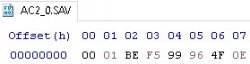
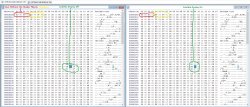
Ok took a quick look at this, im no expert on checksums and checks but here is what i have noticed so far, the first 8 bytes appear to be the check, if you look at the .SAV files first 8 bytes in a hex editor you will see something like the picture below,
after looking at the values the first 4 bytes i noticed they appear to be the length of the file WITHOUT the checksum itself so
00 01 BE F5
is the filelength minus the first 8 bytes (so the save itself is 0x01BEF5 long)
Now the real problem is the next 4 bytes,
99 96 4F 0E
they are most likely the actual checksum, we need to know how this checksum is generated to be able to edit saves,
Anyway i hope this info is useful to you, im going to keep looking into this but as i said above im not great at this sort of thing.
I also tried download a bunch of different saves of thetechguy site but none of them have the uplay map as far as i can see
 

Attachments

  • First8Bytes.jpg
    First8Bytes.jpg
    9.2 KB · Views: 60
Maybe it is CRC32 or some variation (based on length)? Yet You still need to know from what byte range is calculating.
 
Ok took a quick look at this, im no expert on checksums and checks but here is what i have noticed so far, the first 8 bytes appear to be the check, if you look at the .SAV files first 8 bytes in a hex editor you will see something like the picture below,
after looking at the values the first 4 bytes i noticed they appear to be the length of the file WITHOUT the checksum itself so
00 01 BE F5
is the filelength minus the first 8 bytes (so the save itself is 0x01BEF5 long)
Now the real problem is the next 4 bytes,
99 96 4F 0E
they are most likely the actual checksum, we need to know how this checksum is generated to be able to edit saves,
Anyway i hope this info is useful to you, im going to keep looking into this but as i said above im not great at this sort of thing.
I also tried download a bunch of different saves of thetechguy site but none of them have the uplay map as far as i can see
Do you know if the same applies to the Options file? As far as I know the bits related to audiore crypt and other Uplay stuff are stored in the options file, not the .sav
 
Maybe it is CRC32 or some variation (based on length)? Yet You still need to know from what byte range is calculating.
Well im currently assuming its the file without the first 8 bytes but yeah im not sure 100% sure on that


Do you know if the same applies to the Options file? As far as I know the bits related to audiore crypt and other Uplay stuff are stored in the options file, not the .sav
Yes the OPTIONS file is handled the exact same way, the Header appears to use the same protection, it has the header and the checksum right after it, a picture below, In the picture its the exact same save file but with just 1 option changed (turning subtitles on and off) as you can see other then the header only 1 byte changes
 

Attachments

  • OptionsHeader.jpg
    OptionsHeader.jpg
    556.8 KB · Views: 67
Well im currently assuming its the file without the first 8 bytes but yeah im not sure 100% sure on that


Yes the OPTIONS file is handled the exact same way, the Header appears to use the same protection, it has the header and the checksum right after it, a picture below, In the picture its the exact same save file but with just 1 option changed (turning subtitles on and off) as you can see other then the header only 1 byte changes
I came to the same conclusion and used jacksum library to try a bunch of checksum algorithms to see if there was any match. I assumed the checksum was calculated from the next byte after the checksum to the last byte. I didn't get any match, though.
 
I came to the same conclusion and used jacksum library to try a bunch of checksum algorithms to see if there was any match. I assumed the checksum was calculated from the next byte after the checksum to the last byte. I didn't get any match, though.
Been working at this all afternoon, kept feeling i was close and also nearly smashed my keyboard, but i think i finally have it, its a CRC32 with a poly=0x4c11db7 xorout=0x1bf3278a and with this i should now be able to hex edit the OPTIONS file, So far i have only checked the files i already knew their CRC's (so i am able to replicate the crc i already know if i remove the first 8 bytes and then use this algo), but now i am going to test it now and i will reply soon hopefully with good results

EDIT- Ok just did a first test, and its working, switched language then saved, then removed the first 8 bytes then hex edited the OPTIONS then turned subtitles back on and recalculate the checksum, and the save loads, so we can now hex edit saves for AC2
Going to take the dog for a walk now then when i get back i will eat and then feed the dog then i will get back to trying to get the uplay map working, i think i can already see the correct byte in the OPTIONS
 
Last edited:
Been working at this all afternoon, kept feeling i was close and also nearly smashed my keyboard, but i think i finally have it, its a CRC32 with a poly=0x4c11db7 xorout=0x1bf3278a and with this i should now be able to hex edit the OPTIONS file, So far i have only checked the files i already knew their CRC's (so i am able to replicate the crc i already know if i remove the first 8 bytes and then use this algo), but now i am going to test it now and i will reply soon hopefully with good results

EDIT- Ok just did a first test, and its working, switched language then saved, then removed the first 8 bytes then hex edited the OPTIONS then turned subtitles back on and recalculate the checksum, and the save loads, so we can now hex edit saves for AC2
Going to take the dog for a walk now then when i get back i will eat and then feed the dog then i will get back to trying to get the uplay map working, i think i can already see the correct byte in the OPTIONS

interesting, if it's just a custom CRC32, it should be almost trivial to create a BSD script to regenerate the hash with Apollo, something like ( @Devildwarf be sure to set the crc_initial_value, as you didn't say which one I just went default 0xffffffff) :

Code:
[update Custom CRC OPTIONS.DAT]
set crc_bandwidth:32
set crc_polynomial:0x4C11DB7
set crc_initial_value:0
set crc_output_xor:0x1bf3278a
set crc_reflection_input:1
set crc_reflection_output:1
set [size]:read(0x00,4)
set range:0x0008,[size]+7
set [hash]:crc
write at 0x0004:[hash]

Btw, you can test out this code using Bruteforce Save Data (by aldostools) on your windows PC.

Edit: this is a nice site to test a lot of CRC16/32/64 stuff http://www.sunshine2k.de/coding/javascript/crc/crc_js.html
 
Last edited:
But sadly AC II doesn't work very well with Apollo tool

Apollo can manage any ps3 save, it's not an issue with Apollo.
The only possible thing is encryption. On the original "games.conf" database from @aldostools , Assassin Creed 2 is tagged as a "not encrypted game". (This database is also used by Apollo.):

Code:
; ----------------------------------------------------
; games.conf for Bruteforce Save Data - Sep 27th, 2020
; Downloaded from chaoszage's google link
; visit http://bruteforcesavedata.forumms.net/ for latest cheats/keys
; ----------------------------------------------------
; special thanks to SHAkA and other keys finders for dumping certain games to get key

; -- UNPROTECTED GAMES --
; [PROTOTYPE]
; Assassin's Creed
; Assassin's Creed II
; BATTLEFIELD 1943
; BATTLEFIELD: Bad Company
; BATTLEFIELD: Bad Company 2
; Bioshock
; Bioshock 2
...
... etc ...

But perhaps that was only with the original 1.00 version, and some updated game version added save-game encryption.
In that case, you need to:
- dump the save-game key using the CFW/HFW tools (check the xai_plugin options to enable the secure file-id dumper)
- update the games.conf , and set the title-id with that key
- then you can use Apollo normally

If anyone has AC2 installed with the latest update and patch, please try enabling the secure file-id dumper and see if you get a dumped save-game key on the cfw logs file.
 
interesting, if it's just a custom CRC32, it should be almost trivial to create a BSD script to regenerate the hash with Apollo, something like ( @Devildwarf be sure to set the crc_initial_value, as you didn't say which one I just went default 0xffffffff) :

Code:
set crc_bandwidth:32
set crc_polynomial:0x4C11DB7
set crc_initial_value:0xFFFFFFFF
set crc_output_xor:0x1bf3278a
set crc_reflection_input:1
set crc_reflection_output:1
set range:0x0008:EOF+1
set [hash]:crc
write at 0x0004:[hash]

Btw, you can test out this code using Bruteforce Save Data (by aldostools) on your windows PC.

Edit: this is a nice site to test a lot of CRC16/32/64 stuff http://www.sunshine2k.de/coding/javascript/crc/crc_js.html

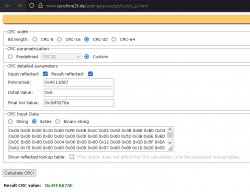
Oh nice thanks for that, that site is great and will save me a lot of time, i was using some obscure tool to generate CRC's on a old linux system, now i can do it in windows (see screenshot) and it gives me the correct CRC-32 Thanks bucanero,
And the Initial Value im using is 0x0 (also in screenshot),
i also have to cut the first 8 bytes (4 bytes for filesize and then 4 bytes for CRC32) to get the files true size then add them back in when i know the new CRC-32 (since im doing it manually). Also only tested this on the OPTIONS file, haven't tested it on the games saves yet but it "should" work hopefully since they do appear to use the same but i still want to check that before i say for certain (i will check later or tomorrow and get back to you on this).

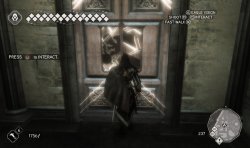
and @ChestnutEnjoyer i have got into the Uplay map now, just required 5 bytes changing (4 for checksum and 1 for the actual enabling) in the OPTIONS and now we can get in :) just use the site above with my settings and you can rewrite the checksum easily (or if you need me too i can post a OPTIONS save), posting a screenshot of the door working on the ps3 version.
 

Attachments

  • CRC32.jpg
    CRC32.jpg
    94.5 KB · Views: 89
  • Uplay map AC2 PS3.jpg
    Uplay map AC2 PS3.jpg
    224.7 KB · Views: 76
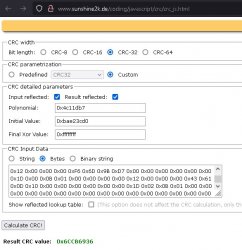
@bucanero ok took a look a normal saves now, they use different values, AC2_0.SAV uses
poly=0x4c11db7
init=0xbae23cd0
xorout=0xffffffff
and this generates the correct hash for those types of saves, not sure why they use different values for OPTIONS but it appears they do, anyway that should blow AC2 open for anyone wanting to hex edit the game saves.
 

Attachments

  • CRC32 for SAV files.jpg
    CRC32 for SAV files.jpg
    90.8 KB · Views: 47

Similar threads

Back
Top