
PS3 Need Some Covers For Your Backups? Updated Pack Right Here!

No0bZiLLa was kind enough to share the latest covers pack for those wanting to add a little finesse to their backups. This cover pack will get you the recent covers to add to your backup games using your favorite backup manager. All done with the ease of a simple PKG install.[break].[/break]
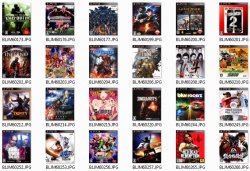

covers.jpg


Download: Updated PS3 Covers Pack

Source: PSX-Place
 
Last edited by a moderator:

Hello

Thanks for sharing your covers but...

Just want to say I have download and extract 2 times your package Covers v3.6 Update EU/US and...
- I have got 482 corupted covers files in !!!
- I have got multiple differents resolutions covers, not sized for multiMAN (260x300) ???

Don't want to heart you, but it does not really appear very serious to me.

Maybe I'm wrong ? Let me know

Regards
 
[MENTION=11]No0bZiLLa[/MENTION] [MENTION=6]bitsbubba[/MENTION]

Thanks for your links, I took time to extract them and verify, and it's the same !!! A big part of covers are damaged :\
I believed, it comes from my tools ??? I decided to install packages on my PS3 and download covers on my PC to verify.

It confirms that a big part of covers are damaged :\

If you want have a look of mines here (password: insomnihack.fr) source gametdb.com
 
the packages are as they were when i downloaded them from brewology, i dunno what happened... i do see what your saying though, it looks like the files have become corrupt somehow.

EDIT: i did manage to find some others, let me check them out before i upload them

EDIT2: i took the covers i found from 3absiso's post at hax and combined them with yours, now totaling over 7170ish covers. everything seemed to be working well with these as well and all in an easy to use pkg, just install from xmb (or extract on desktop/laptop and ftp them).

[MENTION=16840]0_obeWAN[/MENTION] would you mind downloading them and checking them out just for double checking?
(updated covers pack)

ive also noticed that webman does not display all the covers accordingly, for instance assassins creed the ezio trilogy, does not show the cover even though it is in the same place as all the other covers that do show properly.
 
Last edited:
ive also noticed that webman does not display all the covers accordingly, for instance assassins creed the ezio trilogy, does not show the cover even though it is in the same place as all the other covers that do show properly.
If this prob still exists... HERE is a little tool i've made long ago to batch-resize all of my mp3-covers. It works recursivly through the selected target directory resizing all JPEGs along it's way but without making backups(!).
Might be helpful if some of the covers don't have the right dimensions (in case that this is the cause of the described problem !?)... or just for other purposes.
Note: It's a bit 'dirty' and not as polished like my other programs and you will get no sign of life from it until it has done it's job... but it works... and that's all what matters.

Regards
Rudi
 
Last edited:

Trending content

Back
Top

