PS3 New CFW Tools idea on Evilnat

I've successfully moved the entire CFW Tools over to PSN and renamed PSN section to CFW Tools now an icon is refusing to change but CFW Tools was removed from Network after some success now I either move the entire PSN to friends or inside the CFW Tools.
 
I don't know which icon you're referring to, but it could be in an rco or possibly the icontex.qrc. the latter is file that populates the default theme icons that aren't in an rco, such as the main icons. it's a pita to change them as each icon is compressed separately in the file, and you have to use the nvidia 3d plugin for photoshop to create like a mirror image of the icon you're wanting to change. it's best to use the ruler tool for this too or else you could make the icon too big or too small.
 
I don't know which icon you're referring to, but it could be in an rco or possibly the icontex.qrc. the latter is file that populates the default theme icons that aren't in an rco, such as the main icons. it's a pita to change them as each icon is compressed separately in the file, and you have to use the nvidia 3d plugin for photoshop to create like a mirror image of the icon you're wanting to change. it's best to use the ruler tool for this too or else you could make the icon too big or too small.

All main items except PSN are in icontex.qrc.
 
All main items except PSN are in icontex.qrc.

yeah, I figured that. I think the psn icon was at one time in the icontex.qrc,, but I don't know that for sure. I wish there were more mods of it. afaik, demonhades is the only person to do such a thing. I think I know enough to mod it, but I wouldn't be able to test it on hardware. I suck at photoshop though. anyways, I'm keeping my system on stock for now. I have way too much invested in the playstation systems to get banned by an accident or doing something stupid.
 
we have success at loading the first file, which I believe is how the user icon looks. I flipped it vertically and added the alpha path. mipmaps make it look screwed up, so that's the only option I deselected. this is a 3d icon for the xmb. I didn't realize you could flip it till now:
upload_2024-12-2_9-45-33.png
 
that didn't work out too well. at least it didn't brick rpcs3, but I changed that icon. the icon didn't look right in photoshop, but I had hoped it would work:
upload_2024-12-2_10-58-58.png
 
try as I might, I could never invert the image. it appears upside down in photoshop too, moving 180 degrees or inverting it vertically didn't save with settings. saving it with the settings I was told didn't work with that, it also has an issue with the alpha apparently. I'm using photoshop 2020. if anyone has any ideas??
 
try as I might, I could never invert the image. it appears upside down in photoshop too, moving 180 degrees or inverting it vertically didn't save with settings. saving it with the settings I was told didn't work with that, it also has an issue with the alpha apparently. I'm using photoshop 2020. if anyone has any ideas??

I've never messed with icontex.qrc, so I can't help.
 
well, it didn't brick at least. a few other save settings did brick rpcs3 until I replaced the file. however, the file is a disaster in the way it looks. I'm using photoshop 2020, which seems to have different save settings. I kinda guessed it when it comes to the coldboot, and I was right. the icontex.qrc is a mystery to me.
 
which file was that? I was able to fix the icontex.qrc thing long ago, but I don't understand photoshop 2020. it was much earlier than that that I used, but I really have no idea.
 
I think I got 3d plugins installed, but it didn't make a difference. perhaps the problem is with the image. btw, here's the second image. wtf is that!? lol:

upload_2024-12-2_20-46-45.png
 
In my case past, I created image using Photoshop w/Nvidia plugin on Windows, it worked by rewriting icontex.qrc with hex editor.
It was a long time ago so I dont remember... but I created it without any special knowledge.
I just followed the great tutorial left by pinky.
https://www.psx-place.com/threads/pinkys-ps3-tutorials.1546/

Also my main machine is a mac, so after understood the method of porting dds into Icontex, I remember creating png on mac and converting them to dds using a application called aorta.
Either method worked. and after that I think I basically worked on mac because converting with aorta was very easy.
It was a long time ago so my memory is hazy, but if dds settings are correct, it should be possible incorporate them into icontex.qrc any software.

opening my dds in the viewer, its displayed inverted. as far as I know, this is the default and I remember that both official dds and custom dds were inverted in same.
I don know the reason behind it, but I also created images without giving it much thought.

I post some examples of my work. I don't see many custom icons that are similar to official icons, so I hope this will be helpful.
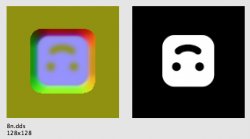
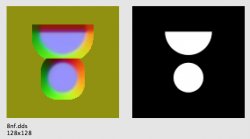
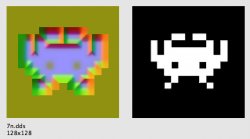
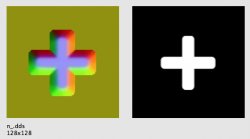
8n.jpg 8nf.jpg 7n.jpg exn.jpg 44n2.jpg
8n and 8nf.dds are alternative icons for the "user column" that myself.
Ive recreated the familiar smily and friend column icon used in XMB versions prior to 1.0, and adding effects from later FW.

7n is the retro category icon from multiMAN ported to the XMB.
I still use the network column as the emulator column, so this invader has been facing me on the screen for a long time.

n_.dds is the PSPs extra column icon ported to the PS3 XMB.
I used to include it, but now moved the extra column to PSN column, so Ive removed it. but It worked fine.

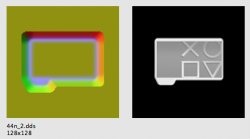
Ill post an example w/effects removed, in case its helpful for someone, custom folder 44n_2.
The parts where the effect is hollow are displayed as no effect, but this isnt used anymore as it didnt produce very visually interesting effect.
At the time I also created a version which holes were filled, but it didnt make much difference.
Because these base are grayscale, the drawn patterns dont seem to stand out as much as patterns made by carving them out.

 
In my case past, I created image using Photoshop w/Nvidia plugin on Windows, it worked by rewriting icontex.qrc with hex editor.
It was a long time ago so I dont remember... but I created it without any special knowledge.
I just followed the great tutorial left by pinky.
https://www.psx-place.com/threads/pinkys-ps3-tutorials.1546/

Also my main machine is a mac, so after understood the method of porting dds into Icontex, I remember creating png on mac and converting them to dds using a application called aorta.
Either method worked. and after that I think I basically worked on mac because converting with aorta was very easy.
It was a long time ago so my memory is hazy, but if dds settings are correct, it should be possible incorporate them into icontex.qrc any software.

opening my dds in the viewer, its displayed inverted. as far as I know, this is the default and I remember that both official dds and custom dds were inverted in same.
I don know the reason behind it, but I also created images without giving it much thought.

I post some examples of my work. I don't see many custom icons that are similar to official icons, so I hope this will be helpful.
View attachment 44815 View attachment 44816 View attachment 44817 View attachment 44818 View attachment 44819
8n and 8nf.dds are alternative icons for the "user column" that myself.
Ive recreated the familiar smily and friend column icon used in XMB versions prior to 1.0, and adding effects from later FW.

7n is the retro category icon from multiMAN ported to the XMB.
I still use the network column as the emulator column, so this invader has been facing me on the screen for a long time.

n_.dds is the PSPs extra column icon ported to the PS3 XMB.
I used to include it, but now moved the extra column to PSN column, so Ive removed it. but It worked fine.

Ill post an example w/effects removed, in case its helpful for someone, custom folder 44n_2.
The parts where the effect is hollow are displayed as no effect, but this isnt used anymore as it didnt produce very visually interesting effect.
At the time I also created a version which holes were filled, but it didnt make much difference.
Because these base are grayscale, the drawn patterns dont seem to stand out as much as patterns made by carving them out.
thanks. I think the issue is with the alpha. I was able to install that old 3d software into photoshop 2020. unfortunately, my images look like the ones where the icon is white, and the background is black. the ones I extracted from the icontex.qrc look fine. I think there may be something up with my save settings. I'd appreciate any help. I can get the image to appear, but it looks really messed up, and it's still inverted. I have to pad the zlib-compressed file heavily to get it to fit in the icontex.qrc. it's far smaller under normal circumstances. I just wanted to try with one icon to learn how it's done. I think I may have done this in the past, but I don't remember how I did it.
 
I think I've got it, somewhat. I changed it to blue conversion after looking at psdevwiki. the color looks a little off, so maybe remove that?

upload_2024-12-3_17-10-9.png
 
Sorry, I don't remember how I set the alpha value. I remember when I made my first icon, I extracted the dds from the original icontex and used that as reference. looking back, I can guess that in my case, I started by simply imitating the settings and colors of official icon, so it worked well without me having to think about something.

Once the icons look fine, you can customize of RGB channels to your liking add effects to create like 3dimensional looking and glossy effect that matches XMB waves moving.
I think I set the 3d like effect to B channel, and glossy effect w/wave movement to R and G channels. but I dont remember too well.
In my case, part of customizing XMB that took the longest time was editing icontex.prc. I kept trying and failing because it didn't display properly, couldnt get wanted effect... so, excited when it worked just as expected first time.
 
Sorry, I don't remember how I set the alpha value. I remember when I made my first icon, I extracted the dds from the original icontex and used that as reference. looking back, I can guess that in my case, I started by simply imitating the settings and colors of official icon, so it worked well without me having to think about something.

Once the icons look fine, you can customize of RGB channels to your liking add effects to create like 3dimensional looking and glossy effect that matches XMB waves moving.
I think I set the 3d like effect to B channel, and glossy effect w/wave movement to R and G channels. but I dont remember too well.
In my case, part of customizing XMB that took the longest time was editing icontex.prc. I kept trying and failing because it didn't display properly, couldnt get wanted effect... so, excited when it worked just as expected first time.
I'm pretty bad at Photoshop, have to look up things constantly, but I'm learning a little more each time. Using the original images as a base isn't a bad idea actually. I just found a random drawing of a cobra head and used that. My image doesn't look anything like the originals'. I noticed that it seems to require an alpha channel, so save settings are very important. The RGB channels seem to add some sort of depth and make the image translucent. Mine looks greyish, since I remembered the translucent effect with grey and a coldboot.raf.
 
Back
Top