New ps2 dev here

**UPDATE**

Showing a example of a fully working cutscene player from game engine im making.


This cutscene was made by the engine and coded from scratch via standerd ps2sdk NO "SMS" code was used.

It was VERY tricky getting the audio to play in sync with video and its framerate adjustments. Sense the video runs off the EE core and uses GS graph_vsync the vsync was throwing off the audio buffer and timing.

To fix I created a background proccess that spawns from the video that then plays the audio with correct adjustments for vsync framerates.


The result is a fully working cutscene "raw video player"
Without using any of the SMS framework.

I fixed the memory allocation issues aswell so it can now load and play 15+ minutes of video/audio and cut back to its programming after np.

https://drive.google.com/file/d/1SeMUd9qyqU2vGymNxOpOdkrWC3bpsqt3/view


I forgot to mention, This game engine and all of these examples I am showing it produce has 100% been done off of and from a android mobile phone. No PC was used in the making other than some wine tricks in the ARM linux of android.
 
Last edited:
Oh yeah and the cutscenes it creates are 100000000% Lag Proof, basiclly almost impossible to have a laggy cutscene with how I coded this to work with emulation in mind.

A system with 200mb ram can emulate these cutscenes lol
 
I fixed the memory allocation issues aswell so it can now load and play 15+ minutes of video/audio and cut back to its programming after np.

https://drive.google.com/file/d/1SeMUd9qyqU2vGymNxOpOdkrWC3bpsqt3/view

I only tested it with neutrino+NHDDL through USB on SCPH-50004 & SCPH-75004.
On SCPH-50004 video and audio is getting out of sync really quick (maybe 10s?!).
While on SCPH-75004 it plays quite nice.
It happens probably due to USB speed:
speed.png


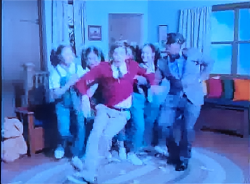
BTW Nice song & music video. +
IMG_20251002_21071.png
IMG_20251002_21105.png
IMG_20251002_21193.png

PROF - Squad Goals:
 
Last edited:
I only tested it with neutrino+NHDDL through USB on SCPH-50004 & SCPH-75004.
On SCPH-50004 video and audio is getting out of sync really quick (maybe 10s?!).
While on SCPH-75004 it plays nice.
It happens probably due to USB speed:
View attachment 46718

BTW Nice song & music video. +

Thanks a ton


By the way could you let me know on the

SCPH-50004

Is the video playing slow and stuttering or is the audio stuttering or both ? Sounds like just the audio is a issue on the SCPH-50004. Which is even more bizzare to me if thats the case lol


What Happens when you try my first .iso the first test iso that ONLY plays audio no video ?

Does that play fine on the SCPH-50004 model ?

Thanks for the test runs, And tbh im VERY confused as to why that would be happening on the SCPH-50004 Model and not the other. Could it be by chance your SCPH-50004 is a PAL system not NTSC ?

I did optimize and format the video so that it would play off a NTSC based system I forgot to consider PAL framerate adjustment.


Or maybe has nothing to do with PAL/NTSC framerates and the video amd has to do with the reading speeds of the threads on older models very interesting...

Anyways thanks a ton for the testing as I am trying to make this engine create some quility libraries and making sure the video and audio plays correctly is step 1 for me.


I will try to dig into if this is a reading speed issue from the spawned background thread and throwing off sync or if its a PAL vs NTSC framerate issue.


When deep diving into the SCPH-50004 model it seems like this is a half modded ps2 by sony themselves lol. Internally this system has alot of things that differ it from other FAT consoles I never knew this
 
Last edited:
Is the video playing slow and stuttering or is the audio stuttering or both ? Sounds like just the audio is a issue on the SCPH-50004. Which is even more bizarre to me if that's the case lol

The video plays nice same as audio.
No cracking, no stuttering.
It just that after a while audio & video is out of sync.
I may say a way out of sync.
I mean lips do not sync with the music\lyrics.

What Happens when you try my first .iso the first test iso that ONLY plays audio no video ?
Does that play fine on the SCPH-50004 model ?

I did not try the 1st .iso.

Thanks for the test runs, And TBH I am VERY confused as to why that would be happening on the SCPH-50004 Model and not the other. Could it be by chance your SCPH-50004 is a PAL system not NTSC ?

The same thing is on SCPH-70004.
Basically I only have PAL (04) consoles.
BTW here is the PS2 console region information:
https://consolemods.org/wiki/PS2:Region_Information.

I did optimize and format the video so that it would play off a NTSC based system I forgot to consider PAL framerate adjustment.
Or maybe has nothing to do with PAL/NTSC framerates and the video and has to do with the reading speeds of the threads on older models very interesting...
I will try to dig into if this is a reading speed issue from the spawned background thread and throwing off sync or if its a PAL vs NTSC framerate issue.

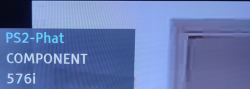
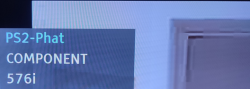
I do not know if that matters but while playing the video my TV shows:
IMG_20251003_14220.png
 
The video plays nice same as audio.
No cracking, no stuttering.
It just that after a while audio & video is out of sync.
I may say a way out of sync.
I mean lips do not sync with the music\lyrics.


I did not try the 1st .iso.


The same thing is on SCPH-70004.
Basically I only have PAL (04) consoles.
BTW here is the PS2 console region information:
https://consolemods.org/wiki/PS2:Region_Information.


I do not know if that matters but while playing the video my TV shows:
View attachment 46723


Ahhhh thanks for the followup that actually makes alot more sense. Yeah so tech the video and audio play fine on both consoles just they get out of sync on the SCPH-50004 which must be either from the background thread timing or could be down to read speeds yeah it does pinpoint the issue for me so thanks

I tested on a SCPH-9xxxx and 3 different emulators without issue so far.
 
I have noticed one thing.
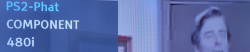
SCPH-50004 & SCPH-70004 while playing this video outputs (576i 50Hz\288p* 50Hz):
IMG_20251003_14220.png

While SCPH-75004 output (480i 60Hz\240p* 60Hz):
IMG_20251004_13023.png

The lip sync issue on SCPH-50004 & SCPH-70004 starts to become noticeable after a while.
On the other on SCPH-75004 lip sync is quite nice.

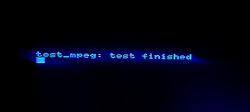
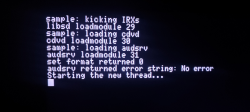
* - These resolutions (240p\288p) are being display at this screen:
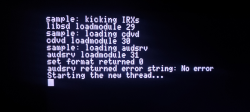
IMG_20251002_21071.png

So I do know if this has to do something with IOP/Deckard or maybe not?!
https://www.psdevwiki.com/ps2/IOP/Deckard.

Or maybe it is an improper speed issue (PAL vs. NTSC)?

BTW All of these consoles can output 480i\576i resolutions depending of a region of a game
launching them e.g. through OPL.


Thanks ! And yeah thanks for this extended debugging.

The resolution swap is a odd one. I was pretty sure I had the code hardlocked and defined set resolution sense the video itself expects to be played at a certain resolution and rate.

I may have changed my code to display at a rate avaliable to the system instead which could be the issue the system trying to display it at a higher pixel count than it even should. Which would deff explain the offsync issue.
This would turn it into a NTSC vs PAL type bug without it being that issue directly same stem.


Or yeah it could come down to the actual ram chip itself and read speeds being the IOP has issues but I dont think it is that tbh cause I battle tested this memory allocation pretty damn well and tech the audio and video threads run entirely off the ee core thread. There is or shouldnt be a memory leak.

I could maybe try making the audio thread work differently or maybe just needs its buffer chunks raised or lowered depending on the model of ram.

ill have to dig into the code more. Or better yet ill post a stripped down single c of the code this uses later here.
 

Attachments

Last edited:
Thanks ! And yeah thanks for this extended debugging.

The resolution swap is a odd one. I was pretty sure I had the code hardlocked and defined set resolution sense the video itself expects to be played at a certain resolution and rate.

I may have changed my code to display at a rate avaliable to the system instead which could be the issue the system trying to display it at a higher pixel count than it even should. Which would deff explain the offsync issue.
This would turn it into a NTSC vs PAL type bug without it being that issue directly same stem.


Or yeah it could come down to the actual ram chip itself and read speeds being the IOP has issues but I dont think it is that tbh cause I battle tested this memory allocation pretty damn well and tech the audio and video threads run entirely off the ee core thread. There is or shouldnt be a memory leak.

I could maybe try making the audio thread work differently or maybe just needs its buffer chunks raised or lowered depending on the model of ram.

ill have to dig into the code more. Or better yet ill post a stripped down single c of the code this uses later here.

I admire your enthusiasm, but as some say, "if it works, don't touch it."
In my opinion, your sample size is too small; it could even be "faulty" hardware without jolek noticing.
You need more testers and a larger sample size to then draw conclusions about the code.
In the meantime, you can test with enough videos and reduce the quality to rule out hardware overload.
 
I admire your enthusiasm, but as some say, "if it works, don't touch it."
In my opinion, your sample size is too small; it could even be "faulty" hardware without jolek noticing.
You need more testers and a larger sample size to then draw conclusions about the code.
In the meantime, you can test with enough videos and reduce the quality to rule out hardware overload.

I dont think its sample size, as the audio and video play perfectly still, Just the 2 threads the audio and video EE threads themselves seem to be off timing when on some systems. And yeah not entiterly sure as to why but I could try playing with chunk size anyway.
..but I feel this is something to do more with the thread and allocation for the thread acting differently on some older models.
 
I dont think its sample size, as the audio and video play perfectly still, Just the 2 threads the audio and video EE threads themselves seem to be off timing when on some systems. And yeah not entiterly sure as to why but I could try playing with chunk size anyway.
..but I feel this is something to do more with the thread and allocation for the thread acting differently on some older models.

I think you misunderstood me, my friend. You see, when I say "sample," I mean the number of consoles it's been tested on, specifically for that model.

My advice is not to rush into making modifications until there's a larger "sample" size. As I said, it could be a number of things, and not necessarily a code problem.

In other words, start with the simplest and work your way up to the most complex.
 

Similar threads

Back
Top