

jolek
Senior Member
This is an obsolete discussion.
The proper one is here:
https://www.psx-place.com/threads/nhddl.45053/.
Source:
https://github.com/pcm720/nhddl.
The proper one is here:
https://www.psx-place.com/threads/nhddl.45053/.
NHDDL - a PS2 exFAT BDM launcher for Neutrino
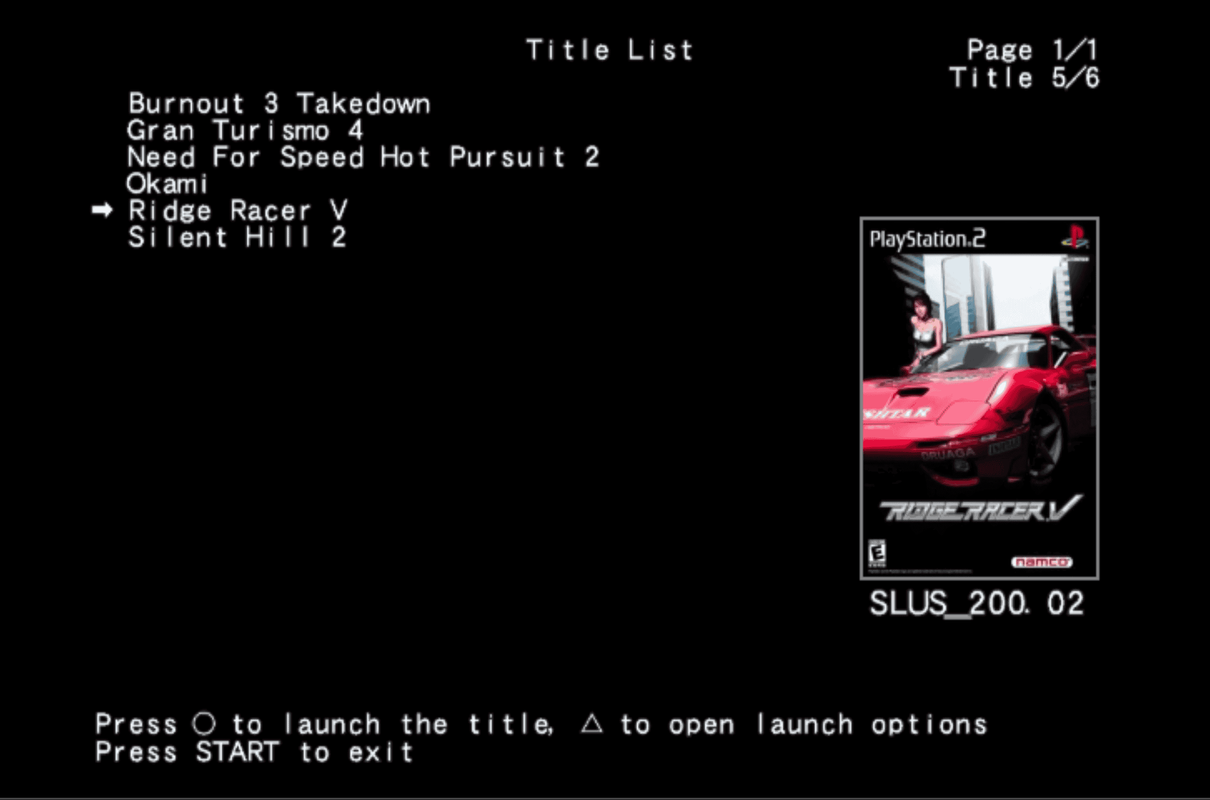
-
NHDDL is a memory card-based launcher that scans FAT-formatted BDM devices for ISO files, lists them and boots selected ISO via Neutrino.
It displays visual Game ID to trigger per-game settings on the Pixel FX line of products and writes to memory card history file before launching the title, triggering per-title memory cards on SD2PSX and MemCard PRO 2.
It will not boot ISOs from anything other than BDM devices.
GSM, PADEMU, IGR and other stuff is out-of-scope of this launcher. -
Usage
Just put the ELF file into Neutrino folder on your memory card and launch it.
By default, NHDDL initializes ATA modules and looks for ISOs on internal HDD.
Supported BDM devices
NHDDL reuses Neutrino modules for BDM support and requires them to be present in Neutrino modules directory.
ATA
Make sure that Neutrino modules directory contains the following IRX files:
- bdm.irx
- isofs.irx
- bdmfs_fatfs.irx
- dev9_ns.irx
- ata_bd.irx
MX4SIO
The following files are required for MX4SIO:
- bdm.irx
- isofs.irx
- bdmfs_fatfs.irx
- mx4sio_bd_mini.irx
USB
The following files are required for USB:
- bdm.irx
- isofs.irx
- bdmfs_fatfs.irx
- usbd_mini.irx
- usbmass_bd_mini.irx
UDPBD
The following files are required for UDPBD:
- bdm.irx
- isofs.irx
- bdmfs_fatfs.irx
- dev9_ns.irx
- smap_udpbd.irx
UDPBD module requires PS2 IP address to work.
NHDDL attempts to retrieve PS2 IP address from the following sources:
- udpbd_ip flag in nhddl.yml
- SYS-CONF/IPCONFIG.DAT on the memory card (usually created by w/uLaunchELF)
See this section for details on nhddl.yml.
Storing ISO
Just like OPL, NHDDL looks for ISOs in directories named CD or DVD. There is no distinction between CD and DVD images, both can be placed in any of those two directories.
Displaying cover art
NHDDL uses the same file naming convention and file format used by OPL.
Just put 140x200 PNG files named <title ID>_COV.png (e.g. SLUS_200.02_COV.png) into the ART directory on the root of your HDD.
If unsure where to get your cover art from, check out the latest version of OPL Manager.
-
Configuration files
NHDDL uses YAML-like files to load and store its configuration options.
Launcher configuration file
Launcher configuration is read from the nhddl.yaml file, which must be located in the same directory as nhddl.elf.
This file is completely optional and must be used only to enable 480p or use any device other than ATA.
By default, 480p is disabled and the ATA device is used to look for ISO files.
Example of a valid config file:
To disable a flag, you can add $ before the argument name or just comment it out with #.Code:480p: # if this flag exists and is not disabled, enables 480 output mode: ata # supported modes: ata (default), mx4sio, udpbd, usb udpbd_ip: 192.168.1.6 # PS2 IP address for UDPBD mode
Configuration files on storage device
NHDDL stores its Neutrino-related config files in config directory in the root of BDM device.
lastTitle.txt
To point to the last launched title, NHDDL writes the full ISO path to lastTitle.txt.
This file is created automatically.
Argument files
These files store arbitrary arguments that are passed to Neutrino on title launch.
For a list of valid arguments, see Neutrino README.
Example of a valid file:
To disable an argument by default, place a $ before the argument name.Code:# All flags are passed to neutrino as-is for future-proofing, comments are ignored # Empty values are treated as a simple flag gc: 2 mc0: mass:/memcard0.bin # file located on HDD $mc1: mass:/memcard1.bin # disabled argument # Arguments that don't have a value dbc: logo:
NHDDL supports two kinds of argument files:
global.yaml
Neutrino arguments that need to be applied to every ISO by default are stored in global.yaml file
Title-specific files
Neutrino arguments that need to be applied to a specific ISO are loaded from either
<ISO name>.yaml or <title ID><anything>.yaml.
File that has the same name as ISO has the priority.
NHDDL creates this file automatically when title options are modified and saved in UI.
BDM device file structure example
# marks a comment
Code:ART/ # cover art, optional | - SLUS_200.02_COV.jpg - SLUS_202.28_COV.png - SLUS_213.86_COV.jpg config/ | - lastTitle.txt # created automatically - global.yaml # optional, applies to all ISOs - Silent Hill 2.yaml # optional, applies only to ISOs that start with "Silent Hill 2" - SLUS_213.86.yaml # optional, applies to all ISOs that have a title ID of SLUS_213.86 CD/ | — Ridge Racer V.iso DVD/ | - Silent Hill 2.iso - TOTA.iso # SLUS_213.86 - TOTA UNDUB.iso # SLUS_213.86
Source:
https://github.com/pcm720/nhddl.
Attachments
Last edited:


