
PS VITA / PsTV Nobody was able to help me !!! I need a pro

Hello everybody !!!
I have a real journey through the web behind me, looking for a solution for my damn PSVita.
Nobody was able to help me. I have a used Vita and the problem, that the App " Update Blocker "
was on it in the past. This App, which is deleted, makes it impossible for the Vita, to make an Firmware
update.
This is what i see, when i press the update button : Screenshot (2).jpg
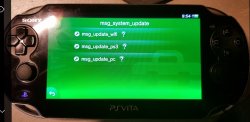
I made a system restore but with no success. Update section keeps looking like picture above. Through this error, it is also impossible for the Vita to make an working connection to the Install manager assistant, which makes the hencore progress not working. I try to update the Vita with Qcma = no success.
Vita says, i am on newest firmware !!! What can i do ??? Any suggestion for me ???
I am so sad and done !!! Is my vita now ready for the garbage ???
Help
 
Last edited:
Why would anyone want to update is beyond me, but ok, i'll bite. Have you tried updating in recovery mode? What firmware are you on right now?
 
I don't know how this mentioned app works but maybe, just maybe put empty update pup and changed fs privileges or modifying somewhere in the firmware it's version. i don't know, just blind shot. Look for sources of this app or maybe this app allow You to reverse changes...

Why do You want fw update in the first place? There is no reason to update even past 3.60.
 
I think you have two options.

1. Install henkaku. Then install update blocker and uninstall update blocker.
2. Use QCMA to reinstall the latest firmware. You might need to spoof to a higher version than latest version since the blocker is messing with the versions.
 
you can disable update blocker. I have the app as well, but I didn't even have to uninstall the blocker to downgrade. afaik, it's only for downloading an update.
 
My Vita is on 3.68 and an update is the only change to get the Vita back to live.
The " Update Blocker " was not correctly deleted and after the system restore there must be something left from the Update blocker on the system. This is what I think. An update maby will overwrite the error, was my hope !!!
An Update with Qcma is not working !!! The Vita always shows : firmware is newest !!!
Installing hencore and etc is not working, because Vita won't connect to Sony 's Install Manager Assistant on PC. How can I get access to my vita? The Vita is after the system restore like fresh out of the box but with this errors. And yes, I try to make the update on recovery mode but same result. Vita says, i am on newest firmware.
 
Last edited:
It is hard to understand what you wrote without telling us the errors/screenshots. If the vita is reporting the firmware is on the latest version you should not have any problems connecting to your pc. The only time the vita can't connect to the pc is when the vita checks online then pops up a nag screen telling you to update if you are not on the latest version. Then you would need some techniques to bypass it. I do not understand this.
Installing hencore and etc is not working, because Vita won't connect to Sony 's Install Manager Assistant on PC
Is that QCMA or the Sony content manager you are using on your pc?

First thing you can do is try and connect the vita to pc with QCMA. Then use finalhe to install henkaku. Next install modoru to downgrade firmware to 3.60.
https://codestation.github.io/qcma/
https://github.com/soarqin/finalhe/releases/tag/v1.92
https://github.com/TheOfficialFloW/modoru
 
qcma will become unstable if you disable/enable updates without restarting. have you tried reinstalling update blocker, then disabling it? this is update blocker by @sineca and pine ? I don't know if I have that spelled correctly. it was a part of the main vita guide, then was removed as it's not needed. I just left it on my system in case I ever need again if the vita ever gets updated again.
 
Thanks for all your kindly help. To my surprise the problem with my Vita is now ok. I don't know why but with a new try everything was working now flawless and is working as expected.
Thanks for helping me.
Feel free to delete this !!!

Gesendet von meinem SM-N976B mit Tapatalk
 
Back
Top