
You are using an out of date browser. It may not display this or other websites correctly.
You should upgrade or use an alternative browser.
You should upgrade or use an alternative browser.
PS3 NoPSN Apps
- Thread starter bitsbubba
- Start date
Yes I can you need to edit the Netflix param.sfo to either match the new version number or a higher build. Since you are using the no psn app I'd say just spoof to 99.99 and call it good. Also you could QA flag the console and change the debug settings for np environment to invalid and it will no longer even connect to the game update servers.
CrazyCellist
Forum Noob
same happy stuff as with the last version...
note that we've been version spoofing Netflix 2.19 for every new version since....
so if you have the 2.19 pkg instead of a 2.23 or 2.24 pkg you should be fine with the above
until Netflix 2.24 is "officially" De-PSN-ed, you can always edit these two files from 2.23 to SAY version "2.24" to avoid the Update nag
NPUP00030/PARAM.SFO
NPUP00030/USRDIR/APPDATA/version
If your PC isn't handy AND you have the fixed 2.23 pkg on your local usbstick you can spoof "2.25" using MultiMan's filemanager.
let Netflix update to 2.25, use MultiMan to copy the new 2.25 "PARAM.SFO" to your usbstick, uninstall netflix 2.25, re install the fixed 2.23 pkg, use MultiMan to copy the new 2.25 "PARAM.SFO" from your usbstick over the top of your 2.23 version, use MultiMan to delete the "version" file, launch Netflix (Netflix will create a new 2.25 "version" file), sign in to your Netflix account, watch stuff without being nagged to update... until v2.26
note that we've been version spoofing Netflix 2.19 for every new version since....
so if you have the 2.19 pkg instead of a 2.23 or 2.24 pkg you should be fine with the above
If your PC isn't handy AND you have the fixed 2.23 pkg on your local usbstick you can spoof "2.25" using MultiMan's filemanager.
let Netflix update to 2.25, use MultiMan to copy the new 2.25 "PARAM.SFO" to your usbstick, uninstall netflix 2.25, re install the fixed 2.23 pkg, use MultiMan to copy the new 2.25 "PARAM.SFO" from your usbstick over the top of your 2.23 version, use MultiMan to delete the "version" file, launch Netflix (Netflix will create a new 2.25 "version" file), sign in to your Netflix account, watch stuff without being nagged to update... until v2.26
Can't find this "version" file, can you be more specific?
app.sprx
browser.sprx
buildinfo.txt
core.sprx
data
EBOOT.BIN
javascriptcore.sprx
manifest.txt
rigel_loader_dll.self
data/fonts
data/ICON0.PNG
data/fonts/HangulGothicMT_CForNetflix.ttf
data/fonts/HeiseiMaruGoth213_CForNetflix.ttf
data/fonts/MHeiM-B5HK_CForNetflix.ttf
data/fonts/MHeiM18030_CForNetflix.ttf

I was trying to do it trough FTP (FileZilla) and for some reason I couldn't find "APPDATA" folder, but MultiMAN did the job. Now it's 2.25 and working fine.

kadorna2
Member
Spoofing to 99.99 works. That should pretty much stop the nagging indefinitely. Unless of course, the Netflix servers change something and 2.19 app can no longer connect.
if, for any reason, your psid and or idps get sent to netflix you could be in some deep shit IF you are not banned already... i don't think it would be wise to do this...

pinky
Retired
if u leave the app version blank, it supersedes all versions including 99.99. I've not looked at how it's recorded though, but within the mms folder u can check ur metadata indexer in HxD to check. u'll see the app version which is probably blank as well. the system doesn't understand the "number." :p I'd suggest a media player, usenet, and rss feeds to do the same as netflix. some media players can use rss by themselves. u won't have to risk ur system if ur idps is recorded somehow.
if, for any reason, your psid and or idps get sent to netflix you could be in some deep shit IF you are not banned already... i don't think it would be wise to do this...
Good call. Will change that. I guess my mind didn't think like that. I figured if the app itself didn't talk to PSN then there wasn't anything to worry about. I didn't think Netflix would log all that and report back to Sony.


Aldo's tool works fine for that, I've been converting my computer over to Linux so I haven't been fooling around with Windows too much anymore (as to why I haven't made a pig yet)Question:
How can I make a package after I spoof Netflix with the param.sfo and version file to just install. I have a friend that I keep updated and it would be great to be able to just send them a .pkg after an update spoof.
sent from bitsbubba using tapatalk
Aldo's tool works fine for that, I've been converting my computer over to Linux so I haven't been fooling around with Windows too much anymore (as to why I haven't made a pig yet)
sent from bitsbubba using tapatalk
I feel really stupid, but, which one of his tools are we talking about. I've looked in our downloads section and on aldos website and don't see anything about packaging a pkg.

No0bZiLLa
Developer
[MENTION=379]neruve[/MENTION]
not sure if this is the most updated version.... but anyways - install_ps3tools_2.7.38.exe
extract and then right click the exe and select run as admin. then you can right click on a folder and make it into a pkg
not sure if this is the most updated version.... but anyways - install_ps3tools_2.7.38.exe
extract and then right click the exe and select run as admin. then you can right click on a folder and make it into a pkg
[MENTION=379]neruve[/MENTION]
not sure if this is the most updated version.... but anyways - install_ps3tools_2.7.38.exe
extract and then right click the exe and select run as admin. then you can right click on a folder and make it into a pkg
Is there an issue with this and windows 10? I don't have a context menu to make the package.
[MENTION=89]aldostools[/MENTION] any input?
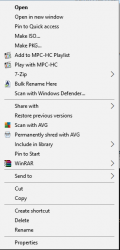
run the install exe as admin. im on latest windows 10 build and using this same version of aldosps3tools and just made a few packages just to test. after you install with admin priv, when you right click on the folder you will see "Make Pkg" in the context menu
View attachment 4291
I've tried this at least 10 times, I've deleted it, I've re-installed, I've changed the install directory. When I run the install I right click on it and select "Run as Administrator" and when I am done I do not get any additional context menu options when right-clicking on a folder. Is there another way to do it? I don't think I'm missing something I am fairly literate when it comes to computers...
Update: Odd but works fine on my main desktop... It just doesn't work on my computer that I remote into.
Last edited:
Similar threads
-
 PS3 Collection of Apps Patched For NoPSN Access [Quick Download List]
- Started by esc0rtd3w
- Replies: 309
-

-
PS3 No PSN Apps (Netflix, Hulu+,Amazon Video, YouTube, IGN and more) by bitsbubba & strictlyfocused
- Started by STLcardsWS
- Replies: 2
-