PS2 [Open PS2 Loader] Game Bug Reports

Good find, althoug is not mentioned nothing about a freeze, only the sound,
probably they don't found the freeze, too bad for this good game.

I tried the game through SMB with the 0.9 speed and happens exactly the same as the internal HDD.
Game freezes if you move the character in the field, if you don't move the character
then the game do not freezes but the music is muted in the field.

If you not kill the two enemies in the Shurrey Hill at the start of the saved game, when
you arrive to the field the music is working, then it seems the freeze is caused for
the lack of music.

I can't test myself the game with USB and 0.9 speed, i hope @RetroGamer90s can try it.

Best regards.
 
Last edited:
Dear @El_Patas

Sorry for the late reply. I just got off work.

I tried with USB it gave me the same results sadly I also tried with 0.88 and 0.8 and no dice. Still freeze.

It's weird what causes the freeze.

Thank you for testing with SMB too. I hope it gets fixed soon..

Regards
 
Title = Crash Tag Team Racing
ID = SLUS_211.91
Media = DVD5
OPL version = 0.9.3 r1510
Device = USB
Mode(s) = all modes tried
GSM = not use
VMC = not use
IGR = not use
PS2RD = not use
PADEMU = not use
Compatible = Yes
Notes = The game crashes after obtaining the Tyrannosaurus Wrecks gem and returning to Von Clutch's MotorWorld.
MD5 Checksum =
 
Last edited:
sparkles that low cars like the Toyota GT One produce when you hit bumps are gone on rev 1377 in Gran Turismo 3... my main build is 1226, later ones got pretty buggy and the whole global settings thing doesnt make any sense
 
Sure it does...
OPL EVER had global settings, a.k.a. "defaults" to begin with! The only difference is, that you can define the defaults now!
 
sparkles that low cars like the Toyota GT One produce when you hit bumps are gone on rev 1377 in Gran Turismo 3... my main build is 1226, later ones got pretty buggy and the whole global settings thing doesnt make any sense

Could add it into some kind of a report...
This post may help you:
https://www.psx-place.com/threads/open-ps2-loader-game-bug-reports.19401/page-49#post-250543.
Because I don't know what other feature you're using (e.g. VMC) and from what device?
 
Title = Gran Turismo 3
ID = SCUS_971.02
Media = DVD5
OPL version = 0.9.3 r1377
Device = HDD
Mode(s) = use mode 1 + 2 to avoid stutter on intro and background videos
GSM = not active
VMC = not active
IGR = not active
PS2RD = active
PADEMU = not active
Compatible = Yes
Note = sparkles that low cars like the Toyota GT One produce when you hit bumps are gone on rev 1377, I use rev 1226 98% of the time... i think it's the best OPL... rev 1226 = sparkles, rev 1377 = no sparkles
 
Does Clock Tower 3 work with HDD ?

After pressing new game, it stays in black screen.

Tried MDMA 0 same results

Tried with USB, works fine stutters a bit with cutscenes but works.
 
Tried all modes and still didn't work. Even tried playing a bit through USB and saving. Then continue the save through HDD and still not load.

Using USB no modes were used and played fine with stuttering cutscenes.

The weird thing is that of all the compatibility lists I checked it's either not there or all tested through USB or SMB but never with HDD

Regards
 
Dear @El_Patas

Sorry for the late reply. I just got off work.

I tried with USB it gave me the same results sadly I also tried with 0.88 and 0.8 and no dice. Still freeze.

It's weird what causes the freeze.

Thank you for testing with SMB too. I hope it gets fixed soon..

Regards
@RetroGamer90s,
I asked help to @Zarper, and he was so kind to teach me how to build more different speeds
of the cdvdman in Mode 1.

I compiled 29 new speeds of Mode 1, i have put them together with all the previous builds made by @Zarper
in one single zip:

https://mega.nz/file/w0wAgY5D#KeNke-nVsFBnVI80orPmnaQLjszHOXW-SFz7-58CMX4

Tried all modes and still didn't work. Even tried playing a bit through USB and saving. Then continue the save through HDD and still not load.

Using USB no modes were used and played fine with stuttering cutscenes.

The weird thing is that of all the compatibility lists I checked it's either not there or all tested through USB or SMB but never with HDD

Regards
I tested the game Clock Tower 3 PAL version with the internal HDD and works perfect.

Do not use your GameStar adaptor, and do not use this modified OPL builds i give you for a regular use with
all the games, they are only test builds for test the game Tales of the Abyss, if you use them
with the games activating Mode 1, maybe can cause issues or not working games.

My setup for Clock Tower PAL:

Official OPL 0.9.3 and Beta r1535
Original IDE Network Adapter
IDE HDD Maxtor 80GB
Default UDMA 4
No compatibility modes needed
Runs perfect

Title = Gran Turismo 3
ID = SCUS_971.02
Media = DVD5
OPL version = 0.9.3 r1377
Device = HDD
Mode(s) = use mode 1 + 2 to avoid stutter on intro and background videos
GSM = not active
VMC = not active
IGR = not active
PS2RD = active
PADEMU = not active
Compatible = Yes
Note = sparkles that low cars like the Toyota GT One produce when you hit bumps are gone on rev 1377, I use rev 1226 98% of the time... i think it's the best OPL... rev 1226 = sparkles, rev 1377 = no sparkles

@Carloss, you are using the original IDE Network Adapter with Gran Turismo 3 or a clone adapter?

Best regards
 
Last edited:
@RetroGamer90s,
I asked help to @Zarper, and he was so kind to teach me how to build more different speeds
of the cdvdman in Mode 1.

I compiled 29 new speeds of Mode 1, i have put them together with all the previous builds made by @Zarper
in one single zip:

https://mega.nz/file/w0wAgY5D#KeNke-nVsFBnVI80orPmnaQLjszHOXW-SFz7-58CMX4


I tested the game Clock Tower 3 PAL version with the internal HDD and works perfect.

Do not use your GameStar adaptor, and do not use this modified OPL builds i give you for a regular use with
all the games, they are only test builds for test the game Tales of the Abyss, if you use them
with the games activating Mode 1, maybe can cause issues or not working games.

My setup for Clock Tower PAL:

Official OPL 0.9.3 and Beta r1535
Original IDE Network Adapter
IDE HDD Maxtor 80GB
Default UDMA 4
No compatibility modes needed
Runs perfect


@Carloss, you are using the original IDE Network Adapter with Gran Turismo 3 or a clone adapter?

Best regards


Thank you for your support @El_Patas, I really appreciate it.

I am using the official Sony adapter and never going to back to Gamestar.

I will try out all new different speeds for Tales of the Abyss and see which one click and report here after work.

As for Clock Tower 3 it's really weird that the PAL version does not hang after choosing new game, I mean why ?

I was testing with all versions of OPL before even the test ones to see if it gets passed the black screen after choosing new game but all still hang. Only works fine with USB for some reason. It must be a speed thing that is causing the freeze as USB is slower loading than HDD.

Best regards
 
official network adapter tio
@Carloss, and you are using an IDE HDD?
Or you have modified the adapter for use a SATA HDD like the Maxdyipower one?

Thank you for your support @El_Patas, I really appreciate it.

I am using the official Sony adapter and never going to back to Gamestar.

I will try out all new different speeds for Tales of the Abyss and see which one click and report here after work.

As for Clock Tower 3 it's really weird that the PAL version does not hang after choosing new game, I mean why ?

I was testing with all versions of OPL before even the test ones to see if it gets passed the black screen after choosing new game but all still hang. Only works fine with USB for some reason. It must be a speed thing that is causing the freeze as USB is slower loading than HDD.

Best regards
@RetroGamer90s,
Works fine with the internal HDD not only with USB.

It not must be a speed thing that is causing the freeze, there are other differences between USB and internal HDD/SMB
and not just the speed difference.

But that is not the question, because i repeat, the game works fine with the internal HDD, it is not a problem with the OPL,
because if that were the case, the game would not work for me either.
The problem comes from your side.

It can be the app used to format the HDD, or the apps you have used to install the games.

Never use Winhiipp for anything.
And do not mix never different installers for install the games.

Or if you have used functions such as GSM, VMC, CHEATS, etc.

Or if OPL is launched from FMCB, uLaunchELF, etc.
I launch always the OPL from uLaunchelf stored in a pendrive.

Or a problem caused by a modchip if there is any in the console.

Or a fault of the HDD, sector errors, etc.
Put also the jumper in the position of Master in the IDE HDD.

Or a bad dump of the game, or patched with something, etc.

Or for some reason when the game was installed it didn't install well, try deleting
the game from OPL and reinstalling it.

I tested the (NTSC-U) (SLUS-20633) version now and it runs perfect also like the PAL version.
Tested with the official OPL 0.9.3 and with the official Beta r1535.

Best regards.
 
Last edited:
@Carloss, and you are using an IDE HDD?
Or you have modified the adapter for use a SATA HDD like the Maxdyipower one?


@RetroGamer90s,
Works fine with the internal HDD not only with USB.

It not must be a speed thing that is causing the freeze, there are other differences between USB and internal HDD/SMB
and not just the speed difference.

But that is not the question, because i repeat, the game works fine with the internal HDD, it is not a problem with the OPL,
because if that were the case, the game would not work for me either.
The problem comes from your side.

It can be the app used to format the HDD, or the apps you have used to install the games.

Never use Winhiipp for anything.
And do not mix never different installers for install the games.

Or if you have used functions such as GSM, VMC, CHEATS, etc.

Or if OPL is launched from FMCB, uLaunchELF, etc.
I launch always the OPL from uLaunchelf stored in a pendrive.

Or a problem caused by a modchip if there is any in the console.

Or a fault of the HDD, sector errors, etc.
Put also the jumper in the position of Master in the IDE HDD.

Or a bad dump of the game, or patched with something, etc.

Or for some reason when the game was installed it didn't install well, try deleting
the game from OPL and reinstalling it.

I tested the (NTSC-U) (SLUS-20633) version now and it runs perfect also like the PAL version.
Tested with the official OPL 0.9.3 and with the official Beta r1535.

Best regards.


Well I thought about what you said and thought maybe because my PS2 is chipped, it didn't work. So luckily, I have a backup PS2 that is not chipped and thought I could test if the chip caused an issue

My original chipped PS2 is model 39001 and the backup one is 50001

I got the same result.

So I thought maybe the issue with the way I installed the game to my HDD.
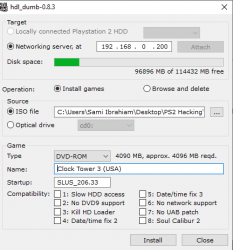
Since I don't have a way to connect the HDD to my PC, I used ethernet to install using HDL Dumb

I deleted the game and installed again and to my surprise it worked !! I don't know why the first time I installed it didn't work.
I also noticed some compatibility options with HDL that I just ignored. Not sure if they are the same modes as in OPL

upload_2020-7-13_19-40-1.png


I played until I defeated the first boss and it's working just fine :)

I will be testing the different speeds with Tales of the Abyss now

Best regards
 

Attachments

  • upload_2020-7-13_19-39-39.png
    upload_2020-7-13_19-39-39.png
    26.2 KB · Views: 51
I deleted the game and installed again and to my surprise it worked !! I don't know why the first time I installed it didn't work.
I also noticed some compatibility options with HDL that I just ignored. Not sure if they are the same modes as in OPL
@RetroGamer90s, sometimes happens, reinstalling a game fixes something wrong.
This compatibility options of HDL are only for HDL, the OPL have its own ones.

patas, try the game with the builds i reported....
Well, i can try off course but you can answer also the simple question:

You have modified the adapter for use a SATA HDD like the Maxdyipower one?

And also i don't understand why you not try with the latest r1537 instead r1377, there is a lot of
builds with big changes between r1377 and 1537, and maybe the problem do not happens in
the latest r1537.

Best regards.
 
Back
Top