
You are using an out of date browser. It may not display this or other websites correctly.
You should upgrade or use an alternative browser.
You should upgrade or use an alternative browser.
PS2 [Open PS2 Loader] Game Bug Reports
- Thread starter jolek
- Start date


HWNJ
Developer
I tested it using a genuine Network AdapterYou are using genuine NA?
Genuine NA with SATA modification or 3rd party (e.g. GameStar)?
If you have any modification can you try "clean" NA (without any modification)?
You installed this game from DVD on a PS2
or through network?
All my tests were done with genuine NA.
Game installed via hdl_dumx (via command line), not GUI.

jolek
Senior Member
I don't know why, but it is very strange that this game (Rayman M - SLES_504.57)
refuses to launch when it will be installed from different game installer than HDLGameInstaller?
Also @Haker120 had problems with this game when he installed it with HDLGameInstaller...
After 2nd or 3rd re-installation (?) game through HDD on OPL 1562 started to work,
while it was working fine on OPL 0.8.
However everything seems to be fine through SMB on all versions...
I can only add that I did not experience any of these problems...
refuses to launch when it will be installed from different game installer than HDLGameInstaller?
Also @Haker120 had problems with this game when he installed it with HDLGameInstaller...
After 2nd or 3rd re-installation (?) game through HDD on OPL 1562 started to work,
while it was working fine on OPL 0.8.
However everything seems to be fine through SMB on all versions...
I can only add that I did not experience any of these problems...
JustWinstonIsOK
Member
Title = Dragon Quest VIII
ID = SLUS_212.07
Media = DVD5
OPL version = r1562
Device = SMB
Mode(s) = tested with 1+3+6, 2+3+6, and 1+2+3+6
IGR = Untested
VMC = Untested
Compatible = See notes
MD5 Checksum = 7c4aacc0bb5108b9e6e12734c0f84967
Notes = Severe audio stuttering on the title screen and during the game's opening cutscene--I'd assume it happens whenever music is being streamed from the disc. Does not occur when playing from USB. Issue is also present on 0.9.3 (same modes tested) but not on 0.9.2 (tested with 3+6).
I'm hosting the SMB share on a Raspberry Pi 4B connected directly to the PS2 with the ISO stored on the SD card, so I doubt the issue is with my SMB setup.
ID = SLUS_212.07
Media = DVD5
OPL version = r1562
Device = SMB
Mode(s) = tested with 1+3+6, 2+3+6, and 1+2+3+6
IGR = Untested
VMC = Untested
Compatible = See notes
MD5 Checksum = 7c4aacc0bb5108b9e6e12734c0f84967
Notes = Severe audio stuttering on the title screen and during the game's opening cutscene--I'd assume it happens whenever music is being streamed from the disc. Does not occur when playing from USB. Issue is also present on 0.9.3 (same modes tested) but not on 0.9.2 (tested with 3+6).
I'm hosting the SMB share on a Raspberry Pi 4B connected directly to the PS2 with the ISO stored on the SD card, so I doubt the issue is with my SMB setup.
jolek
Senior Member
Dragon Quest VIII
Can you test this game on a PC\laptop with windows?
Currently some people might have problems with Samba with VMC when they will not add:
Code:
"strict sync = no"I know that it is not a problem with VMC, but maybe different OS might works differently...
JustWinstonIsOK
Member
Can you test this game on a PC\laptop with windows?
There's no stuttering at all when playing from a Windows share (!). I'd really like to keep using the Pi, though; any idea what might account for the difference? There are plenty of other games I've been able to play without stuttering. I'd be happy to do additional testing to help get to the bottom of this.
For reference, here's my samba.conf, it's pretty standard with a few tweaks borrowed from the Samba tutorial thread on this forum (though please note that the issue was present before I added the tweaks):
Code:
[global]
server role = standalone
map to guest = Bad User
disable netbios = yes
load printers = no

aio read size = 0
aio write size = 0
keepalive = 0
socket options = TCP_NODELAY TCP_NODELAYACK IPTOS_LOWDELAY SO_KEEPALIVE TCP_KEEPIDLE=30
strict locking = no
strict sync = no

[ps2]
path = /ps2
guest ok = yes
writeable = yes

[media]
path = /media
guest ok = yes
writeable = noJustWinstonIsOK
Member
There's no stuttering at all when playing from a Windows share (!).
I happened to try a different Windows host today and got stuttering, so it looks like the OS isn't the deciding factor. Both of my test Windows devices are Intel NUCs running Windows 10 LTSC 1903, but different models:
NUC8i5BEH (Bean Canyon) - this is the first Windows device I tested. I did get a tiny bit of stuttering when I retested today, but not nearly as much as the other NUC or the Pi.
NUC6CAYH (Apollo Lake) - I need the Bean Canyon NUC for desktop use, so I thought I'd use this one for any future testing. Stutters just as much as the Pi.
Notable difference between the two: NUC8i5BEH has an Intel Ethernet adapter vs. Realtek for the NUC6CAYH. I'm very interested in trying the Linux OS+Intel NIC combination now...
I happened to try a different Windows host today and got stuttering, so it looks like the OS isn't the deciding factor. Both of my test Windows devices are Intel NUCs running Windows 10 LTSC 1903, but different models:
NUC8i5BEH (Bean Canyon) - this is the first Windows device I tested. I did get a tiny bit of stuttering when I retested today, but not nearly as much as the other NUC or the Pi.
NUC6CAYH (Apollo Lake) - I need the Bean Canyon NUC for desktop use, so I thought I'd use this one for any future testing. Stutters just as much as the Pi.
Notable difference between the two: NUC8i5BEH has an Intel Ethernet adapter vs. Realtek for the NUC6CAYH. I'm very interested in trying the Linux OS+Intel NIC combination now...
When testing SMB from PC (static ip direct connection) I could either get or not stuttering depending on firewall settings. For the max reading speed I had to set it in a certain way. Totally disabling the firewall wasn't the best solution, I had to twist some settings for the best performance.
I never had similar problems using the mini-router instead (my is Nexx WT3020F I got for 10$, but you could easilly find something better for a similar price now), I simply configured it and never had any slowdown problem.
JustWinstonIsOK
Member
When testing SMB from PC (static ip direct connection) I could either get or not stuttering depending on firewall settings. For the max reading speed I had to set it in a certain way. Totally disabling the firewall wasn't the best solution, I had to twist some settings for the best performance.
I never had similar problems using the mini-router instead (my is Nexx WT3020F I got for 10$, but you could easilly find something better for a similar price now), I simply configured it and never had any slowdown problem.
In Dragon Quest VIII specifically? Most of the games I've tested run smoothly on any old SMB host. There just seems to be something about DQ8 that causes stuttering even with pains taken to remove every bottleneck imaginable.
As an update to my previous post, I went ahead and installed Linux (Manjaro) on the Bean Canyon NUC to see if the OS made a difference, and DQ8 ran just as smoothly as with Windows (maybe a little more smoothly, even). Though I should add that I was too quick to declare it completely stutter-free--the title screen is fine, but there are intermittent stutters during gameplay, especially when entering or leaving a building. Completely playable, though.
Tentative conclusion: switching to a SMB host with an Intel Ethernet adapter might reduce stuttering?
In Dragon Quest VIII specifically? Most of the games I've tested run smoothly on any old SMB host. There just seems to be something about DQ8 that causes stuttering even with pains taken to remove every bottleneck imaginable.
As an update to my previous post, I went ahead and installed Linux (Manjaro) on the Bean Canyon NUC to see if the OS made a difference, and DQ8 ran just as smoothly as with Windows (maybe a little more smoothly, even). Though I should add that I was too quick to declare it completely stutter-free--the title screen is fine, but there are intermittent stutters during gameplay, especially when entering or leaving a building. Completely playable, though.
Tentative conclusion: switching to a SMB host with an Intel Ethernet adapter might reduce stuttering?
No I was talking in general (I noticed those reading speed differences i.e. with tekken tag, or FFX).
I have DQ8 on internal HDD, also tested it from USB I think, but don't remember about SMB. I'll check it.
In Dragon Quest VIII specifically? Most of the games I've tested run smoothly on any old SMB host. There just seems to be something about DQ8 that causes stuttering even with pains taken to remove every bottleneck imaginable.
As an update to my previous post, I went ahead and installed Linux (Manjaro) on the Bean Canyon NUC to see if the OS made a difference, and DQ8 ran just as smoothly as with Windows (maybe a little more smoothly, even). Though I should add that I was too quick to declare it completely stutter-free--the title screen is fine, but there are intermittent stutters during gameplay, especially when entering or leaving a building. Completely playable, though.
Tentative conclusion: switching to a SMB host with an Intel Ethernet adapter might reduce stuttering?
I done some testing on Dragon Quest VIII NTSC-U: MD5: 7c4aacc0bb5108b9e6e12734c0f84967
Tested from ETH with OPL 0.9.2, 0.9.3 (r.851), 1319, 1559. Enabling MODEs seems to not change anything.
No version was 100% perfect, but I got much better performance with OPL 0.9.2, 99% perfect let's say.
It stutters at Level 5 logo, then all intro is perfect. Also beginning a new game all is fine aside for a precise moment on the cut-scene when entering the town, where there's like a little freeze, then all keeps running fine.
All is 100% perfect once in game.
So if you really want to play from ETH, OPL 0.9.2 is the best (if you use it remember to rename the ISO with his ID as prefix, also the games take a little longer to boot compared to newer OPL versions, so be patient).
Otherwise you could play it from USB, it is a streamed game with in engine cut-scenes, it runs pratically the same from any device.
Another test would be to try the PAL version, it is possible that the problem isn't present on it (it happens sometimes). In case, You can force PAL version to NTSC using GSM without problems.
EDIT: Forgot to mention I tested with a direct connection from PC. Maybe I'll also test from the mini-router next time.
Last edited:
JustWinstonIsOK
Member
I done some testing on Dragon Quest VIII NTSC-U: MD5: 7c4aacc0bb5108b9e6e12734c0f84967
Tested from ETH with OPL 0.9.2, 0.9.3 (r.851), 1319, 1559. Enabling MODEs seems to not change anything.
No version was 100% perfect, but I got much better performance with OPL 0.9.2, 99% perfect let's say.
It stutters at Level 5 logo, then all intro is perfect. Also beginning a new game all is fine aside for a precise moment on the cut-scene when entering the town, where there's like a little freeze, then all keeps running fine.
All is 100% perfect once in game.
So if you really want to play from ETH, OPL 0.9.2 is the best (if you use it remember to rename the ISO with his ID as prefix, also the games take a little longer to boot compared to newer OPL versions, so be patient).
Otherwise you could play it from USB, it is a streamed game with in engine cut-scenes, it runs pratically the same from any device.
Another test would be to try the PAL version, it is possible that the problem isn't present on it (it happens sometimes). In case, You can force PAL version to NTSC using GSM without problems.
EDIT: Forgot to mention I tested with a direct connection from PC. Maybe I'll also test from the mini-router next time.
Thanks for doing all that testing. It's great that we have a known more-or-less-working version but I'd still like to get to the bottom of the issue. My C programming skills and PS2 hardware knowledge are extremely minimal, but I did at least manage to get the Docker build environment up and running so I might try some things on the dev side. If I want to play DQ8 in the meantime, I guess I can just use the disc, like a caveman ;-)...

jolek
Senior Member
Gran Turismo 4 works with OPL 0.9.3 and with OPL 1562 through ETH (SMB).
As for USB, are you sure that your game is not fragmented?
Did you turn ON "Check USB game fragmentation" in settings?
Additionally you can turn on mode 6.
Please provide more info about your game:
As for USB, are you sure that your game is not fragmented?
Did you turn ON "Check USB game fragmentation" in settings?
Additionally you can turn on mode 6.
Please provide more info about your game:
Code:
Title =
ID =
Mode(s) =
VMC =
IGR =
MD5 Checksum =jolek
Senior Member
ID of your game can be found at the side of your cover:
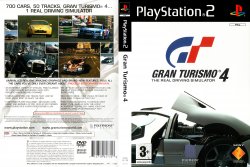
E.g. SCES_XXX.XX.
MD5sum:
https://www.psx-place.com/threads/how-to-check-game-md5-checksum.19277/.
E.g. SCES_XXX.XX.
MD5sum:
https://www.psx-place.com/threads/how-to-check-game-md5-checksum.19277/.
Similar threads
-

-
-
-
PS2 Problems Launching "Buzz! The Big Quiz (Europe) (v2.00)" via OPL through sd2psx (PSxMemCard Gen2)
- Started by SawJig511
- Replies: 7