HWNJ
Developer
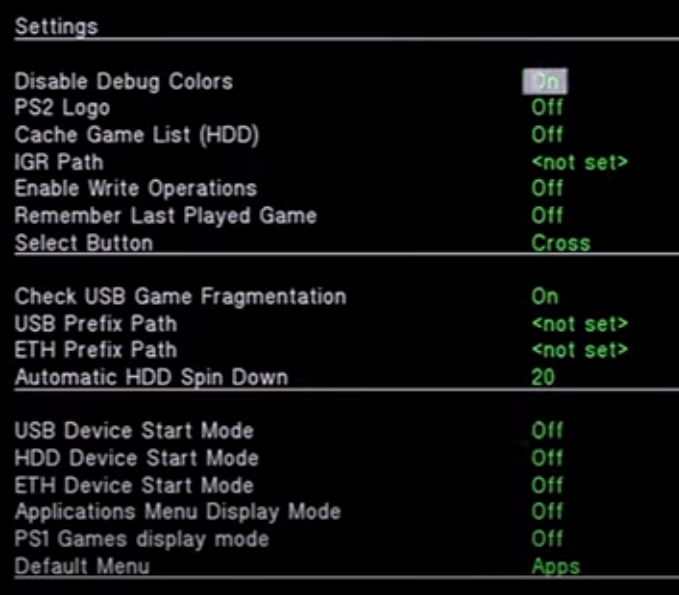
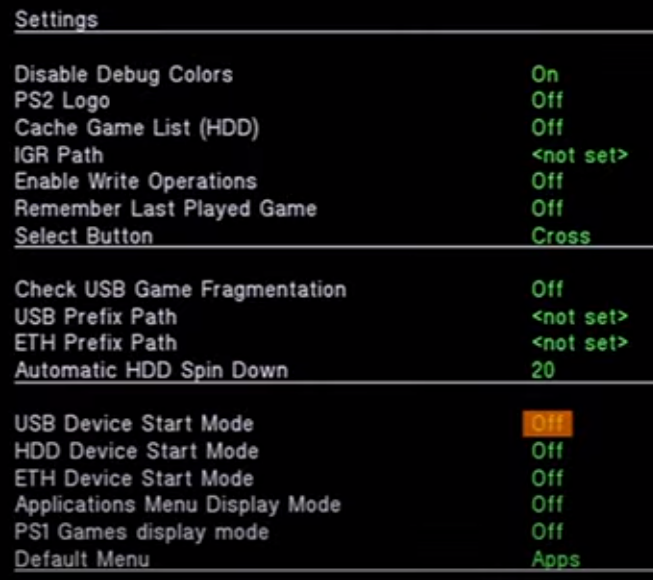
@MrMario2011I have also seen recommendation to turn Off "Check USB Game fragmentation":
Code:https://youtu.be/KpOUylfmQdM?t=1306

@MrMario2011I have also seen recommendation to turn Off "Check USB Game fragmentation":
Code:https://youtu.be/KpOUylfmQdM?t=1306
Yeah, he edited it to remove that part:I have notice that something got changed today in the video that I linked before.
Currently there is no recommendation to turn it off.
For a blink of an eye this option is on:

He told me yesterday he was going to do so.
Since he removed that part, I think that should be enough...Is there any chance to add some kind of a "*" at the bottom of a video?
I mean I saw in some videos that people add, e.g. * - my mistake it was false not true.
But I do not know that if it was done while making video or after uploading it...

Hello guys
I hope you are all doing well during this pandemic.
I just wanna say I do appreciate all your hard work on improving OPL.
I tried Dirge of Cerberus - Final Fantasy VII - Japanese version through HDD. It seems it freezes right after the Square Enix logo. I tried a the newest OPL build and a couple of old ones, tried different speeds and modes they all yield the same result. However, the game works fine when using USB mode with of course the usual stuttering during cutscenes.
I read that the US version is fixed and works fine but I didn't try it.
Is there a fix or a way to play the japanese version through HDD ?
Best regards
Hello guys
I hope you are all doing well during this pandemic.
I just wanna say I do appreciate all your hard work on improving OPL.
I tried Dirge of Cerberus - Final Fantasy VII - Japanese version through HDD. It seems it freezes right after the Square Enix logo. I tried a the newest OPL build and a couple of old ones, tried different speeds and modes they all yield the same result. However, the game works fine when using USB mode with of course the usual stuttering during cutscenes.
I read that the US version is fixed and works fine but I didn't try it.
Thank you for your help. It matches the one in the redump. I found another thread with another user having the same issue with the japanese version as well here:
https://www.ps2-home.com/forum/viewtopic.php?t=6940
It seems it works just fine through SMB and USB only. No luck with HDD
Just asking... why do you want to play the Japanese version so badly if the European version already includes Japanese?
PAL version is 50hz onlyI don't remember if PAL version has the 50/60hz selector.

Title = Grand Theft Auto: Vice City
ID = SLUS_205.52
Media = DVD5
OPL version = Rev 1319, SMB-UPDATE Testbuild, 1.0.0, 1.1.0 Beta 1629
Device = SMB
Mode(s) = (2)+3+6
VMC = Untested
IGR = Untested
Compatible = Yes
MD5 Checksum = 953FA1DA81F6EBA8F010EBA926CDFC0D
Notes = see belowCode:Title = Grand Theft Auto: Vice City ID = SLUS_205.52 Media = DVD5 OPL version = Rev 1319, SMB-UPDATE Testbuild, 1.0.0, 1.1.0 Beta 1629 Device = SMB Mode(s) = (2)+3+6 VMC = Untested IGR = Untested Compatible = Yes MD5 Checksum = 953FA1DA81F6EBA8F010EBA926CDFC0D Notes = see below
Hello, there is a problem with GTA Vice City over SMB, because the game studders every few seconds when Mode 2 is not enabled. With Mode 2 enabled you can play this game flawlessly without any lag. Mode 3+6 should always be enabled because of freezups during gameplay if not activated.
However, Mode 2 with this game got broken along the way. I did a lot of testing with different modes and revisions, but it all boils down to when Mode 2 is enabled starting at a certain build, the game hangs at the loading screen (loading bar doesn't begin to fill up). When Mode 2 is turned off, the game loads fine but studders every few seconds as mentioned above.
Here the builds I tested and where it started to fail with Mode 2:
Could you please look into this? Thank you very much.
- ifcaro Rev 1319 was the last version I could find, where Mode 2 still worked
- There was a test build shorty after Rev 1319 "OPNPS2LD-SMB-UPDATE-190210.ELF" in a thread >here< by @sp193 . That's when Mode 2 stopped working for this game. The sendspace link in the post still works, so I was able to test the build.
- All versions afterwards don't work as well with Mode 2, tested with a few betas and 1.1.0, 1.1.0 Beta 1629, of course.