OPL (Open PS2 Loader)

PS2 Open PS2 Loader v1.1.0

I have a question: can SMB be currently used to create & format VMCs properly? Does this VMC function even work at all, on USB and/or SMB?

I made a generic_0 VMC when doing all the tests from SMB in the last period. Never noticed problems… The last game I was testing is Trasformers (this game has a auto-save function, Always save and load fine).
 
I don't know when this started to become a thing, but I am now also unable to log into my PC with my normal user account. SMB support has always been a can of worms, but I also have left my PS2 to use the GUEST account for as far as I can remember.
In my experience, connection issues (assuming correct settings in OPL) are usually due to either not using SMBv1 or credentials. Easiest to just share a folder and allow anyone to read, write and execute in it.
 
Just wondering... when you hex patch a game to force progressive scan, FMVs arent in 480p, only gameplay. This is the case of Bully. Would be possible to make GSM detect incompatible FMVs and temporaly disable 480p while the FMV is playing?
 
I don't know when this started to become a thing, but I am now also unable to log into my PC with my normal user account. SMB support has always been a can of worms, but I also have left my PS2 to use the GUEST account for as far as I can remember.
In my experience, connection issues (assuming correct settings in OPL) are usually due to either not using SMBv1 or credentials. Easiest to just share a folder and allow anyone to read, write and execute in it.

It appears to be a new problem that became a thing since 11th January: https://support.microsoft.com/en-us/help/4487345/update-for-windows-7-sp1-and-windows-server-2008-r2
Installing this patch (KB4487345) helped.

I was also unable to connect to this PC from my Windows 10 laptop, with my admin account.

Yes, there are currently no major problems with the basic functionality of SMB, thanks. The problems came about, due to me making mistakes while editing the teacherous code of SMBMAN.
Since that happened, I've tried to revamp it to rid it of all ambiguities and magic values (hardcoded numbers with no explanations), but it's been expensive. Looking back at its commit history, I did try something similar in 2015... but gave up. It seems to be working now, but I hope I will not regret going so far.

I learned that it is possible to make longer reads & writes with SMB Read_AndX and Write_AndX. Windows negotiates for the SMB CAP_LARGE_READX and CAP_LARGE_WRITEX capabilities. Windows does 61440-byte reads and 65536-byte writes, according to this article anyway. The SMB specification does not seem to specify the actual limits.

The MaxBufferSize value passed to SMB COM Session_Setup_AndX might not be correct. We're using the value that is passed by the server, but the documentation suggests that the client can decide on this value.

And I must really get this out of my system. Thanks to the version of GCC we are using, many hours were wasted today.
This does not work, with no errors and no warnings: o_O
Code:
typedef struct {
    ...
} myStructure __attribute__((packed));

On the other hand, this works:
Code:
typedef struct {
    ...
} __attribute__((packed)) myStructure;

I only found out about this the hard way because the packed attribute did not seem to be working. Stack Overflow had a post about this, so I found this solution.

Just wondering... when you hex patch a game to force progressive scan, FMVs arent in 480p, only gameplay.

This depends on the game. There is nothing that will prevent a game from using multiple video modes or even multiple methods of rendering over different parts.

This is the case of Bully. Would be possible to make GSM detect incompatible FMVs and temporaly disable 480p while the FMV is playing?

I'm not sure why you need this, but it will not be easy because there are no standardized functions and formats for FMV.
Even GSM doesn't have a one-size-fit-all function to skipping FMVs; it provides some generic solutions, which do not have effect on every game.

Why not just use the GSM within OPL? It sounds like the game has a problem with a lack of field flipping. This should be taken care of with the field flipping emulation option.
 
Last edited:
@sp193, do your latest updates to PS2SDK need an accompanying update to OPL? Otherwise there are regressions with the new commits, like not finding all games on the share.
 
The new APPS feature is pretty cool eh?

zastanawia.gif

I'm not sure what is new in APPS feature?
Per APP image?
OPL supports that feature way before:
https://web.archive.org/web/20140325194714/http://opl.sksapps.com/index.php?opl=art.html.

Or you want to show how applications in APPS folder works?
 
@sp193, do your latest updates to PS2SDK need an accompanying update to OPL? Otherwise there are regressions with the new commits, like not finding all games on the share.

No, but the changes will probably be back-ported into OPL someday.

It is unfortunate, but you seem to have found a problem that I saw yesterday but did not understand why it happened. Today, I found that filenames were not null-terminated. The defect has been fixed, so thanks for bringing it up.

The new APPS feature is pretty cool eh?


Thank you for exploring and sharing this.

zastanawia.gif

I'm not sure what is new in APPS feature?
Per APP image?
OPL supports that feature way before:
https://web.archive.org/web/20140325194714/http://opl.sksapps.com/index.php?opl=art.html.

Or you want to show how applications in APPS folder works?

Since each app now has its own CFG, you can apply theme customizations as well.
 
Bonjour à vous tous.

Je viens vous donner une rapport concernant mes tests sur une compilation spéciale du OPL rev1319 faite par Zarper.
Cette compilation comporte un additif qui permet le bon fonctionnement des VMCs pour les jeux "Gran Turismo 3" et "Gran Turismo 4" installés sur une machine PC en liaison Ethernet (protocole SMB). Cet OPL spécial ne comportait pas dans un premier temps les fonctionnalités PADEMU et IGS.

Voici mon rapport :
"Très bien, tout est parfaitement OK pour les GT3 et GT4 sur ETH (Ethernet), ton OPL est parfait chez moi. Ils fonctionnent maintenant tous les deux parfaitement avec ma configuration (PS2 SCPH39004 avec un VRAI adaptateur Ethernet/IDE de SONY via un APPLE Mac-Mini C2D/2,53Ghz/8go Ram, DD interne 500Go pour les DATAs et SSD pour les Systèmes d'Exploitation). Ce MAC démarre en PC sous Win7-SP1 Ultimate 32bits mais aussi en vrai MAC (c'est au besoin). Tout mon réseau LAN est en Gigabits.

J'ai passé presque 6 heures de tests très divers pour créer des VMC (via OPL), les gérer via GT3, configurer GT3 pour des transferts entre VMC et mémoires physiques, voire entre VMC de 8 et 64Mo. J'ai créé des VMC de 32 et 64Mo, leur ai mis des SAVEs en provenance de VMC anciennes sur 7Mo de longueur.
J'ai aussi fait des tests avec la même console sur son DD interne (un IDE) et une clef USB2 (une rapide) comportant GT3 et GT4, tout s'est parfaitement déroulé. Ces tests ont pour but de vérifier si une régression était présente, mais rien, c'est tout bon."

Je me propose dans un second temps de refaire ces tests mais avec la toute dernière compilation que @Zarper m'a produite. Cette compilation comporte soit : "IGR-IGS-VMC-PADEMU-GSM-RD", soit "IGR-VMC-PADEMU-GSM-RD" (donc pas de IGS). C'est encore une implémentation spéciale de la rev1319.
Mes rapports seront aussi consignés dans une liste, mon club local (entre amis de la PS2) et moi-même y veilleront. Voici le lien :
==> https://docs.google.com/spreadsheets/d/1MLEw7TIKvn9MCwd5Ptbqh2lkUj3lX6YQ2wPgLEx8Koo/edit#gid=0


In English via Google-trad.

Hello everyone.

I'm coming to report on my tests on a special OPL rev1319 compilation made by Zarper.
This compilation includes an addendum that allows the VMCs to work properly for the games "Gran Turismo 3" and "Gran Turismo 4" installed on a PC machine in Ethernet link (SMB protocol). This special OPL did not initially include the PADEMU and IGS features.

Here is my report:
"Okay, everything is perfectly OK for the GT3 and GT4 on ETH (Ethernet), your OPL is perfect for me, now they both work perfectly with my setup (PS2 SCPH39004 with a TRUE Ethernet / IDE adapter from SONY via a APPLE Mac-Mini C2D / 2.53Ghz / 8GB Ram, Internal HDD 500GB for DATA and SSD for Operating Systems) This MAC starts in PC under Win7-SP1 Ultimate 32bits but also in real MAC my entire LAN is in Gigabits.

I spent almost 6 hours of very different tests to create VMCs (via OPL), manage them via GT3, configure GT3 for transfers between VMC and physical memories, and even between VMCs of 8 and 64Mo. I created VMCs of 32 and 64Mo, put them SAVEs from VMC old on 7Mo of length.
I also did tests with the same console on its internal DD (an IDE) and a USB2 key (a fast) with GT3 and GT4, everything went perfectly. These tests are intended to check if a regression was present, but nothing, is good. "

I propose in a second time to repeat these tests but with the latest compilation @Zarper produced me. This compilation comprises either: "IGR-IGS-VMC-PADEMU-GSM-RD", or "IGR-VMC-PADEMU-GSM-RD" (thus no IGS). This is still a special implementation of the rev1319.

My reports will also be recorded in a list, my local club (between friends of PS2) and myself will take care of it. Here is the link :
==> https://docs.google.com/spreadsheets/d/1MLEw7TIKvn9MCwd5Ptbqh2lkUj3lX6YQ2wPgLEx8Koo/edit#gid=0
 
Last edited:
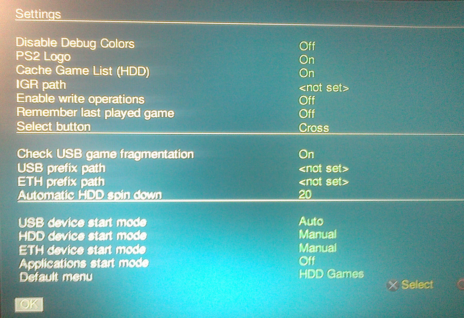
Can someone check "HDD device start mode" in "Settings"?

Currently with OPL 1319 I cannot load this option with "Off" or "Manual":
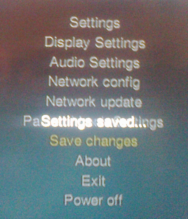
I mean after I'll save settings (with "HDD device start mode: Manual"):
manual.png

settings.png


Reboot OPL.

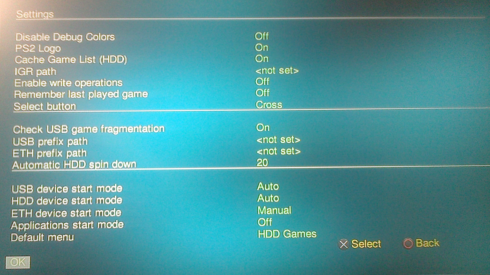
Enter "Setting", I've "HDD device start mode: Auto" not "HDD device start mode: Manual" or "HDD device start mode: Off":
Auto.png

Of course OPL is loading game list from HDD "behind my back".

Tested without any MC on SCPH-50004 with SCPH-10350 NA.
 
Last edited:
Can someone check "HDD device start mode" in "Settings"?

Currently with OPL 1319 I cannot load this option with "Off" or "Manual".
I mean after I'll save settings (with "HDD device start mode: Manual"), reboot OPL.
Enter "Setting", I've "HDD device start mode: Auto" not "HDD device start mode: Manual" or "HDD device start mode: Off".

Tested without any MC on SCPH-50004 with SCPH-10350 NA.
Cela fonctionne parfaitement chez moi. Je peux tout configurer avec ma version spéciale (remerciements à Zarper) de la rev1319. Tous les types de démarrage Manuel/Auto/Off sont configurables sur HDD, ETH, USB. Tu dois avoir un souci avec ta MC "FMCB" qui vieillie mal, change-la.

Voici ma configuration :
SCPH39004 / DD Ide 320Go interne / FreeMCBoot sur MC 8Mo Sony en port-2 / MC 64Mo sur port-1 sans le FMCB / pas de FHDB installé sur ce DD, DD formaté avec WinHIIP uniquement.
 
Cela fonctionne parfaitement chez moi. Je peux tout configurer avec ma version spéciale (remerciements à Zarper) de la rev1319. Tous les types de démarrage Manuel/Auto/Off sont configurables sur HDD, ETH, USB. Tu dois avoir un souci avec ta MC "FMCB" qui vieillie mal, change-la.

Voici ma configuration :
SCPH39004 / DD Ide 320Go interne / FreeMCBoot sur MC 8Mo Sony en port-2 / MC 64Mo sur port-1 sans le FMCB / pas de FHDB installé sur ce DD, DD formaté avec WinHIIP uniquement.
I'm not using any Memory Cards, all setting will be\was saved on HDD.
Maybe this settings works normally when it'll be saved on MC, but it fails to load\save it from\on HDD?

BTW I've edited my previous post by adding some pictures to better understand my problem.
 
OPL will change the HDD mode setting to "AUTO" because it had to activate HDD support to access the HDD, to load the settings files.

I though that HDD support will be enabled\activated even without AUTO for HDD.
So even with "Off" or "Manual".
At least that's how this feature works previously.

However, this is done in memory. If you don't save the settings again, then it will not update the mode setting on disk.

I'm not sure if I understand this correctly.
 
No, but the changes will probably be back-ported into OPL someday.

I backported the changes, but could not get it to work with decent performance, without adjusting SMSTCPIP. The current parameters seemed to somehow allow OPL to work around the Windows TCP congestion control algorithm.
Well, at least I think it is because my PC will wait for a TCP window update by the PS2, whenever the receive window reaches 2200/5120. :(

Once I set the TCP receive window to 16384 and gave it 16 PBUFs, I could watch the Valkyrie Profile 2 OP without any pauses.
Unfortunately, there is an interest in using as little memory as possible and increasing just the TCP window doesn't work. Likely because the frames come really quickly, and then they get dropped when no PBUFs are available.

This is really a can of worms.

At least that's how this feature works previously.

Previously? No, it's been like that.

I'm not sure if I understand this correctly.

I meant to say that if you save your settings on the HDD and have HDD mode set to either manual or off, then OPL will change the HDD mode to auto. But it will not update the settings file for you.
So if you don't save the settings yourself and copy the conf_opl.cfg file to study it, you will find that HDD mode is still set to either manual or off.
 
It is unfortunate, but you seem to have found a problem that I saw yesterday but did not understand why it happened. Today, I found that filenames were not null-terminated. The defect has been fixed, so thanks for bringing it up.
Even with the latest commit I still have games missing. I don't have many games on my share since I usually use HDD, but the once I have that are missing are modified/translated games. However they work on prior revisions and on USB, so it shouldn't be the games.

EDIT: It seems to occur when there are more than one entry with the same GAME ID.

I backported the changes, but could not get it to work with decent performance, without adjusting SMSTCPIP. The current parameters seemed to somehow allow OPL to work around the Windows TCP congestion control algorithm.
Well, at least I think it is because my PC will wait for a TCP window update by the PS2, whenever the receive window reaches 2200/5120. :(

Once I set the TCP receive window to 16384 and gave it 16 PBUFs, I could watch the Valkyrie Profile 2 OP without any pauses.
Unfortunately, there is an interest in using as little memory as possible and increasing just the TCP window doesn't work. Likely because the frames come really quickly, and then they get dropped when no PBUFs are available.

This is really a can of worms.
If you're able to get an increase of speed by sacrificing a bit of memory, couldn't it become a MODE? Or is the new code with larger buffers still not faster than current code?
 
Last edited:
I was playing some Ps1 games with the last Ps2-Home DB… I was playing it from USB (POPS games too are on USB HDD), when I IGR from POPS it starts OPL ifcaro build ('cause I've it in BOOT folder, named as BOOT.ELF) and it couldn't load my iHDD game-list.

After a couple seconds, it loop on the loading icon, exactly as it used to do when IGResetting from some Ps2 games (like Ace Combat).

I wonder if listing POPS games as APPS, then IGResetting it would happen the same problem.
 

Similar threads

Back
Top