OPL (Open PS2 Loader)

PS2 Open PS2 Loader v1.1.0

If controller is connect to ´port 2 and the elf is launched from MC it still loads settings from USB

In my config it is working differently, I mean If I've controller connected only to 2nd port,
I'm launching OPL from MC, settings from MC will be loaded.
So the same situations is similar as I'll have gamepad connected into 1st port\socket.

If I have settings on MC and USB, load OPL from HDD\ETH\USB,
settings from MC will loaded, because MC has got the highest priority.

Did you tried to load OPL without Auto launch (E1 Launch keys)?

EDIT: Here is how its suppose to work:
https://www.psx-place.com/threads/open-ps2-loader-game-bug-reports.19401/page-13#post-149544.
However I still prefer to add some kind of a message from where config\settings was loaded.
 
Last edited:
View attachment 18335
OPL made these two files that CHKDSK didnt liked, I ran CHKDSK with /f and it said the Size entry for these two were invalid, then CHKDSK created those 2 corrupted files of 32KB in size, same cluster size of my disk they are in...

It wouldn't be an OPL problem, but USBHDFSD. It depends on the version that OPL was compiled with. OPL only tells USBHDFSD that it wants to write files, and that's it.

Anyway, I think its problems are difficult to identify. We might need somebody with the domain knowledge of USB and a USB protocol analyzer, to understand and suggest fixes for the USB-related problems.
I've got this feeling that there is some hardware-level compatiblity problem with some devices, since the errors are so random.

But well, I've got no time or energy to bother with these things anymore.

Now I lauched the OPL ELF from MC1 and the problem was there... I dunno from where I launched at the time of that post because its been a long time and my ps2 fat is faulty. I guess it was not from USB. I also rename the OPL folder on MC so OPL cant see it.

but yes, Launching ELF from MC and loading conf from USB if controller is unplugged from port 1 (On this test the port 2 was empty) doesnt works.

If controller is connect to ´port 2 and the elf is launched from MC it still loads settings from USB
If no controller is connected then settings arent loaded from USB
If no controller is connect and the ELF is loaded from USB settings arent loaded too!

What type of Settings? All of them

It is possible that when you don't do some things, the bulk of OPL can start up faster. Faster than the USB device can initialize, so much that the device is missed at boot.
There isn't really a nice way to solve this because this is not a device that will be always immediately accessible after the related modules are loaded. In FMCB, I delay the startup process by 500ms, just to serve this purpose.
 
Do you tried to make another project?
With less polygon?

Tbh I haven't revisited it. We've been working on some Xbox 360 projects...

Also I went to clone my 2Tb PS2 HDD and discovered it had unreadable sectors so I've been building a new one -_-

The MC icon you made is decent, much better than the current one.
 
@jolek

Something like this?
OPL_MC_Icon.jpg


BTW I didn't test it on the console, just with PS2 Save Builder.
 

Attachments

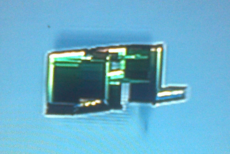
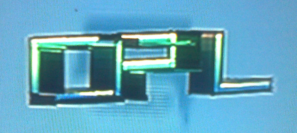
@Tupakaveli this Icon work also on PS2, but I've a problem with "O", "P" & "L" letters.
I mean left side of "O" and "P" when is spining looks like texture was missing,
upper of "L" have the same problem.

I've a pretty s***y camera, but it looks like this:
OPL-1.png


OPL-2.png
 
@Tupakaveli this Icon work also on PS2, but I've a problem with "O", "P" & "L" letters.
I mean left side of "O" and "P" when is spining looks like texture was missing,
upper of "L" have the same problem.

There was a problem with some of the faces on the model, they were facing the wrong way.

Try this one, I tested on the console this time.
 

Attachments

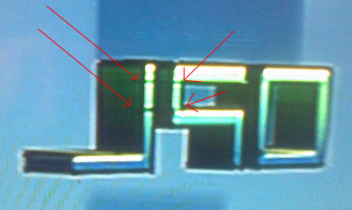
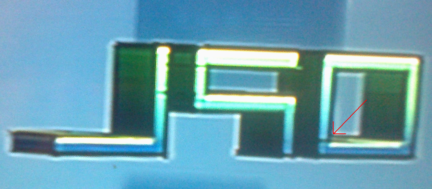
Now I've another problem.
I mean everything is fine when icon is static.
When it spins, I'm getting strange graphical glitches (once again low quality photos).
At the almost highest point at "P" & "L":
13072019651-ab.png


Almost at the bottom of "O":
13072019652ab.png
 
  • Like
Reactions: TnA
I'm not sure I can fix that.

I've been using 3 different 3D modelling programs and everything looks fine. I can try tilting it on a 30° angle so it looks square on in the Browser...

It could also be the PS2 MC icon plugin for Milkshape 3D. I saw on PSX-Scene that ffgriever wrote a command line tool to convert 3D Studio Max (.3ds) files to MC icons so I could try that as well.
 
I'm not sure I can fix that.

At least thanks for trying.

I've been using 3 different 3D modelling programs and everything looks fine.

I only tried to preview these icons in PS2 Save Builder and also everything was fine.
Unfortunately something wrong is happening in PS2 MC Browser...

I can try tilting it on a 30° angle so it looks square on in the Browser...

It could also be the PS2 MC icon plugin for Milkshape 3D. I saw on PSX-Scene that ffgriever wrote a command line tool to convert 3D Studio Max (.3ds) files to MC icons so I could try that as well.

Theoretically it's worth a shot...
 
Last edited:
With v 3, I've only glitch in right upper "O", it's not as noticeable as it was before...
So... hmm...

Could also upload "version" with tilting it back to 20° and 10°?

If yes...
I'll be unavailable for few hours, so I'll give my report ASAP.
 
IMHO 10° looks best.
8d2ad9671de3.jpg

But I have some glitches at upper-right "P" when I'm in PS2 MC Browser.
Here is a another preview, this time from PS2 save builder:
10V4.png


Here is 20°:
20V4.png

I don't have any majors problem with it, so...

I don't like 30°, so I haven't added any preview.
chytry.gif


@El_Patas what do you think about it?
Only you can merge pull request at github.


Thanks @Tupakaveli for 3D model and for all these ways to find solution,
@Berion for 2D template\preview.
 
If someone is still interested in OPL, here is new test build:
https://www.sendspace.com/file/tqetk2.

It has:
  • Memory Card icon update.
  • Fix MC icon not being written, if the OPL folder already exists.
  • Replace slide transition with Maximus32's fade transition.
  • Fix transition sound effect.
For now I've a problem with overwriting MC icon ("icon.sys", "opl.icn") in OPL folder on memory card in OPL folder (mc?:/OPL).
I mean if these files are in OPL folder:
before.png

OPL will overwrite them at every boot:
after.png


One of the best PS2 games, Shadow of the Colossus refuse (BSOD) to work after 50\60 Hz selector.
The last known version that this game is playable is OPL 1355\1353.

Here is source of this build (pull request):
https://github.com/ifcaro/Open-PS2-Loader/pull/208.

Any kind of support will be helpful.

Who knows maybe it can be a big step into "tagging" 0.9.4. ;)
 

Attachments

In attachment OPL 1364 can be found.

It has:
  • Memory Card icon update by Tupakaveli (2D model by Berion, 3D model by Tupakaveli).
  • Replace slide transition with Maximus32's fade transition.
  • Fix transition sound effect.
Currently there are few things worth mentioned...
Do we need settings and OPL folder on MC when OPL has been loaded from other device (HDD, SMB, USB)?
When OPL has been loaded from HDD, settings should be saved on HDD, so there is no need to create almost empty folder on MC.

If there is an empty folder (OPL) or this folder do not exist, OPL has been loaded from MC this stuff should be updated\created.

Can translations be loaded from other path than MC?
Currently no...
Why not add this feature?

Shadow of the Colossus still refuse (BSOD) to work after 50\60 Hz selector.
The last known version that this game was playable is OPL 1355\1353.
 

Attachments

New test version is out:
https://github.com/ifcaro/Open-PS2-Loader/pull/210.

It should support themes from other devices than MC and it has got fix for main10 bug.
Language files can now be read from USB, HDD & SMB, .lng files need to be in LNG folder.. ttf and otf font files for these devices also now need to be in LNG folder..
Translations from MC remain the same as before.
OPL now creates a LNG folder on these devices just as it does ART, THM folders etc

Currently I've two problems with it:
  1. When lang files are in LNG folder in at least 2 devices, OPL is crashing.
    I mean when I put lang_Polish.lng, font_Polish.ttf in hdd0:/+OPL/LNG & mass:/LNG,
    OPL is constantly crashing\freezing almost at boot:
    crash-OPL-lng.png

    Maybe some kind of a priorytety system will probably needs to be added,
    e.g. MC->HDD->USB->SMB or
    Device from where OPL was loaded->MC->other devices, etc.

  2. OPL is not loading font (font_Polish.ttf) from SMB.
    It is only loading translations (lang_Polish.lng),
    so I don't have this "bizarre" letters (ą, ć, ę, ł, ń, ó, ś, ź, ż).
Language files was taken from here:
https://www.psx-place.com/threads/open-ps2-loader-beta-revisions-releases-language-pack.20547/.
 
  • Like
Reactions: TnA

Similar threads

Back
Top