OPL (Open PS2 Loader)

PS2 Open PS2 Loader v1.1.0

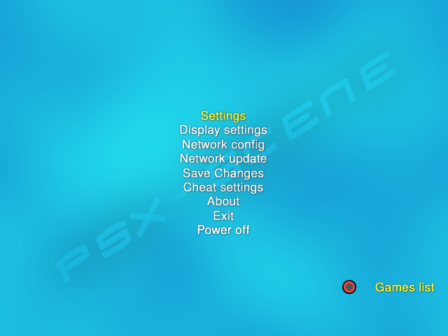
IMO it would be nice to have globally defined defaults for all game settings. For instance GSM is driving me insane, applying the same settings over and over again. But when these settings are defined globally, I would like to override them for some games.
The same applies to most (if not all) game settings, like pademu, etc...

Verstuurd vanaf mijn SM-G930F met Tapatalk
 
Its already in display settings mate ;)

facepalm.gif

My bad.
 
IMO it would be nice to have globally defined defaults for all game settings. For instance GSM is driving me insane, applying the same settings over and over again. But when these settings are defined globally, I would like to override them for some games.
The same applies to most (if not all) game settings, like pademu, etc...

Verstuurd vanaf mijn SM-G930F met Tapatalk

Then we come to 2 possible solutions:

1. the global setting override the per game setting (so, global setting off for using per game settings)

2. the per game setting override the global setting (so, a on/off global option for "per game settings" must be added somewhere)

I think the first one is the healthier.
 
Then we come to 2 possible solutions:

1. the global setting override the per game setting (so, global setting off for using per game settings)

2. the per game setting override the global setting (so, a on/off global option for "per game settings" must be added somewhere)

I think the first one is the healthier.

I think the second option is better.

Globally defined defaults that can be overridden on a per game basis.

Take the GSM example. You want to use the same settings for every game but then you find 1 game where those settings don't work. You could use the per game settings for that particular game.
 
Last edited:
Hah! I proposed it before Maximus32 and didn't get a like! :P

...and I already pointed out that 2nd solution in the very same reply + a better implementation than @Peppe90 is proposing...

It would need some additional code to the per-game-settings however and NOT a function to 'manually turn off the global settings'... (because that then would apply to EVERY global setting to be excluded!

A way better implementation (IMO) would be an 'Auto'-entry (or similar) PER FUNCTION, WHICH IS SUPPORTED IN BOTH (so for those functions which are included in 'global game settings' as well as 'per game settings').
 
I'm thinking just something like a toggle switch in the Settings screen per feature. Let's call it "Settings Mode" for now. You could switch between "Global" and "Per Game". It would default to "Global".

Then you could use global settings for one feature, e.g. GSM, but per game settings for another feature, e.g. Cheats.
 
Damn... Chrome had an issue and deleted my Edit...

Yes, similar!

IMO every function which should be supported by the 'global settings' should have it's own override-function!
Why? Because one function which turns all settings supported by both to either 'global' or 'per-game-settings' would render the global-settings-feature quite useless!!!
Why? What if I want to use the same VMC in every game and also the same VMode in every game, but due to incompatibilities I have to choose another VMode or VMC?

A function which switches per-game-settings or those functions which should/might be supported by both would mean that I (or anyone else) would have to change all settings manually again!

IMO ALL functions which are meant to be supported by global- & per-game-settings would need an auto/manual-switch + that switch can even be left out entirely, for example if a VMC-Name is already defined in the per-game-setting-config!
 
Sorry for double-posting.

Well... @Krah is working on the new per-game-settings, right?

The simplest way for this 'switch' would be, to copy off the 'Auto'/'Manual'/'Off' from the USB/HDD/LAN/Apps-Page-Selection to the beginning of the new sub-menus + the 'grey-out/non-selectable' code which is used in the network-settings, when not 'Manual' was chosen! ;)
Then it still would need some additional smaller code-changes in the code that handles these settings, to check for either using the global setting or the manual setting or no setting!

I'm however not sure, if it is the best way to go, so suggestions are welcome!
 
IMO every function which should be supported by the 'global settings' should have it's own override-function!
Why? Because one function which turns all settings supported by both to either 'global' or 'per-game-settings' would render the global-settings-feature quite useless!!!
Why? What if I want to use the same VMC in every game and also the same VMode in every game, but due to incompatibilities I have to choose another VMode or VMC?

A function which switches per-game-settings or those functions which should/might be supported by both would mean that I (or anyone else) would have to change all settings manually again!

IMO ALL functions which are meant to be supported by global- & per-game-settings would need an auto/manual-switch + that switch can even be left out entirely, for example if a VMC-Name is already defined in the per-game-setting-config!

This is the problem I was referring to.

@Tupakaveli if you want all games to output 1920x1080 but one at 640x480, then you just have to turn-off global settings when you want to play that game (considering option 1 I wrote).

I think you can't avoid it, neither make it easier/faster.

Considering option 2, you'll need to add a setting for enabling/disabling the per game settings. Otherwise, if I have global settings with GSM on-1080i, but the per game settings is GSM off, GSM won't work.

For this reason I thought option 1 is better, since them both are mathematically the same (just inverted order), simply option1 is more straight, you won't have to add a "per game on/off" setting.
 
I think the second option is better.

Globally defined defaults that can be overridden on a per game basis.

Take the GSM example. You want to use the same settings for every game but then you find 1 game where those settings don't work. You could use the per game settings for that particular game.

After all I think there isn't much difference between the 2 solutions. This way is good too. So you could add a on/off/switch and regroup the supported functions on a sub-menù in the per game settings screen. This will be Off by default and you can turn in On just on games you don't want to use global settings.

It would be the best definitely, I finally got it :chuncky::D
 
I have an idea of how to make it work but it'll take a lot of messing around and testing :-p

On the subject of features...

Is there some reason that PADEMU should not be integrated? I don't use it myself so I don't know. It's already a run time option.
 
What about add new "Advanced Settings" under e.g. Display setting or any other entry in here:
792986964-menu-small.png


In this card we can have:
PADEMU ---> Enable for all - Per game - Off
GSM ---> Enable for all - Per game - Off
PS2RD ---> Enable for all - Per game - Off
Save Config Path ---> Default (MC0 or any other available device) - MC1 - HDD - USB

When "Enable for all" will be selected,
I can set wanted position (in Advanced Settings of course), e.g. GSM 576p @50 Hz.

When PADEMU or GSM will be "Off" or "Enable for all" in Advanced Settings,
under Game Settings this option (e.g. GSM) will be Grayed out (unavailable).
Something like in here (Redo, Cut, Copy):
GreyedOut.png


When PADEMU or GSM will be set "Per game" under Game Settings,
I can select what I really want.
Also additional text can be added that this setting can be changed at Game Settings.

Some games might be incompatible with GSM, PADEMU, so in this scenario we will have "mixed-mode".
 
Last edited:
In this card we can have:
PADEMU ---> Enable for all - Per game - Off
GSM ---> Enable for all - Per game - Off
PS2RD ---> Enable for all - Per game - Off
Save Config Path ---> Default (MC0 or any other available device) - MC1 - HDD - USB

You mean 3 options right?? Enable all/per game/off

This way would be like option 1 of my post. Maybe it 'd be simpler to realize, but less polished.

i.e. I want all my games with GSM 1280x720, but one games is not compatible with GSM. With your solution I'd have to change the GSM setting in advanced menu to Per game every time I want to play that one game, then put the option back to enable for all when playing any other game.

The @Tupakaveli and @TnA solution is better, since you'd have a advanced screen settings with on/off switch in the per game setting screen (the traditional per game screen) that, when on, overwrites the global setting.

In the example above, you'd have GSM to 1280x720 in global serttings and GSM Off in that particular game (in his per game settings you'll switch on the advanced menù and put GSM Off).

This way you won't have to change anything anymore.
 
Last edited:
What if we call the existing per-game settings screen from the main menu. This menu item can be called "Default Game Settings". The settings can be stored in exactly the same format as the current per-game settings.

Then if a game does not have a settings file, the default settings will be used.

When the user wants to change the default settings for a particular game, it can create a game specific settings file, in exactly the same way it works now. When a new settings file is created, it should default to the system default settings, so only the settings we want changed need to be specified.

This changes the current flow of game settings from:
compiled-in-default-game-settings -> per-game-settings
To:
compiled-in-default-game-settings -> default-game-settings -> per-game-settings

This does not give the fine-grained control we would perhaps like to have, but I think it's a realistic option to implement with the code-base (and developers) we currently have.
 
You mean 3 options right?? Enable all/per game/off

Yes.
i.e. I want all my games with GSM 1280x720, but one games is not compatible with GSM. With your solution I'd have to change the GSM setting in advanced menu to Per game every time I want to play that one game, then put the option back to enable for all when playing any other game.

The @Tupakaveli and @TnA solution is better, since you'd have a advanced screen settings with on/off switch in the per game setting screen (the traditional per game screen) that, when on, overwrites the global setting.

In the example above, you'd have GSM to 1280x720 in global serttings and GSM Off in that particular game (in his per game settings you'll switch on the advanced menù and put GSM Off).

This way you won't have to change anything anymore.

I do not fully get it why keep settings that can affect all games in
Games List -> Game Settings-> - Advanced Settings?
It is not fully intuitive.
Or I misunderstand something?
 
What if we call the existing per-game settings screen from the main menu. This menu item can be called "Default Game Settings". The settings can be stored in exactly the same format as the current per-game settings.

Then if a game does not have a settings file, the default settings will be used.

When the user wants to change the default settings for a particular game, it can create a game specific settings file, in exactly the same way it works now. When a new settings file is created, it should default to the system default settings, so only the settings we want changed need to be specified.

This changes the current flow of game settings from:
compiled-in-default-game-settings -> per-game-settings
To:
compiled-in-default-game-settings -> default-game-settings -> per-game-settings

This does not give the fine-grained control we would perhaps like to have, but I think it's a realistic option to implement with the code-base (and developers) we currently have.

I like this idea, nice and simple.

I was thinking of some other way like saving default settings to a new cfg, something like conf_globals.cfg and depending on the toggle switch we either read that or the game config.

That could cause problems though trying to read 2 configs.
 
Some other things are being worked on at the moment...
  • Move Game settings to a submenu 'Game Menu'
  • Move rename and delete functionality to new 'Game Menu' (this will fix hint strings)
  • Map info to square on main (since now we should have room in hint text to do this without rendering off screen)
  • Align hint text, (aligned=1 theme element option to center align hint text for main and info) submenus (Game Menu & Main Menu) will be right justified.
Any objections for the proposed changes?
 
Last edited:
I do not fully get it why keep settings that can affect all games in
Games List -> Game Settings-> - Advanced Settings?
It is not fully intuitive.
Or I misunderstand something?

No it would be just per game. I meant so:

- global settings (GSM/PS2RD/PADEMU) that affect all games, is placed in the OPL main settings menù (as you said)
- a advanced menu placed in the per game settings screen (the current one) with a on/off switch that includes GSM/PS2RD/PADEMU.

I called it advanced menù just to say, but you can call it otherwise. The important thing is to have a on/off switch, so OPL knows when to use global or per game settings. The per game switch (present in every game settings screen) should be Off by default, then you can enable it just for games you don't want to use global settings.
 
Last edited:

Similar threads

Back
Top